
Amplicon Suite Aggregator
Description
Aggregates the results from AmpliconSuite
- Takes in zip files (completed results of individual or grouped Amplicon Suite runs)
- Aggregates results
- Packages results into a new file
- Outputs an aggregated .html and .csv file of results.
- Result file (in .tar.gz) is the aggregated results of all individual AmpliconSutie runs. It can be directly loaded onto AmpliconRepository.
- Can also take additional files along with the upload, provided the directory they are in contains a file named
AUX_DIR.
Parameters available on GenePattern Server
- Available at: https://genepattern.ucsd.edu/gp/pages/index.jsf?lsid=urn:lsid:genepattern.org:module.analysis:00429:4.1
- Amplicon Architect Results (required)
- Compressed (.tar.gz, .zip) files of the results from individual or grouped Amplicon Architect runs.
- project_name (required)
- Prefix for output .tar.gz. Result will be named: output_prefix.tar.gz
- Amplicon Repository Email
- If wanting to directly transfer results to AmpliconRepository.org, please enter your email.
- run amplicon classifier
- Option for users to re-run Amplicon Classifier.
- reference genome
- Reference genome used for Amplicon Architect results in the input.
- upload only
- If 'Yes', then skip aggregation / classification and upload file to AmpliconRepository as is.
- name map
- A two column file providing the current identifier for each sample (col 1) and a replacement name (col 2). Enables batch renaming of samples.
Installation
- Option 1: Git Clone
- Step 1:
git clone https://github.com/genepattern/AmpliconSuiteAggregator.git - Step 2: Install python package dependencies from list below.
- If running into dependency issues, please use the docker methods.
- Step 1:
- Option 2: Docker
- Step 1:
docker pull genepattern/amplicon-suite-aggregator
- Step 1:
Dependencies
- List of python package dependencies used: intervaltree, matplotlib, numpy, pandas, Pillow, requests, scipy, urllib3
Options when running locally
Amplicon Suite Aggregator related options
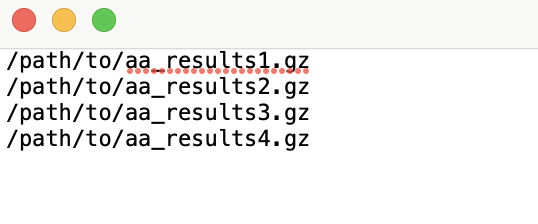
-flist/--filelist: Text file with files to use (one per line)-
Create an
input_list.txtfile in this format where each line is a filepath to compressed aa_results: -
Use this file as the input to the
-flistflag.
-
--files: List of files or directories to use. Can specify multiple paths of (.tar.gz, .zip) of Amplicon Architect results.-o/--output_name: Output Prefix. Will be used as project name for Amplicon Repository upload.--name_map: A two column file providing the current identifier for each sample (col 1) and a replacement name (col 2). Enables batch renaming of samples.-c/--run_classifier(Yes, No): If 'Yes', then run Amplicon Classifier on AA samples. If Amplicon Classifier results are already included in inputs, then they will be removed and samples will be re-classified.--ref(hg19, GRCh37, GRCh38, GRCh38_viral, mm10): Reference genome name used for alignment, one of hg19, GRCh37, GRCh38, GRCh38_viral, or mm10.
AmpliconRepository related options
-u/--username: Email address for Amplicon Repository. If specified, will trigger an attempt to upload the aggregated file to AmpliconRepository.org.--upload_only(Yes, No): If 'Yes', then skip aggregation / classification and upload file to AmpliconRepository as is.-s/--server(dev, prod, local-debug): Which server to send results to. Accepts 'dev' or 'prod' or 'local-debug'. 'prod' is what most users want. 'dev' and 'local-debug' are for development and debugging.
How to run
-
If using local CLI:
- Running aggregator:
python3 /path/to/AmpliconSuiteAggregator/path/src/AmpliconSuiteAggregator.py **options** - Using API to upload directly to AmpliconRepository without aggregation:
python3 /path/to/AmpliconSuiteAggregator/path/src/AmpliconSuiteAggregator.py --files /path/to/aggregated/file.tar.gz -o projname -u your.amplicon.repository.username@gmail.com --upload_only Yes -s prod- Log into Amplicon Repository, you should see a new project with the output prefix you specified.
- Running aggregator:
-
If using Docker:
- To Running aggregator:
docker run --rm -it -v PATH/TO/INPUTS/FOLDER:/inputs/ genepattern/amplicon-suite-aggregator python3 /opt/genepatt/AmpliconSuiteAggregator.py **options**
- Using API to upload directly to AmpliconRepository without aggregation:
docker run --rm -it -v PATH/TO/INPUTS/FOLDER:/inputs/ genepattern/amplicon-suite-aggregator python3 /opt/genepatt/AmpliconSuiteAggregator.py -flist /path/to/input_list.txt -u YOUR_AMPLICON_REPOSITORY_EMAIL -o projname -u your.amplicon.repository.username@gmail.com --upload_only Yes -s prod- Log into Amplicon Repository, you should see a new project with the output prefix you specified.
- To Running aggregator:
Programming Language
- Python
Contact
For any issues
- Edwin Huang, edh021@cloud.ucsd.edu


Release files for AmpliconSuiteAggregator 1
For a detailed explanation of source distributions (sdists) and built distributions (wheels), please see the package formats documentation.
Source distribution (sdist)
| File | Size | Uploaded | |
|---|---|---|---|
| ampliconsuiteaggregator-1.tar.gz | 24.1 kB | Details |
Built distribution (wheel)
| File | Interpreter | ABI | Platform | Reset |
|---|---|---|---|---|
| AmpliconSuiteAggregator-1-py3-none-any.whl | Python 3 | none | any | Details |
Total release size: 50.9 kB
Release files / ampliconsuiteaggregator-1.tar.gz
| Download URL | ampliconsuiteaggregator-1.tar.gz |
|---|---|
| Size | 24.1 kB |
| Tags | Source |
|
SHA-256 checksum How to use checksums |
bfdf2d6c0a02c25bbad6543f7280c73951edab5f26e53b7c729df03535ea3961
|
|
BLAKE2b-256 checksum How to use checksums |
49202c5a829fec75990fd23c2ee432bdcab6ff71ef2df395c8556e58217eeca5
|
| Upload date | |
|
Uploaded using Trusted Publishing? What is trusted publishing? |
No |
| Uploaded via |
twine/5.1.1 CPython/3.10.2
|
Release files / AmpliconSuiteAggregator-1-py3-none-any.whl
| Download URL | AmpliconSuiteAggregator-1-py3-none-any.whl |
|---|---|
| Size | 26.8 kB |
| Tags | Python 3 |
|
SHA-256 checksum How to use checksums |
6eb8379c9a04f0b22b0c34227a95404ffa1224322e78967f79fdd51e9506410e
|
|
BLAKE2b-256 checksum How to use checksums |
864b41f269aa90793f2dd0e0c32046c65640a25b2f9b85754be00d7b7ea91127
|
| Upload date | |
|
Uploaded using Trusted Publishing? What is trusted publishing? |
No |
| Uploaded via |
twine/5.1.1 CPython/3.10.2
|














