
Aggregator tool for multiple Amplicon Architect outputs


Project description
Amplicon Suite Aggregator
Description
Aggregates the results from AmpliconSuite
- Takes in zip files (completed results of individual or grouped Amplicon Suite runs)
- Aggregates results
- Packages results into a new file
- Outputs an aggregated .html and .csv file of results.
- Result file (in .tar.gz) is the aggregated results of all individual AmpliconSutie runs. It can be directly loaded onto AmpliconRepository.
- Can also take additional files along with the upload, provided the directory they are in contains a file named
AUX_DIR.
Parameters available on GenePattern Server
- Available at: https://genepattern.ucsd.edu/gp/pages/index.jsf?lsid=urn:lsid:genepattern.org:module.analysis:00429:4.1
- Amplicon Architect Results (required)
- Compressed (.tar.gz, .zip) files of the results from individual or grouped Amplicon Architect runs.
- project_name (required)
- Prefix for output .tar.gz. Result will be named: output_prefix.tar.gz
- Amplicon Repository Email
- If wanting to directly transfer results to AmpliconRepository.org, please enter your email.
- run amplicon classifier
- Option for users to re-run Amplicon Classifier.
- reference genome
- Reference genome used for Amplicon Architect results in the input.
- upload only
- If 'Yes', then skip aggregation / classification and upload file to AmpliconRepository as is.
- name map
- A two column file providing the current identifier for each sample (col 1) and a replacement name (col 2). Enables batch renaming of samples.
Installation
- Option 1: Git Clone
- Step 1:
git clone https://github.com/genepattern/AmpliconSuiteAggregator.git - Step 2: Install python package dependencies from list below.
- If running into dependency issues, please use the docker methods.
- Step 1:
- Option 2: Docker
- Step 1:
docker pull genepattern/amplicon-suite-aggregator
- Step 1:
Dependencies
- List of python package dependencies used: intervaltree, matplotlib, numpy, pandas, Pillow, requests, scipy, urllib3
Options when running locally
Amplicon Suite Aggregator related options
-flist/--filelist: Text file with files to use (one per line)-
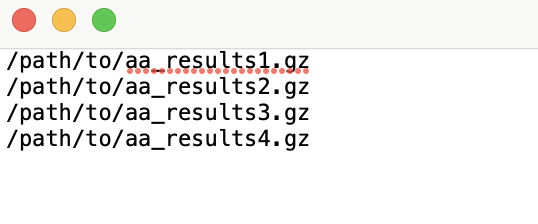
Create an
input_list.txtfile in this format where each line is a filepath to compressed aa_results: -
Use this file as the input to the
-flistflag.
-
--files: List of files or directories to use. Can specify multiple paths of (.tar.gz, .zip) of Amplicon Architect results.-o/--output_name: Output Prefix. Will be used as project name for Amplicon Repository upload.--name_map: A two column file providing the current identifier for each sample (col 1) and a replacement name (col 2). Enables batch renaming of samples.-c/--run_classifier(Yes, No): If 'Yes', then run Amplicon Classifier on AA samples. If Amplicon Classifier results are already included in inputs, then they will be removed and samples will be re-classified.--ref(hg19, GRCh37, GRCh38, GRCh38_viral, mm10): Reference genome name used for alignment, one of hg19, GRCh37, GRCh38, GRCh38_viral, or mm10.
AmpliconRepository related options
-u/--username: Email address for Amplicon Repository. If specified, will trigger an attempt to upload the aggregated file to AmpliconRepository.org.--upload_only(Yes, No): If 'Yes', then skip aggregation / classification and upload file to AmpliconRepository as is.-s/--server(dev, prod, local-debug): Which server to send results to. Accepts 'dev' or 'prod' or 'local-debug'. 'prod' is what most users want. 'dev' and 'local-debug' are for development and debugging.
How to run
-
If using local CLI:
- Running aggregator:
python3 /path/to/AmpliconSuiteAggregator/path/src/AmpliconSuiteAggregator.py **options** - Using API to upload directly to AmpliconRepository without aggregation:
python3 /path/to/AmpliconSuiteAggregator/path/src/AmpliconSuiteAggregator.py --files /path/to/aggregated/file.tar.gz -o projname -u your.amplicon.repository.username@gmail.com --upload_only Yes -s prod- Log into Amplicon Repository, you should see a new project with the output prefix you specified.
- Running aggregator:
-
If using Docker:
- To Running aggregator:
docker run --rm -it -v PATH/TO/INPUTS/FOLDER:/inputs/ genepattern/amplicon-suite-aggregator python3 /opt/genepatt/AmpliconSuiteAggregator.py **options**
- Using API to upload directly to AmpliconRepository without aggregation:
docker run --rm -it -v PATH/TO/INPUTS/FOLDER:/inputs/ genepattern/amplicon-suite-aggregator python3 /opt/genepatt/AmpliconSuiteAggregator.py -flist /path/to/input_list.txt -u YOUR_AMPLICON_REPOSITORY_EMAIL -o projname -u your.amplicon.repository.username@gmail.com --upload_only Yes -s prod- Log into Amplicon Repository, you should see a new project with the output prefix you specified.
- To Running aggregator:
Programming Language
- Python
Contact
For any issues
- Edwin Huang, edh021@cloud.ucsd.edu
Release history Release notifications | RSS feed


Download files
Download the file for your platform. If you're not sure which to choose, learn more about installing packages.
Source Distribution
Built Distribution
Filter files by name, interpreter, ABI, and platform.
If you're not sure about the file name format, learn more about wheel file names.
Copy a direct link to the current filters
File details
Details for the file ampliconsuiteaggregator-5.2.0.tar.gz.
File metadata
- Download URL: ampliconsuiteaggregator-5.2.0.tar.gz
- Upload date:
- Size: 15.5 kB
- Tags: Source
- Uploaded using Trusted Publishing? No
- Uploaded via: twine/6.1.0 CPython/3.10.18
File hashes
| Algorithm | Hash digest | |
|---|---|---|
| SHA256 |
ba5da6611693c24ff066e8b692b1201ff4b18fc81e08bb511d4abad9c000b144
|
|
| MD5 |
b550099dd5b7645cb222a84236966d17
|
|
| BLAKE2b-256 |
4b9ca2072fdc35b8f9f8eb6d31e3b787edce51f9d61f757733b7f3a3312abbfd
|
File details
Details for the file ampliconsuiteaggregator-5.2.0-py3-none-any.whl.
File metadata
- Download URL: ampliconsuiteaggregator-5.2.0-py3-none-any.whl
- Upload date:
- Size: 18.3 kB
- Tags: Python 3
- Uploaded using Trusted Publishing? No
- Uploaded via: twine/6.1.0 CPython/3.10.18
File hashes
| Algorithm | Hash digest | |
|---|---|---|
| SHA256 |
f18b6d6e0c54a31f0fd96cc5b35517309d2bfb5dae4f59eddf83b173f117bfe3
|
|
| MD5 |
674de99a42d25436ed283d5eef6f83c9
|
|
| BLAKE2b-256 |
14e3bdff5474941281fda6f669169412bbdcbb174e99f2e7dc31057b9cbcc8ea
|






