
AwesomeTkinter offers some pretty tkinter widgets
These widgets are just a tkinter widgets with custom styles and images.

Homepage: https://github.com/Aboghazala/AwesomeTkinter
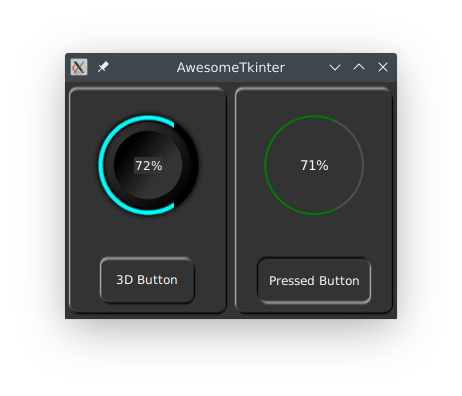
current available widgets:
- radial progressbar (flat or 3d).
- segment progressbar.
- scrollable frames.
- 3d buttons,
- 3d frames.
- Scrollable text widget
- radiobutton with better indicator/check mark quality.
- simple scrollbar "without arrow heads"
- tooltip
- right click menu
- auto wrapping label
- auto fit label
- alternative filechooser, and folderchooser for linux using zenity or kdialog if installed on target system
- date picker window
new widgets are coming soon
bidi support:
tkinter has no bidi support for RTL languages
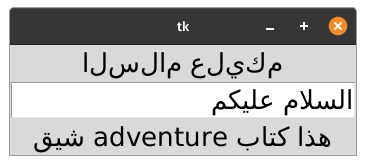
Linux: Arabic words shown reversed and not joined
Windows: bidi support is provided by Windows bidi Engine, but it is not efficient enough, espicially when writing arabic into "Entry" widget
This Library help solving these problems in Linux and windows, see example below
import tkinter as tk
from awesometkinter.bidirender import add_bidi_support, render_text
root = tk.Tk()

text = 'السلام عليكم'

# text display incorrectly on linux without bidi support
dummyvar = tk.StringVar()
dummyvar.set(text)
tk.Label(root, textvariable=dummyvar, font='any 20').pack()

# uncomment below to set a rendered text to first label
# dummyvar.set(render_text(text))

entry = tk.Entry(root, font='any 20', justify='right')
entry.pack()

lbl = tk.Label(root, font='any 20')
lbl.pack()

# adding bidi support for widgets
add_bidi_support(lbl)
add_bidi_support(entry)

# now there is a new set() and get() methods to set and get text on a widget
entry.set(text)
lbl.set('هذا كتاب adventure شيق')

root.mainloop()
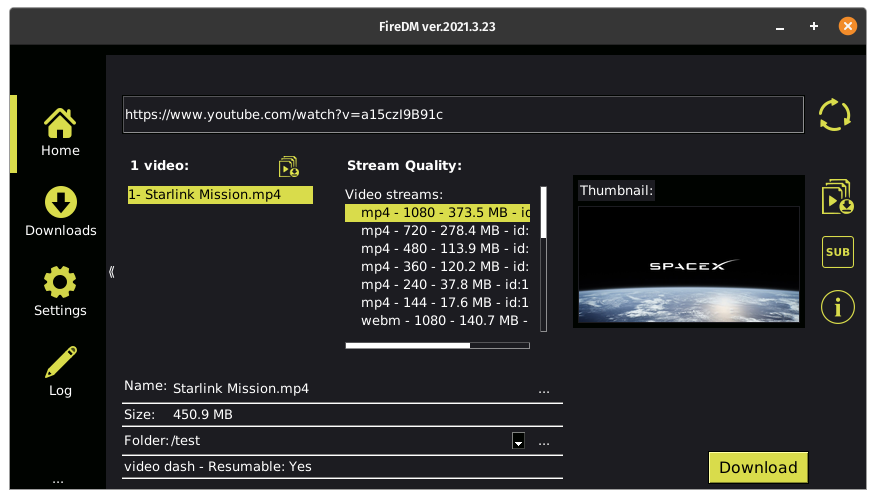
Applications examples that uses AwesomeTkinter:
Installation:
python pip install awesometkinter on windows
python3 pip install awesometkinter on linux
for quick test:
import awesometkinter as atk
atk.main()
or from terminal:
python3 -m awesometkinter
or just
awesometkinter
this will display a test window
Requirements:
- minimum python version 3.6
- tkinter
- pillow >= 6.0.0
- python-bidi (for linux)
Limitations:
- some widgets don't work well with all tkinter themes, it is recommended to set tkinter theme to 'default', 'alt', or 'classic' for things to work fine, so after creating your root you should change theme like example below
Example:
import tkinter as tk
from tkinter import ttk
import awesometkinter as atk

# our root
root = tk.Tk()
root.config(background=atk.DEFAULT_COLOR)

# it is recommended to select tkinter theme required for things to be right on windows,
# 'alt', 'default', or 'classic' work fine on windows
s = ttk.Style()
s.theme_use('default')

# 3d frame
f1 = atk.Frame3d(root)
f1.pack(side='left', expand=True, fill='both', padx=3, pady=3)

# 3d progressbar
bar = atk.RadialProgressbar3d(f1, fg='cyan', size=120)
bar.pack(padx=20, pady=20)
bar.start()

# 3d button
atk.Button3d(f1, text='3D Button').pack(pady=10)

f2 = atk.Frame3d(root)
f2.pack(side='left', expand=True, fill='both', padx=3, pady=3)

# flat radial progressbar
bar = atk.RadialProgressbar(f2, fg='green')
bar.pack(padx=30, pady=30)
bar.start()

atk.Button3d(f2, text='Button2').pack(pady=10)

root.mainloop()
ToolTip
you can enable tooltip for tkinter widgets on mouse hover, signature and arguments like below
class ToolTip:
    def __init__(self, widget, text, waittime=500, xoffset=10, yoffset=10, **kwargs):
        """
        tooltip class

        Args:
            widget: any tkinter widget
            text: tooltip text
            waittime: time in milliseconds to wait before showing tooltip
            xoffset(int): x - offset (pixels) of tooltip box from mouse pointer
            yoffset(int): y - offset (pixels) of tooltip box from mouse pointer
            kwargs: parameters to be passed to tooltip label, e.g: , background='red', foreground='blue', etc

        """
Tooltip Example:
import tkinter as tk
import awesometkinter as atk

root = tk.Tk()
btn = tk.Button(root, text="Hello", command=root.destroy)
btn.pack()
lbl = tk.Label(root, text='my label')
lbl.pack()
btn.tp = tooltip(btn, "Hello world")
lbl.tp = tooltip(lbl, "Hello world")

# we can modify any property thru the widget.tooltip reference
btn.tp.waittime = 100
btn.tp.text = 'new text'

# Also we can dynamically change tooltip as follows:
lbl.counter = 0

def foo():
    # change tooltip every second to mimic progress
    lbl.counter = lbl.counter + 1 if lbl.counter < 100 else 0
    lbl.tp.update_tooltip('Progress: ' + str(lbl.counter) + '%')  # or use lbl.tp.text='some text'
    root.after(1000, foo)

foo()

root.mainloop()
also, you can use a lot of useful functions that manipulate images, e.g. to create a tkinter PhotoImage from a file but want to change its size and color:
img = atk.create_image(fp='path to my image file', color='red', size=(150, 100))
Demos:
https://github.com/Aboghazala/AwesomeTkinter/tree/master/demos
Author:
Mahmoud Elshahat
2020-2021
1 maintainer

Release files for AwesomeTkinter 2021.11.8
For a detailed explanation of source distributions (sdists) and built distributions (wheels), please see the package formats documentation.
Source distribution (sdist)
| File | Size | Uploaded | |
|---|---|---|---|
| AwesomeTkinter-2021.11.8.tar.gz | 40.4 kB | Details |
Built distribution (wheel)
| File | Interpreter | ABI | Platform | Reset |
|---|---|---|---|---|
| AwesomeTkinter-2021.11.8-py3-none-any.whl | Python 3 | none | any | Details |
Total release size: 86.0 kB
Release files / AwesomeTkinter-2021.11.8.tar.gz
| Download URL | AwesomeTkinter-2021.11.8.tar.gz |
|---|---|
| Size | 40.4 kB |
| Tags | Source |
|
SHA-256 checksum How to use checksums |
2944e11468a437d51859f596b755c64f0df557b92b7641626fe3cfb222e4c180
|
|
BLAKE2b-256 checksum How to use checksums |
c911191ddd4d04919003cd23614c0235ff9dda6a6b5c0c4a88b7030706098251
|
| Upload date | |
|
Uploaded using Trusted Publishing? What is trusted publishing? |
No |
| Uploaded via |
twine/3.5.0 importlib_metadata/4.8.1 pkginfo/1.7.1 requests/2.26.0 requests-toolbelt/0.9.1 tqdm/4.62.3 CPython/3.10.0
|
Release files / AwesomeTkinter-2021.11.8-py3-none-any.whl
| Download URL | AwesomeTkinter-2021.11.8-py3-none-any.whl |
|---|---|
| Size | 45.6 kB |
| Tags | Python 3 |
|
SHA-256 checksum How to use checksums |
a10aa984d7d60e90e3c76e96698d3f0377aeb14461d83d824d8096b5e0c55950
|
|
BLAKE2b-256 checksum How to use checksums |
e3706ba1ef42425d9aa58aade18779fb2c2dc59986fd440bf2a0d6d48547d4ea
|
| Upload date | |
|
Uploaded using Trusted Publishing? What is trusted publishing? |
No |
| Uploaded via |
twine/3.5.0 importlib_metadata/4.8.1 pkginfo/1.7.1 requests/2.26.0 requests-toolbelt/0.9.1 tqdm/4.62.3 CPython/3.10.0
|














