
DACLhound
DACLhound collects and analyzes Active Directory permissions over LDAP or native ADWS. Review DACLs and effective permission paths in an interactive graph, or triage saved data from the command line.
Unlike BloodHound CE's modeled graph edges, DACLhound preserves the collected DACL details and exposes individual Write-Property rights by attribute (for example, WriteLogonHours or WriteUserAccountControl). This helps inspect the specific property and ACE behind a relationship.
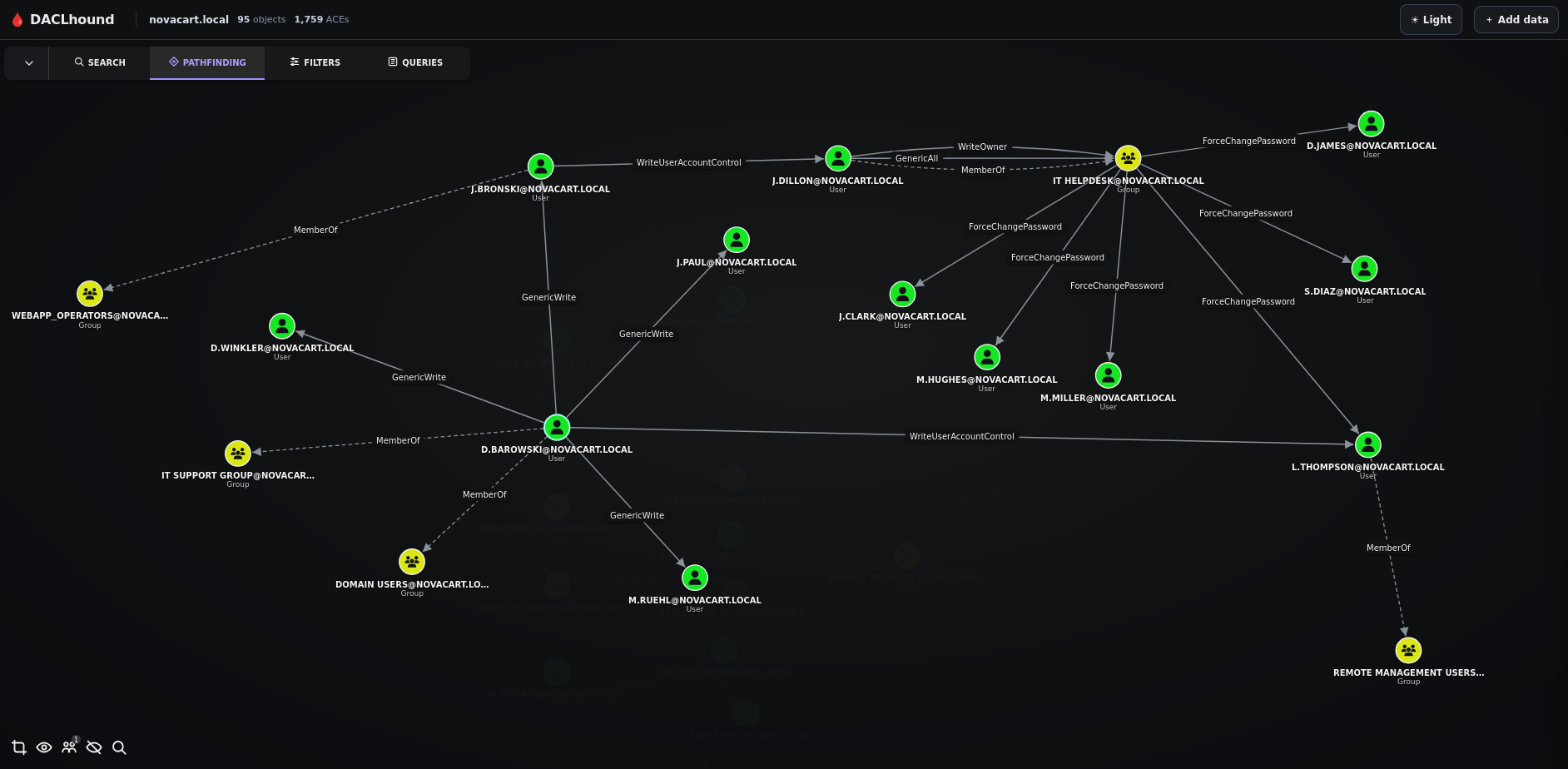
https://github.com/user-attachments/assets/d691098f-426c-4c34-ae8d-40e148de3154
Install
Python 3.10 or newer is required.
pipx install DACLhound
Upgrade with pipx upgrade DACLhound.
Collect
daclhound collect --host DC01.lab.local -d lab.local -u 'user' -p 'password' --dc-ip 192.168.2.1
By default, collection tries LDAP and falls back to ADWS if LDAP is unavailable. Choose --transport ldap or --transport adws to select one explicitly. ADWS uses TCP port 9389; --secure applies to LDAP only. Use the domain controller FQDN for Kerberos authentication.
The collector is read-only. It collects users, groups, computers, OUs, containers, GPOs, the domain, trusts, sites, Foreign Security Principals, and ADCS data. Limit directory object types with --types, or skip ADCS with --no-adcs:
daclhound collect --host DC01.lab.local -d lab.local -u 'user' -p 'password' --types users,groups --no-adcs
Output is saved as lab.local.json in the current directory; if that name exists, a numbered filename is chosen. Set a path with --output, replace an existing file with --overwrite, or retain raw collector entries with --raw-output.
Optional host checks
Add --host-checks to check SMB signing policy and whether the WebClient service's DAV RPC Service pipe is available over SMB on collected computers. The checks require authentication to each computer; they do not perform HTTP/WebDAV requests. Use --host-check-timeout to set the per-host timeout and --dns-server to select a DNS resolver.
daclhound collect --host DC01.lab.local -d lab.local -u 'user' -p 'password' --host-checks --host-check-timeout 5 --dns-server 192.168.2.1
Analyze
Get a prioritized terminal overview of permissions, membership, Kerberos exposure, delegation, ADCS, trusts, and GPO links:
daclhound analyze lab.local.json
daclhound analyze lab.local.json other-domain.json --from-user 'alice@lab.local'
Multiple input files are combined, with duplicate objects and relationships merged. Use --color never to disable colored output.
Open the graph
Run the viewer in the foreground and stop it with Ctrl+C:
daclhound graph --input lab.local.json
Or manage the viewer as a background service:
- Start the viewer without preloading a graph:
daclhound graph start. - Start the viewer and load a graph immediately:
daclhound graph start --input lab.local.json. - Check whether the background viewer is running:
daclhound graph status. - Stop the background viewer:
daclhound graph stop.
The server listens on 127.0.0.1:8765 by default. Uploaded JSON files stay in memory while the server is running and are discarded when it stops. Use --bind and --port to change the listener. Run daclhound collect --help or daclhound graph --help for all options.
Authentication
NTLM password
daclhound collect --host DC01.lab.local -d lab.local -u 'user' -p 'password' --dc-ip 192.168.2.1
Cross-forest collection
When collecting from a trusted forest with an account from another forest, point --host to a domain controller in the forest you want to query. Set -d to the account's logon domain, and pass only the username to -u (do not prefix it with DOMAIN\; DACLhound uses -d to qualify the username).
For example, if analyst belongs to lab.local and lab.local has a bidirectional trust with megacorp.local, the collection command can look like this:
daclhound collect --host DC01.megacorp.local -d lab.local -u 'analyst' -p 'P@ssw0rd01!' --dc-ip 192.0.2.10
Replace 192.0.2.10 with the IP address of DC01.megacorp.local. The trust must permit the account to authenticate, and the account must have sufficient directory permissions for the data you want to collect.
NTLM pass-the-hash
Pass the NT hash directly, or use LMHASH:NTHASH when you have both hashes:
daclhound collect --host DC01.lab.local -d lab.local -u 'user' -hashes '613a519b5b0ef57c07bc6395aa1aff14' --dc-ip 192.168.2.1
Kerberos
Kerberos supports a password, pass-the-hash, or an existing ccache. When using a
ccache, -u is optional; the identity is taken from the ticket. -no-pass is
an explicit flag for ccache authentication.
Password:
daclhound collect --host DC01.lab.local -d lab.local -u 'user' -p 'password' -k --dc-ip 192.168.2.1
Pass-the-hash (NT hash used as the Kerberos RC4 key):
daclhound collect --host DC01.lab.local -d lab.local -u 'user' -hashes '613a519b5b0ef57c07bc6395aa1aff14' -k --dc-ip 192.168.2.1
If both hashes are available, use -hashes '<LMHASH>:<NTHASH>'.
Existing ccache:
# Use the current KRB5CCNAME
daclhound collect --host DC01.lab.local -d lab.local -k -no-pass --dc-ip 192.168.2.1

# Or provide a ccache file directly
daclhound collect --host DC01.lab.local -d lab.local -k user.ccache -no-pass --dc-ip 192.168.2.1
An AES key enables Kerberos automatically: use -aesKey '<AESKEY>' (with -u). Add -s to use LDAPS.
License
MIT. See LICENSE.
1 maintainer

Metadata
1 maintainer
Release files for DACLhound 0.1.33
For a detailed explanation of source distributions (sdists) and built distributions (wheels), please see the package formats documentation.
Source distribution (sdist)
| File | Size | Uploaded | Provenance | Actions |
|---|---|---|---|---|
| daclhound-0.1.33.tar.gz | 172.5 kB | Without provenance | Details for daclhound-0.1.33.tar.gz |
Built distribution (wheel)
| File | Interpreter | ABI | Platform | Actions Reset |
|---|---|---|---|---|
| daclhound-0.1.33-py3-none-any.whl | Python 3 | none | any | Details for daclhound-0.1.33-py3-none-any.whl |
Total release size: 356.6 kB
Release files / daclhound-0.1.33.tar.gz
| Download URL | daclhound-0.1.33.tar.gz |
|---|---|
| Size | 172.5 kB |
| Tags | Source |
|
SHA-256 checksum How to use checksums |
9b1599b2affb439d43e20970cc82c5b9c8374ffac4a4c4d495cf6003bc7b914b
|
|
BLAKE2b-256 checksum How to use checksums |
ae33dd27f218214c6a6b70eff48d9cdd734c52a8e4b8563433e72cae29ecec0c
|
| Upload date | |
|
Uploaded using Trusted Publishing? What is trusted publishing? |
No |
| Uploaded via |
twine/7.0.0 CPython/3.14.7
|
Release files / daclhound-0.1.33-py3-none-any.whl
| Download URL | daclhound-0.1.33-py3-none-any.whl |
|---|---|
| Size | 184.0 kB |
| Tags | Python 3 |
|
SHA-256 checksum How to use checksums |
dfc3530c32a6243420c8860f5a2778de3c2a88093e333fc30257910cfa3e4ecd
|
|
BLAKE2b-256 checksum How to use checksums |
c5db4782fd39f7fefe3df4e947850e3020398195058c9d03a428aef886e92395
|
| Upload date | |
|
Uploaded using Trusted Publishing? What is trusted publishing? |
No |
| Uploaded via |
twine/7.0.0 CPython/3.14.7
|
Security for DACLhound 0.1.33
Provenance
Provenance describes where a file came from. On PyPI, provenance is shared via attestations, which provide a verifiable record of the build or publishing details. View details, limitations and caveats.
No provenance found
None of the files in this release were uploaded with provenance metadata.
A note on package security
PyPI is a repository for distributing packages, not a service for auditing them. While third-party security researchers and our staff do their best to detect and remove malicious packages, PyPI cannot guarantee the quality, security or suitability of any given package.
To learn more about protecting yourself from malicious actors, visit our package security documentation.














