



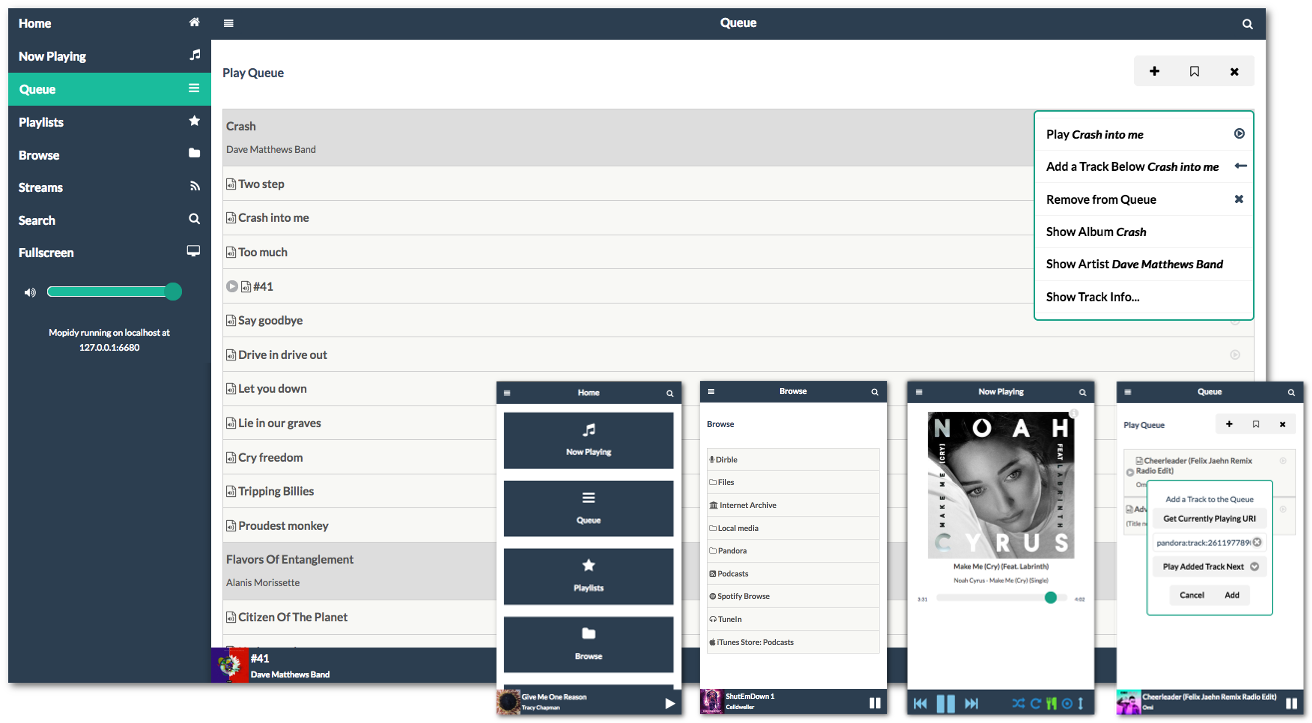
Mopidy MusicBox Webclient (MMW) is a frontend extension and JavaScript-based web client especially written for Mopidy.
Features
Responsive design that works equally well on desktop and mobile browsers.
Browse content provided by any Mopidy backend extension.
Add one or more tracks or entire albums to the queue.
Save the current queue to an easily accessible playlist.
Search for tracks, albums, or artists from specific backends or all of Mopidy.
Shows detailed track and album information during playback, with album cover retrieval from Last.fm.
Support for all of the Mopidy playback controls (consume mode, repeat, shuffle, etc.)
Deep integration with, and additional features for, the Pi MusicBox.
Fullscreen mode.
Dependencies
MMW has been tested on the major browsers (Chrome, IE, Firefox, Safari, iOS). It may also work on other browsers that support websockets, cookies, and JavaScript.
Mopidy >= 3.0.0. An extensible music server that plays music from local disk, Spotify, SoundCloud, Google Play Music, and more.
Installation
Install by running:
sudo python3 -m pip install Mopidy-MusicBox-Webclient
Or, if available, install the Debian/Ubuntu package from apt.mopidy.com.
Configuration
MMW is shipped with default settings that should work straight out of the box for most users:
[musicbox_webclient]
enabled = true
musicbox = false
websocket_host =
websocket_port =
on_track_click = PLAY_ALL
The following configuration values are available should you wish to customize your installation further:
musicbox_webclient/enabled: If the MMW extension should be enabled or not. Defaults to true.
musicbox_webclient/musicbox: Set this to true if you are connecting to a Mopidy instance running on a Pi Musicbox. Expands the MMW user interface to include system control/configuration functionality.
musicbox_webclient/websocket_host: Optional setting to specify the target host for Mopidy websocket connections.
musicbox_webclient/websocket_port: Optional setting to specify the target port for Mopidy websocket connections.
musicbox_webclient/on_track_click: The action performed when clicking on a track. Valid options are: PLAY_ALL (default), PLAY_NOW, PLAY_NEXT, ADD_THIS_BOTTOM, ADD_ALL_BOTTOM, and DYNAMIC (repeats last action).
Usage
Enter the address of the Mopidy server that you are connecting to in your browser (e.g. http://localhost:6680/musicbox_webclient)
Project resources
Credits
Original author: Wouter van Wijk
Current maintainer: Nick Steel
2 maintainers


Release files for Mopidy-MusicBox-Webclient 3.1.0
For a detailed explanation of source distributions (sdists) and built distributions (wheels), please see the package formats documentation.
Source distribution (sdist)
| File | Size | Uploaded | |
|---|---|---|---|
| Mopidy-MusicBox-Webclient-3.1.0.tar.gz | 1.4 MB | Details |
Built distribution (wheel)
| File | Interpreter | ABI | Platform | Reset |
|---|---|---|---|---|
| Mopidy_MusicBox_Webclient-3.1.0-py3-none-any.whl | Python 3 | none | any | Details |
Total release size: 2.8 MB
Release files / Mopidy-MusicBox-Webclient-3.1.0.tar.gz
| Download URL | Mopidy-MusicBox-Webclient-3.1.0.tar.gz |
|---|---|
| Size | 1.4 MB |
| Tags | Source |
|
SHA-256 checksum How to use checksums |
92f4f39cb4637bb07222b5db1fc46c0a99ca32e85a1d48d7ec76f7db47b80fb8
|
|
BLAKE2b-256 checksum How to use checksums |
9eca95f08bf6fd4d14666fdadc9005784cf7b272fc2fa06198c359cf46264854
|
| Upload date | |
|
Uploaded using Trusted Publishing? What is trusted publishing? |
No |
| Uploaded via |
twine/3.1.1 pkginfo/1.5.0.1 requests/2.22.0 setuptools/41.6.0 requests-toolbelt/0.9.1 tqdm/4.36.1 CPython/3.7.5rc1
|
Release files / Mopidy_MusicBox_Webclient-3.1.0-py3-none-any.whl
| Download URL | Mopidy_MusicBox_Webclient-3.1.0-py3-none-any.whl |
|---|---|
| Size | 1.4 MB |
| Tags | Python 3 |
|
SHA-256 checksum How to use checksums |
4bb6a77c21c612a745546d46e12095cdf0949071421e04d5d427bff0bcb12e16
|
|
BLAKE2b-256 checksum How to use checksums |
99ba8839c15bb13acead4222311823af4041d7d8f0f09b3e7e5d04145f6fa942
|
| Upload date | |
|
Uploaded using Trusted Publishing? What is trusted publishing? |
No |
| Uploaded via |
twine/3.1.1 pkginfo/1.5.0.1 requests/2.22.0 setuptools/41.6.0 requests-toolbelt/0.9.1 tqdm/4.36.1 CPython/3.7.5rc1
|














