
Dynamic web security scanner with normalized JSON and HTML reporting

Project description






R-AScan (Rusher Automatic Scanner)
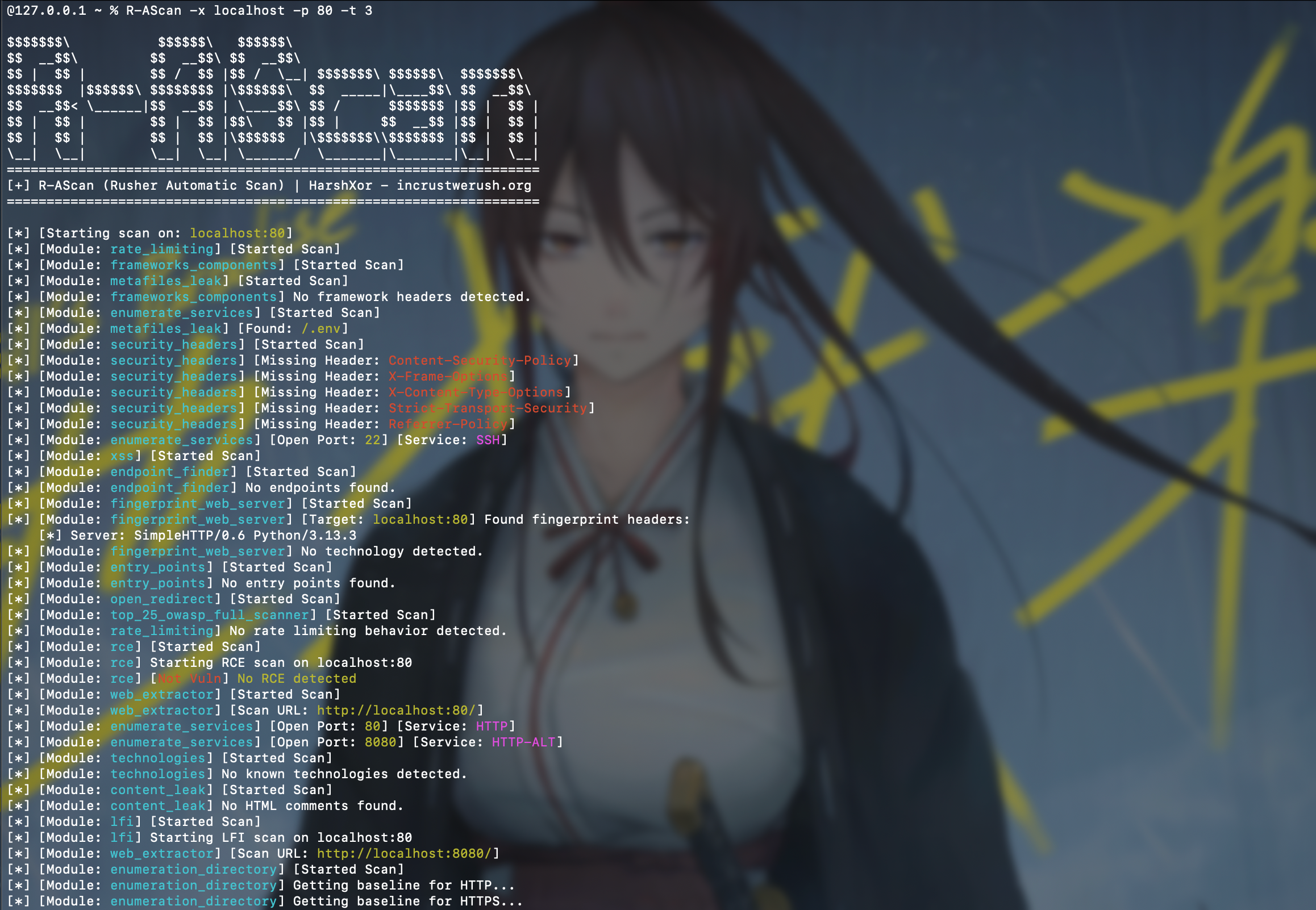
R-AScan is a modular, multithreaded web security scanner written in Python. It discovers scanner modules at runtime, executes them against a target, and stores the combined results as JSON.
Use R-AScan only against systems you own or have explicit permission to test. Several modules send active payloads or state-changing HTTP requests.
Features
- Dynamic scanner discovery from
r_ascan/scanners/ - Globally bounded scanner execution
- Scanner safety modes: passive, safe-active, intrusive, and exploit
- Deterministic scanner/category selection
- HTTP, HTTPS, and raw-socket checks
- JSON scan reports
- Configurable target, port, thread count, and output path
- Optional verbose output
- Optional deterministic risk scoring and prioritization
- Self-contained HTML reports generated from normalized JSON data
- GitHub-based source update command
- Extensible
scan(args)module interface
Included checks cover:
- SQL injection, command injection, LFI, RCE, XSS, SSRF, and SSTI
- LDAP injection and open redirects
- Access-control and rate-limiting behavior
- HTTP request smuggling
- Security headers and sensitive-file exposure
- Directory, endpoint, service, technology, and web-server discovery
- Apache Struts, PHPUnit, and selected CVE-specific checks
Scanner results are heuristic and may contain false positives or false negatives. Validate findings manually before reporting or remediation.
Requirements
- Python 3.10 or newer
- Linux or Windows
- Network access to the authorized target
Python dependencies are installed automatically when installing the package.
Installation
Install from PyPI
python3 -m pip install --upgrade R-AScan
R-AScan --help
On Windows, use py if python3 is unavailable:
py -m pip install --upgrade R-AScan
R-AScan --help
Install with pipx
pipx installs the command in an isolated environment:
pipx install R-AScan
R-AScan --help
Install from source
git clone https://github.com/ICWR-TEAM/R-AScan.git
cd R-AScan
python3 -m venv .venv
Activate the virtual environment:
# Linux/macOS
source .venv/bin/activate
# Windows PowerShell
.\.venv\Scripts\Activate.ps1
Install the local package:
python -m pip install --upgrade pip
python -m pip install -e .
R-AScan --help
The editable installation is recommended for development because changes under r_ascan/ are immediately available to the CLI.
Usage
Basic scan:
R-AScan --target example.com
The basic command runs all discovered scanners, including intrusive and exploit modules, and writes both JSON and HTML reports. Use it only with explicit authorization.
Common examples:
# Increase the worker count
R-AScan --target example.com --threads 10

# Scan a specific port
R-AScan --target 192.0.2.10 --port 8080

# Write to a custom report
R-AScan --target example.com --output reports/example.json

# Print detailed module output
R-AScan --target example.com --verbose

# Apply deterministic risk scoring and prioritization
R-AScan --target example.com --optimize

# Generate matching JSON and self-contained HTML reports
R-AScan --target example.com --optimize --html

# Select the HTML destination
R-AScan --target example.com --html --html-output reports/example.html

# List available scanners and their safety modes
R-AScan --list-scanners

# Run only selected scanners
R-AScan --target example.com --scanners security_headers,sqli

# Send repeatable custom headers to all HTTP scanners
R-AScan --target example.com \
  -H "X-API-Key: secret" \
  -H "Accept: application/json" \
  --headers "Cookie: session=abc"

# Explicitly authorize intrusive scanners
R-AScan --target example.com --mode intrusive

# Restrict execution to passive and safe-active scanners
R-AScan --target example.com --mode safe-active

# Disable the automatically generated HTML report
R-AScan --target example.com --no-html
Command-line options
-h, --help              Show help and exit
-x, --target TARGET     Target hostname or IP address
-t, --threads THREADS   Global worker limit (default: 5)
-o, --output OUTPUT     Custom JSON output path
-p, --port PORT         Custom HTTP/HTTPS port
--path PATH             Base URL path (default: /)
--timeout SECONDS       Request timeout
--max-requests COUNT    Global request budget
--mode MODE             Maximum mode; default exploit runs all scanners
--scanners IDS          Include comma-separated scanner IDs
--exclude IDS           Exclude comma-separated scanner IDs
--category NAMES        Filter scanner categories
--list-scanners         List scanner metadata and exit
--proxy URL             HTTP/S proxy
-H, --header VALUE      Custom `Name: value` HTTP header; repeatable
--headers VALUE         Alias of `--header`; also repeatable
--authorization VALUE   Authorization header value
--cookie VALUE          Cookie header value
--insecure              Disable TLS certificate verification
--update                 Update package source from GitHub
--verbose                Print detailed scanner output
--optimize               Apply deterministic risk scoring
--html                   HTML compatibility flag; HTML is generated by default
--no-html                Disable automatic HTML report generation
--html-output PATH       Custom HTML report path
The target must be a hostname or IP address. URL schemes, embedded ports, paths, queries, and fragments are rejected. Supply ports and base paths separately:
R-AScan -x example.com --port 8443 --path /application
The default exploit mode runs all discovered scanners. To avoid state-changing
or exploit checks, explicitly select --mode safe-active or --mode passive.
Custom headers are merged case-insensitively. When a name is repeated, the last value wins:
R-AScan -x example.com \
  -H "User-Agent: first" \
  -H "user-agent: final"
--authorization and --cookie are convenience options applied after
generic -H values, so they override matching Authorization or Cookie
headers. Custom headers are sent only by HTTP/HTTPS scanners; raw socket
service checks do not use them.
Output
By default, results are written in the current directory:
scan_output-<target>.json
Example structure:
{
  "schema_version": "2.0",
  "scan": {
    "target": {"host": "example.com", "port": null, "base_path": "/"},
    "mode": "safe-active",
    "scanner_count": 1
  },
  "summary": {
    "finding_count": 1,
    "risk_score": 2.0,
    "severity": {"critical": 0, "high": 0, "medium": 0, "low": 1, "info": 0}
  },
  "results": [
    {
      "scanner": {
        "id": "security_headers",
        "category": "reconnaissance",
        "mode": "passive"
      },
      "status": "completed",
      "duration_ms": 42,
      "findings": [
        {
          "id": "stable-finding-id",
          "scanner_id": "security_headers",
          "title": "Missing security control: Content-Security-Policy",
          "target": "example.com",
          "endpoint": "Content-Security-Policy",
          "method": "GET",
          "severity": "low",
          "confidence": "high",
          "status": "confirmed",
          "evidence": {},
          "score": 2.0
        }
      ],
      "observations": [],
      "errors": [],
      "summary": {"finding_count": 1, "error_count": 0, "risk_score": 2.0}
    }
  ]
}
Every scanner result uses the same fields. Legacy scanner payloads are retained
under observations[].data, while actionable items are converted into the
same finding schema. Use --output to select another path:
R-AScan -x example.com -o reports/example.json
Parent output directories are created automatically. The HTML report is
self-contained, uses the same normalized data as JSON, and includes summary
cards, finding prioritization, scanner execution status, remediation, and
escaped evidence. Unless --no-html is supplied, a matching .html file is
always created beside the JSON report.
Updating
For a PyPI installation, use pip or pipx:
python3 -m pip install --upgrade R-AScan
pipx upgrade R-AScan
R-AScan also provides:
R-AScan --update
The built-in updater downloads repository content from the pypi-release branch and overwrites local package files. It does not currently provide signature verification, rollback, or atomic updates. Package-manager upgrades are recommended for normal installations.
Writing a Scanner Module
Create a Python file under r_ascan/scanners/. The file must expose a
module-level scan(args) function and return JSON-serializable data. New
scanners should declare metadata and use the shared context:
SCANNER = {
    "id": "example_check",
    "title": "Example Check",
    "category": "configuration",
    "mode": "passive",
    "version": "1.0",
}


def scan(args):
    url = args.target_model.url("https", "test")
    response = args.http.get(url)
    return {"url": url, "status_code": response.status_code}
Scanner files are discovered recursively. Files whose names begin with __ are ignored. Keep results serializable by json.dump.
Available arguments include:
args.targetargs.portargs.pathargs.threadsargs.outputargs.verboseargs.updateargs.optimizeargs.contextargs.target_modelargs.httpargs.base_urls
Project Structure
r_ascan/
├── app.py                  # CLI and scanner orchestration
├── config.py               # Shared settings and resource paths
├── core/
│   ├── context.py          # Scan configuration and shared context
│   ├── models.py           # Scanner metadata and normalized results
│   ├── registry.py         # Discovery filters and safety modes
│   ├── scheduler.py        # Global request budget
│   ├── target.py           # Host/IP and custom-port validation
│   └── transport.py        # Shared HTTP policy
├── module/
│   ├── ml_optimizer.py     # Experimental result classifier
│   └── other.py            # Terminal formatting
├── resources/              # Payload and wordlist data
└── scanners/               # Scanner plugins
    └── exploits/           # Product/CVE-specific checks
Technical architecture, current limitations, and development priorities are documented in NOTE.md.
Development
git clone https://github.com/ICWR-TEAM/R-AScan.git
cd R-AScan
python3 -m venv .venv
source .venv/bin/activate
python -m pip install -e .
Before changing the project, read NOTE.md. Record completed changes in NOTE.md where relevant and in docs/changelog/YYYY/MM/DD.md.
Release maintainers should follow RELEASE.md for build,
validation, API-token, upload, and clean-install verification steps.
License
R-AScan is available under the MIT License.
Developed by HarshXor — incrustwerush.org


Download files
Download the file for your platform. If you're not sure which to choose, learn more about installing packages.
Source Distribution
Built Distribution
Filter files by name, interpreter, ABI, and platform.
If you're not sure about the file name format, learn more about wheel file names.
Copy a direct link to the current filters
File details
Details for the file r_ascan-0.0.15.tar.gz.
File metadata
- Download URL: r_ascan-0.0.15.tar.gz
- Upload date:
- Size: 55.6 kB
- Tags: Source
- Uploaded using Trusted Publishing? No
- Uploaded via: twine/6.2.0 CPython/3.14.2
File hashes
| Algorithm | Hash digest | |
|---|---|---|
| SHA256 |
9605220b4f93dbe008312c5c5f9fe2adde10a5a642fa0c50063d694495d6f2b9
|
|
| MD5 |
ae0a2a428ffced43b071f5185f3d2007
|
|
| BLAKE2b-256 |
ee3eec9cfbed8ea8cce0078d3902bf252b53aa8d76d456fe2b8728873ecefde7
|
File details
Details for the file r_ascan-0.0.15-py3-none-any.whl.
File metadata
- Download URL: r_ascan-0.0.15-py3-none-any.whl
- Upload date:
- Size: 71.2 kB
- Tags: Python 3
- Uploaded using Trusted Publishing? No
- Uploaded via: twine/6.2.0 CPython/3.14.2
File hashes
| Algorithm | Hash digest | |
|---|---|---|
| SHA256 |
1a14eef8781180f84f5c90966e43e0209ec67e93c803107a9331858b9004de34
|
|
| MD5 |
4a431c4cbd3358cbe79ba76b54943049
|
|
| BLAKE2b-256 |
6c88f475cc806e42f633a1da4bd8728db7bdc6c63c50e792f33b8774a35e9ad4
|






