
Parametric 2D/3D CAD modeling in pure Python — fluent API, boolean operations, built on Shapely and trimesh
Verified details
These details have been verified by PyPIProject links
GitHub Statistics
Maintainers

Project description
ScadPy




Programmatic CAD in Pure Python. — Documentation
ScadPy is a parametric modeling library for Python. Define 2D shapes and 3D solids with a fluent, chainable API: boolean operations, extrusions, fillets, patterns and topology queries. Export to STL, DXF, SVG or render interactively.
Built on Shapely for 2D geometry, trimesh for 3D meshes and NumPy for topology queries (vertex coordinates, edge normals, ring types and more). If you know OpenSCAD, the approach will feel familiar.
Installation
pip install scadpy
Requirements: Python ≥ 3.12.
Quick examples
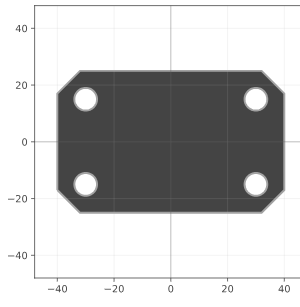
# 2D — chamfered mounting plate
from scadpy import rectangle, circle, text
import numpy as np

PLATE_WIDTH   = 80
PLATE_HEIGHT  = 50
PLATE_THICKNESS = 10
HOLE_RADIUS   = 4
HOLE_MARGIN   = 10
CHAMFER_SIZE  = 8

base  = rectangle([PLATE_WIDTH, PLATE_HEIGHT])
plate = base.chamfer(CHAMFER_SIZE)

for position, normal in zip(base.vertex_coordinates, base.vertex_normals):
    hole_center = position - HOLE_MARGIN * np.sqrt(2) * normal
    plate -= circle(HOLE_RADIUS).translate(hole_center)

plate.to_screen()
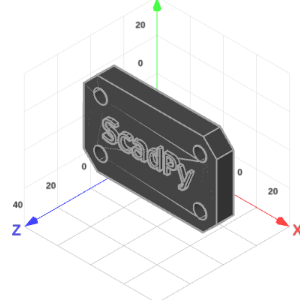
# 3D — extruded mounting plate with label (continues from above)
TEXT_THICKNESS = 2

extruded_plate = plate.linear_extrude(PLATE_THICKNESS)
label = text("ScadPy", size=15).linear_extrude(TEXT_THICKNESS)
extruded_plate |= label.translate(z(PLATE_THICKNESS))
extruded_plate.to_screen()
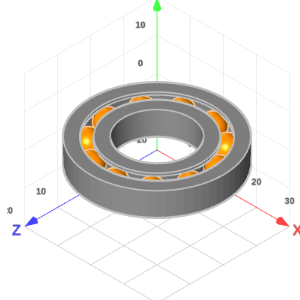
# 3D — parametric ball bearing
from scadpy import circle, rectangle, sphere, x, y, GRAY, ORANGE

BALL_RADIUS    = 3
RACE_RADIUS    = 15
NB_BALLS       = 11
CLEARANCE      = 0.1
RING_HEIGHT    = 7
RACE_THICKNESS = 10

groove  = circle(BALL_RADIUS + CLEARANCE) | rectangle([BALL_RADIUS, RING_HEIGHT])
race    = rectangle([RACE_THICKNESS, RING_HEIGHT]) - groove
bearing = race.radial_extrude(axis=y(), pivot=x(RACE_RADIUS)).color(GRAY)
ball    = sphere(BALL_RADIUS).color(ORANGE)
bearing += ball.radial_pattern(count=NB_BALLS, axis=y(), pivot=x(RACE_RADIUS))

bearing.to_screen()
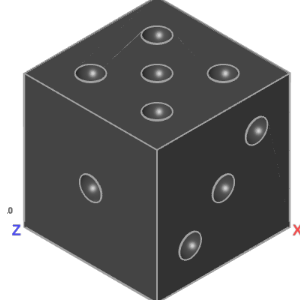
# 3D — dice
from scadpy import cuboid, sphere, x, y, z

SIZE = 20
dice = cuboid(SIZE)
pip  = sphere(SIZE / 12).translate(z(SIZE / 2))

one   = pip
two   = pip.translate([SIZE / 4, SIZE / 4, 0]) + pip.translate([-SIZE / 4, -SIZE / 4, 0])
three = one + two
four  = two + two.rotate(90, z())
five  = one + four
six   = four + pip.translate(x(SIZE / 4)) + pip.translate(x(-SIZE / 4))

dice -= (
    one
    + two.rotate(90, x())
    + three.rotate(90, y())
    + four.rotate(-90, y())
    + five.rotate(-90, x())
    + six.rotate(-180, x())
)

dice.to_screen()
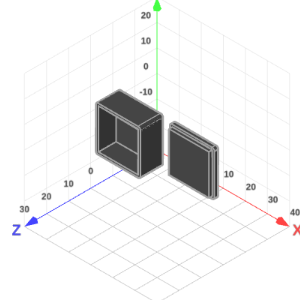
# 3D — storage box
from scadpy import square, x, z

SIZE_OUTER      = 20
SIZE_INNER      = 18
FILLET          = 1
BASE_HEIGHT     = 10
CUT_HEIGHT      = 8
CAP_HEIGHT_OUTER = 1.5
CAP_HEIGHT_INNER = 3
CAP_OFFSET_X    = 25
CUT_OFFSET_Z    = 2

outer_base = square(SIZE_OUTER).fillet(FILLET).linear_extrude(BASE_HEIGHT)
inner_cut  = square(SIZE_INNER).linear_extrude(CUT_HEIGHT).translate(z(CUT_OFFSET_Z))
base       = outer_base - inner_cut

cap_outer = square(SIZE_OUTER).fillet(FILLET).linear_extrude(CAP_HEIGHT_OUTER)
cap_inner = square(SIZE_INNER).linear_extrude(CAP_HEIGHT_INNER)
cap       = (cap_outer | cap_inner).translate(x(CAP_OFFSET_X))

storage_box = base + cap
storage_box.to_screen()
AI integration
ScadPy ships a machine-readable skill file (ai-skills.txt) that lets AI
assistants understand the full API without reading source code — signatures,
descriptions, parameters, return types, and usage examples, extracted directly
from the source.
Cheat sheet
Parameters shown in # comments are optional, with their default values.
2D — Shape
from scadpy import *

# primitives
circle(radius=3)                                # segment_count=64
polygon(points=[(-2, -2), (2, -2), (0, 2)])
rectangle(size=[6, 3])
Shape.from_dxf("file.dxf")
Shape.from_svg("file.svg")
square(size=4)

# boolean operations
s = square(size=4);  c = circle(radius=3)
s | c    # union
s - c    # difference
s & c    # intersection
s ^ c    # symmetric difference
s + c    # concat (no merge)

# transforms
s.chamfer(size=0.8)              # vertex_filter=None, epsilon=1e-8
s.color(color=RED)
s.convexify()                    # part_filter=None
s.fill()                         # part_filter=None
s.fillet(size=0.8)               # vertex_filter=None, segment_count=32, epsilon=1e-8
s.grow(distance=0.5)             # part_filter=None
s.linear_cut(axis=x())          # pivot=0
s.linear_pattern(counts=4, steps=x(3))        # counts=[nx, ny], steps=[sx, sy]
s.linear_slice(thickness=2, direction=x())  # pivot=0, part_filter=None
s.mirror(normal=[1, 0])          # pivot=0
s.pull(distance=1.0)             # pivot=0, vertex_filter=None
s.push(distance=1.0)             # pivot=0, vertex_filter=None
s.radial_pattern(count=6)        # angle=360, pivot=0
s.radial_slice(start=0, end=180) # pivot=0, part_filter=None
s.resize(size=[6, None])         # auto=False, pivot=None, vertex_filter=None
s.rotate(angle=30)               # pivot=0, vertex_filter=None
s.scale(scale=[2, 0.5])          # pivot=0, vertex_filter=None
s.shrink(distance=0.5)           # part_filter=None
s.translate(translation=[2, 1])  # vertex_filter=None

# features
s.bounds                         # [min_x, min_y, max_x, max_y]
s.bounding_box                   # → Shape (rectangle)
s.centroid                       # [cx, cy] — geometric centroid
s.is_empty                       # bool

# topology — coordinates & attributes
s.are_vertices_convex            # (n_vertices,)   — convexity mask
s.directed_edge_directions       # (2*n_edges, 2)
s.edge_lengths                   # (n_edges,)
s.edge_midpoints                 # (n_edges,  2)
s.edge_normals                   # (n_edges,  2)
s.ring_types                     # (n_rings,)  — "exterior"|"interior"
s.vertex_angles                  # (n_vertices,)   — interior angles (°)
s.vertex_coordinates             # (n_vertices, 2)
s.vertex_normals                 # (n_vertices, 2) — outward unit normals

# topology — bridges (*_to_*)
s.directed_edge_to_edge             # directed_edge → edge
s.directed_edge_to_vertex           # directed_edge → [start, end]
s.edge_to_vertex                    # edge          → [start, end]
s.ring_to_part                      # ring          → part
s.vertex_to_incoming_directed_edge  # vertex        → directed_edge
s.vertex_to_outgoing_directed_edge  # vertex        → directed_edge
s.vertex_to_neighbor_vertex       # vertex        → [prev, next]
s.vertex_to_part                    # vertex        → part
s.vertex_to_ring                    # vertex        → ring

# extrusions → Solid
s.linear_extrude(height=3)
s.radial_extrude(axis=y(), pivot=x(5))  # start=0, end=360, segment_count=64
s.path_extrude(path)                    # fillet_segments=None, min_fillet_radius=None, intermediate_sections=None, strategy=None

# sweep strategies (for path_extrude strategy= parameter)
scale_sweep(end=3)                      # start=1.0
rotate_sweep(angle=360)                 # start_angle=0.0
resize_sweep(end_size=[2, 4])           # start_size=None
reverse_sweep(strategy=scale_sweep(3))

# export
s.to_dxf_file("output.dxf")
s.to_html_file("output.html")
s.to_screen()
s.to_svg_file("output.svg")
3D — Solid
from scadpy import *

# primitives
cone(radius=2, height=4)         # section_count=32
cuboid(size=[4, 3, 2])
cylinder(radius=2, height=4)     # section_count=32
polyhedron(vertices=vertices, faces=faces)
sphere(radius=3)                 # subdivision_count=4
Solid.from_stl("model.stl")

# boolean operations
a = cuboid(size=[4, 3, 2]);  b = sphere(radius=2)
a | b    # union
a - b    # difference
a & b    # intersection
a ^ b    # symmetric difference
a + b    # concat (no merge)

# transforms
a.color(color=RED)
a.convexify()                    # part_filter=None
a.linear_pattern(counts=4, steps=x(3))        # counts=[nx, ny, nz], steps=[sx, sy, sz]
a.mirror(normal=[1, 0, 0])       # pivot=0
a.pull(distance=1.0)             # pivot=0, vertex_filter=None
a.push(distance=1.0)             # pivot=0, vertex_filter=None
a.radial_pattern(count=6, axis=z())            # angle=360, pivot=0
a.resize(size=[6, None, None])   # auto=False, pivot=None, vertex_filter=None
a.rotate(angle=30, axis=z())    # pivot=0, vertex_filter=None
a.scale(scale=[2, 1, 0.5])       # pivot=0, vertex_filter=None
a.translate(translation=[1, 0, 0])  # vertex_filter=None

# features
a.bounds                         # [min_x, min_y, min_z, max_x, max_y, max_z]
a.bounding_box                   # → Solid (cuboid)
a.centroid                       # [cx, cy, cz] — geometric centroid
a.is_empty                       # bool

# topology — coordinates & bridges (*_to_*)
a.triangle_to_vertex    # triangle → [v0, v1, v2]
a.vertex_coordinates    # (n_vertices,  3)
a.vertex_to_part        # vertex   → part

# export
a.to_html_file("output.html")
a.to_screen()
a.to_stl_file("output.stl")
Roadmap
- Improve documentation
- Richer topology for Shape and Solid
- Richer transformations for Shape and Solid
- Chamfer and fillet on Solid
- New assembly types:
PointCloud2d,Wire2d,PointCloud3d,Wire3d - Better error messages
- More import/export formats
Development
# Create and activate venv
python3 -m venv .venv
source .venv/bin/activate

# Install with dev dependencies
pip install -e .[dev]

# Run doctests & generate documentation & AI skill file
cd docs && make doctest && make html && make skills
License
See LICENSE.md.
Project details
Verified details
These details have been verified by PyPIProject links
GitHub Statistics
Maintainers
Release history Release notifications | RSS feed


Download files
Download the file for your platform. If you're not sure which to choose, learn more about installing packages.
Source Distribution
Built Distribution
Filter files by name, interpreter, ABI, and platform.
If you're not sure about the file name format, learn more about wheel file names.
Copy a direct link to the current filters
File details
Details for the file scadpy-0.4.26.tar.gz.
File metadata
- Download URL: scadpy-0.4.26.tar.gz
- Upload date:
- Size: 485.2 kB
- Tags: Source
- Uploaded using Trusted Publishing? Yes
- Uploaded via: twine/6.1.0 CPython/3.13.12
File hashes
| Algorithm | Hash digest | |
|---|---|---|
| SHA256 |
88b0642b387876894f150afd4a5bdef3b1413cf4a523c79d40c9288a8b272493
|
|
| MD5 |
0e4145a662e9f2f1c70eda9bbc2c6436
|
|
| BLAKE2b-256 |
16a7055d8e802e4cefd62c1e95bfe9f9fac4e56508c3095dceb8d6cd15d577a4
|
Provenance
The following attestation bundles were made for scadpy-0.4.26.tar.gz:
Publisher:
release.yml on m-fabregue/scadpy
-
Statement:
-
Statement type:
https://in-toto.io/Statement/v1 -
Predicate type:
https://docs.pypi.org/attestations/publish/v1 -
Subject name:
scadpy-0.4.26.tar.gz -
Subject digest:
88b0642b387876894f150afd4a5bdef3b1413cf4a523c79d40c9288a8b272493 - Sigstore transparency entry: 1781309394
- Sigstore integration time:
-
Permalink:
m-fabregue/scadpy@f6874185e2a13aa7bc950a383ebc406d65360c3e -
Branch / Tag:
refs/heads/main - Owner: https://github.com/m-fabregue
-
Access:
public
-
Token Issuer:
https://token.actions.githubusercontent.com -
Runner Environment:
github-hosted -
Publication workflow:
release.yml@f6874185e2a13aa7bc950a383ebc406d65360c3e -
Trigger Event:
workflow_run
-
Statement type:
File details
Details for the file scadpy-0.4.26-py3-none-any.whl.
File metadata
- Download URL: scadpy-0.4.26-py3-none-any.whl
- Upload date:
- Size: 201.6 kB
- Tags: Python 3
- Uploaded using Trusted Publishing? Yes
- Uploaded via: twine/6.1.0 CPython/3.13.12
File hashes
| Algorithm | Hash digest | |
|---|---|---|
| SHA256 |
35304c557ec36344b6b627a3be2291cd59d69cef48b7ce09f90934626bf1f98b
|
|
| MD5 |
f3c3fe49d0301a7d7303a1de5092aa99
|
|
| BLAKE2b-256 |
3e584474406d46f9a2617aa678c6e2e4a6fb8ce79d7c9151b62e0c22f389848d
|
Provenance
The following attestation bundles were made for scadpy-0.4.26-py3-none-any.whl:
Publisher:
release.yml on m-fabregue/scadpy
-
Statement:
-
Statement type:
https://in-toto.io/Statement/v1 -
Predicate type:
https://docs.pypi.org/attestations/publish/v1 -
Subject name:
scadpy-0.4.26-py3-none-any.whl -
Subject digest:
35304c557ec36344b6b627a3be2291cd59d69cef48b7ce09f90934626bf1f98b - Sigstore transparency entry: 1781309459
- Sigstore integration time:
-
Permalink:
m-fabregue/scadpy@f6874185e2a13aa7bc950a383ebc406d65360c3e -
Branch / Tag:
refs/heads/main - Owner: https://github.com/m-fabregue
-
Access:
public
-
Token Issuer:
https://token.actions.githubusercontent.com -
Runner Environment:
github-hosted -
Publication workflow:
release.yml@f6874185e2a13aa7bc950a383ebc406d65360c3e -
Trigger Event:
workflow_run
-
Statement type:






