
Subsearch - Download subtitles for movies and shows, automatically with one easy mouse click.

Project description








Readme Table of Contents
Wiki Table of Contents
- Home
- Code Analysis and Verification Process
- Fixing Context Menu Issue in Subsearch
- Subsearch Settings
- Troubleshooting Subtitle Search Issues
Misc Table of Contents
About
Key Features
- Initiate a search for subtitles by simply right-clicking on a media file.
- Search for subtitles in 70 different languages
- User-friendly GUI for easy customization and configuration
- Available in three options, including a compiled executable and source code on GitHub and PyPI
- The setup process is straightforward and has minimal reliance on external modules.
Details
Subsearch is an automated subtitle downloader and extractor that allows users to search and download subtitles for movies and TV shows with a single click from the context menu. The application features a graphical user interface for configuring settings, including options for searching subtitles in 70 different languages from various subtitle sites, filtering hearing-impaired subtitles, and adjusting filename matching criteria.
The application has a user-friendly GUI for all custom settings that can be easily configured. It supports 70 different languages, most of which work on all available subtitle sites. Users can configure it to include hearing impaired subtitles only, non-hearing impaired subtitles only, or both. They can also adjust how strictly the file name matches the search results.
The tool is available in three different options: as a compiled executable that can be run without the need for a Python interpreter and imported modules, as source code on GitHub, and on PyPI. Users can pick the source that suits them best.
Initially created as a personal project to learn Python programming and git version control, this application has evolved into a daily-use tool that I continue to enjoy working on. While there are many similar repositories available that automatically download subtitles from the internet, this project may offer unique features that set it apart. The setup process has been designed to be as straightforward as possible with minimal reliance on external modules.
Preview
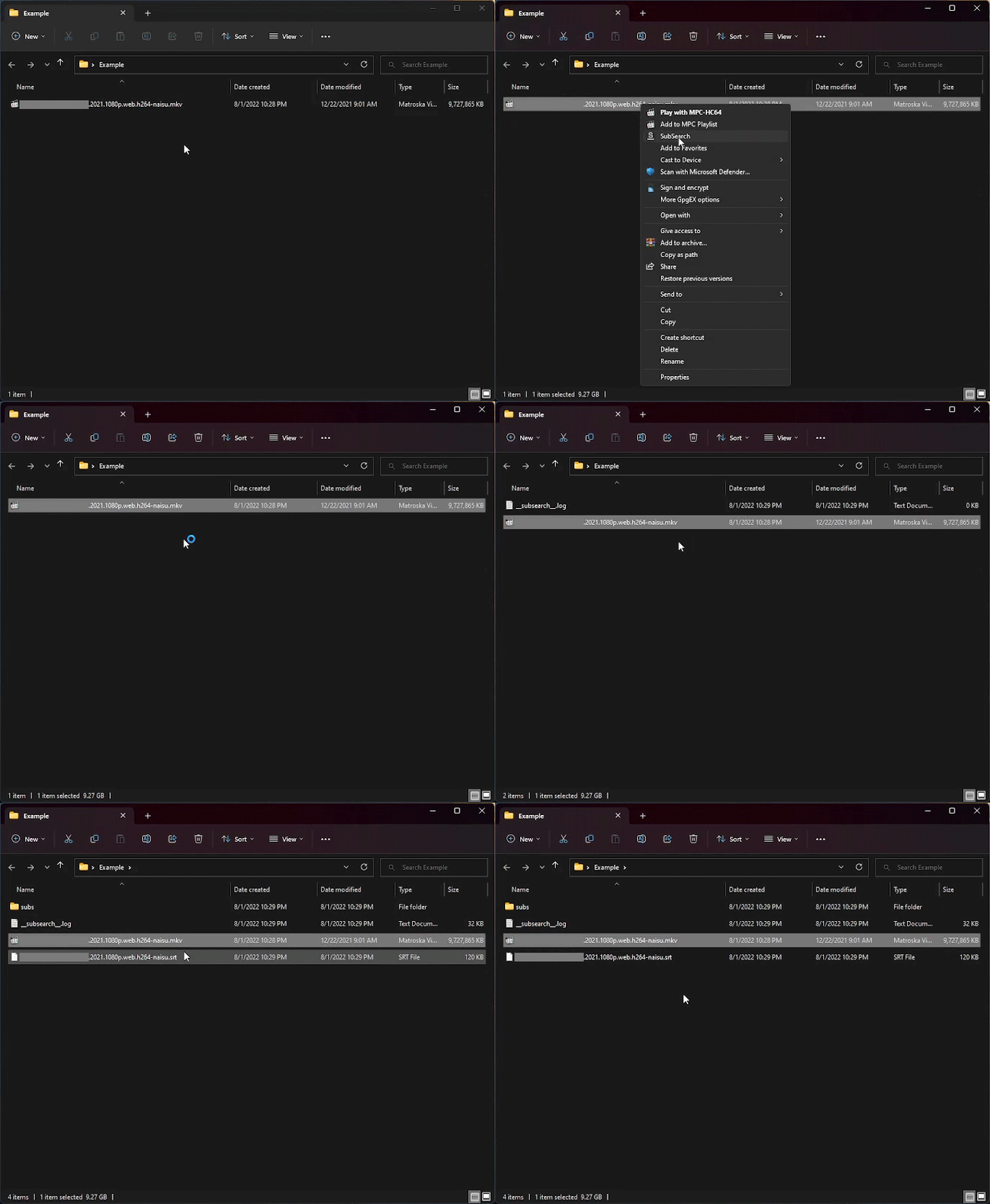
Screenshots of the interface


Getting Started
PyPi
- Download Python version 3.10 or later.
- Install Subsearch by running
pip install subsearchin the command prompt. - Add the context menu by running
subsearch --registry-key add. - For additional options, run
subsearch --helpin the command prompt.
Source code
- Download and install Python version 3.10 or later.
- Clone the Subsearch repository by running
git clone https://github.com/vagabondHustler/subsearch.git. - Install Subsearch by running
pip install -e <local project path>[package-index-options]. For example, runpip install -e .for only required dependencies orpip install -e .[dev, optional]for dev/optional dependencies. - Build the executable and MSI installer by running
python setup.py bdist_msi.
Subsearch .msi Installer
- Download
SubSearch-x.x.x-win64.msifrom the Subsearch releases page - Install the .msi file.
- Run Subsearch.exe at least once
- To update from a previous version, download and run the new installer in the same directory. If installed in a different directory, delete the old registry key (see Wiki for details).the same directory. Else you might have to delete the old registry key, (see Wiki for details).
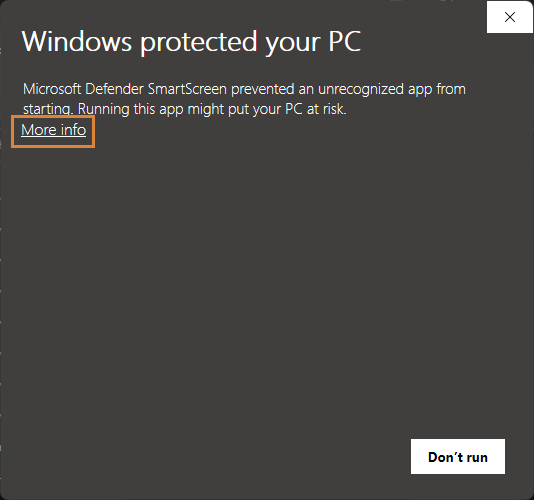
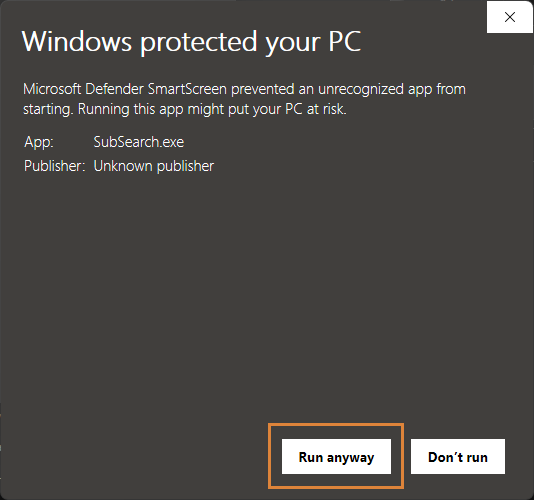
- If you receive a PUA message, click
More info.
Acknowledgements
I would like to express my gratitude to the following repositories for providing templates, inspiration, themes, and solutions to similar problems:
Release history Release notifications | RSS feed


Download files
Download the file for your platform. If you're not sure which to choose, learn more about installing packages.
Source Distribution
Built Distribution
Filter files by name, interpreter, ABI, and platform.
If you're not sure about the file name format, learn more about wheel file names.
Copy a direct link to the current filters
File details
Details for the file Subsearch-2.36.0rc3.tar.gz.
File metadata
- Download URL: Subsearch-2.36.0rc3.tar.gz
- Upload date:
- Size: 73.7 kB
- Tags: Source
- Uploaded using Trusted Publishing? No
- Uploaded via: twine/4.0.2 CPython/3.11.3
File hashes
| Algorithm | Hash digest | |
|---|---|---|
| SHA256 |
d33cb81b868159706cf6c035970204b6c2396c0dbc2ed8970abee30871fe6895
|
|
| MD5 |
6e6d169043ab15d71040148ab7be789c
|
|
| BLAKE2b-256 |
e1d0625f6e97b0c0c477d96f4d70eb2a2d196cfa448c7307dd9dbbbbc7db00d9
|
File details
Details for the file Subsearch-2.36.0rc3-py3-none-any.whl.
File metadata
- Download URL: Subsearch-2.36.0rc3-py3-none-any.whl
- Upload date:
- Size: 94.8 kB
- Tags: Python 3
- Uploaded using Trusted Publishing? No
- Uploaded via: twine/4.0.2 CPython/3.11.3
File hashes
| Algorithm | Hash digest | |
|---|---|---|
| SHA256 |
9df0c79326556f3b16e94fdd10490834bb47d0385f2db08077247f0b55a1b987
|
|
| MD5 |
d1209e330cc10f9f8790b784a206ab3d
|
|
| BLAKE2b-256 |
3c5f84420f0976374ebee1d20e167b6cfaa91f4dd0da275ac3a39592f4a2d4c4
|






