


TrackmaniaRL is a Python library for building and training reinforcement-learning agents in Trackmania 2020. Compose your own models, feature pipelines, replay samplers and learners, then use the same configuration from Python or the CLI.
- Composable models: encoders, temporal cores, value heads and actor-critic models.
- Training workflows: online RL, demonstrations, behavior cloning and checkpoint resume.
- Game integration: telemetry, camera observations, map geometry and control.
- Repeatable evaluation: complete trial records, finish rates and timing metrics.
The Python package and game integration support Windows and desktop Linux. On Linux, Trackmania runs through Proton and is not officially supported by Ubisoft Nadeo, so the game setup is experimental. WSL is not a supported game host. TrackmaniaRL 1.2.x requires Python 3.12 and uses RunSpec 2.0 and checkpoint schema 2.0.
Installation
Add the library to your Python 3.12 project:
pip install trackmaniarl
Optional integrations are available as extras, for example
pip install "trackmaniarl[vision,wandb,distributed]".
See platform and PyTorch setup
for CPU and GPU installation details.
Train across computers
For off-policy algorithms such as IQN and SAC, multiple Trackmania actors on separate computers can send rollouts asynchronously to one learner that trains the model and publishes policy updates. Follow the multi-computer setup guide for installation, matching assets, authentication, encrypted tunneling and commands; PPO training remains local.
Use from Python
Given a run.yaml with an environment and learner configured:
from pathlib import Path

from trackmaniarl import RunSpec, Trainer, resolve_run

config = Path("run.yaml").resolve()
run = resolve_run(RunSpec.from_yaml(config), base_dir=config.parent)
try:
    result = Trainer(run).train()
    print(f"Collected {result.transitions} transitions; ran {result.updates} updates")
finally:
    run.logger.close()
Trainer runs local training. The CLI also provides the distributed actor/learner
workflow. Start with the Python quickstart
for a complete example that needs no game, GPU, map assets or tracking account.
| Example | What it demonstrates |
|---|---|
| Game-free training | Custom environment and reward, replay, updates and checkpoints |
| Train a configuration | Python API, resource cleanup and checkpoint resume |
| Custom model | Your own encoder in a bundled value model |
| Own-map configuration | Connect the components to Trackmania |
Train in Trackmania
Create a separate project for your maps, models, configurations and training data:
trackmaniarl init my-agent --template trackmania
cd my-agent
uv sync
Follow the game quickstart to install Openplanet, connect the game, build map geometry and run training and evaluation. The generated project includes configurations for IQN, SAC, REDQ, TQC, discrete SAC, PPO and camera-based variants.
For the separately qualified Linux native backend, see the native headless environment and QR reference profile. It requires caller-supplied native assets and source references and runs without the Windows game client. See the guide for its strict clock and map limits.
Neural inference in motion
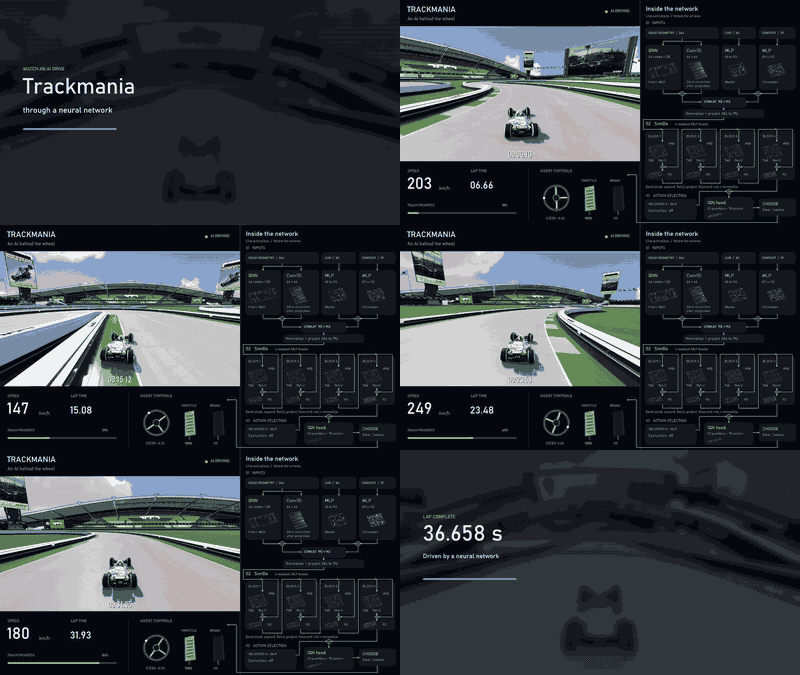
This full drive shows a selected evaluation lap from the contributor's strongest
checkpoint for this map. The contributor reports approximately 12 wall-clock hours
of training before the recording; capturing and rendering the film did not update
its weights. The panel is an architecture showcase: it follows map-relative road
geometry, a 60-value car/physics vector and 29 engineered driving-context values
through the model to action scores and selected controls. The changing activation
colours show real tensor values, but they are not feature attribution and individual
cells are not intended to explain a decision by themselves. This selected lap uses
the map-specific neighbors action filter. It is neither an unassisted-policy
benchmark nor evidence of generalization. See the model and recording explanation
for provenance, the five-attempt film series and GIF reproduction.
Documentation
Start at the documentation index.
| Task | Guide |
|---|---|
| Learn the Python API | Python quickstart · SDK reference |
| Extend the library | Public API · Examples |
| Configure training | Configuration · Algorithms |
| Use images or demonstrations | Vision and PPO · Imitation learning |
| Understand the runtime | Architecture · Distributed training |
| Diagnose a run | Observability · Troubleshooting |
Development and research
uv sync --group dev
uv run ruff format --check .
uv run ruff check .
uv run mypy --strict trackmaniarl
uv run pytest
uv build
uv run python scripts/check_distribution.py
See contributing and the development guide for the full checks. The repository layout separates the published package, examples, tests and local experiment data.
TrackmaniaRL is released under the MIT license. It originated from TMRL. Attribution is in NOTICE. It is not affiliated with Ubisoft or Nadeo.
1 maintainer

Metadata
1 maintainer
Release files for TrackmaniaRL 1.3.0
For a detailed explanation of source distributions (sdists) and built distributions (wheels), please see the package formats documentation.
Source distribution (sdist)
| File | Size | Uploaded | Provenance | Actions |
|---|---|---|---|---|
| trackmaniarl-1.3.0.tar.gz | 29.0 MB | With provenance | Details for trackmaniarl-1.3.0.tar.gz |
Built distribution (wheel)
| File | Interpreter | ABI | Platform | Actions Reset |
|---|---|---|---|---|
| trackmaniarl-1.3.0-py3-none-any.whl | Python 3 | none | any | Details for trackmaniarl-1.3.0-py3-none-any.whl |
Total release size: 29.9 MB
Release files / trackmaniarl-1.3.0.tar.gz
| Download URL | trackmaniarl-1.3.0.tar.gz |
|---|---|
| Size | 29.0 MB |
| Tags | Source |
|
SHA-256 checksum How to use checksums |
c855e13e525ca032747fc7357dbec8737ccbf860e5d9e34ca801bd521a1b82e3
|
|
BLAKE2b-256 checksum How to use checksums |
0f8e3196b50cbd0eef198050afaabefdda2dee018adaf02f9eff20464f4c0a52
|
| Upload date | |
|
Uploaded using Trusted Publishing? What is trusted publishing? |
Yes |
| Uploaded via |
uv/0.12.5 {"installer":{"name":"uv","version":"0.12.5","subcommand":["publish"]},"python":null,"implementation":{"name":null,"version":null},"distro":{"name":"Ubuntu","version":"26.04","id":"resolute","libc":null},"system":{"name":null,"release":null},"cpu":null,"openssl_version":null,"setuptools_version":null,"rustc_version":null,"ci":true}
|
Provenance
Provenance describes where a file came from. On PyPI, provenance is shared via attestations, which provide a verifiable record of the build or publishing details. View details, limitations and caveats.


PyPI Publish Attestation
PyPI verified that this artifact, at this checksum, originated from the publisher listed below.
Signed by GitHub Actions, verified by PyPI on Oct 30, 2026.
Transparency logRelease files / trackmaniarl-1.3.0-py3-none-any.whl
| Download URL | trackmaniarl-1.3.0-py3-none-any.whl |
|---|---|
| Size | 863.9 kB |
| Tags | Python 3 |
|
SHA-256 checksum How to use checksums |
88b10c9390df92b1e0ea6df3a0574fa059b9032ebe9049ff85dfdba1f92c47df
|
|
BLAKE2b-256 checksum How to use checksums |
a10c81a7e54795411d06081a8aec3326e5028a4561bb42b1e3b4b4e612fd7d3f
|
| Upload date | |
|
Uploaded using Trusted Publishing? What is trusted publishing? |
Yes |
| Uploaded via |
uv/0.12.5 {"installer":{"name":"uv","version":"0.12.5","subcommand":["publish"]},"python":null,"implementation":{"name":null,"version":null},"distro":{"name":"Ubuntu","version":"26.04","id":"resolute","libc":null},"system":{"name":null,"release":null},"cpu":null,"openssl_version":null,"setuptools_version":null,"rustc_version":null,"ci":true}
|
Provenance
Provenance describes where a file came from. On PyPI, provenance is shared via attestations, which provide a verifiable record of the build or publishing details. View details, limitations and caveats.
PyPI Publish Attestation
PyPI verified that this artifact, at this checksum, originated from the publisher listed below.
Signed by GitHub Actions, verified by PyPI on Oct 30, 2026.
Transparency logSecurity for TrackmaniaRL 1.3.0
Provenance
Provenance describes where a file came from. On PyPI, provenance is shared via attestations, which provide a verifiable record of the build or publishing details. View details, limitations and caveats.
Full provenance
All 2 files in this release have been uploaded with provenance metadata.
Attestation for trackmaniarl-1.3.0.tar.gz
PyPI Publish Attestation
PyPI verified that this artifact, at this checksum, originated from the publisher listed below.
Signed by GitHub Actions, verified by PyPI on Oct 30, 2026.
Transparency logA note on package security
PyPI is a repository for distributing packages, not a service for auditing them. While third-party security researchers and our staff do their best to detect and remove malicious packages, PyPI cannot guarantee the quality, security or suitability of any given package.
To learn more about protecting yourself from malicious actors, visit our package security documentation.














