
TrackmaniaRL


TrackmaniaRL is a reinforcement-learning library for training agents in Trackmania 2020. It combines ready-to-use algorithms, replay buffers, model families and Trackmania telemetry with explicit interfaces for replacing any component in an experiment.
This checkout is TrackmaniaRL 1.1.0 and supports Python 3.12. This package
release introduces the breaking RunSpec 2.0 runtime and checkpoint contract;
follow the migration guide
before reusing a 1.0 project or checkpoint. Pin trackmaniarl==1.1.0 exactly
during this transition; a compatible 1.x dependency range cannot express this
intentional breaking boundary.
What you get
- asynchronous local or distributed actor/learner training;
- Standard Q, QR-DQN, IQN and FQF through one distributional learner, plus SAC, REDQ-SAC, TQC, PPO, BC and stable discrete SAC;
- uniform, prioritized, sequence and demonstration-mixing replay;
- typed configuration, transitions and training batches;
- Trackmania telemetry, lidar and track-geometry feature pipelines;
- durable rollout journals, safe policy transfer and resumable checkpoints;
- local JSONL observability with optional W&B, Gemini and Optuna integrations;
- an installable extension project generated by
trackmaniarl init.
TrackmaniaRL has no global runtime configuration and no mandatory external
tracker. A run is described by run.yaml and explicit module:attribute
component paths.
Documentation
| If you want to... | Start here |
|---|---|
| install the released library and create an agent | Quick start |
| run this repository from source | Development setup |
| understand processes, data flow, security boundaries and package ownership | Architecture and editable diagrams |
| configure RunSpec, Trackmania, evaluation or distributed execution | Configuration reference |
| replace a learner, model, replay strategy or game adapter | SDK and extension guide |
| choose an algorithm and verify its support contract | Algorithm support matrix |
| configure PER, n-step returns or recurrent replay | Replay and sequence guide |
| understand and tune every Trackmania reward component | Reward reference |
| prepare Trackmania and OpenPlanet | Trackmania workflow |
| record demonstrations, train BC and hand off to RL | Imitation-learning workflow |
| migrate a 1.x run or checkpoint | 2.0 migration guide |
| design a useful W&B workspace or diagnose a run | Observability guide |
| diagnose low GPU utilization or compare throughput | Performance guide |
| report a security issue or review trust boundaries | Security policy |
Install and create an agent
Install the published CLI with uv:
uv tool install --index https://download.pytorch.org/whl/cpu --with "torch==2.11.0+cpu" "trackmaniarl==1.1.0"
trackmaniarl init my-trackmania-agent --template trackmania
cd my-trackmania-agent
uv sync
uv run trackmaniarl validate run.yaml
The trackmania template creates an installable agent project with a validated
reference RunSpec and the Trackmania, algorithm and distributed extras declared
for you. W&B remains
opt-in: add the wandb extra and an explicit WandbTracker component only when
you want remote logging. Omit --template trackmania to generate the smaller,
game-free starter project.
trackmaniarl validate checks imports, contracts and a synthetic learner update
without starting the game or contacting an external tracker.
The generated directory is the application layer of your project. Keep custom
models, rewards and adapters there and treat the installed trackmaniarl
package as the reusable library. run.yaml is executable configuration because
its class_path entries import Python objects; only run configurations and
extension packages you trust.
To add the SDK to an existing Python project instead, choose only the extras you need:
uv add "trackmaniarl==1.1.0"
uv add "trackmaniarl[distributed]==1.1.0"
uv add "trackmaniarl[trackmania,distributed]==1.1.0" "vgamepad @ git+https://github.com/Palamabron/vgamepad@5f3435df3f8a0e658feb58b207d9137cdb5183cd"
The CPU Torch override keeps the short-lived scaffolding tool lightweight; the
generated Trackmania project selects the tested CUDA index independently. For
an existing Trackmania project, add the Trackmania extra and vetted vgamepad
source in the same resolver transaction shown above, then retain that direct
source until its required installation fix is released upstream. The all
extra cannot carry repository-local uv source pins into another project.
| Extra | Adds |
|---|---|
all |
every optional integration and model dependency |
trackmania |
Trackmania environment and Windows/Linux virtual-gamepad support |
distributed |
authenticated gRPC rollouts and safetensors policy transfer |
wandb |
Weights & Biases logging |
orchestrator |
Gemini and Optuna experiment strategies |
mamba |
optional native Mamba kernel; the Pure PyTorch backend needs no extension |
Run Trackmania
Live collection requires Trackmania 2020 on Windows, Openplanet School Mode,
the signed TrackmaniaRL Connect (SAC_GetData)
plugin installed through Plugin Manager, and a prepared map/geometry asset. The bundled source is a
developer-reference snapshot, not the normal installation path. Follow the
Trackmania workflow
or the concrete
OpenPlanet guide
before starting the game integration.
The generated Trackmania project pins the patched Palamabron/vgamepad revision containing the unreleased Windows installation fix from vgamepad PR #47. Keep that source pin until the fix is included in an upstream vgamepad release.
With Trackmania and the OpenPlanet plugin running:
uv run trackmaniarl track check --config run.yaml
uv run trackmaniarl smoke run.yaml --transitions 100
uv run trackmaniarl train run.yaml
The connection check validates three exact 33-field frames, session protocol 2,
the active map UID and player readiness. The bounded smoke test uses the same
asynchronous learner/actor path as training, verifies a live policy refresh and
writes a checkpoint. Start a fresh
run directory when the run API or immutable configuration changes; the current
schema is RunSpec 2.0.
Generated Trackmania projects select the tested CUDA PyTorch wheels on Windows
and Linux. CPU-only Linux and ROCm users must replace that generated Torch
source with the index matching their host; macOS uses the normal PyPI wheel and
can use MPS. device: auto resolves CUDA, ROCm, MPS or CPU from the installed
Torch build.
Off-policy runtime model
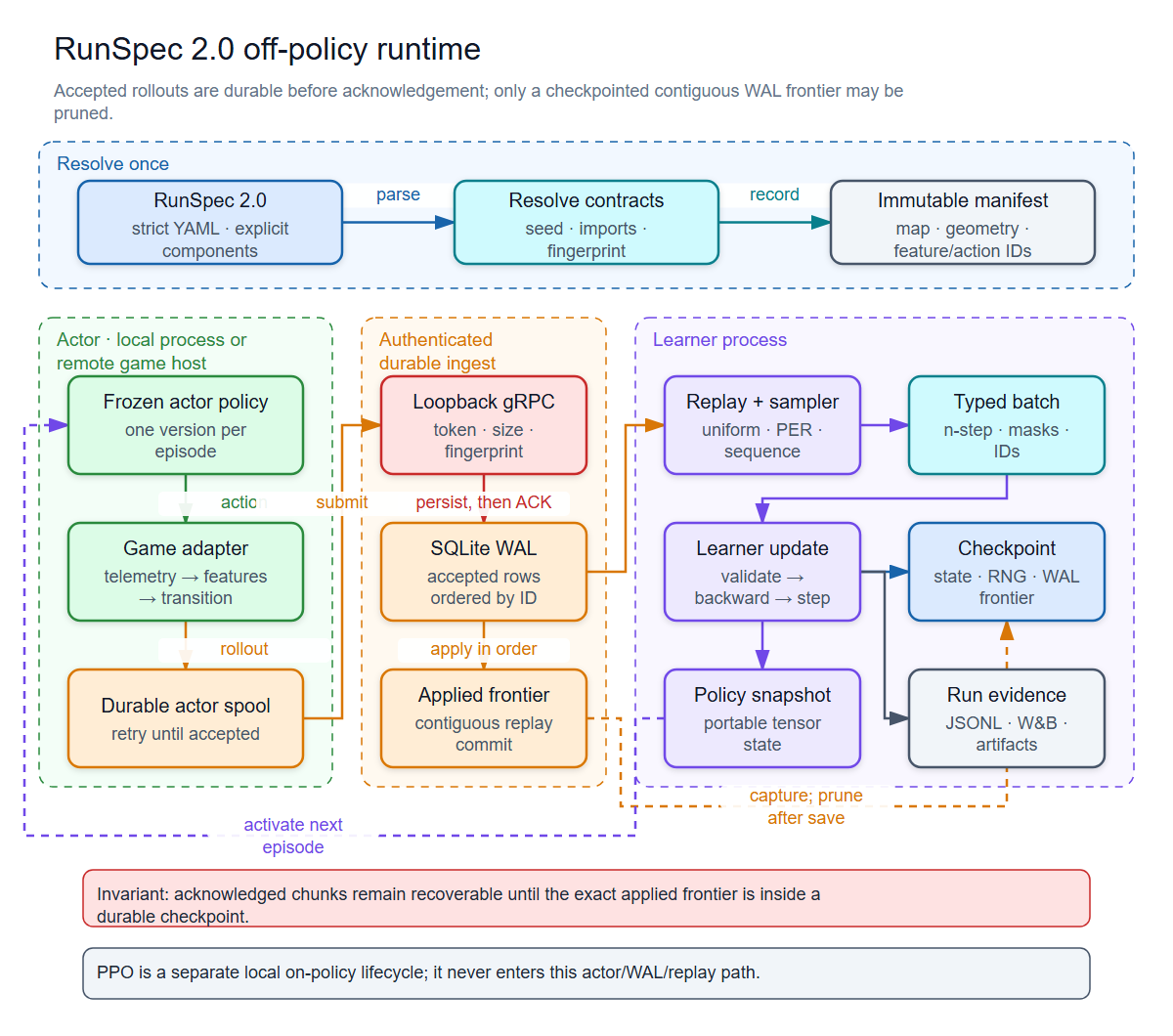
The architecture guide contains the full explanation and editable Excalidraw sources for the runtime, local/remote deployment, checkpoint recovery and Trackmania integration.
trackmaniarl train starts a coordinator/learner and one local actor as
independent, Windows-safe spawn processes. This is the off-policy runtime used
by the value-based and actor-critic learners: collection continues while the
learner updates replay and periodically publishes policy snapshots. PPO is an
on-policy exception and uses the local trackmaniarl.Trainer API with
OnPolicySequenceSampler; it is not supported by the distributed
learner/actor commands.
Read the diagram from top to bottom: run.yaml selects and validates
components, the actor collects game transitions and spools them durably, and
the learner ingests, samples, updates and checkpoints. The feedback arrow is
an immutable policy snapshot, so an actor never receives a pickled learner
object. Mamba belongs inside the selected model as an opt-in temporal encoder;
it does not change the actor/learner boundary or the rollout protocol.
Distributed security and durability
For multiple machines, set the same TRACKMANIARL_DISTRIBUTED_TOKEN on every
participant and expose the learner through an encrypted tunnel. The learner
binds to loopback so its bearer token and rollout data are not sent over the
network in clear text:
# Generate once, then put the value in an ignored .env on both machines.
uv run python -c "import secrets; print(secrets.token_urlsafe(32))"

# training machine
uv run trackmaniarl learner run.yaml --bind 127.0.0.1:8787

# Trackmania machine: create the tunnel first
ssh -N -L 8787:127.0.0.1:8787 TRAINING_MACHINE
uv run trackmaniarl actor run.yaml --connect 127.0.0.1:8787 --actor-id PC-1
The handshake rejects mismatched run fingerprints, map UIDs, geometry and pace reference contents, custom component package source, and feature/action contracts. Rollouts use Protobuf/gRPC with Zstandard compression, and policy state is transferred with safetensors rather than pickle.
The token authenticates participants but does not encrypt traffic. Never expose the gRPC port directly; keep the listener on loopback and use SSH, WireGuard or another authenticated encrypted tunnel.
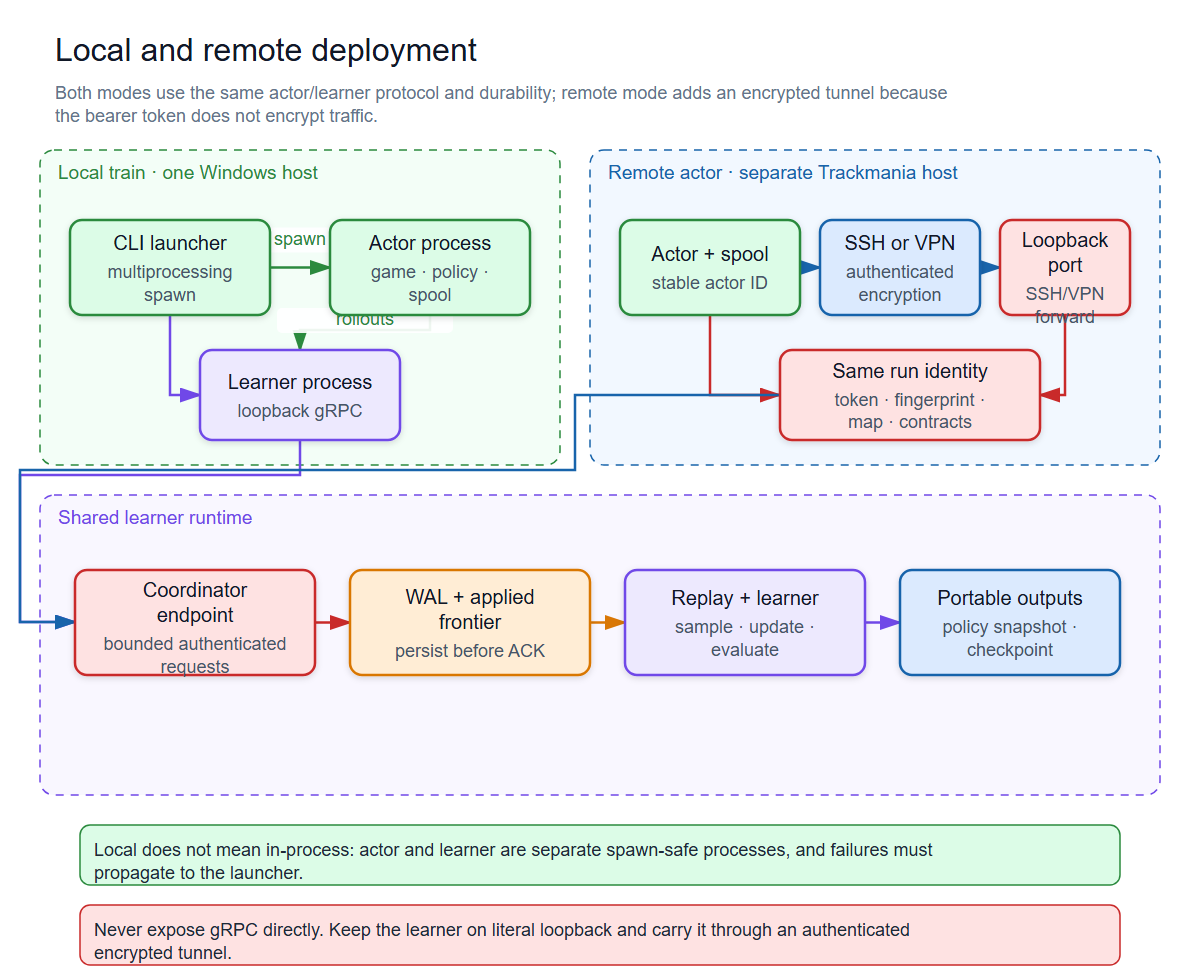
Read this diagram from left to right. An actor persists a rollout before it is sent, the encrypted tunnel terminates at the learner's loopback listener, and the learner checks identity, run compatibility and payload limits before the contiguous WAL/replay commit. Portable policy snapshots and checkpoints leave the shared learner runtime. The editable source is available for architecture reviews.
Components and extension API
Components are selected through stable descriptive module paths. The unified value learner and composite model factory are configured directly, for example:
components:
  learner:
    class_path: trackmaniarl.algorithms.value_based:DiscreteValueLearner
  model_factory:
    class_path: trackmaniarl.models.factory:CompositeValueModelFactory
Start a new component in the generated extension project. Keep it there when it is project-specific; move it to the owning library package only when it is reusable and has passed deterministic contract, configuration and, where applicable, live Trackmania checks. The SDK guide lists the contract and release gates; the Trackmania connection check and bounded smoke test apply only to game-facing components.
The stable contracts in trackmaniarl.core include Learner,
OfflineSupervisedLearner, Policy, ModelFactory, ReplayStore, Sampler,
FeaturePipeline, Evaluator, RunLogger and CheckpointCodec. Game-specific implementations belong in the
generated extension project, so offline validation does not require Trackmania
or optional game dependencies.
Every run writes a redacted immutable config manifest, per-attempt environment
and execution provenance, local JSONL events, checkpoints and bounded compressed
episode artifacts. Only the learner needs W&B
credentials; WANDB_API_KEY can be supplied through the environment or project
.env.
See the SDK guide for the full component schema and a built-in run example. Release history is in the changelog.
Development
Clone the repository and install the development group:
git clone https://github.com/Palamabron/TrackmaniaRL.git
cd TrackmaniaRL
uv sync --group dev
uv run poe fmt
uv run poe types
uv run poe test
The commands are intentionally identical on Windows, Linux, WSL and CI. See CONTRIBUTING.md and SECURITY.md before opening a contribution or reporting a vulnerability.
For the repository layout, change workflow, test levels and rules for adding a public component, read the development guide.
Project status and attribution
TrackmaniaRL is beta software. The project originated from TMRL and has since been substantially redesigned. It is not affiliated with or endorsed by Ubisoft, Nadeo or the TMRL maintainers. Trackmania is a trademark of Nadeo/Ubisoft. See NOTICE for attribution.
1 maintainer

Download files
Download the file for your platform. If you're not sure which to choose, learn more about installing packages.
Source Distribution
Built Distribution
Filter files by name, interpreter, ABI, and platform.
If you're not sure about the file name format, learn more about wheel file names.
Copy a direct link to the current filters
File details
Details for the file trackmaniarl-1.1.0.tar.gz.
File metadata
- Download URL: trackmaniarl-1.1.0.tar.gz
- Upload date:
- Size: 3.2 MB
- Tags: Source
- Uploaded using Trusted Publishing? Yes
- Uploaded via:
uv/0.12.5 {"installer":{"name":"uv","version":"0.12.5","subcommand":["publish"]},"python":null,"implementation":{"name":null,"version":null},"distro":{"name":"Ubuntu","version":"24.04","id":"noble","libc":null},"system":{"name":null,"release":null},"cpu":null,"openssl_version":null,"setuptools_version":null,"rustc_version":null,"ci":true}
File hashes
| Algorithm | Hash digest | |
|---|---|---|
| SHA256 |
628621494565523ce218154d275099cbd85aa63e6564022769d2cd8a7db840b4
|
|
| MD5 |
d4376ff0b131777a16fcb394ad14ff90
|
|
| BLAKE2b-256 |
8361724506db9f486da0fc71293328fdd810c3a06e0ffa04fe1a2363e89fe1e8
|
File details
Details for the file trackmaniarl-1.1.0-py3-none-any.whl.
File metadata
- Download URL: trackmaniarl-1.1.0-py3-none-any.whl
- Upload date:
- Size: 448.6 kB
- Tags: Python 3
- Uploaded using Trusted Publishing? Yes
- Uploaded via:
uv/0.12.5 {"installer":{"name":"uv","version":"0.12.5","subcommand":["publish"]},"python":null,"implementation":{"name":null,"version":null},"distro":{"name":"Ubuntu","version":"24.04","id":"noble","libc":null},"system":{"name":null,"release":null},"cpu":null,"openssl_version":null,"setuptools_version":null,"rustc_version":null,"ci":true}
File hashes
| Algorithm | Hash digest | |
|---|---|---|
| SHA256 |
8b26ee2e802d6238423ee061a5ede3750605ba8ba8cc4d35c6d11357b884cecb
|
|
| MD5 |
ce0cb66921b1f179a95f2868820dd52a
|
|
| BLAKE2b-256 |
1f6e064d065484ffac3349a86df5719a89b34dca781225537d6a5cceebce6862
|














