
AllianceAuth CharLink


A simple app for AllianceAuth that allows users to link each character to all the AllianceAuth apps with only 1 login action.
Overview
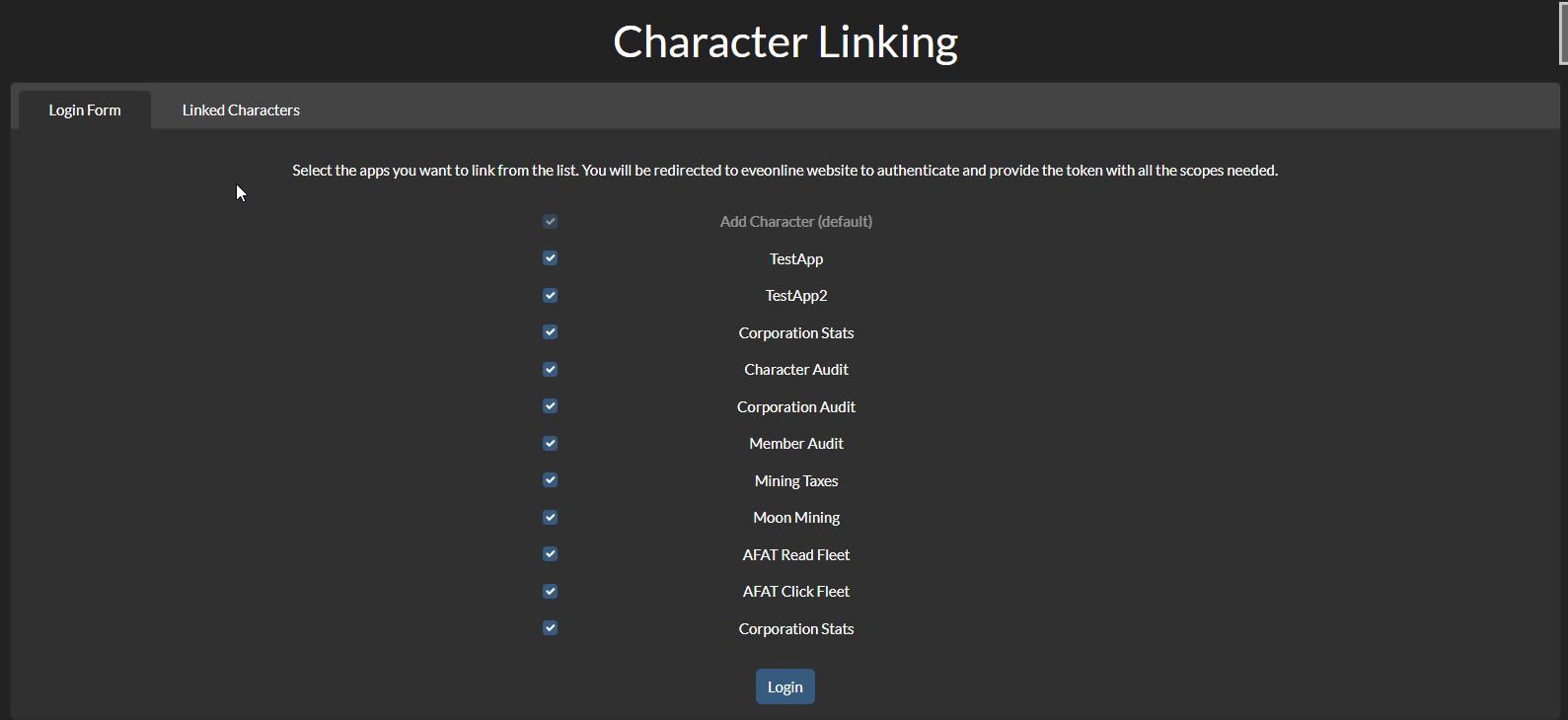
Basic usage
- Select which app you want to link your character to
- Login on CPP site
- Character linked to the selected apps

Auditing
Users with the appropriate permission (see permissions) can audit the linked characters of the users of their corporation, alliance or auth state. A link will appear on top of the main page of the app and will redirect to a page with a table of all the linked characters of the users of the selected corporation.
A user can be audited by clicking on the link on the Main Character column.
App Audit: Users can now audit character based on the apps they have access to. Select the app you want to audit from the dropdown menu in the audit page.
Admin App status: users with is_superuser can now see the list of imported apps and the ones with issues with the import.
Installation
-
Install the app with
pip install aa-charlink
if you have a baremetal installation, or add the following line to your
requirements.txtif you are using Docker:aa-charlink==x.y.z
where
x.y.zis the version you want to install. It is important to pin the version in order to avoid unexpected upgrades and potential breaking changes. -
Add
'charlink',to yourINSTALLED_APPSinlocal.py -
Run migrations and collectstatic
If you are using Docker, run:
auth migrate
auth collectstatic
otherwise
python manage.py migrate
python manage.py collectstatic
-
Check in CharLink Admin page that the apps you want to use are shown correctly and their default selection and visibility are what you want. Some apps have their default selection turned off for a good reason, go to default selection for more information.
Current apps
I've opened an issue to track the apps that have a default integration in CharLink and the WIPs. If you want another app to be supported, please comment on the issue, reach me on the AllianceAuth discord server or ask the developer of the app to implement an integration via hook.
Hook integration
From version 1.1.0, CharLink supports hook integration. If you want to integrate your app with CharLink, you need to register a hook in the auth_hooks.py file:
@hooks.register('charlink')
def register_charlink_hook():
   return 'testauth.testapp.charlink_hook'
The hook has to return a string with the import path of the module containing the app integration. The module must contain a variable called app_import which is an instance of charlink.app_imports.utils.AppImport. You can find the documentation of the class in the utils.py and some examples in the imports folder.
Ignoring apps
Ignoring apps has been moved from settings to the CharLink Admin page. In order to ignore an app, or one of its login options, click on the related eye button in this page.
Default selection
From version 1.10.0, login options can have their default selection changed by the admin. This can be done in the CharLink Admin page using the "Default selection" button.
WARNING: Some apps, like Structures, have reportedly causing issues and get the AA instance banned due to the high number of ESI calls they make after linking many chars. In order to avoid this, the default selection of these apps is set to off and a warning is shown in the CharLink Admin page when trying to enable it.
If you want to reset all the default selections to their original value, you can use the management command:
python manage.py charlink_reset_selections
or, if you are using Docker:
auth charlink_reset_selections
Smartfilters
If Securegroups is installed, CharLink exports the following smartfilters:
- Compliance filter: checks if the user has added all his characters to the selected apps.
Permissions
| Name | Description |
|---|---|
charlink.view_corp |
Can view linked character of members of their corporation. |
charlink.view_alliance |
Can view linked character of members of their alliance. |
charlink.view_state |
Can view linked character of members of their auth state. |
charlink.view_admin |
Can view CharLink Admin page. |
Login page url
If you want to setup a template override to link the "Add character" button to the login page of this package, set the a element to:
<a href="{% url 'charlink:index' %}" class="btn btn-primary flex-fill m-1" title="{% translate 'Add Character' %}">
      <span class="d-md-inline m-2">{% translate 'Add Character' %}</span>
</a>
Known issues
- For AFAT is not possible to check the validity of the added character's token.
1 maintainer

Metadata
1 maintainer
Release files for aa-charlink 1.14.0
For a detailed explanation of source distributions (sdists) and built distributions (wheels), please see the package formats documentation.
Source distribution (sdist)
| File | Size | Uploaded | Provenance | |
|---|---|---|---|---|
| aa_charlink-1.14.0.tar.gz | 54.1 kB | With provenance | Details |
Built distribution (wheel)
| File | Interpreter | ABI | Platform | Reset |
|---|---|---|---|---|
| aa_charlink-1.14.0-py3-none-any.whl | Python 3 | none | any | Details |
Total release size: 138.2 kB
Release files / aa_charlink-1.14.0.tar.gz
| Download URL | aa_charlink-1.14.0.tar.gz |
|---|---|
| Size | 54.1 kB |
| Tags | Source |
|
SHA-256 checksum How to use checksums |
9fa3b29f8774122751511e5302b49c30b6b94b816a706968b1d972e0c8dc7e86
|
|
BLAKE2b-256 checksum How to use checksums |
26711cfbc31396f12dfdcebd8607e72af0e8813a89d7b441961f5abb93ddce97
|
| Upload date | |
|
Uploaded using Trusted Publishing? What is trusted publishing? |
Yes |
| Uploaded via |
twine/6.1.0 CPython/3.13.12
|
Provenance
Provenance describes where a file came from. On PyPI, provenance is shared via attestations, which provide a verifiable record of the build or publishing details. View details, limitations and caveats.


PyPI Publish Attestation
PyPI verified that this artifact, at this checksum, originated from the publisher listed below.
Signed by GitHub Actions, verified by PyPI on May 22, 2026.
Transparency logRelease files / aa_charlink-1.14.0-py3-none-any.whl
| Download URL | aa_charlink-1.14.0-py3-none-any.whl |
|---|---|
| Size | 84.1 kB |
| Tags | Python 3 |
|
SHA-256 checksum How to use checksums |
a392aa2e9792c72781770447e2e5042f11c1ff1de990738d6c41936d75b6d282
|
|
BLAKE2b-256 checksum How to use checksums |
a804c79b45785c204e65dbb2f448a08b7dc97a7360a5ab61147a1f027cc70b44
|
| Upload date | |
|
Uploaded using Trusted Publishing? What is trusted publishing? |
Yes |
| Uploaded via |
twine/6.1.0 CPython/3.13.12
|
Provenance
Provenance describes where a file came from. On PyPI, provenance is shared via attestations, which provide a verifiable record of the build or publishing details. View details, limitations and caveats.
PyPI Publish Attestation
PyPI verified that this artifact, at this checksum, originated from the publisher listed below.
Signed by GitHub Actions, verified by PyPI on May 22, 2026.
Transparency logSecurity for aa-charlink 1.14.0
Provenance
Provenance describes where a file came from. On PyPI, provenance is shared via attestations, which provide a verifiable record of the build or publishing details. View details, limitations and caveats.
Full provenance
All 2 files in this release have been uploaded with provenance metadata.
Attestation for aa_charlink-1.14.0.tar.gz
PyPI Publish Attestation
PyPI verified that this artifact, at this checksum, originated from the publisher listed below.
Signed by GitHub Actions, verified by PyPI on May 22, 2026.
Transparency logA note on package security
PyPI is a repository for distributing packages, not a service for auditing them. While third-party security researchers and our staff do their best to detect and remove malicious packages, PyPI cannot guarantee the quality, security or suitability of any given package.














