
Character Linker for Alliance Auth
Verified details
These details have been verified by PyPIProject links
GitHub Statistics
Maintainers

Project description
AllianceAuth CharLink


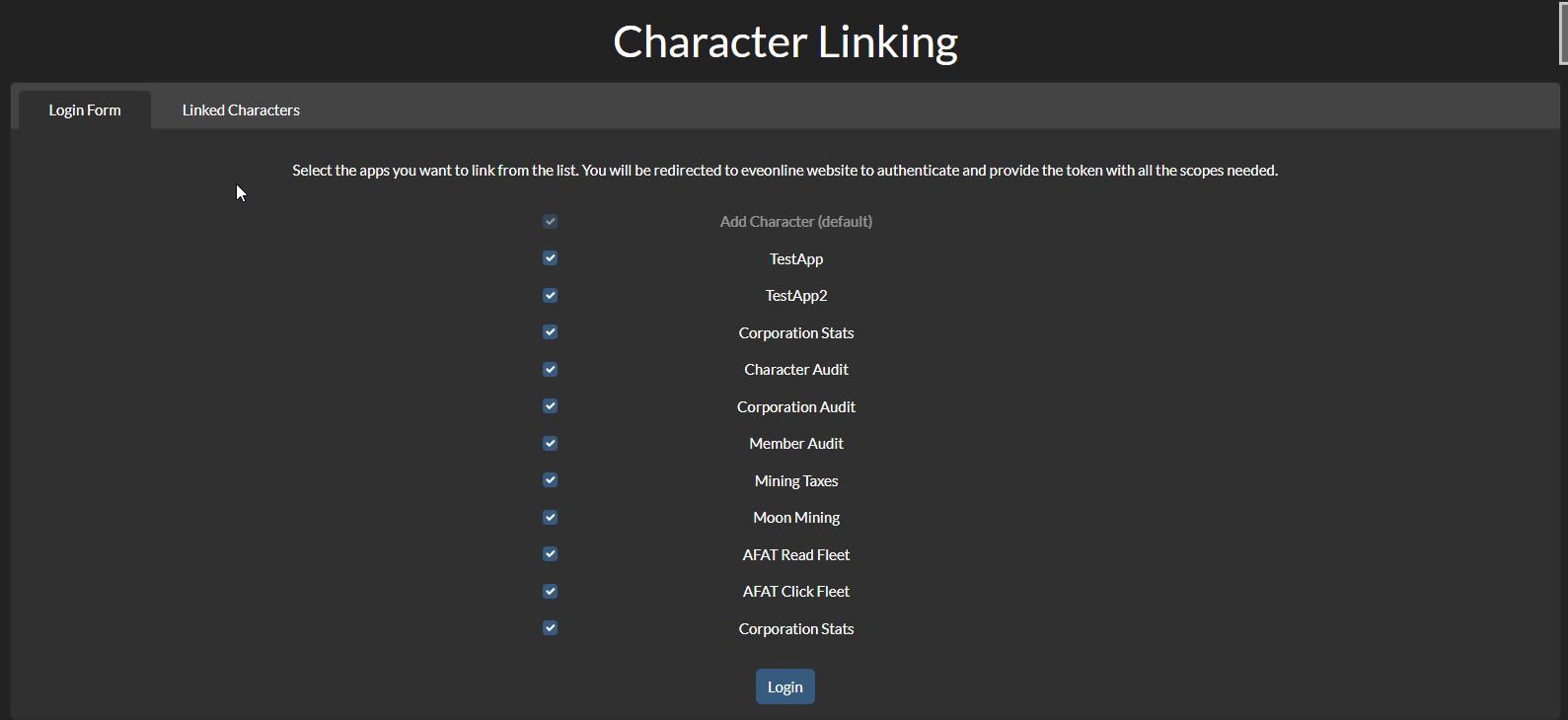
A simple app for AllianceAuth that allows users to link each character to all the AllianceAuth apps with only 1 login action.
Overview
Basic usage
- Select which app you want to link your character to
- Login on CPP site
- Character linked to the selected apps

Auditing
Users with the appropriate permission (see permissions) can audit the linked characters of the users of their corporation, alliance or auth state. A link will appear on top of the main page of the app and will redirect to a page with a table of all the linked characters of the users of the selected corporation.
A user can be audited by clicking on the link on the Main Character column.
App Audit: Users can now audit character based on the apps they have access to. Select the app you want to audit from the dropdown menu in the audit page.
Admin App status: users with is_superuser can now see the list of imported apps and the ones with issues with the import.
Installation
-
Install the app with
pip install aa-charlink
if you have a baremetal installation, or add the following line to your
requirements.txtif you are using Docker:aa-charlink==x.y.z
where
x.y.zis the version you want to install. It is important to pin the version in order to avoid unexpected upgrades and potential breaking changes. -
Add
'charlink',to yourINSTALLED_APPSinlocal.py -
Run migrations and collectstatic
If you are using Docker, run:
auth migrate
auth collectstatic
otherwise
python manage.py migrate
python manage.py collectstatic
-
Check in CharLink Admin page that the apps you want to use are shown correctly and their default selection and visibility are what you want. Some apps have their default selection turned off for a good reason, go to default selection for more information.
Current apps
I've opened an issue to track the apps that have a default integration in CharLink and the WIPs. If you want another app to be supported, please comment on the issue, reach me on the AllianceAuth discord server or ask the developer of the app to implement an integration via hook.
Hook integration
From version 1.1.0, CharLink supports hook integration. If you want to integrate your app with CharLink, you need to register a hook in the auth_hooks.py file:
@hooks.register('charlink')
def register_charlink_hook():
   return 'testauth.testapp.charlink_hook'
The hook has to return a string with the import path of the module containing the app integration. The module must contain a variable called app_import which is an instance of charlink.app_imports.utils.AppImport. You can find the documentation of the class in the utils.py and some examples in the imports folder.
Ignoring apps
Ignoring apps has been moved from settings to the CharLink Admin page. In order to ignore an app, or one of its login options, click on the related eye button in this page.
Default selection
From version 1.10.0, login options can have their default selection changed by the admin. This can be done in the CharLink Admin page using the "Default selection" button.
WARNING: Some apps, like Structures, have reportedly causing issues and get the AA instance banned due to the high number of ESI calls they make after linking many chars. In order to avoid this, the default selection of these apps is set to off and a warning is shown in the CharLink Admin page when trying to enable it.
If you want to reset all the default selections to their original value, you can use the management command:
python manage.py charlink_reset_selections
or, if you are using Docker:
auth charlink_reset_selections
Smartfilters
If Securegroups is installed, CharLink exports the following smartfilters:
- Compliance filter: checks if the user has added all his characters to the selected apps.
Permissions
| Name | Description |
|---|---|
charlink.view_corp |
Can view linked character of members of their corporation. |
charlink.view_alliance |
Can view linked character of members of their alliance. |
charlink.view_state |
Can view linked character of members of their auth state. |
charlink.view_admin |
Can view CharLink Admin page. |
Login page url
If you want to setup a template override to link the "Add character" button to the login page of this package, set the a element to:
<a href="{% url 'charlink:index' %}" class="btn btn-primary flex-fill m-1" title="{% translate 'Add Character' %}">
      <span class="d-md-inline m-2">{% translate 'Add Character' %}</span>
</a>
Known issues
- For AFAT is not possible to check the validity of the added character's token.
Project details
Verified details
These details have been verified by PyPIProject links
GitHub Statistics
Maintainers
Release history Release notifications | RSS feed


Download files
Download the file for your platform. If you're not sure which to choose, learn more about installing packages.
Source Distribution
Built Distribution
Filter files by name, interpreter, ABI, and platform.
If you're not sure about the file name format, learn more about wheel file names.
Copy a direct link to the current filters
File details
Details for the file aa_charlink-1.12.0.tar.gz.
File metadata
- Download URL: aa_charlink-1.12.0.tar.gz
- Upload date:
- Size: 54.1 kB
- Tags: Source
- Uploaded using Trusted Publishing? Yes
- Uploaded via: twine/6.1.0 CPython/3.13.7
File hashes
| Algorithm | Hash digest | |
|---|---|---|
| SHA256 |
cb81f584924a7aaf8bd0c074640e3312f4d1bd4388959eb5b8efe814e3c0dc7f
|
|
| MD5 |
555d2e37c1301ee34a1410c6b09ad350
|
|
| BLAKE2b-256 |
9ee607879e1dad62bd4841089cc45c151454df8bfc08cd5a2ec1279f63780039
|
Provenance
The following attestation bundles were made for aa_charlink-1.12.0.tar.gz:
Publisher:
python-publish.yml on Maestro-Zacht/aa-charlink
-
Statement:
-
Statement type:
https://in-toto.io/Statement/v1 -
Predicate type:
https://docs.pypi.org/attestations/publish/v1 -
Subject name:
aa_charlink-1.12.0.tar.gz -
Subject digest:
cb81f584924a7aaf8bd0c074640e3312f4d1bd4388959eb5b8efe814e3c0dc7f - Sigstore transparency entry: 854044577
- Sigstore integration time:
-
Permalink:
Maestro-Zacht/aa-charlink@5dc38b9dd9634d3d744e32be03690f902aad42eb -
Branch / Tag:
refs/tags/v1.12.0 - Owner: https://github.com/Maestro-Zacht
-
Access:
public
-
Token Issuer:
https://token.actions.githubusercontent.com -
Runner Environment:
github-hosted -
Publication workflow:
python-publish.yml@5dc38b9dd9634d3d744e32be03690f902aad42eb -
Trigger Event:
release
-
Statement type:
File details
Details for the file aa_charlink-1.12.0-py3-none-any.whl.
File metadata
- Download URL: aa_charlink-1.12.0-py3-none-any.whl
- Upload date:
- Size: 86.4 kB
- Tags: Python 3
- Uploaded using Trusted Publishing? Yes
- Uploaded via: twine/6.1.0 CPython/3.13.7
File hashes
| Algorithm | Hash digest | |
|---|---|---|
| SHA256 |
667f5d192e6a377649d3ce02a8b48d1237022b11a4cb8ed484d98748f95ad8d7
|
|
| MD5 |
ce9c45e007d9e11fec8fd483b209ffd7
|
|
| BLAKE2b-256 |
dd7ee29dca4868177c1c7c84bd1d49b314ba498ca3f042ae13beb42f2ecba7a7
|
Provenance
The following attestation bundles were made for aa_charlink-1.12.0-py3-none-any.whl:
Publisher:
python-publish.yml on Maestro-Zacht/aa-charlink
-
Statement:
-
Statement type:
https://in-toto.io/Statement/v1 -
Predicate type:
https://docs.pypi.org/attestations/publish/v1 -
Subject name:
aa_charlink-1.12.0-py3-none-any.whl -
Subject digest:
667f5d192e6a377649d3ce02a8b48d1237022b11a4cb8ed484d98748f95ad8d7 - Sigstore transparency entry: 854044579
- Sigstore integration time:
-
Permalink:
Maestro-Zacht/aa-charlink@5dc38b9dd9634d3d744e32be03690f902aad42eb -
Branch / Tag:
refs/tags/v1.12.0 - Owner: https://github.com/Maestro-Zacht
-
Access:
public
-
Token Issuer:
https://token.actions.githubusercontent.com -
Runner Environment:
github-hosted -
Publication workflow:
python-publish.yml@5dc38b9dd9634d3d744e32be03690f902aad42eb -
Trigger Event:
release
-
Statement type:






