
Azure Container Instance Distributed Operations

Project description
acido (0.16)
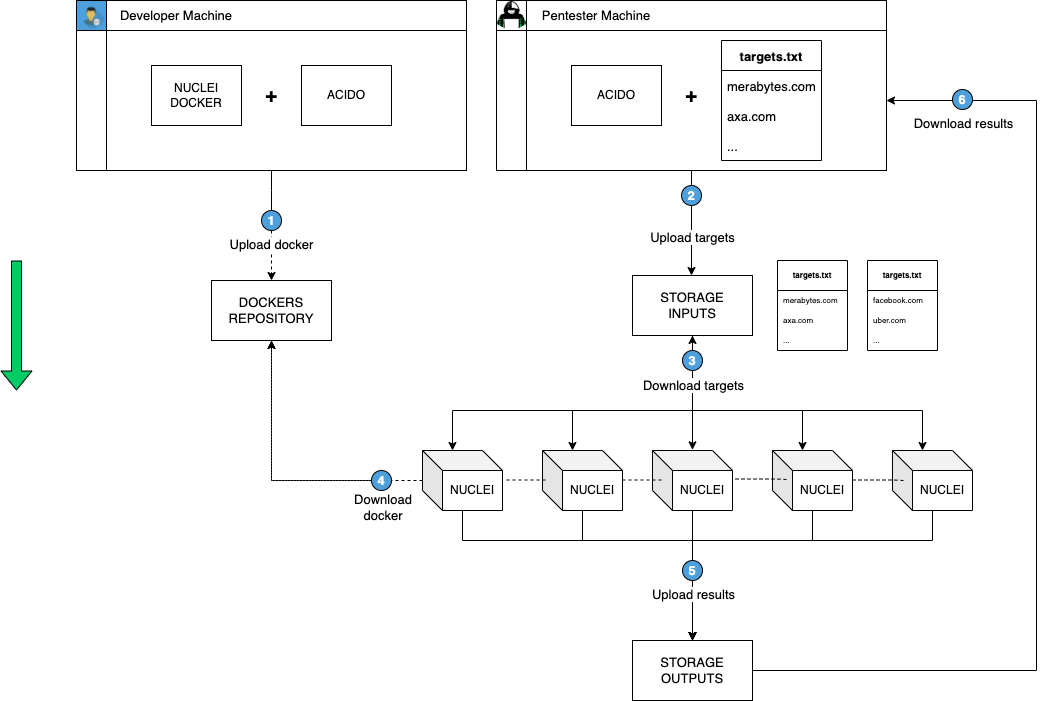
Acido stands for Azure Container Instance Distributed Operations, with acido you can easily deploy container instances in Azure and distribute the workload of a particular task, for example, a port scanning task which has an input file with x hosts is splitted and distributed between y instances.
This tool is inspired by axiom where you can just spin up hundreds of instances to perform a distributed nmap/ffuf/screenshotting scan, and then delete them after they have finished.
Depending on your quota limit you may need to open a ticket to Azure to request container group limits increase.
A little diagram on how the acido CLI works, for example with Nuclei:
Add an alias in .bashrc / .zshrc:
alias acido='python3 -m acido.cli'
Usage:
usage: acido [-h] [-c] [-f FLEET] [-im IMAGE_NAME] [-n NUM_INSTANCES] [-t TASK] [-e EXEC_CMD] [-i INPUT_FILE] [-w WAIT] [-s SELECT] [-l] [-r REMOVE] [-in]
          [-sh SHELL] [-d DOWNLOAD_INPUT] [-o WRITE_TO_FILE] [-rwd]

optional arguments:
-h, --help            show this help message and exit
-c, --config          Start configuration of acido.
-f FLEET, --fleet FLEET
                        Create new fleet.
-im IMAGE_NAME, --image IMAGE_NAME
                        Deploy an specific image.
-n NUM_INSTANCES, --num-instances NUM_INSTANCES
                        Instances that the operation affect
-t TASK, --task TASK  Execute command as an entrypoint in the fleet.
-e EXEC_CMD, --exec EXEC_CMD
                    Execute command on a running instance.
-i INPUT_FILE, --input-file INPUT_FILE
                        The name of the file to use on the task.
-w WAIT, --wait WAIT  Set max timeout for the instance to finish.
-s SELECT, --select SELECT
                        Select instances matching name/regex.
-l, --list              List all instances.
-r REMOVE, --rm REMOVE
                        Remove instances matching name/regex.
-in, --interactive    Start interactive acido session.
-sh SHELL, --shell SHELL
                        Execute command and upload to blob.
-d DOWNLOAD_INPUT, --download DOWNLOAD_INPUT
                        Download file contents remotely from the acido blob.
-o WRITE_TO_FILE, --output WRITE_TO_FILE
                    Save the output of the machines in JSON format.
-rwd, --rm-when-done  Remove the container groups after finish.
Example usage with nmap
In this example we are going to:
- Create our base container image with acido (required) and nmap.
- Create 20 containers.
- Run a nmap scan using the 20 containers.
Step 1: Create the base image
Dockerfile (merabytes.azurecr.io/ubuntu:latest):
FROM ubuntu:20.04

RUN apt-get update && apt-get install python3 python3-pip python3-dev -y
RUN python3 -m pip install acido
RUN apt-get install nmap -y

CMD ["sleep", "infinity"]
This will install acido & nmap on our base docker image (merabytes.azurecr.io/ubuntu:latest).
To upload the image to the registry, as always go to the folder of your Dockerfile and:
docker login merabytes.azurecr.io
docker build -t ubuntu .
docker tag ubuntu merabytes.azurecr.io/ubuntu:latest
docker push merabytes.azurecr.io/ubuntu:latest
Step 2: Run the scan
$ cat file.txt
merabytes.com
uber.com
facebook.com
...

$ acido -f ubuntu \
        -n 20 \
        --image merabytes.azurecr.io/ubuntu:latest \
        -t 'nmap -iL input -p 0-200' \
        -i file.txt \
        -o output

[+] Selecting I/O storage account (acido).
[+] Splitting into 20 files.
[+] Uploaded 20 targets lists.
[+] Successfully created new group/s: [ ubuntu-01 ubuntu-02 ]
[+] Successfully created new instance/s: [ ubuntu-01-01 ubuntu-01-02 ubuntu-01-03 ubuntu-01-04 ubuntu-01-05 ubuntu-01-06 ubuntu-01-07 ubuntu-01-08 ubuntu-01-09 ubuntu-01-10 ubuntu-02-01 ubuntu-02-02 ubuntu-02-03 ubuntu-02-04 ubuntu-02-05 ubuntu-02-06 ubuntu-02-07 ubuntu-02-08 ubuntu-02-09 ubuntu-02-10 ]
[+] Waiting 2 minutes until the machines get provisioned...
[+] Waiting for outputs...
[+] Executed command on ubuntu-02-01. Output: [
Starting Nmap 7.80 ( https://nmap.org ) at ...
...
]
[+] Executed command on ubuntu-02-02. Output: [
Starting Nmap 7.80 ( https://nmap.org ) at ...
...
]
...
[+] Saved container outputs at: output.json
[+] Saved merged outputs at: all_output.txt.
The result of doing this, is that acido automatically creates 2 container groups with 10 instances, splits the targets file into 20 chunks, uploads the chunks to the instances with the name "input", runs the command provided with -t and after finishing, saves the output to a JSON file.
Requirements
OS: Mac OS / Linux / Windows
Requirement 1: Login to Azure & Create an Azure Container Registry
$ az login
$ az acr create --resource-group Merabytes \
--name merabytes --sku Basic
Note: For production use or CI/CD pipelines, consider creating a Service Principal with appropriate permissions. See .github/AZURE_PERMISSIONS.md for detailed instructions on setting up Azure permissions and authentication.
Requirement 2: Install acido and configure your RG & Registry
pip install acido
python3 -m acido.cli -c
$ acido -c
[+] Selecting I/O storage account (acido).
[!] Please provide a Resource Group Name to deploy the ACIs: Merabytes
[!] Image Registry Server: merabytes.azurecr.io
[!] Image Registry Username: merabytes
[!] Image Registry Password: *********
$
Troubleshooting
Setting Flags for OpenSSL on Devices using Apple Silicon
If you are on an Apple Silicon device, follow these steps to install openssl@1.1 and set the necessary environment variables:
-
Install OpenSSL@1.1: Use Homebrew to install
openssl@1.1.brew install openssl@1.1
-
Set Environment Variables: Export the necessary environment variables to point to the correct library and include directories.
export LDFLAGS="-L/opt/homebrew/opt/openssl@1.1/lib"
export CPPFLAGS="-I/opt/homebrew/opt/openssl@1.1/include"
-
Verify Your Configuration: You can verify the installation and see the suggested environment variables by checking the information provided by Homebrew.
brew info openssl
By following these steps, you should have openssl@1.1 installed and the necessary flags set for your Apple Silicon device.
Optional requirement (--exec): Install tmux & Patch Azure CLI
If you want to use --exec (similar to ssh) to execute commands on running containers having tmux installed and on PATH is mandatory.
Also, for the --exec command to work properly, you need to monkey-patch a bug inside az container exec command in the sys.stdout.write function.
File: /lib/python3.9/site-packages/azure/cli/command_modules/container/custom.py
Line: 684
def _cycle_exec_pipe(ws):
    r, _, _ = select.select([ws.sock, sys.stdin], [], [])
    if ws.sock in r:
        data = ws.recv()
        sys.stdout.write(data.decode() if isinstance(data, bytes) else data) # MODIFY THE LINE LIKE THIS
        sys.stdout.flush()
    if sys.stdin in r:
        x = sys.stdin.read(1)
        if not x:
            return True
        ws.send(x)
    return True
Upcoming features
- Add argument to specify docker image of the fleet
- Add argument to execute scans through the Docker ENTRYPOINT (-t / --task)
- Test on Windows
- Add argument to retrieve ACI logs
- Add argument to create the fleet with a Network Group (route the traffic from all instances to a single Public IP)
- Get rid of monkey-patching of Azure CLI for --exec
Credits / Acknowledgements
- Xavier Álvarez (xalvarez@merabytes.com)
- Juan Ramón Higueras Pica (jrhigueras@dabbleam.com)
Release history Release notifications | RSS feed


Download files
Download the file for your platform. If you're not sure which to choose, learn more about installing packages.
Source Distribution
Built Distribution
Filter files by name, interpreter, ABI, and platform.
If you're not sure about the file name format, learn more about wheel file names.
Copy a direct link to the current filters
File details
Details for the file acido-0.16.tar.gz.
File metadata
- Download URL: acido-0.16.tar.gz
- Upload date:
- Size: 22.5 kB
- Tags: Source
- Uploaded using Trusted Publishing? No
- Uploaded via: twine/6.2.0 CPython/3.10.19
File hashes
| Algorithm | Hash digest | |
|---|---|---|
| SHA256 |
e46c7c9cbe3799143d04f13e0348c3d4889d1b9b14c9d4de4036cdea2531b35c
|
|
| MD5 |
ca2fb641a9af0cf2897cdcd915482643
|
|
| BLAKE2b-256 |
795b349b6f7147afeeeb52a70abb775e14e4a57829d2d2ab3a16545b31758a3f
|
File details
Details for the file acido-0.16-py3-none-any.whl.
File metadata
- Download URL: acido-0.16-py3-none-any.whl
- Upload date:
- Size: 22.5 kB
- Tags: Python 3
- Uploaded using Trusted Publishing? No
- Uploaded via: twine/6.2.0 CPython/3.10.19
File hashes
| Algorithm | Hash digest | |
|---|---|---|
| SHA256 |
de85344e4c91adf3e69c425577b3e0dde88179006a4a37a3ddff907982a8139d
|
|
| MD5 |
033498e5f9d89d3922902744c3978650
|
|
| BLAKE2b-256 |
80c3c4956602736b055ae501be805ccafd919a350667e9da3bd0a135ee9279fc
|






