
Azure Container Instance Distributed Operations

Project description
acido
Distributed security scanning framework for Azure Container Instances.
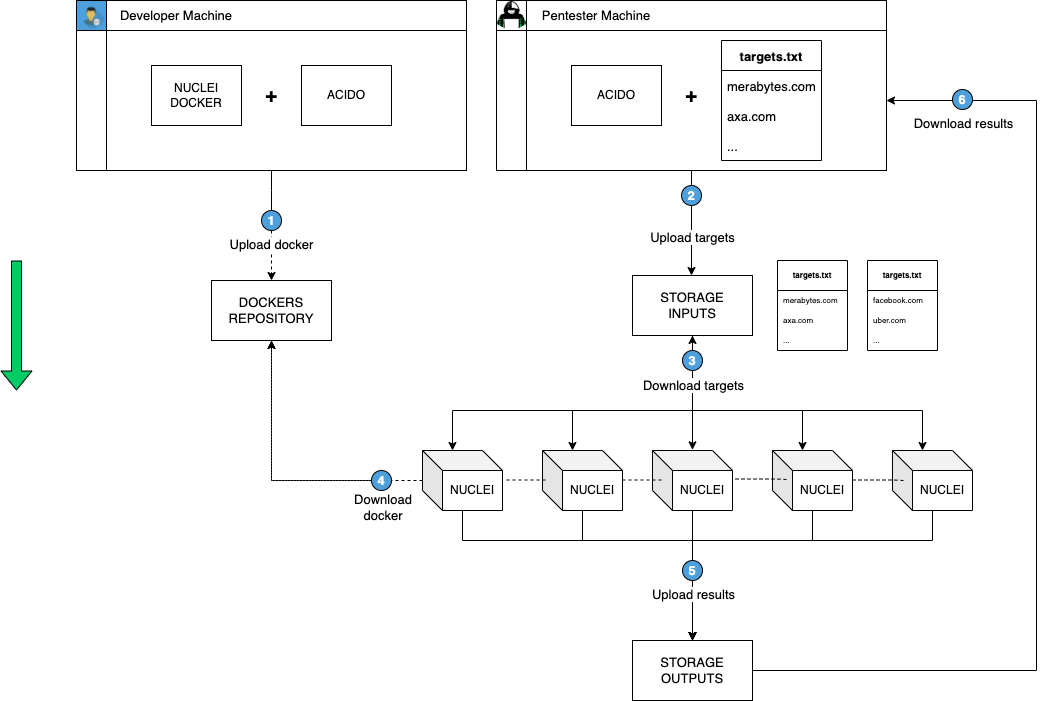
Acido (Azure Container Instance Distributed Operations) enables bug bounty hunters, penetration testers, and red team operators to scan at massive scale by distributing workloads across multiple Azure containers.
Table of Contents
Why Acido?
Speed: Distribute scans across 10, 50, or 100+ containers. What takes 24 hours on one machine completes in minutes with parallelization.
Cost-Effective: Pay only when scanning. Spin up 100 containers for 30 minutes, then destroy them - no idle infrastructure costs.
Tool Support: Works with any containerized security tool (nmap, masscan, Nuclei, Nikto, gowitness, etc.).
Simple: Split targets automatically, deploy containers, collect results, cleanup - all automated.
Inspired by axiom.
Installation
Prerequisites:
- Python 3.7+
- Docker
- Azure account (free tier works)
Setup:
- Install acido:
pip install acido
- Login to Azure:
az login
- Create Azure Container Registry:
az acr create --resource-group MyResourceGroup --name myregistry --sku Basic
- Configure acido:
acido -c
# or
acido configure
Provide: resource group name, registry server (e.g., myregistry.azurecr.io), registry username, registry password, and storage account name.
Note: For CI/CD pipelines and Lambda deployments, you can use environment variables instead:
AZURE_RESOURCE_GROUPIMAGE_REGISTRY_SERVERIMAGE_REGISTRY_USERNAMEIMAGE_REGISTRY_PASSWORDSTORAGE_ACCOUNT_NAMESTORAGE_ACCOUNT_KEY(optional, if not provided will fetch from Azure)
See .github/AZURE_PERMISSIONS.md for Service Principal setup.
Quick Start
- Create a target list (
targets.txt):
facebook.com
uber.com
paypal.com
- Create scanning image:
# Using short name (will look for 'nmap' image)
acido create nmap

# Or specify the full Docker image URL
acido create nuclei --image projectdiscovery/nuclei:latest
- Run distributed scan:
acido -f nmap-scan \
    -n 3 \
    -im nmap \
    -t 'nmap -iL input -p 0-1000' \
    -i targets.txt \
    -o output \
    --rm-when-done
Parameters:
-fFleet name-nNumber of container instances-imImage name (e.g., 'nmap', 'nuclei:latest', or full URL)-tCommand to execute-iInput file (auto-split across containers)-oOutput file--rm-when-doneAuto-delete containers after completion
Results saved to output.json and all_output.txt.
CLI Reference
usage: acido [-h] [-c] [-f FLEET] [-im IMAGE_NAME] [--create-ip CREATE_IP]
             [--ip] [-n NUM_INSTANCES] [-t TASK] [-e EXEC_CMD]
             [-i INPUT_FILE] [-w WAIT] [-s SELECT] [-l] [-r REMOVE] [-in]
             [-sh SHELL] [-d DOWNLOAD_INPUT] [-o WRITE_TO_FILE] [-rwd]
             {create,configure}

positional arguments:
  {create,configure}    Subcommands
    create              Create acido-compatible image from base image
                        Usage: acido create <name> [--image <full-image-url>]
    configure           Configure acido (alias for -c/--config)
                        Usage: acido configure

optional arguments:
  -h, --help            Show help message
  -c, --config          Configure acido
  -f FLEET              Fleet name
  -im IMAGE_NAME        Deploy specific image
  --create IMAGE        Create acido-compatible image (alternative syntax)
  --create-ip NAME      Create IPv4 address for routing
  --ip                  Use existing IPv4 address
  -n NUM                Number of instances
  -t TASK               Command to execute
  -e EXEC_CMD           Execute on selected instances
  -i INPUT_FILE         Input file for task
  -w WAIT               Max timeout
  -s SELECT             Select instances by name/regex
  -l, --list            List all instances
  -r REMOVE             Remove instances by name/regex
  -in, --interactive    Interactive session
  -sh SHELL             Execute and upload to blob
  -d DOWNLOAD           Download from blob
  -o OUTPUT             Save output in JSON
  -rwd, --rm-when-done  Remove containers after completion
Examples
Distributed Nmap Scan
Scan 1,000 hosts with 20 containers:
acido -f nmap-fleet \
    -n 20 \
    -im nmap \
    -t 'nmap -iL input -p- --min-rate 1000' \
    -i targets.txt \
    -o output \
    --rm-when-done
Nuclei Vulnerability Scan
Scan 10,000 URLs with 50 containers:
acido -f nuclei-scan \
    -n 50 \
    -im nuclei \
    -t 'nuclei -list input -t /nuclei-templates/' \
    -i urls.txt \
    -o results
Masscan Port Discovery
Scan entire network with 100 containers:
acido -f masscan \
    -n 100 \
    -im masscan \
    -t 'masscan -iL input -p0-65535 --rate 10000' \
    -i networks.txt \
    -o masscan-results
Single IP Routing
Route all containers through one IP for whitelisting:
# Create IP
acido --create-ip pentest-ip

# Deploy with IP routing
acido -f scan -n 50 --ip \
    --image myregistry.azurecr.io/nmap:latest \
    -t 'nmap -iL input -p-' \
    -i targets.txt
AWS Lambda Support
Acido can be deployed as an AWS Lambda function, enabling serverless security scanning workflows.
Key Features:
- Serverless invocation via AWS Lambda
- Automatic container provisioning in Azure
- JSON-based event interface
- Continuous deployment via GitHub Actions
Quick Example:
{
  "image": "nmap",
  "targets": ["merabytes.com", "uber.com", "facebook.com"],
  "task": "nmap -iL input -p 0-1000"
}
Documentation:
- See LAMBDA.md for complete deployment and usage instructions
- Example payload: example_lambda_payload.json
- Automatic deployment workflow: .github/workflows/deploy-lambda.yml
Credits
- Xavier Álvarez (xalvarez@merabytes.com)
- Juan Ramón Higueras Pica (jrhigueras@dabbleam.com)
Release history Release notifications | RSS feed


Download files
Download the file for your platform. If you're not sure which to choose, learn more about installing packages.
Source Distribution
Built Distribution
Filter files by name, interpreter, ABI, and platform.
If you're not sure about the file name format, learn more about wheel file names.
Copy a direct link to the current filters
File details
Details for the file acido-0.31.tar.gz.
File metadata
- Download URL: acido-0.31.tar.gz
- Upload date:
- Size: 29.6 kB
- Tags: Source
- Uploaded using Trusted Publishing? No
- Uploaded via: twine/6.2.0 CPython/3.10.19
File hashes
| Algorithm | Hash digest | |
|---|---|---|
| SHA256 |
d43c37f67789d243f7e3f0c77cfde72bb423933033f3852f0a0a37844d161b27
|
|
| MD5 |
0498a440a3a15fb455e5a41c14966b6e
|
|
| BLAKE2b-256 |
4fdee7353296d65a0548d2f956e3c459b2fed16a078647c4ffb598651fd2597f
|
File details
Details for the file acido-0.31-py3-none-any.whl.
File metadata
- Download URL: acido-0.31-py3-none-any.whl
- Upload date:
- Size: 30.5 kB
- Tags: Python 3
- Uploaded using Trusted Publishing? No
- Uploaded via: twine/6.2.0 CPython/3.10.19
File hashes
| Algorithm | Hash digest | |
|---|---|---|
| SHA256 |
09fe6f5aa5a3350e9f411cfcb29643803e1440781c18a5b77f11c3341359e9ca
|
|
| MD5 |
a92423c8c42939aabb55b64c6575957d
|
|
| BLAKE2b-256 |
37afb78bbe003d4222f64ec825b7f23cde3c4d97d03b41f2742b76ad4db558cb
|






