
Azure Container Instance Distributed Operations

Project description
acido (0.18)
The distributed security scanning framework built for speed and scale.
Table of Contents
- Why Acido?
- CLI Reference
- Quick Start Example: Distributed Nmap Scanning
- More Real-World Examples
- Key Benefits for Security Professionals
- Installation & Setup
- Architecture
- Upcoming Features
- Credits / Acknowledgements
Acido (Azure Container Instance Distributed Operations) is a powerful framework designed specifically for bug bounty hunters, penetration testers, and red team operators who need to scan at massive scale without sacrificing speed.
Why Acido?
🚀 Scan Faster, Find More
- 10-100x Speed Increase: Distribute your workload across 10, 50, or 100+ containers and complete scans in minutes instead of hours or days
- Real-Time Parallelization: Instead of scanning 10,000 targets sequentially, scan them all simultaneously across your fleet
- No More Waiting: What takes 24 hours on a single machine completes in 15 minutes with 100 instances
🎯 Built for Security Professionals
Perfect for:
- Bug Bounty Hunting: Quickly scan massive scope lists to find vulnerabilities before other hunters
- Penetration Testing: Complete comprehensive network scans within tight engagement timeframes
- Red Team Operations: Deploy at scale for reconnaissance and attack surface enumeration
- Continuous Security Monitoring: Automated, distributed scanning for large environments
💰 Cost-Effective Cloud Scaling
- Pay Only When Scanning: Spin up 100 containers for 30 minutes, then destroy them - no idle infrastructure costs
- Elastic Scaling: Scale from 1 to 100+ instances based on your needs
- No Hardware Required: No need to maintain expensive scanning infrastructure
🛠️ Works with Your Favorite Tools
Acido supports any security tool that can be containerized:
- Port Scanners: nmap, masscan, RustScan
- Vulnerability Scanners: Nuclei, Nikto, Nessus
- Web Crawlers: gospider, hakrawler, katana
- Screenshot Tools: aquatone, gowitness, EyeWitness
- Custom Tools: Anything you can put in a Docker container
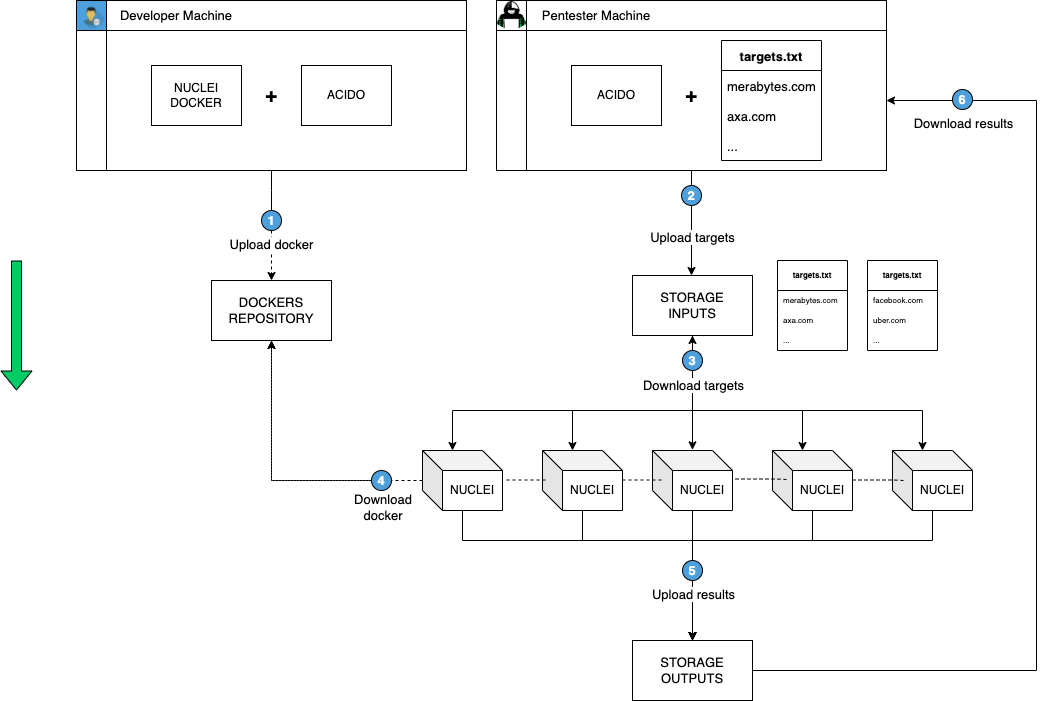
🔥 How It Works
- Split: Your target list (10,000 hosts) is automatically split into chunks
- Distribute: Deploy 100 containers, each gets 100 targets
- Scan: All 100 containers scan their targets simultaneously
- Collect: Results are automatically aggregated into a single output file
- Cleanup: Containers are automatically destroyed (optional)
Result: What would take 20 hours sequentially completes in 12 minutes with 100x parallelization.
🌐 Open Source + Enterprise
- Open Source Version: This repository - free and open source for the community
- Web Platform: Coming soon at merabytes.com - managed scanning platform with UI and additional features
Inspired by axiom, acido brings distributed security scanning to Azure with enterprise-grade security features and seamless cloud integration.
Note: Depending on your Azure quota limits, you may need to request container group limit increases through Azure support.
CLI Reference
Acido provides a powerful command-line interface for managing distributed security scans:
Usage:
usage: acido [-h] [-c] [-f FLEET] [-im IMAGE_NAME] [--create-ip CREATE_IP] [--ip] [-n NUM_INSTANCES] [-t TASK] [-e EXEC_CMD] [-i INPUT_FILE] [-w WAIT] [-s SELECT] [-l] [-r REMOVE] [-in]
          [-sh SHELL] [-d DOWNLOAD_INPUT] [-o WRITE_TO_FILE] [-rwd]

optional arguments:
-h, --help            show this help message and exit
-c, --config          Start configuration of acido.
-f FLEET, --fleet FLEET
                        Create new fleet.
-im IMAGE_NAME, --image IMAGE_NAME
                        Deploy an specific image.
--create-ip CREATE_IP Create a new IPv4 address and network profile for routing container traffic.
--ip                  Select an existing IPv4 address to route containers through.
-n NUM_INSTANCES, --num-instances NUM_INSTANCES
                        Instances that the operation affect
-t TASK, --task TASK  Execute command as an entrypoint in the fleet.
-e EXEC_CMD, --exec EXEC_CMD
                    Execute command on the selected instances.
-i INPUT_FILE, --input-file INPUT_FILE
                        The name of the file to use on the task.
-w WAIT, --wait WAIT  Set max timeout for the instance to finish.
-s SELECT, --select SELECT
                        Select instances matching name/regex.
-l, --list              List all instances.
-r REMOVE, --rm REMOVE
                        Remove instances matching name/regex.
-in, --interactive    Start interactive acido session.
-sh SHELL, --shell SHELL
                        Execute command and upload to blob.
-d DOWNLOAD_INPUT, --download DOWNLOAD_INPUT
                        Download file contents remotely from the acido blob.
-o WRITE_TO_FILE, --output WRITE_TO_FILE
                    Save the output of the machines in JSON format.
-rwd, --rm-when-done  Remove the container groups after finish.
Quick Start Example: Distributed Nmap Scanning
Scenario: You need to scan 1,000 hosts across all 65,535 ports for a penetration test. On a single machine, this would take ~20 hours. With acido and 20 containers, it completes in under 1 hour.
In this example we will:
- Create a base container image with acido and nmap
- Deploy 20 containers to Azure
- Distribute the scan across all 20 containers simultaneously
- Collect all results automatically
Step 1: Create the base image
Dockerfile (merabytes.azurecr.io/ubuntu:latest):
FROM ubuntu:20.04

RUN apt-get update && apt-get install python3 python3-pip python3-dev -y
RUN python3 -m pip install acido
RUN apt-get install nmap -y

CMD ["sleep", "infinity"]
This will install acido & nmap on our base docker image (merabytes.azurecr.io/ubuntu:latest).
To upload the image to the registry, as always go to the folder of your Dockerfile and:
docker login merabytes.azurecr.io
docker build -t ubuntu .
docker tag ubuntu merabytes.azurecr.io/ubuntu:latest
docker push merabytes.azurecr.io/ubuntu:latest
Step 2: Run the distributed scan
Prepare your target list:
$ cat targets.txt
merabytes.com
uber.com
facebook.com
... (997 more targets)
Deploy and scan with a single command:
$ acido -f nmap-fleet \
        -n 20 \
        --image merabytes.azurecr.io/ubuntu:latest \
        -t 'nmap -iL input -p- --min-rate 1000' \
        -i targets.txt \
        -o output \
        --rm-when-done

[+] Selecting I/O storage account (acido).
[+] Splitting 1000 targets into 20 chunks (50 targets each).
[+] Uploaded 20 target lists to blob storage.
[+] Successfully created new group/s: [ nmap-fleet-01 nmap-fleet-02 ]
[+] Successfully created new instance/s: [ nmap-fleet-01-01 nmap-fleet-01-02 ... nmap-fleet-02-10 ]
[+] Waiting 2 minutes for container provisioning...
[+] All containers running - distributed scan in progress...
[+] Waiting for scan outputs...
[+] Container nmap-fleet-01-01 completed (50 hosts scanned)
[+] Container nmap-fleet-01-02 completed (50 hosts scanned)
...
[+] All scans completed!
[+] Saved individual outputs: output.json
[+] Saved merged results: all_output.txt
[+] Removed all container groups.
What Just Happened?
- ✅ Acido split your 1,000 targets into 20 files (50 targets each)
- ✅ Deployed 20 Azure Container Instances running nmap
- ✅ Each container scanned its 50 targets independently and simultaneously
- ✅ Results automatically collected and merged
- ✅ All containers automatically deleted to stop costs
Time Saved: ~19 hours (20 hours → ~1 hour with 20x parallelization)
Cost: ~$5-10 for the entire distributed scan (charged only for actual runtime)
More Real-World Examples
Nuclei: Distributed Vulnerability Scanning
Scan 10,000 URLs for vulnerabilities using 50 containers:
acido -f nuclei-scan \
      -n 50 \
      --image merabytes.azurecr.io/nuclei:latest \
      -t 'nuclei -list input -t /nuclei-templates/' \
      -i urls.txt \
      -o nuclei-results \
      --rm-when-done
Result: 50x faster than sequential scanning
Masscan: Ultra-Fast Port Discovery
Scan an entire /16 network (65,536 IPs) across all ports using 100 containers:
acido -f masscan-scan \
      -n 100 \
      --image merabytes.azurecr.io/masscan:latest \
      -t 'masscan -iL input -p0-65535 --rate 10000' \
      -i networks.txt \
      -o masscan-results
Result: Complete a massive scan in minutes instead of days
Screenshots: Visual Reconnaissance
Take screenshots of 5,000 web applications using 25 containers:
acido -f screenshot-scan \
      -n 25 \
      --image merabytes.azurecr.io/gowitness:latest \
      -t 'gowitness file -f input' \
      -i webapps.txt \
      -o screenshots
Result: Parallel screenshot capture at scale
Key Benefits for Security Professionals
⚡ Speed & Scale That Matters
- Bug Bounty Edge: Be the first to scan new scope - scan 100,000 subdomains in minutes
- Engagement Efficiency: Complete full penetration tests faster, leaving more time for exploitation
- Red Team Recon: Rapidly enumerate attack surface across massive infrastructure
- No Single Point of Failure: If one container fails, the other 99 keep scanning
🔒 Enterprise-Grade Security Features
- Managed Identity Authentication: No hardcoded credentials in containers
- Single IP Routing: Route all containers through one IP for easy whitelisting during authorized tests
- Azure Security: Built on Microsoft Azure's enterprise security infrastructure
- Audit Trails: All operations logged in Azure for compliance
💡 Flexible & Extensible
- Any Tool, Any Workflow: If it runs in Docker, it runs in acido
- Custom Scripts: Package your proprietary tools and run them at scale
- Pipeline Integration: Automate scans in your CI/CD or bug bounty automation
- Result Aggregation: Automatic merging of outputs from all containers
📊 Perfect For
- Bug Bounty Platforms: Scan Hackerone/Bugcrowd programs faster than the competition
- Penetration Testing Firms: Deliver more thorough assessments in less time
- Red Team Operations: Large-scale reconnaissance and infrastructure enumeration
- Security Operations: Continuous vulnerability scanning across dynamic environments
- Compliance Scanning: Regularly scan large networks for PCI, HIPAA, etc.
🌐 Looking for a managed solution? Check out the upcoming web platform at merabytes.com - a hosted version of acido with a user-friendly interface, team collaboration features, and managed infrastructure. This open-source version will always remain free for the community.
Installation & Setup
Prerequisites
Operating System: Linux / macOS / Windows (WSL recommended)
Azure Account: Free tier works to get started (sign up here)
Step 1: Login to Azure & Create an Azure Container Registry
$ az login
$ az acr create --resource-group Merabytes \
--name merabytes --sku Basic
Note: For production use or CI/CD pipelines, consider creating a Service Principal with appropriate permissions. See .github/AZURE_PERMISSIONS.md for detailed instructions on setting up Azure permissions and authentication.
Step 2: Install acido and configure Azure credentials
pip install acido
$ acido -c
[+] Selecting I/O storage account (acido).
[!] Please provide a Resource Group Name to deploy the ACIs: Merabytes
[!] Image Registry Server: merabytes.azurecr.io
[!] Image Registry Username: merabytes
[!] Image Registry Password: *********
$
Troubleshooting
Setting Flags for OpenSSL on Devices using Apple Silicon
If you are on an Apple Silicon device, follow these steps to install openssl@1.1 and set the necessary environment variables:
-
Install OpenSSL@1.1: Use Homebrew to install
openssl@1.1.brew install openssl@1.1
-
Set Environment Variables: Export the necessary environment variables to point to the correct library and include directories.
export LDFLAGS="-L/opt/homebrew/opt/openssl@1.1/lib"
export CPPFLAGS="-I/opt/homebrew/opt/openssl@1.1/include"
-
Verify Your Configuration: You can verify the installation and see the suggested environment variables by checking the information provided by Homebrew.
brew info openssl
By following these steps, you should have openssl@1.1 installed and the necessary flags set for your Apple Silicon device.
Optional requirement (--exec): Install tmux & Patch Azure CLI
If you want to use --exec (similar to ssh) to execute commands on running containers having tmux installed and on PATH is mandatory.
Also, for the --exec command to work properly, you need to monkey-patch a bug inside az container exec command in the sys.stdout.write function.
File: /lib/python3.9/site-packages/azure/cli/command_modules/container/custom.py
Line: 684
def _cycle_exec_pipe(ws):
    r, _, _ = select.select([ws.sock, sys.stdin], [], [])
    if ws.sock in r:
        data = ws.recv()
        sys.stdout.write(data.decode() if isinstance(data, bytes) else data) # MODIFY THE LINE LIKE THIS
        sys.stdout.flush()
    if sys.stdin in r:
        x = sys.stdin.read(1)
        if not x:
            return True
        ws.send(x)
    return True
Architecture
Internal Architecture Overview
Acido is designed with a modular architecture that makes it easy to support multiple security tools and efficiently distribute workloads across Azure Container Instances. The system consists of several key components that work together seamlessly:
Core Components
┌─────────────────────────────────────────────────────────────────┐
│                         Acido CLI                                │
│                      (User Interface)                            │
└─────────────────┬───────────────────────────────────────────────┘
                  │
                  ├──────────────────────────────────────────────┐
                  │                                              │
                  ▼                                              ▼
    ┌─────────────────────────┐              ┌──────────────────────────┐
    │   InstanceManager       │              │     BlobManager          │
    │  - Deploy containers    │              │  - Upload/download files │
    │  - Manage lifecycle     │◄────────────►│  - Store outputs         │
    │  - Execute commands     │              │  - Input distribution    │
    └────────┬────────────────┘              └──────────┬───────────────┘
             │                                          │
             │ Uses Managed Identity                    │
             ▼                                          ▼
    ┌─────────────────────────┐              ┌──────────────────────────┐
    │  Azure Container        │              │  Azure Blob Storage      │
    │  Instances (ACIs)       │              │  - Container: acido      │
    │  - Run security tools   │◄────────────►│  - Inputs & Outputs      │
    │  - Process data chunks  │   Download   │  - UUIDs for tracking    │
    └─────────────────────────┘   via MI     └──────────────────────────┘
How It Works
1. Input File Distribution via Blob Storage
When you run a distributed scan with an input file, acido follows this workflow:
Host Machine                     Blob Storage                Container Instances
┌─────────────┐                 ┌─────────────┐            ┌──────────────────┐
│ input.txt   │                 │             │            │  Container 1     │
│ (1000 lines)│                 │             │            │  ┌────────────┐  │
└──────┬──────┘                 │             │            │  │ input (50) │  │
       │                        │             │            │  └────────────┘  │
       │ 1. Split into chunks   │             │            └──────────────────┘
       ├────────────────────────┤             │
       │   Chunk 1 (50 lines)   │──Upload────►│ UUID-1     │  ┌──────────────────┐
       │   Chunk 2 (50 lines)   │──Upload────►│ UUID-2     │  │  Container 2     │
       │   Chunk 3 (50 lines)   │──Upload────►│ UUID-3     │  │  ┌────────────┐  │
       │   ...                  │             │            │  │  │ input (50) │  │
       │   Chunk 20 (50 lines)  │──Upload────►│ UUID-20    │  │  └────────────┘  │
       └────────────────────────┘             │            │  └──────────────────┘
                                              │            │           ...
                                              │            │  ┌──────────────────┐
                                              │            │  │  Container 20    │
                                              └────Download──►│  ┌────────────┐  │
                                                   via MI  │  │  │ input (50) │  │
                                                           │  │  └────────────┘  │
                                                           │  └──────────────────┘
Steps:
- File Splitting: The CLI splits the input file into N chunks (where N = number of instances)
- Blob Upload: Each chunk is uploaded to blob storage with a unique UUID identifier
- Container Deployment: Containers are deployed with environment variables containing:
- Blob storage account name
- Managed Identity client ID
- UUID of their assigned input chunk
- Download in Container: Each container uses Managed Identity to authenticate and download its input chunk
- Processing: The security tool processes its chunk independently
- Output Collection: Results are uploaded back to blob storage and collected by the CLI
2. Managed Identity for Secure Access
Acido uses Azure Managed Identity to provide containers with secure, credential-free access to blob storage:
┌────────────────────────────────────────────────────────────────┐
│  Container Instance (ACI)                                       │
│  ┌──────────────────────────────────────────────────────────┐  │
│  │  Environment Variables:                                   │  │
│  │  - IDENTITY_CLIENT_ID: <managed-identity-client-id>      │  │
│  │  - STORAGE_ACCOUNT_NAME: <storage-account>               │  │
│  │  - RG: <resource-group>                                  │  │
│  └────────────────────────┬─────────────────────────────────┘  │
│                           │                                     │
│                           ▼                                     │
│  ┌──────────────────────────────────────────────────────────┐  │
│  │  ManagedAuthentication Class                             │  │
│  │  - Detects cloud environment (MSI_ENDPOINT)              │  │
│  │  - Uses ManagedIdentityCredential with client_id         │  │
│  │  - Obtains access token for storage.azure.com            │  │
│  └────────────────────────┬─────────────────────────────────┘  │
└───────────────────────────┼─────────────────────────────────────┘
                            │ Token-based authentication
                            ▼
               ┌─────────────────────────────┐
               │  Azure Blob Storage         │
               │  - Validates MI token       │
               │  - Grants read/write access │
               └─────────────────────────────┘
Benefits:
- No credentials in code or environment: No storage account keys needed in containers
- Automatic token management: Azure handles token lifecycle
- Fine-grained permissions: RBAC controls what each identity can access
- Audit trail: All access logged in Azure Activity Logs
3. Supporting Multiple Security Tools
The architecture is designed to be tool-agnostic, making it easy to support any security tool:
┌─────────────────────────────────────────────────────────────────┐
│  Acido Abstraction Layer                                        │
│  ┌────────────────────────────────────────────────────────────┐ │
│  │  Generic Command Execution Framework                       │ │
│  │  - Input file handling (--input-file)                      │ │
│  │  - Command wrapper (--task)                                │ │
│  │  - Output collection (--output)                            │ │
│  └────────────────────────────────────────────────────────────┘ │
└─────────────────────────┬───────────────────────────────────────┘
                          │
          ┌───────────────┼───────────────┬────────────────┐
          │               │               │                │
          ▼               ▼               ▼                ▼
    ┌─────────┐     ┌─────────┐    ┌──────────┐    ┌──────────┐
    │  nmap   │     │ nuclei  │    │ masscan  │    │ nikto    │
    │         │     │         │    │          │    │          │
    │ -iL     │     │ -list   │    │ -iL      │    │ -h       │
    │ input   │     │ input   │    │ input    │    │ input    │
    └─────────┘     └─────────┘    └──────────┘    └──────────┘
Key Design Principles:
- Standard Input/Output Pattern: All tools read from a file named
inputand write to stdout - Docker Entrypoint Execution: Commands run via
-tflag use the container's entrypoint - Environment Variable Injection: Tools can access blob storage, registry credentials, etc.
- Result Aggregation: Outputs are collected via blob storage and merged by CLI
Example with different tools:
# Nmap scan
acido -f nmap-fleet -n 20 -im registry.io/nmap:latest \
  -t 'nmap -iL input -p 1-1000' -i targets.txt

# Nuclei scan
acido -f nuclei-fleet -n 50 -im registry.io/nuclei:latest \
  -t 'nuclei -list input -t /nuclei-templates/' -i urls.txt

# Masscan scan
acido -f masscan-fleet -n 30 -im registry.io/masscan:latest \
  -t 'masscan -iL input -p0-65535' -i targets.txt
Data Flow Summary
1. User invokes CLI with task and input file
                    ↓
2. CLI authenticates to Azure (az login or environment credentials)
                    ↓
3. Input file split into N chunks (N = number of instances)
                    ↓
4. Chunks uploaded to blob storage (acido container)
                    ↓
5. Container groups created with:
   - Base image with security tool + acido installed
   - Managed Identity attached
   - Environment variables (IDENTITY_CLIENT_ID, STORAGE_ACCOUNT_NAME, etc.)
   - Command: download input chunk → run security tool → upload output
                    ↓
6. Containers start and use Managed Identity to:
   - Download their assigned input chunk from blob
   - Execute the security tool command
   - Upload results back to blob storage
                    ↓
7. CLI polls containers for completion
                    ↓
8. CLI downloads outputs from blob storage
                    ↓
9. Results aggregated and saved (JSON + merged text file)
                    ↓
10. Optional: Containers deleted (--rm-when-done)
Component Details
InstanceManager
- Purpose: Manages Azure Container Instance lifecycle
- Key Methods:
deploy(): Creates container groups with specified configurationprovision(): Configures individual container instancesrm(): Deletes container groupsls(): Lists all running instances
- Features:
- Automatic splitting of >10 instances into multiple container groups (Azure limit)
- Managed Identity attachment for blob access
- Image registry authentication
- Network profile support for custom IP routing
BlobManager
- Purpose: Handles all blob storage operations
- Key Methods:
upload(): Uploads data with UUID namingdownload(): Retrieves files by UUIDuse_container(): Selects/creates storage container
- Authentication: Supports managed identity, environment credentials, and connection strings
- Features: Automatic UUID generation for file tracking
ManagedAuthentication
- Purpose: Provides unified authentication across Azure services
- Credential Chain:
- Cloud: Managed Identity → Environment Credentials
- Local: Azure CLI → Environment Credentials → Client Secret
- Auto-detection: Automatically detects cloud vs. local environment
NetworkManager
- Purpose: Manages virtual networks and public IPs for container groups
- Key Methods:
create_ipv4(): Creates public IP addressescreate_virtual_network(): Sets up VNetscreate_network_profile(): Creates network profiles for ACIs
- Use Case: Route all container traffic through a single public IP
Traffic Routing for Security Audits
Acido supports routing all container traffic through a single public IPv4 address, which is particularly valuable for security audits and penetration testing engagements:
How It Works
┌────────────────────────────────────────────────────────────────┐
│  Single Public IP (e.g., 20.123.45.67)                         │
│  Created with: acido --create-ip my-pentest-ip                 │
└────────────────┬───────────────────────────────────────────────┘
                 │ All outbound traffic routes through this IP
                 │
    ┌────────────┼────────────┬────────────┬────────────┐
    │            │            │            │            │
    ▼            ▼            ▼            ▼            ▼
┌─────────┐ ┌─────────┐ ┌─────────┐ ┌─────────┐ ┌─────────┐
│Container│ │Container│ │Container│ │Container│ │Container│
│   1     │ │   2     │ │   3     │ │  ...    │ │   50    │
└─────────┘ └─────────┘ └─────────┘ └─────────┘ └─────────┘
    │            │            │            │            │
    └────────────┴────────────┴────────────┴────────────┘
                             │
                   Distributed scanning
                             ▼
                    ┌─────────────────┐
                    │  Target Network │
                    │  (Client site)  │
                    └─────────────────┘
Benefits for Penetration Testing
-
Simplified IP Whitelisting:
- Instead of whitelisting dozens or hundreds of container IPs, security teams only need to whitelist a single IP address
- Reduces firewall rule complexity and management overhead
- Makes it easier to coordinate with client security teams
-
Larger Scale Testing:
- Deploy 50, 100, or more containers for distributed scanning
- All traffic appears to originate from the whitelisted IP
- Achieve significantly higher throughput than traditional single-machine scans
- Complete comprehensive scans in a fraction of the time
-
Audit Trail and Compliance:
- All scan traffic is associated with a single, documented IP address
- Easier to track and correlate security testing activities
- Simplifies incident response if alerts are triggered
- Meets compliance requirements for authorized testing
-
Professional Engagement Workflow:
- Create IP before engagement:
acido --create-ip client-pentest-2024 - Provide IP to client for whitelisting
- Deploy fleet with IP routing:
acido -f scan-fleet -n 50 --ip -t '...' - All containers automatically use the whitelisted IP
- Clean up after engagement
- Create IP before engagement:
Example Usage:
# Create a new public IP for the pentest engagement
acido --create-ip acme-corp-pentest

# Provide the IP address (shown in output) to client for whitelisting
# Example: 20.123.45.67

# Once whitelisted, deploy your fleet routing through this IP
acido -f nmap-fleet -n 50 --ip \
  -im registry.io/nmap:latest \
  -t 'nmap -iL input -p- -T4' \
  -i targets.txt

# All 50 containers will scan through the single whitelisted IP
# Achieving 50x parallelization while maintaining a single source IP
This approach combines the scale and speed of distributed scanning with the simplicity and control required for professional security engagements.
Upcoming features
- Add argument to specify docker image of the fleet
- Add argument to execute scans through the Docker ENTRYPOINT (-t / --task)
- Test on Windows
- Add argument to retrieve ACI logs
- Add argument to create the fleet with a Network Group (route the traffic from all instances to a single Public IP)
- Get rid of monkey-patching of Azure CLI for --exec
Credits / Acknowledgements
- Xavier Álvarez (xalvarez@merabytes.com)
- Juan Ramón Higueras Pica (jrhigueras@dabbleam.com)
Release history Release notifications | RSS feed


Download files
Download the file for your platform. If you're not sure which to choose, learn more about installing packages.
Source Distribution
Built Distribution
Filter files by name, interpreter, ABI, and platform.
If you're not sure about the file name format, learn more about wheel file names.
Copy a direct link to the current filters
File details
Details for the file acido-0.18.tar.gz.
File metadata
- Download URL: acido-0.18.tar.gz
- Upload date:
- Size: 46.1 kB
- Tags: Source
- Uploaded using Trusted Publishing? No
- Uploaded via: twine/6.2.0 CPython/3.10.19
File hashes
| Algorithm | Hash digest | |
|---|---|---|
| SHA256 |
6b891bc686f503b1340c6b1926d99b697ae3264e1c313fcc771c2aab01fd0fd0
|
|
| MD5 |
8ee17df84024a8bf41e46e333785c964
|
|
| BLAKE2b-256 |
30ae37cff23ef6f08d3830e4c94b9f2bbc03a360f4efbe1478500746f53d4548
|
File details
Details for the file acido-0.18-py3-none-any.whl.
File metadata
- Download URL: acido-0.18-py3-none-any.whl
- Upload date:
- Size: 30.4 kB
- Tags: Python 3
- Uploaded using Trusted Publishing? No
- Uploaded via: twine/6.2.0 CPython/3.10.19
File hashes
| Algorithm | Hash digest | |
|---|---|---|
| SHA256 |
b4a24b3f680814ceeb6116a558a20c44c0e86ff9b44015ada44c2b3495156ce9
|
|
| MD5 |
060cc0080fdf954786f91f4c03e0229a
|
|
| BLAKE2b-256 |
d2538e0e41596bc09dd2a15530c167db6c5db2f266e98d76e2ed4b9922e4081e
|






