
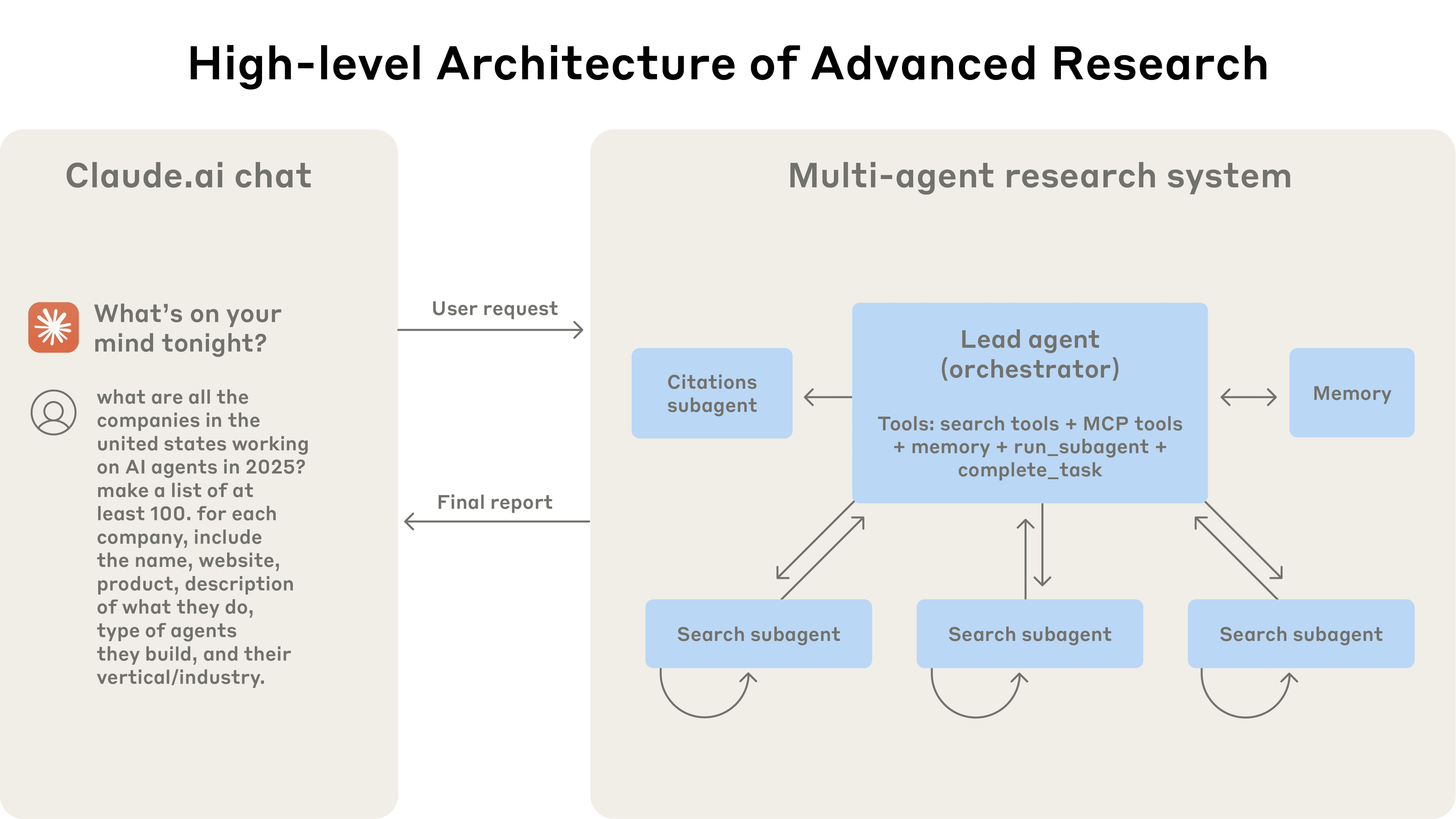
Advanced Research System (Based on Anthropic's Paper)


An implementation of the orchestrator-worker pattern from Anthropic's "How we built our multi-agent research system", built entirely on the Swarms API and Exa search. A lead researcher plans the query, parallel search subagents research each part with Exa, the lead writes the report and decides whether gaps need another round, and a citation agent checks every claim against the sources.
Every agent is one call to the Swarms API and every search is one call to Exa, so there is no agent framework or model-provider SDK to install: two API keys and httpx.
Installation
pip3 install -U advanced-research

# uv pip install -U advanced-research
Environment Variables
SWARMS_API_KEY="your_swarms_api_key_here"   # https://swarms.world/platform/api-keys
EXA_API_KEY="your_exa_api_key_here"         # https://dashboard.exa.ai/api-keys
Models and token limits are set on AdvancedResearch(...), not via environment variables. Any model from GET https://api.swarms.world/v1/models/available works for either role. A Swarms API request ends after 30 seconds, so a slow model with a high max_tokens can time out on the report step; the defaults stay well under that limit.
Quick Start
Basic Usage
from advanced_research import AdvancedResearch

# Initialize the research system
research_system = AdvancedResearch(
    name="AI Research Team",
    description="Specialized AI research system",
    director_model_name="gpt-5.5",      # lead researcher, report, citations
    worker_model_name="gpt-5.4-mini",   # search subagents
    director_max_tokens=4000,
    worker_max_tokens=3000,
    max_loops=1,
    verbose=True,  # print every agent reply to the console
)

# Run research and get results
result = research_system.run(
    "What are the latest developments in quantum computing?"
)
print(result)
With Export Functionality
from advanced_research import AdvancedResearch

# Initialize with export enabled
research_system = AdvancedResearch(
    name="Quantum Computing Research",
    description="Research team focused on quantum computing advances",
    max_loops=1,
    export_on=True,  # Enable JSON export
)

# Run research - will automatically export to JSON file
research_system.run(
    "What are the latest developments in quantum computing?"
)
# Results will be saved to a timestamped JSON file
Advanced Configuration
from advanced_research import AdvancedResearch

# Initialize with custom settings
research_system = AdvancedResearch(
    name="Medical Research Team",
    description="Specialized medical research system",
    director_model_name="claude-sonnet-5",  # any Swarms API model
    worker_model_name="gpt-5.4-mini",
    director_max_tokens=4000,
    max_loops=2,  # up to 2 research rounds; the lead stops early if there are no gaps
    output_type="all",  # Include full conversation history
    export_on=True,
)

# Run research with image input (if applicable)
result = research_system.run(
    "What are the most effective treatments for Type 2 diabetes?",
    img=None  # Optional image input
)
Batch Processing Multiple Queries
from advanced_research import AdvancedResearch

# Initialize the system
research_system = AdvancedResearch(
    name="Batch Research System",
    max_loops=1,
    export_on=True,
)

# Process multiple research tasks
tasks = [
    "Latest advances in renewable energy storage",
    "Current state of autonomous vehicle technology",
    "Recent breakthroughs in cancer immunotherapy"
]

# Run batch processing
research_system.batched_run(tasks)
Using Different Output Formats
from advanced_research import AdvancedResearch

# Initialize with specific output type
research_system = AdvancedResearch(
    name="Research System",
    output_type="json",  # "final" (report), "all", "list", "json", "markdown"
    export_on=False,  # Get results directly instead of exporting
)

# Run research and get formatted output
result = research_system.run(
    "What are the key challenges in AGI development?"
)

# Check available output methods
available_formats = research_system.get_output_methods()
print(f"Available output formats: {available_formats}")
Quick Reference
| Task | Code | Documentation |
|---|---|---|
| Basic Research | AdvancedResearch().run("query") |
Basic Usage → |
| Export Results | AdvancedResearch(export_on=True) |
Export Config → |
| Batch Processing | system.batched_run([queries]) |
Batch Processing → |
| Custom Models | AdvancedResearch(director_model_name="claude-sonnet-5") |
Advanced Config → |
| Output Formats | AdvancedResearch(output_type="json") |
Output Types → |
Examples
Ready-to-run examples demonstrating all features of the Advanced Research system:
| Example | Description | File |
|---|---|---|
| Basic Usage | Simple research with minimal configuration | examples/basic_usage.py |
| Export Functionality | Save research results to JSON files | examples/export_example.py |
| Advanced Configuration | Custom models, tokens, and multiple loops | examples/advanced_config.py |
| Custom Models | Different AI model configurations | examples/custom_models.py |
| Output Formats | JSON, markdown, and conversation history | examples/output_formats.py |
| Batch Processing | Process multiple queries efficiently | examples/batch_processing.py |
| Multi-Loop Research | Iterative research with refinement | examples/multi_loop_research.py |
| Session Management | Conversation tracking and persistence | examples/session_management.py |
| Chat Interface | Interactive web-based chat demo | examples/chat_demo.py |
Quick Start Examples:
# Basic research
python examples/basic_usage.py

# With export functionality
python examples/export_example.py

# Advanced configuration
python examples/advanced_config.py
Key Features
| Feature | Description |
|---|---|
| Orchestrator-worker architecture | A lead researcher plans the query and writes one subtask per search subagent, each with an objective, search queries, an output format and boundaries so subagents don't overlap. |
| Effort scaled to the query | The lead uses 1 subagent for a simple fact, 2 to 4 for a comparison and up to max_subagents for open-ended research, following Anthropic's scaling rules. |
| Iterative Exa search | Each subagent searches Exa, reads the page text and highlights, records cited findings and asks for narrower follow-up searches until its objective is covered. |
| Research rounds | After each round the lead decides whether gaps would change the answer, and plans another round for just those gaps, up to max_loops. |
| Verified citations | Every source gets one number shared by all agents. The citation agent checks each claim against the source text, and the references list is built from the sources the report actually cites. |
| Swarms API only | Every agent is a /v1/agent/completions call with any model the API supports. No framework, no provider keys. |
| Cost tracking | research.total_cost reports the run's Swarms API cost from each response's usage.total_cost. |
| Export and output formats | JSON export of the full session and its sources, and output as the final report, the full history, JSON or Markdown. |
Architecture
                         [Research query]
                                │
                                ▼
          ┌───────────────────────────────────────────┐
          │  Lead researcher (Swarms API)             │
          │  judges complexity, writes 1-N subtasks   │
          └───────────────────────────────────────────┘
                                │ subtasks, in parallel
          ┌─────────────────────┼─────────────────────┐
          ▼                     ▼                     ▼
   ┌─────────────┐       ┌─────────────┐       ┌─────────────┐
   │ Subagent 1  │       │ Subagent 2  │       │ Subagent N  │
   │ Exa search  │       │ Exa search  │       │ Exa search  │
   │   ↓         │       │   ↓         │       │   ↓         │
   │ findings +  │       │ findings +  │       │ findings +  │
   │ follow-ups  │       │ follow-ups  │       │ follow-ups  │
   └─────────────┘       └─────────────┘       └─────────────┘
          └─────────────────────┼─────────────────────┘
                                ▼ cited findings [n]
          ┌───────────────────────────────────────────┐
          │  Lead researcher (Swarms API)             │
          │  writes the report, lists any gaps        │──── gaps? another round
          └───────────────────────────────────────────┘     (up to max_loops)
                                │
                                ▼
          ┌───────────────────────────────────────────┐
          │  Citation agent (Swarms API)              │
          │  checks every claim against the sources   │
          └───────────────────────────────────────────┘
                                │
                                ▼
                 [Report + references from cited sources]
Workflow
- Plan. The lead researcher judges the query's complexity and writes one subtask per subagent.
- Search. Subagents run in parallel. Each runs its searches on Exa in parallel, reads the results, and records findings that cite numbered sources. If something important is missing, it asks for narrower searches in another round (
worker_search_rounds, default 2). - Report. The lead researcher writes the report from all findings and decides whether gaps need another research round.
- Cite. The citation agent checks each claim against the source text and fixes or removes unsupported citations. A references section is added for the sources the report cites.
A typical one-round run with the defaults takes 20 to 60 seconds and costs a few cents in Swarms API usage, plus Exa's per-search price.
Contributing
This implementation is part of the open-source Swarms ecosystem. We welcome contributions!
- Fork the repository
- Create a feature branch (
git checkout -b feature/amazing-research-feature) - Commit your changes (
git commit -m 'Add amazing feature') - Push to the branch (
git push origin feature/amazing-research-feature) - Open a Pull Request
Development Setup with uv
# Clone and setup development environment
git clone https://github.com/The-Swarm-Corporation/AdvancedResearch.git
cd AdvancedResearch

uv venv

uv pip install -r requirements.txt pytest

# Run the offline tests (no API keys needed)
pytest tests

# Setup environment variables
cp .env.example .env
# Edit .env with your API keys
📄 License
This project is licensed under the MIT License. See the LICENSE file for details.
📚 Citation
If you use this work in your research, please cite both the original paper and this implementation:
@misc{hadfield2025multiagent,
  title        = {How we built our multi-agent research system},
  author       = {Hadfield, Jeremy and Zhang, Barry and Lien, Kenneth and Scholz, Florian and Fox, Jeremy and Ford, Daniel},
  year         = {2025},
  month        = jun,
  day          = {13},
  howpublished = {Anthropic Engineering Blog},
  url          = {https://www.anthropic.com/research/multi-agent-research-system},
  note         = {Describes Anthropic's orchestrator--worker multi-agent Research system}
}

@software{advancedresearch2025,
  title        = {AdvancedResearch: An Open-Source Multi-Agent Research System},
  author       = {Gomez, Kye and More, Harshal, The Swarms Corporation},
  year         = {2025},
  url          = {https://github.com/The-Swarm-Corporation/AdvancedResearch},
  note         = {Open-source implementation of Anthropic's multi-agent research system on the Swarms API and Exa}
}

@software{swarms_framework,
  title        = {Swarms: An Open-Source Multi-Agent Framework},
  author       = {Gomez, Kye},
  year         = {2023},
  url          = {https://github.com/kyegomez/swarms}
}
Documentation
For comprehensive API documentation, examples, and advanced usage:
Related Work
- Original Article - Hadfield et al., "How we built our multi-agent research system" (Anthropic, Jun 2025)
- Swarms API - Runs every agent in this system
- Exa - Web search for the search subagents
Support
- Issues: GitHub Issues
- Discussions: GitHub Discussions
- Community: Join our Discord
Built on the Swarms API and Exa
1 maintainer

Metadata
1 maintainer
Release files for advanced-research 0.4.0
For a detailed explanation of source distributions (sdists) and built distributions (wheels), please see the package formats documentation.
Source distribution (sdist)
| File | Size | Uploaded | Provenance | Actions |
|---|---|---|---|---|
| advanced_research-0.4.0.tar.gz | 23.8 kB | Without provenance | Details for advanced_research-0.4.0.tar.gz |
Built distribution (wheel)
| File | Interpreter | ABI | Platform | Actions Reset |
|---|---|---|---|---|
| advanced_research-0.4.0-py3-none-any.whl | Python 3 | none | any | Details for advanced_research-0.4.0-py3-none-any.whl |
Total release size: 44.8 kB
Release files / advanced_research-0.4.0.tar.gz
| Download URL | advanced_research-0.4.0.tar.gz |
|---|---|
| Size | 23.8 kB |
| Tags | Source |
|
SHA-256 checksum How to use checksums |
2f776ff662ea52d8b9bb422e5827d7462eed9e8c7b08f1b8169916d2fd0da5ff
|
|
BLAKE2b-256 checksum How to use checksums |
faa6b4f4b3aa31e49beda9eaa1337feb96a61ebe6351d28653232622fc48931d
|
| Upload date | |
|
Uploaded using Trusted Publishing? What is trusted publishing? |
No |
| Uploaded via |
poetry/2.1.3 CPython/3.12.3 Darwin/24.6.0
|
Release files / advanced_research-0.4.0-py3-none-any.whl
| Download URL | advanced_research-0.4.0-py3-none-any.whl |
|---|---|
| Size | 21.0 kB |
| Tags | Python 3 |
|
SHA-256 checksum How to use checksums |
d11b997bde73018a0561323ee83e87a8b58833dd0e48b68ffe556a63ec90f637
|
|
BLAKE2b-256 checksum How to use checksums |
fe4b53156694762892928e614676a41d20ffef8990444074949c4bfa00c81d12
|
| Upload date | |
|
Uploaded using Trusted Publishing? What is trusted publishing? |
No |
| Uploaded via |
poetry/2.1.3 CPython/3.12.3 Darwin/24.6.0
|
Security for advanced-research 0.4.0
Provenance
Provenance describes where a file came from. On PyPI, provenance is shared via attestations, which provide a verifiable record of the build or publishing details. View details, limitations and caveats.
No provenance found
None of the files in this release were uploaded with provenance metadata.
A note on package security
PyPI is a repository for distributing packages, not a service for auditing them. While third-party security researchers and our staff do their best to detect and remove malicious packages, PyPI cannot guarantee the quality, security or suitability of any given package.
To learn more about protecting yourself from malicious actors, visit our package security documentation.














