
Agent Debugger for LangChain/LangGraph
Verified details
These details have been verified by PyPIProject links
GitHub Statistics
Maintainers

Project description
adb: Agent Debugger
A terminal UI debugger that combines application-level agent inspection (state, memory, tool calls, messages) with Python-level debugging (breakpoints, stepping, variable inspection).
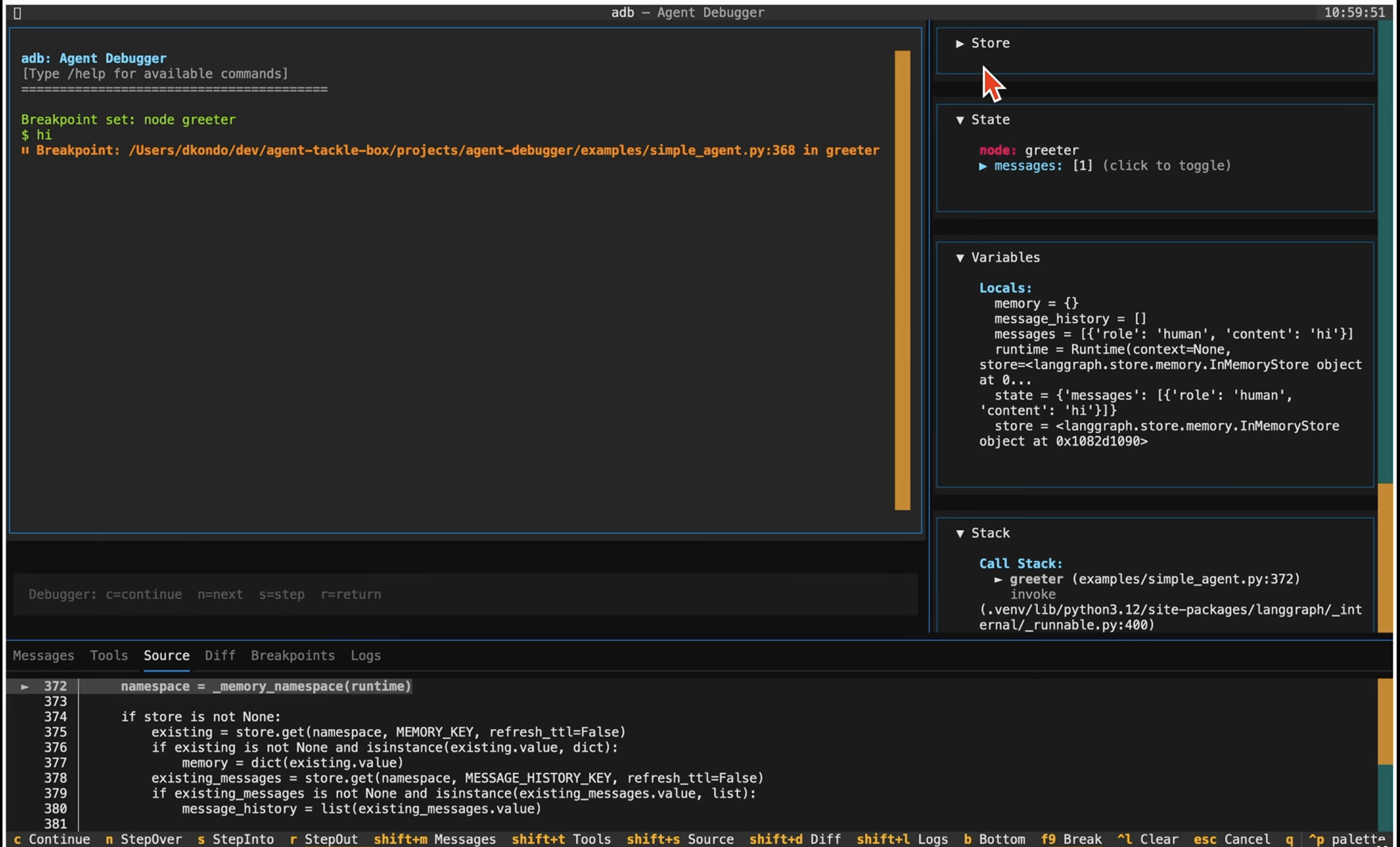
Features
- Application-level inspection: See agent state, messages, tool calls, state diffs
- Code-level debugging: Set breakpoints, step through code, inspect variables
- Agent-level "semantic" breakpoints: Break on node start, tool call, or state change
- Optional renderers/providers: Interfaces to render custom state, store, tools, chat output, and state mutation
- Drop-in breakpoints: Drop into the debugger from anywhere in your agent code with
breakpoint()statement
Motivation
An agent developer needs to answer two kinds of questions simultaneously:
-
Application-level: "How did state or memory change? What tools were called and how?"
-
Code-level: "Why did this node produce that output? What's in the local variables at line 42? Why did the conditional branch go left?"
When you stop at a breakpoint inside a node, you want to see both the Python locals and the graph-level context (which node, what triggered it, the full agent state).
The combined debugger adb makes "zoom in / zoom out" seamless
Also, adb enables generative debugging by providing interfaces and hooks for custom rendering of state, store, and chat output, and custom specification of inputs and state mutation.
The debugger is agent agnostic. The engineering design is based on an agent's event stream, and it extends Python’s standard-library debugger class (Bdb) .
The tool is released on pypi as agent-debugger.
Quick Start
# Install
uv add agent-debugger

# Debug a LangGraph agent script
adb run my_agent.py

# Attach to a specific graph object
adb attach my_module:graph

# Attach with optional renderers/providers
adb attach my_module:graph \
  --store-renderer my_mod:StoreRenderer \
  --state-renderer my_mod:StateRenderer \
  --output-renderer my_mod:ChatOutputRenderer \
  --tool-renderer my_mod:ToolRenderer \
  --state-mutator my_mod:StateMutator
Run from Source
# Create/update local env from this repo
uv sync --all-extras

# Run adb directly from source (project root)
uv run adb run examples/simple_agent.py

# Equivalent module invocation
uv run python -m agent_debugger.cli run examples/simple_agent.py
Without LiteLLM (default)
Uses deterministic, mock tool-calling responses — no API keys or network needed:
uv run adb run examples/simple_agent.py
With LiteLLM
Uses a real LLM via LiteLLM for tool-calling. Requires langchain-litellm (included in extras) and appropriate auth (e.g., Vertex service account / ADC):
# Default model (gemini/gemini-2.0-flash)
USE_LITELLM=1 uv run adb run examples/simple_agent.py

# Custom model
USE_LITELLM=1 LITELLM_MODEL=vertex_ai/gemini-2.0-flash uv run adb run examples/simple_agent.py
Simple Agent Demo
# Run simple_agent with all demo renderer/mutator extensions
uv run adb run examples/simple_agent.py \
  --store-renderer examples.simple_extensions:SimpleStoreRenderer \
  --output-renderer examples.simple_extensions:SimpleChatOutputRenderer \
  --tool-renderer examples.simple_extensions:SimpleToolRenderer \
  --state-mutator examples.simple_extensions:SimpleStateMutator

# Optional: enable LiteLLM tool-calling path in examples/simple_agent.py
# (example model uses Vertex + service account/ADC auth)
USE_LITELLM=1 LITELLM_MODEL=vertex_ai/gemini-2.0-flash uv run adb run examples/simple_agent.py \
  --store-renderer examples.simple_extensions:SimpleStoreRenderer \
  --output-renderer examples.simple_extensions:SimpleChatOutputRenderer \
  --tool-renderer examples.simple_extensions:SimpleToolRenderer \
  --state-mutator examples.simple_extensions:SimpleStateMutator
Usage
CLI commands
adb run vs adb attach
adb run my_agent.py: Execute a Python script and auto-detect (or choose via--graph) aCompiledStateGraphfrom that script.adb attach my_module:graph: Import and debug an already-exposed graph object from amodule:attributereference.
Both commands support the same optional debugger extensions (--store-renderer, --state-renderer, --output-renderer, --tool-renderer, --state-mutator, and --input-provider).
Debugger commands
# Set a breakpoint on a node
/break node agent

# Set a breakpoint on a tool
/break tool search_listings

# Break when a state key changes
/break state messages

# Standard Python breakpoint
/break line my_agent.py:42

# Clear local UI context
/clear

# Local clear + optional mutator mutation
/clear memory

# Quit (or press Ctl-c, Ctl-c)
/q
See /help in the TUI for all commands.
Programmatic Breakpoints
You can drop into the adb debugger from anywhere in your agent code using Python's built-in breakpoint():
PYTHONBREAKPOINT="adb.set_trace" adb run my_agent.py
Then add breakpoint() calls in your code:
def my_node(state: dict) -> dict:
    messages = state.get("messages", [])
    breakpoint()  # execution pauses here in the adb UI
    return {"messages": [...]}
Or call adb.set_trace() directly:
def my_node(state: dict) -> dict:
    import agent_debugger as adb; adb.set_trace()
    return {"messages": [...]}
Debug Keys
When at a breakpoint, use pudb-style keys:
| Key | Action |
|---|---|
c |
Continue execution |
n |
Step over (next line) |
s |
Step into |
r |
Step out (return / finish) |
Implementation note: When a breakpoint hits, the Input widget is disabled (inp.disabled = True). This prevents it from consuming keystrokes, so c/n/s/r go to the App's BINDINGS instead. When the user presses c (continue), the Input is re-enabled and re-focused.
Extensions
adb supports optional extensions that customize how your agent's data is displayed and how input is constructed. Extensions are plain Python classes — no base class required. adb uses duck typing, so any object with the right methods will work.
Pass extensions via CLI flags using module:Class references:
adb attach my_module:graph \
  --store-renderer my_ext:MyStoreRenderer \
  --state-renderer my_ext:MyStateRenderer \
  --output-renderer my_ext:MyChatOutputRenderer \
  --tool-renderer my_ext:MyToolRenderer \
  --state-mutator my_ext:MyStateMutator \
  --input-provider my_ext:MyInputProvider
If a class reference is provided, adb will instantiate it (call Class()) and
validate that the required methods exist. If loading fails, adb logs a warning
and falls back to default behavior.
StoreRenderer
Customizes the Store panel in the right sidebar.
| Method | Signature | Description |
|---|---|---|
render_store |
(snapshot: Mapping[str, Any]) -> MemoryRenderModel | None |
Render store contents. snapshot contains {"store_items": {...}}. |
from agent_debugger.extensions import MemoryRenderModel

class MyStoreRenderer:
    def render_store(self, snapshot):
        items = snapshot.get("store_items", {})
        lines = ["[bold cyan]My Store[/bold cyan]"]
        for ns, entries in items.items():
            lines.append(f"  {ns}: {len(entries)} items")
        return MemoryRenderModel(lines=lines)
StateRenderer
Customizes the State panel in the right sidebar.
| Method | Signature | Description |
|---|---|---|
render_state |
(snapshot: Mapping[str, Any]) -> StateRenderModel | None |
Render state contents. snapshot contains {"state": {...}}. |
from agent_debugger.extensions import StateRenderModel

class MyStateRenderer:
    def render_state(self, snapshot):
        state = snapshot.get("state", {})
        lines = [
            "[bold cyan]Agent State[/bold cyan]",
            f"messages: {len(state.get('messages', []))}",
            f"status: {state.get('status', 'unknown')}",
        ]
        return StateRenderModel(lines=lines)
ChatOutputRenderer
Customizes how agent responses appear in the main chat pane. This is useful
when your agent returns structured output (e.g., JSON with a text field and
metadata) and you want to display only the relevant parts.
| Method | Signature | Description |
|---|---|---|
can_render |
(payload: Mapping[str, Any]) -> bool |
Return True if this renderer handles the given payload. |
render_chat_output |
(payload, state, messages) -> ChatRenderModel | None |
Render the payload into display lines. |
The payload dict contains the raw agent response (e.g., additional_kwargs.parsed
from the AI message, or parsed JSON content). Lines support
Rich markup for styling.
from agent_debugger.extensions import ChatRenderModel

class MyChatOutputRenderer:
    def can_render(self, payload):
        return "text" in payload

    def render_chat_output(self, payload, state, messages):
        text = payload.get("text", "")
        lines = [text]
        recs = payload.get("recommendations", [])
        if recs:
            lines.append("")
            lines.append("[bold]Recommendations:[/bold]")
            for i, rec in enumerate(recs, 1):
                title = rec.get("title", "")
                lines.append(f"  {i}. [cyan]{title}[/cyan]")
        return ChatRenderModel(lines=lines)
ToolRenderer
Customizes the Tools tab in the bottom panel.
| Method | Signature | Description |
|---|---|---|
render_tools |
(snapshot: Mapping[str, Any]) -> ToolRenderModel | None |
Render tool call history. snapshot contains {"tool_calls": [...]}. |
Each tool call dict has keys: name, args, result, error, node, turn.
from agent_debugger.extensions import ToolRenderModel

class MyToolRenderer:
    def render_tools(self, snapshot):
        calls = snapshot.get("tool_calls", [])
        lines = [f"[bold]Tools ({len(calls)} calls)[/bold]"]
        for call in calls:
            name = call.get("name", "?")
            status = "[red]error[/red]" if call.get("error") else "[green]ok[/green]"
            lines.append(f"  {name} — {status}")
        return ToolRenderModel(lines=lines)
StateMutator
Handles custom /clear <mutation> commands (e.g., /clear memory).
| Method | Signature | Description |
|---|---|---|
mutate_state |
(mutation, args, current_state, runner) -> StateMutationResult | None |
Apply a named mutation. runner provides access to the graph and store. |
from agent_debugger.extensions import StateMutationResult

class MyStateMutator:
    def mutate_state(self, mutation, args, current_state, runner):
        if mutation != "memory":
            return StateMutationResult(applied=False, message="Unknown mutation.")
        store = getattr(getattr(runner, "graph", None), "store", None)
        if store is None:
            return StateMutationResult(applied=False, message="No store configured.")
        # ... clear store entries ...
        return StateMutationResult(applied=True, message="Memory cleared.")
InputProvider
Customizes the input dict sent to graph.stream(). Use this when your agent's
state schema requires fields beyond messages (e.g., user_id).
| Method | Signature | Description |
|---|---|---|
build_input |
(message: str) -> dict[str, Any] |
Build the input dict. Must include a "messages" key. |
import getpass

class MyInputProvider:
    def build_input(self, message):
        return {
            "messages": [{"role": "human", "content": message}],
            "user_id": getpass.getuser(),
        }
Render model line format
All render models (MemoryRenderModel, StateRenderModel, ChatRenderModel,
ToolRenderModel) contain a lines: list[str] field. Each string is rendered
as a separate line in the UI and supports
Rich console markup:
[bold cyan]Title[/bold cyan]       # bold cyan text
[dim]subtitle[/dim]               # dimmed text
[green]success[/green]            # green text
[red]error[/red]                  # red text
If markup parsing fails for a line, adb falls back to rendering it as plain text.
Full example
See examples/simple_extensions.py for a
working implementation of StoreRenderer, ChatOutputRenderer, ToolRenderer,
and StateMutator.
CLI Options
| Option | Default | Description |
|---|---|---|
--env-file |
.env |
Path to a dotenv file to load before starting. |
--thread-id, -t |
— | Thread ID for checkpointed graphs. |
--store-renderer |
— | Store panel renderer (module:Class). |
--state-renderer |
— | State panel renderer (module:Class). |
--output-renderer |
— | Chat output renderer (module:Class). |
--tool-renderer |
— | Tools panel renderer (module:Class). |
--state-mutator |
— | State mutator for /clear commands (module:Class). |
--input-provider |
— | Input provider for custom graph input (module:Class). |
--store-prefix |
— | Backend store namespace prefix (comma-separated). |
--store-max-namespaces |
20 |
Max store namespaces to display. |
--store-items-per-namespace |
20 |
Max items per namespace to display. |
Design
See Design.md.
Project details
Verified details
These details have been verified by PyPIProject links
GitHub Statistics
Maintainers


Download files
Download the file for your platform. If you're not sure which to choose, learn more about installing packages.
Source Distribution
Built Distribution
Filter files by name, interpreter, ABI, and platform.
If you're not sure about the file name format, learn more about wheel file names.
Copy a direct link to the current filters
File details
Details for the file agent_debugger-0.1.11.tar.gz.
File metadata
- Download URL: agent_debugger-0.1.11.tar.gz
- Upload date:
- Size: 273.9 kB
- Tags: Source
- Uploaded using Trusted Publishing? Yes
- Uploaded via: twine/6.1.0 CPython/3.13.7
File hashes
| Algorithm | Hash digest | |
|---|---|---|
| SHA256 |
fb2bdbd86e87de8ff8e4c1bbd96f302f71f8a304400d7689baed4181ef39f6fc
|
|
| MD5 |
7bb833c0695a1dddc00bb928723dbdba
|
|
| BLAKE2b-256 |
750788be3153240a82983fb943593b753cd8be94a192c26f1fdf9c75bfa34c45
|
Provenance
The following attestation bundles were made for agent_debugger-0.1.11.tar.gz:
Publisher:
release.yml on dkondo/agent-tackle-box
-
Statement:
-
Statement type:
https://in-toto.io/Statement/v1 -
Predicate type:
https://docs.pypi.org/attestations/publish/v1 -
Subject name:
agent_debugger-0.1.11.tar.gz -
Subject digest:
fb2bdbd86e87de8ff8e4c1bbd96f302f71f8a304400d7689baed4181ef39f6fc - Sigstore transparency entry: 977245445
- Sigstore integration time:
-
Permalink:
dkondo/agent-tackle-box@098b36f85bdcd5a6393984f45195d4d92e81cebb -
Branch / Tag:
refs/tags/v0.1.11 - Owner: https://github.com/dkondo
-
Access:
public
-
Token Issuer:
https://token.actions.githubusercontent.com -
Runner Environment:
github-hosted -
Publication workflow:
release.yml@098b36f85bdcd5a6393984f45195d4d92e81cebb -
Trigger Event:
push
-
Statement type:
File details
Details for the file agent_debugger-0.1.11-py3-none-any.whl.
File metadata
- Download URL: agent_debugger-0.1.11-py3-none-any.whl
- Upload date:
- Size: 48.5 kB
- Tags: Python 3
- Uploaded using Trusted Publishing? Yes
- Uploaded via: twine/6.1.0 CPython/3.13.7
File hashes
| Algorithm | Hash digest | |
|---|---|---|
| SHA256 |
5b59a60854acb78f33bb6b22ebdf8d2bc00ff487298d199ec9a4eb3fba9816ba
|
|
| MD5 |
f2af22dd47960bef314f3bfaf53a03f6
|
|
| BLAKE2b-256 |
b170249b222ef2d3b05cf871948d1b7fc7974900f0d93c3614e14fe524a8c1f5
|
Provenance
The following attestation bundles were made for agent_debugger-0.1.11-py3-none-any.whl:
Publisher:
release.yml on dkondo/agent-tackle-box
-
Statement:
-
Statement type:
https://in-toto.io/Statement/v1 -
Predicate type:
https://docs.pypi.org/attestations/publish/v1 -
Subject name:
agent_debugger-0.1.11-py3-none-any.whl -
Subject digest:
5b59a60854acb78f33bb6b22ebdf8d2bc00ff487298d199ec9a4eb3fba9816ba - Sigstore transparency entry: 977245455
- Sigstore integration time:
-
Permalink:
dkondo/agent-tackle-box@098b36f85bdcd5a6393984f45195d4d92e81cebb -
Branch / Tag:
refs/tags/v0.1.11 - Owner: https://github.com/dkondo
-
Access:
public
-
Token Issuer:
https://token.actions.githubusercontent.com -
Runner Environment:
github-hosted -
Publication workflow:
release.yml@098b36f85bdcd5a6393984f45195d4d92e81cebb -
Trigger Event:
push
-
Statement type:






