
agent-toolkit-cli
The official CLI for agent-toolkit — install skills, agents, loops, and MCP configs across every major AI coding assistant.




















Monorepo · Docs · Installation · CLI surfaces · Changelog
What is this package?
agent-toolkit-cli is the PyPI adapter for the agent-toolkit monorepo (ADR-021). Platform wheels bundle the native V binary; agent-toolkit / agent-toolkit-cli are a thin trampoline (same idea as the npm package). There is no Python CLI fallback — see python-fallback.md.
It also ships:
- bundled skills, agents, loops, profiles, packs, and MCP templates
- install / doctor / sync workflows that deploy the right artifacts per AI tool
One CLI. Any coding assistant. Zero duplication.
uvx --from agent-toolkit-cli agent-toolkit install
agent-toolkit doctor
Quick start
Recommended: uv — no permanent install required.
# One-shot (preferred)
uvx --from agent-toolkit-cli agent-toolkit install
uvx --from agent-toolkit-cli agent-toolkit doctor

# Or install the CLI persistently
uv tool install agent-toolkit-cli
agent-toolkit install    # auto-detects Claude, Cursor, OpenCode, Windsurf, Pi, Copilot
agent-toolkit doctor
Other installers
pip install agent-toolkit-cli
pipx install agent-toolkit-cli

# System packages (release notify → dedicated taps)
brew tap ulises-jeremias/homebrew-tap && brew install agent-toolkit
yay -S agent-toolkit-bin   # Arch Linux (AUR) — GitHub Release V binary; not the Python AUR package
docker pull ghcr.io/ulises-jeremias/agent-toolkit
Full walkthrough: docs/INSTALLATION.md
Desktop GUI
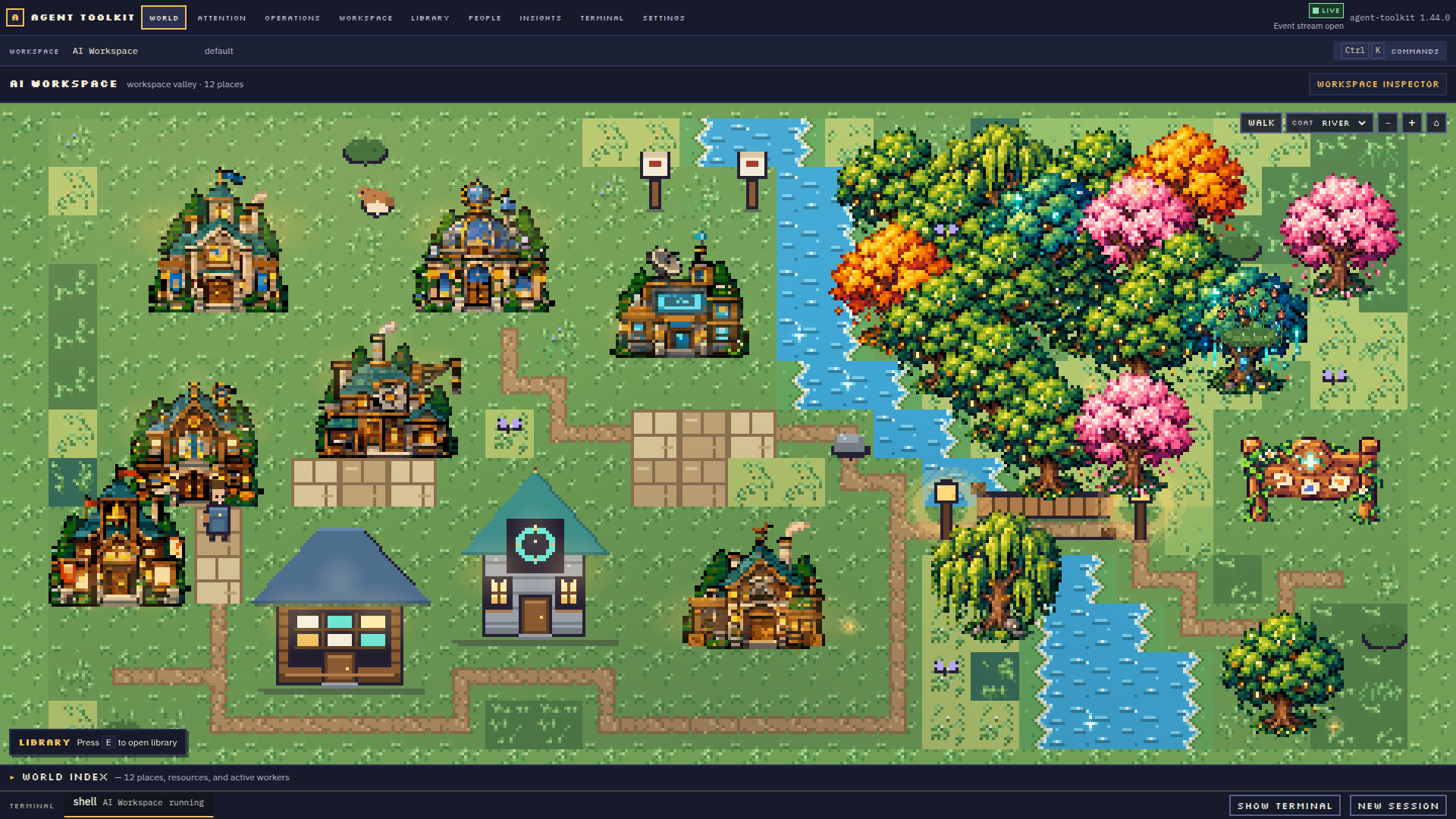
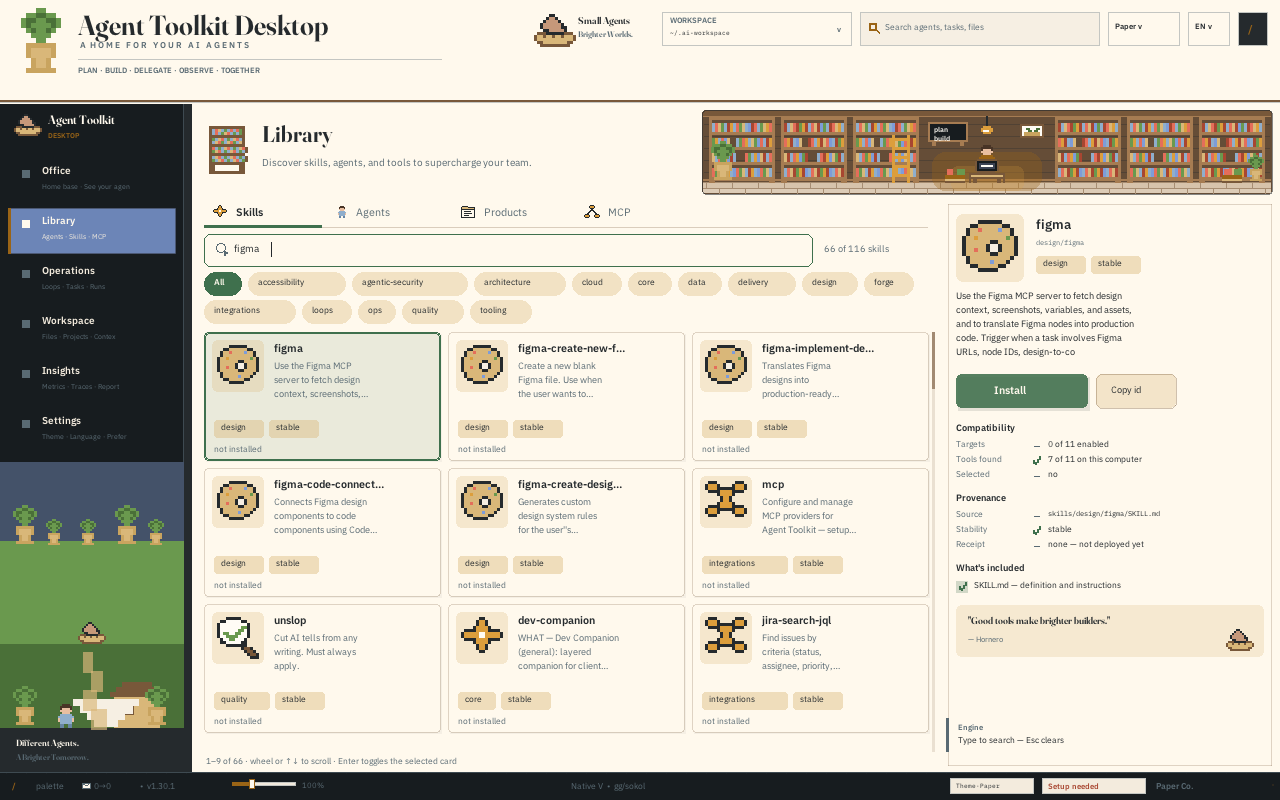
Agent Toolkit Desktop is a standalone Electron app over the same V backend. It opens with a semantic pixel-art workspace and includes project interiors, People, Library, Operations, and real PTY terminals. Download the installer for your platform from GitHub Releases; a CLI or source checkout is not required to use Desktop. See the Desktop product guide and packaging notes.
Key concepts
🛠️ SkillsReusable capability units (SKILL.md) that teach an agent how to do a job — delivery, forge CLIs, design, data, ops.
80 skills across domains. Browse with agent-toolkit inventory or agent-toolkit skills list.
|
🤖 AgentsPersonas that constrain how the AI works — review, plan, architect, fix CI — without rewriting prompts each time.17 personas, compiled into each target's native format via install.
|
🔄 LoopsRecurring agentic workflows with mutation-safety tiers (L1 observe → L2 controlled → L3 high autonomy).agent-toolkit loop run daily-triage · 10 bundled templates
|
🔗 MCPProvider registry + ready templates (GitHub, Slack, Notion, Linear, Figma, ClickUp) emitted into target-native configs.agent-toolkit mcp list · mcp setup <provider> · mcp doctor
|
Supported tools
| Tool | What install deploys |
|---|---|
| Claude Code | Plugin manifest, skill references, settings |
| Cursor | Marketplace plugins + .mdc rules (IDE + Agent CLI) |
| OpenCode | System prompt overlays, agent configs |
| GitHub Copilot | copilot-instructions.md with domain selection |
| Windsurf | Rules and memory files via Cascade (~/.codeium/windsurf/) |
| Pi Agent | Skills and loop templates in Pi's native format |
| Muse Code | Agent Skills under ~/.config/muse/skills/ |
# Target specific tools
agent-toolkit install --tools claude-code,cursor
agent-toolkit install --dry-run
agent-toolkit install --force
Command reference
Everyday consumer commands vs advanced workstation / harness commands. Details: docs/CLI_SURFACES.md
Consumer
| Command | Purpose |
|---|---|
install |
Install profiles for detected or selected AI tools |
update |
Refresh installed profiles from latest toolkit data |
uninstall |
Remove toolkit-owned files using install receipts |
doctor |
Check toolkit data and tool availability |
diff |
Show changes vs currently installed plugin bundles |
skills |
Sync, list, and validate skills |
mcp |
MCP provider setup, health, doctor, uninstall |
plugin |
Plugin bundle sync and check |
agent-toolkit skills list
agent-toolkit skills sync --tools claude-code,cursor
agent-toolkit mcp setup github
agent-toolkit doctor --fix
Advanced
Still on the same binary — start here when running an agentic-harness-style workspace:
| Command | Purpose |
|---|---|
loop |
Loop engineering: init, run, status, audit, cost, schedule, sync |
workspace |
Workspace scaffolding: init, context, personas, packs |
memory |
Knowledge base: add, search, inject, review, todo |
project |
Project index: clone, list, add, remove, scan |
devcompanion |
Background job queue (dc alias) |
insights |
Local usage analytics (OpenCode, Cursor, Claude) |
inventory |
List skills, agents, and products |
matrix |
Platform capability matrix |
build / release |
Compile / release artifacts (maintainer) |
# Loops (mutation-safety tiers L1 → L3)
agent-toolkit loop init daily-triage
agent-toolkit loop run daily-triage
agent-toolkit loop status
agent-toolkit loop audit daily-triage

# Workspace harness
agent-toolkit workspace init --dir ~/.agentic-harness
agent-toolkit memory search "topic"
agent-toolkit project clone owner/my-repo
agent-toolkit inventory
| Tier | Posture | Examples |
|---|---|---|
| L1 | Observe / propose (report-only) | oss-daily-briefing, daily-triage, oss-triage |
| L2 | Controlled mutations (PR-gated) | ci-sweeper, dep-sweeper, pr-babysitter |
| L3 | High autonomy (allowlist) | oss-pr-monitor |
Optional dependencies
# YAML-backed pack / catalog features
uv tool install "agent-toolkit-cli[yaml]"

# Everything optional
uv tool install "agent-toolkit-cli[all]"
| Extra | Provides |
|---|---|
yaml |
PyYAML for pack overlays and richer catalog parsing |
all |
Currently same as yaml |
dev |
pytest, ruff (contributors) |
Upgrade & uninstall
uv tool upgrade agent-toolkit-cli
agent-toolkit update          # refresh deployed profiles
agent-toolkit uninstall       # remove toolkit-owned files via receipts

uv tool uninstall agent-toolkit-cli
# or: pip uninstall agent-toolkit-cli
Ecosystem
agent-toolkit is the capability distribution layer (L1.5) in a personal DX stack:
| Layer | Repo | Role |
|---|---|---|
| L1 | agentic-workstation | Machine provisioning — chezmoi, shell, packages, LLM policy |
| L1.5 | agent-toolkit (this CLI) | Skills, loops, profiles, MCP |
| L3 | agentic-harness | AI workspace scaffold — memory, personas, multi-repo orchestration |
Documentation
| Guide | Description |
|---|---|
| README (monorepo) | Full product overview, skills, agents, packs |
| INSTALLATION.md | Install paths per tool |
| CLI_SURFACES.md | Consumer vs advanced commands |
| LOOPS.md | Loop engineering reference |
| TRUST.md | Trust boundaries and supply chain |
| COMPATIBILITY.md | Python / tool matrix |
| Wiki | Extended reference |
Canonical sources live in the agent-toolkit monorepo. This package is the installable distribution of that source of truth.
Requirements
- Python 3.10+
- Optional: uv for
uvx/uv toolworkflows - At least one supported AI coding assistant (for
installto deploy profiles)
Contributing
Issues and PRs welcome on the monorepo:
- Contributing guide
- Discord
- Package changelog:
CHANGELOG.md
git clone https://github.com/ulises-jeremias/agent-toolkit
cd agent-toolkit
uv sync --project packages/pypi/agent-toolkit-cli --all-extras
uv run --project packages/pypi/agent-toolkit-cli --directory . agent-toolkit --help
MIT © ulises-jeremias · PyPI · npm · AUR · GitHub
1 maintainer

Metadata
1 maintainer
Release files for agent-toolkit-cli 1.42.0
For a detailed explanation of source distributions (sdists) and built distributions (wheels), please see the package formats documentation.
Source distribution (sdist)
| File | Size | Uploaded | |
|---|---|---|---|
| agent_toolkit_cli-1.42.0.tar.gz | 953.9 kB | Details |
Built distributions (wheels)
| File | Reset | |||
|---|---|---|---|---|
| agent_toolkit_cli-1.42.0-py3-none-win_amd64.whl | Python 3 | none | Windows x86-64 | Details |
| agent_toolkit_cli-1.42.0-py3-none-manylinux_2_38_x86_64.whl | Python 3 | none | Linux glibc 2.38+ x86-64 | Details |
| agent_toolkit_cli-1.42.0-py3-none-manylinux_2_38_aarch64.whl | Python 3 | none | Linux glibc 2.38+ ARM64 | Details |
| agent_toolkit_cli-1.42.0-py3-none-macosx_11_0_x86_64.whl | Python 3 | none | macOS 11.0+ x86-64 | Details |
| agent_toolkit_cli-1.42.0-py3-none-macosx_11_0_arm64.whl | Python 3 | none | macOS 11.0+ ARM64 | Details |
Total release size: 35.5 MB
Release files / agent_toolkit_cli-1.42.0.tar.gz
| Download URL | agent_toolkit_cli-1.42.0.tar.gz |
|---|---|
| Size | 953.9 kB |
| Tags | Source |
|
SHA-256 checksum How to use checksums |
a220b6b9a5f2c430a0956848136ac7668f4b74155aeb9a766f04cba892a2ad94
|
|
BLAKE2b-256 checksum How to use checksums |
e151f664734f49d242fb7ef0a41f7d045dd416042fa460243526886b89b2aa64
|
| Upload date | |
|
Uploaded using Trusted Publishing? What is trusted publishing? |
Yes |
| Uploaded via |
twine/7.0.0 CPython/3.13.14
|
Provenance
Provenance describes where a file came from. On PyPI, provenance is shared via attestations, which provide a verifiable record of the build or publishing details. View details, limitations and caveats.


PyPI Publish Attestation
PyPI verified that this artifact, at this checksum, originated from the publisher listed below.
Signed by GitHub Actions, verified by PyPI on Oct 6, 2026.
Transparency logRelease files / agent_toolkit_cli-1.42.0-py3-none-win_amd64.whl
| Download URL | agent_toolkit_cli-1.42.0-py3-none-win_amd64.whl |
|---|---|
| Size | 8.7 MB |
| Tags | Python 3 Windows x86-64 |
|
SHA-256 checksum How to use checksums |
bbf7dc2b03779ebf68bd40f6f8abd8db8d4887d60b28caa666a6cf366460cf65
|
|
BLAKE2b-256 checksum How to use checksums |
661227cbdc13b115c626e0d67c0316aec98e5284c55de2171f284d365986f730
|
| Upload date | |
|
Uploaded using Trusted Publishing? What is trusted publishing? |
Yes |
| Uploaded via |
twine/7.0.0 CPython/3.13.14
|
Provenance
Provenance describes where a file came from. On PyPI, provenance is shared via attestations, which provide a verifiable record of the build or publishing details. View details, limitations and caveats.
PyPI Publish Attestation
PyPI verified that this artifact, at this checksum, originated from the publisher listed below.
Signed by GitHub Actions, verified by PyPI on Oct 6, 2026.
Transparency logRelease files / agent_toolkit_cli-1.42.0-py3-none-manylinux_2_38_x86_64.whl
| Download URL | agent_toolkit_cli-1.42.0-py3-none-manylinux_2_38_x86_64.whl |
|---|---|
| Size | 6.9 MB |
| Tags | Linux glibc 2.38+ x86-64 Python 3 |
|
SHA-256 checksum How to use checksums |
eaf388458a6826be709d6d1f1c9f1b719f875c495d839a040b42976b3e8c7385
|
|
BLAKE2b-256 checksum How to use checksums |
b88399c4b6e849e3f98f7a32effeb6eb2152df57c7422abe47d0e13c2d58920e
|
| Upload date | |
|
Uploaded using Trusted Publishing? What is trusted publishing? |
Yes |
| Uploaded via |
twine/7.0.0 CPython/3.13.14
|
Provenance
Provenance describes where a file came from. On PyPI, provenance is shared via attestations, which provide a verifiable record of the build or publishing details. View details, limitations and caveats.
PyPI Publish Attestation
PyPI verified that this artifact, at this checksum, originated from the publisher listed below.
Signed by GitHub Actions, verified by PyPI on Oct 6, 2026.
Transparency logRelease files / agent_toolkit_cli-1.42.0-py3-none-manylinux_2_38_aarch64.whl
| Download URL | agent_toolkit_cli-1.42.0-py3-none-manylinux_2_38_aarch64.whl |
|---|---|
| Size | 6.7 MB |
| Tags | Linux glibc 2.38+ ARM64 Python 3 |
|
SHA-256 checksum How to use checksums |
040765650e79e186e94152fa54dddb52f3b4a517d8cd7cd1e43b8dd558e2638a
|
|
BLAKE2b-256 checksum How to use checksums |
b6e56748cbe33318b2cea6740ef74efa6a5f9d18902ef1804607a35c812658f5
|
| Upload date | |
|
Uploaded using Trusted Publishing? What is trusted publishing? |
Yes |
| Uploaded via |
twine/7.0.0 CPython/3.13.14
|
Provenance
Provenance describes where a file came from. On PyPI, provenance is shared via attestations, which provide a verifiable record of the build or publishing details. View details, limitations and caveats.
PyPI Publish Attestation
PyPI verified that this artifact, at this checksum, originated from the publisher listed below.
Signed by GitHub Actions, verified by PyPI on Oct 6, 2026.
Transparency logRelease files / agent_toolkit_cli-1.42.0-py3-none-macosx_11_0_x86_64.whl
| Download URL | agent_toolkit_cli-1.42.0-py3-none-macosx_11_0_x86_64.whl |
|---|---|
| Size | 6.2 MB |
| Tags | Python 3 macOS 11.0+ x86-64 |
|
SHA-256 checksum How to use checksums |
5f25c44a95074bcf14237369aab9d6ebac31ae9e877fe04c1af93f72192ba7fb
|
|
BLAKE2b-256 checksum How to use checksums |
7ce1228197249424e11e1076deb371e959a5122626df12530b4675df255c5a1c
|
| Upload date | |
|
Uploaded using Trusted Publishing? What is trusted publishing? |
Yes |
| Uploaded via |
twine/7.0.0 CPython/3.13.14
|
Provenance
Provenance describes where a file came from. On PyPI, provenance is shared via attestations, which provide a verifiable record of the build or publishing details. View details, limitations and caveats.
PyPI Publish Attestation
PyPI verified that this artifact, at this checksum, originated from the publisher listed below.
Signed by GitHub Actions, verified by PyPI on Oct 6, 2026.
Transparency logRelease files / agent_toolkit_cli-1.42.0-py3-none-macosx_11_0_arm64.whl
| Download URL | agent_toolkit_cli-1.42.0-py3-none-macosx_11_0_arm64.whl |
|---|---|
| Size | 6.0 MB |
| Tags | Python 3 macOS 11.0+ ARM64 |
|
SHA-256 checksum How to use checksums |
48f9b1d9e7ecd7702767ad8464a582ca664f9c15914b961755e717170d3a3838
|
|
BLAKE2b-256 checksum How to use checksums |
64bd463cf2b68d431a57c6e10d7439b73fe76bc895914688b2767c95f56ff36c
|
| Upload date | |
|
Uploaded using Trusted Publishing? What is trusted publishing? |
Yes |
| Uploaded via |
twine/7.0.0 CPython/3.13.14
|
Provenance
Provenance describes where a file came from. On PyPI, provenance is shared via attestations, which provide a verifiable record of the build or publishing details. View details, limitations and caveats.
PyPI Publish Attestation
PyPI verified that this artifact, at this checksum, originated from the publisher listed below.
Signed by GitHub Actions, verified by PyPI on Oct 6, 2026.
Transparency log













