
AI Ledger
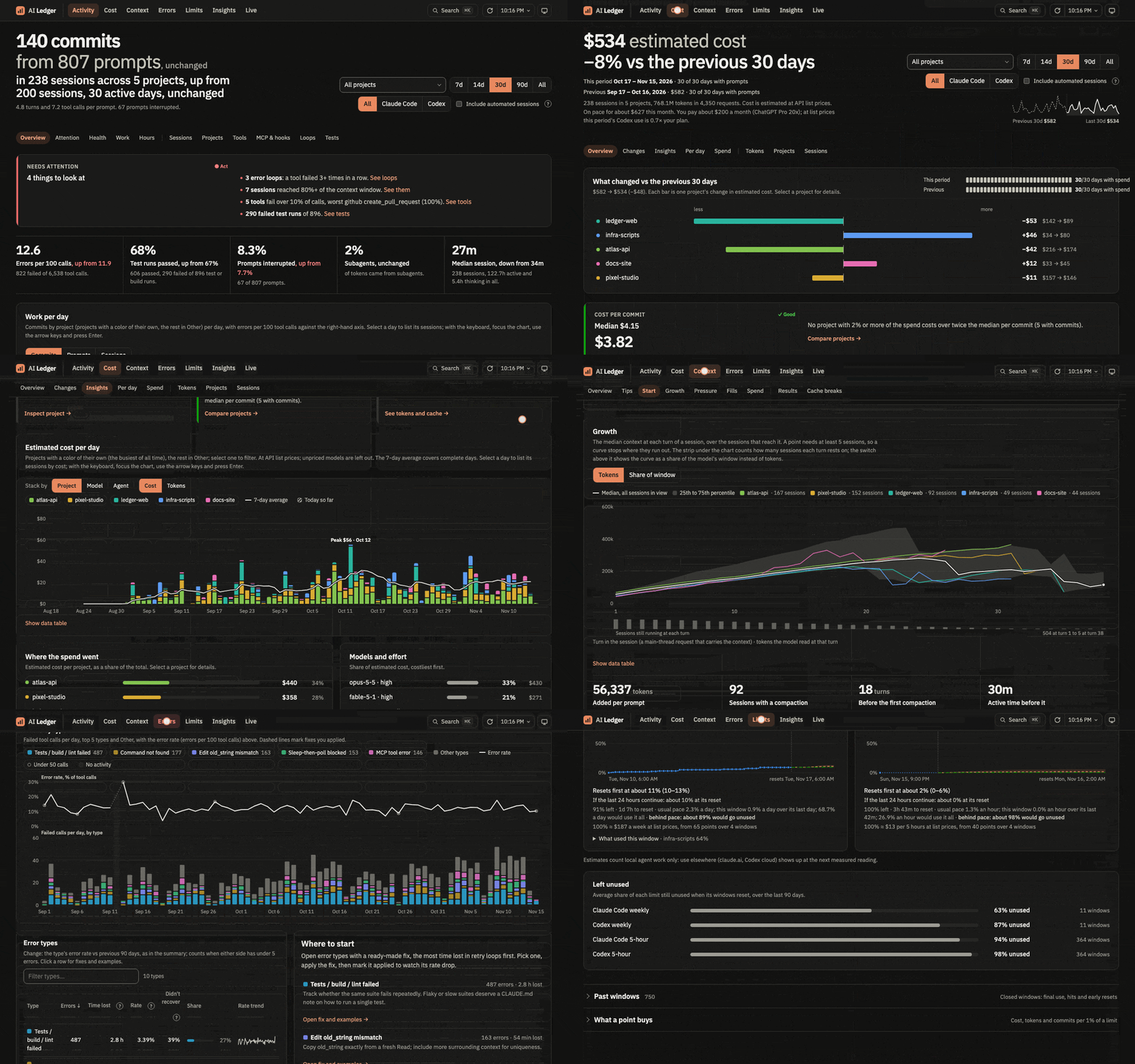
A local ledger of your Claude Code and Codex transcripts, with six pages: Activity, Cost, Errors, Limits, Insights and Live.
Why
Coding agents leave a full record of their work on disk, then delete or archive it. That record answers questions their own UIs don't:
- What did the agents get done, and where did they struggle?
- What did it cost, and why did that change?
- Which errors keep coming back, and how do I stop them?
- Will I hit my plan limit before it resets?
- What are my agents doing right now?
Everything stays on your machine: the server listens on 127.0.0.1 only. The store keeps every transcript line, even after the agent deletes the file. Claude Code and Codex share the same tables, so every page filters by source. Filters and open sheets live in the URL.
Run
Needs uv; it fetches Python 3.14 when you have none. macOS and Linux.
uvx ai-ledger # http://127.0.0.1:8765/ (use 127.0.0.1, not localhost)
Or install the ai-ledger command:
uv tool install ai-ledger
ai-ledger
uv tool upgrade ai-ledger   # later, to get a new version and its prices
The first start reads every transcript (about 4 minutes for 3.4 GB). After that the app reads new lines every 60 seconds, every second while a Live page is open, or when you click Refresh.
Stop the app before you run these commands, because the app keeps the store open (with uvx, run uvx ai-ledger ingest):
ai-ledger ingest            # read new transcript lines and /insights data once
ai-ledger rebuild           # recompute the derived tables, e.g. after a parser change
A store from before session titles needs one rebuild to title past Claude Code sessions.
Options: --port <number> (default 8765), --projects <dir> (default ~/.claude/projects), --codex <dir> (default ~/.codex), --usage-data <dir> (default ~/.claude/usage-data), --db <file> (default: the store in the data folder). ai-ledger --version prints the version.
The store is one file in your data folder:
- macOS:
~/Library/Application Support/ai-ledger/ai-ledger.duckdb - Linux:
$XDG_DATA_HOME/ai-ledger/ai-ledger.duckdb, or~/.local/share/ai-ledger/ai-ledger.duckdbwhenXDG_DATA_HOMEis unset
Upgrades keep it.
What it reads and sends
- It reads your Claude Code transcripts (
~/.claude/projects), Claude Code's/insightsdata (~/.claude/usage-data) and your Codex sessions (~/.codex). - It stores every transcript line in full in the store, including any secrets that appeared in a session: API keys, tokens, passwords, file contents. The store and its folder are readable only by your user. Do not share the store.
- It sends, on macOS only, the Claude Code OAuth token from your Keychain to Anthropic's usage endpoint, every 5 minutes, for the Limits page. The endpoint is undocumented and can change without notice; Limits then falls back to estimates from your transcripts. The token goes only to that endpoint and is never stored or logged.
- Your browser loads the pages' font from Google Fonts. No transcript data goes with it. Nothing else leaves your machine.
- It listens on
127.0.0.1only, and answers only requests addressed to it there. - Prices for the Cost page ship with each release. Upgrade to get new ones.
Pages
Pages name each session by its title: the name you gave it (/rename in Claude Code), else the title the agent wrote (Claude Code's own title, Codex's thread name), else the start of its first prompt.
Activity: what got done and what needs attention, per day, session and tool.
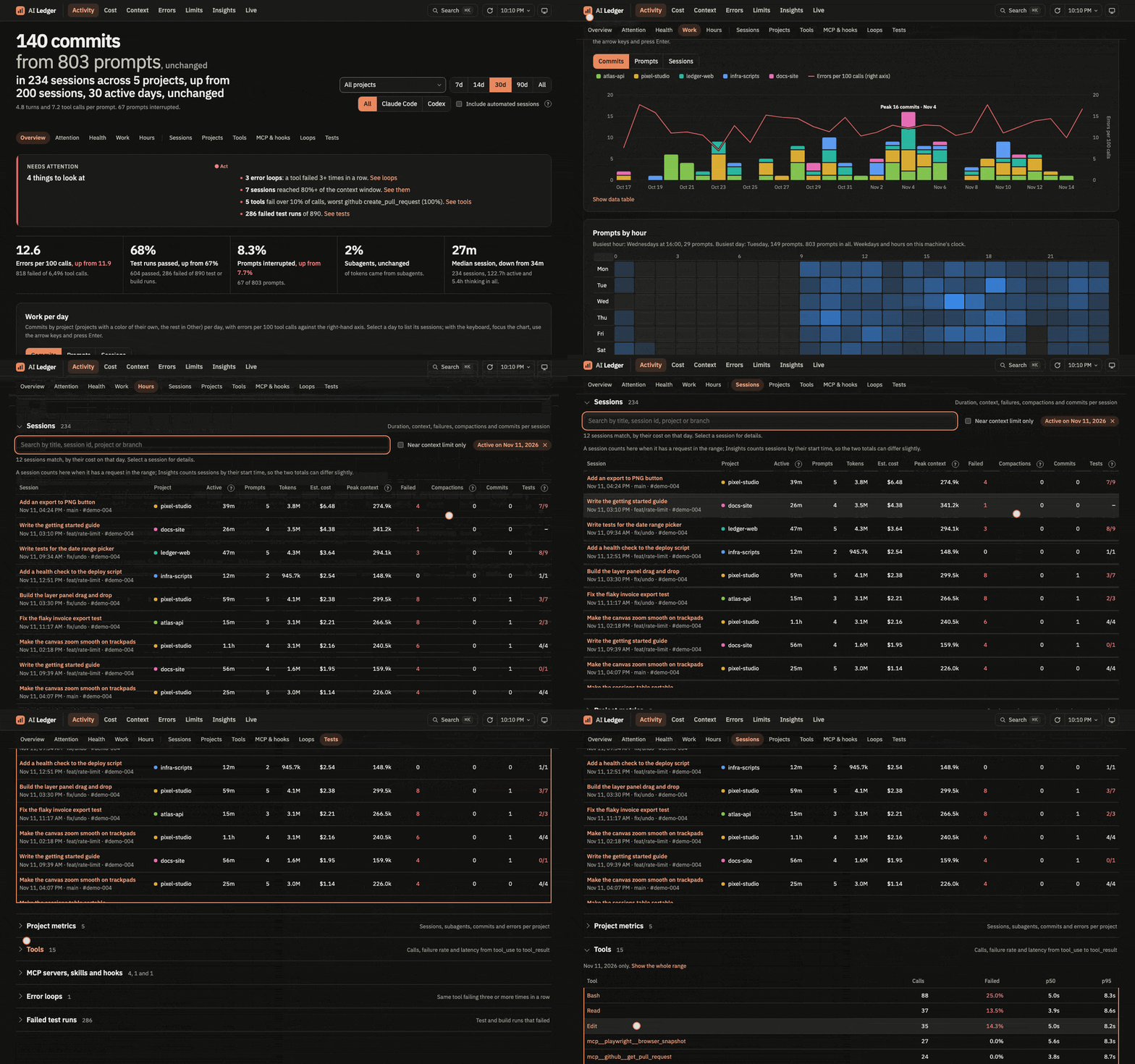
Cost: estimated cost at API list prices against the period before, per project, day, model and session. Prices come from prices.json, which ships with each release.
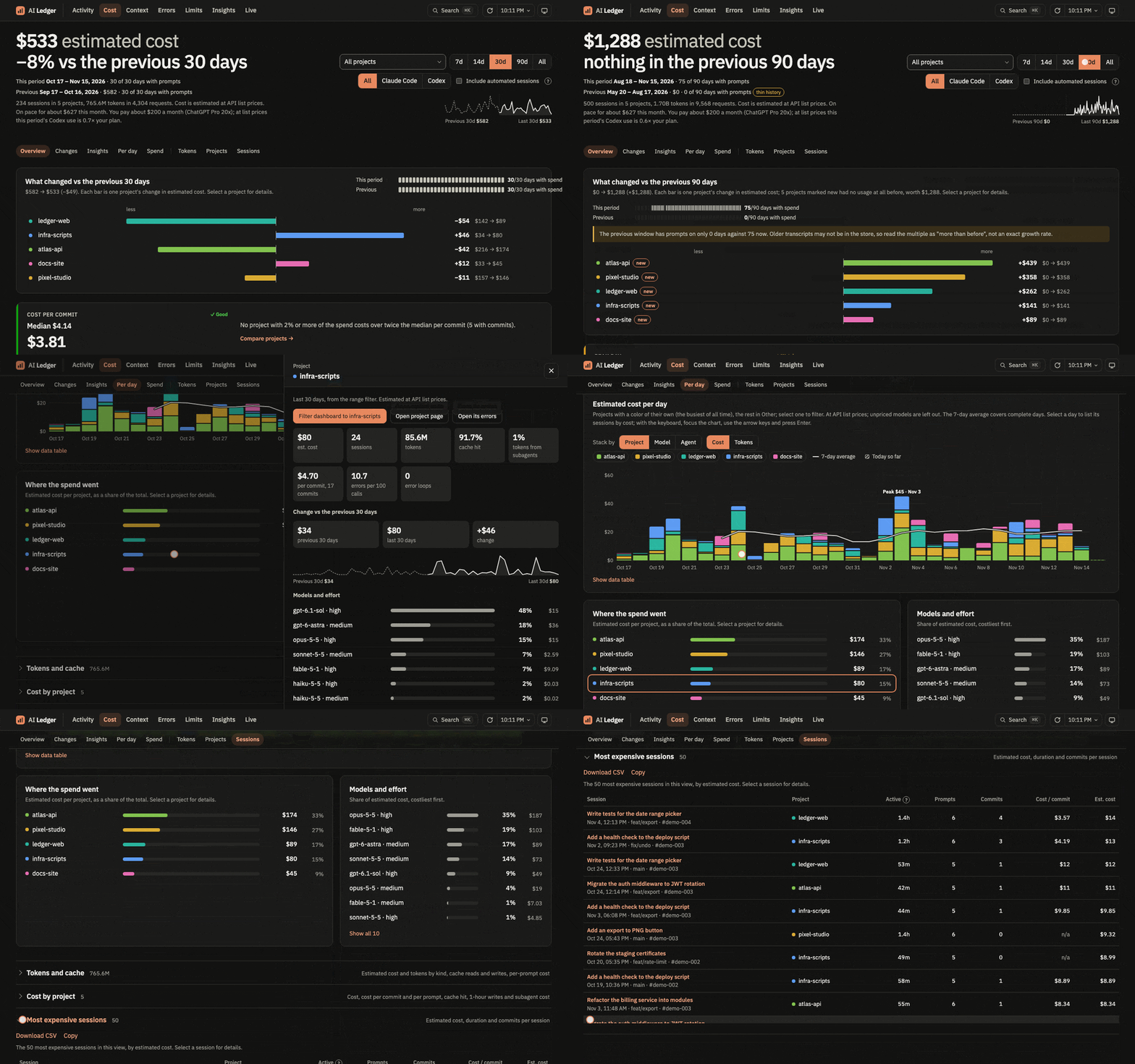
Errors: failed tool calls by type, the error rate over time, and a fix to paste into CLAUDE.md for each type.
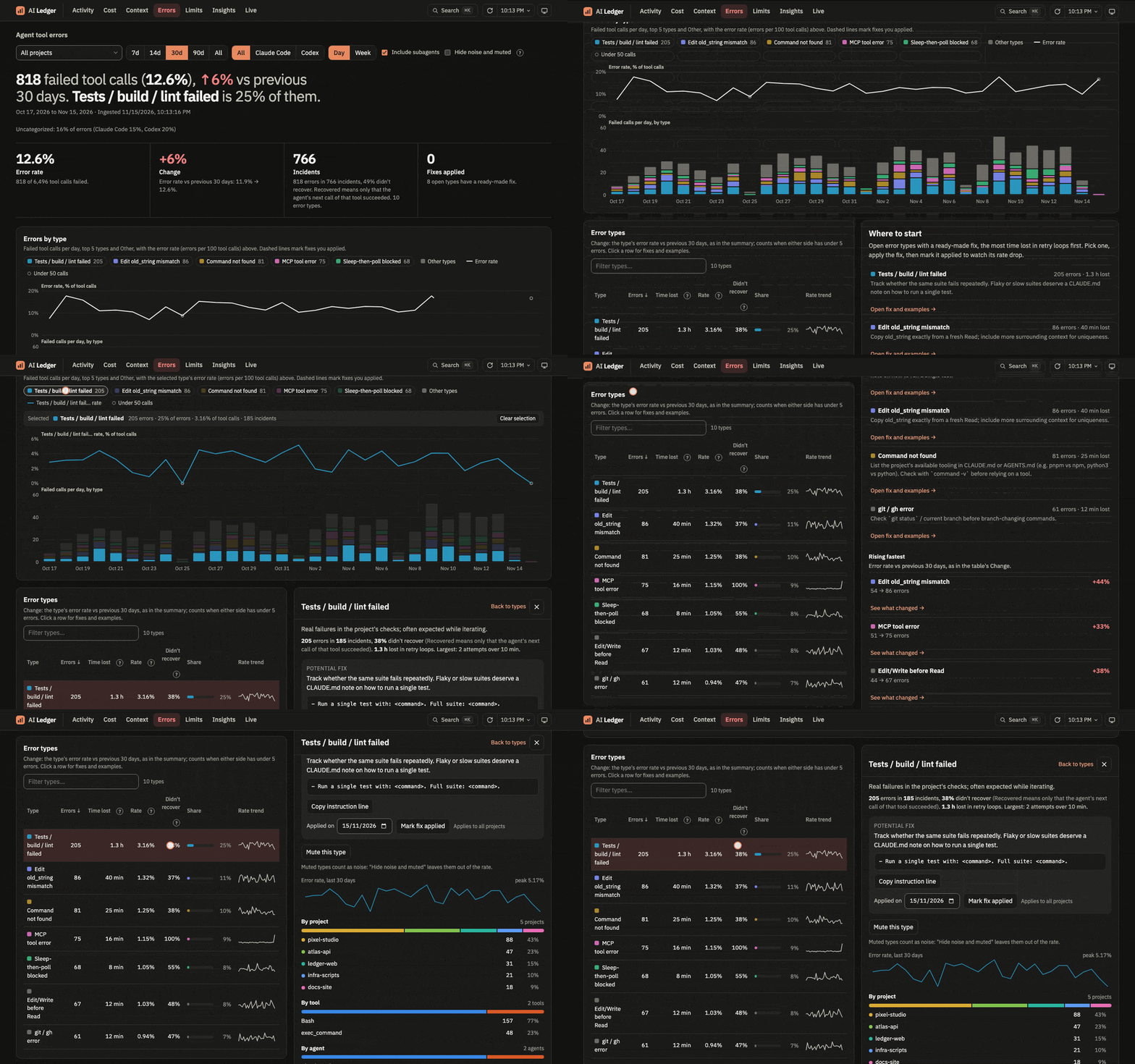
Limits: usage of each plan limit window, with a forecast to its reset.
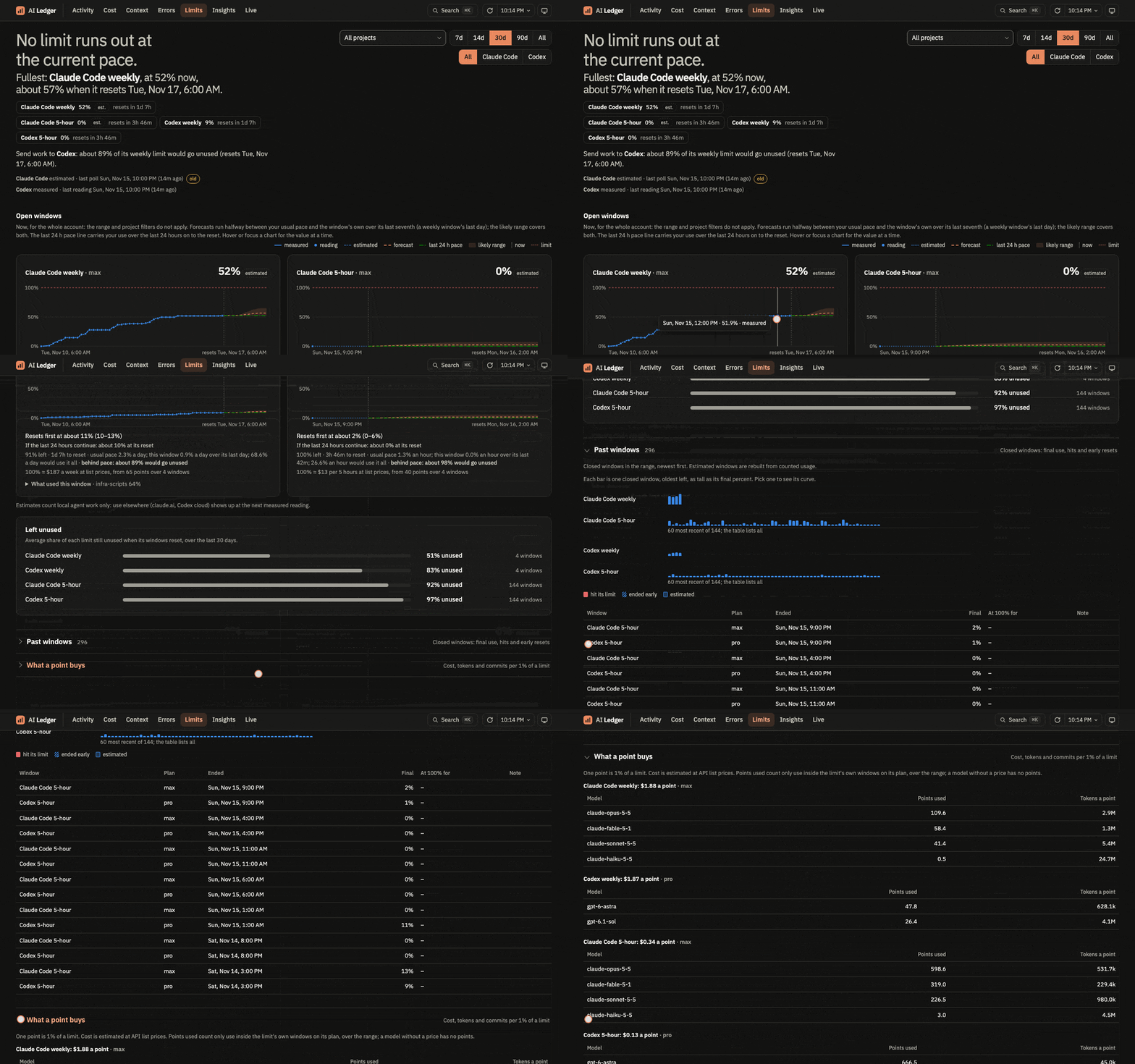
Codex writes its limits into its session files. For Claude Code, the app polls Anthropic's undocumented usage endpoint every 5 minutes, using the OAuth token from the macOS Keychain. The token goes only to that endpoint and is never stored or logged. Off macOS, the app does not poll. Between readings, the page estimates usage from transcripts and labels it as estimated.
Insights: how Claude Code's /insights command judged your sessions: outcomes, satisfaction, friction, goals. These are model judgments, not measurements. Run /insights in Claude Code to analyse more sessions, then Refresh.
Live: the sessions active in the last 10 minutes, as their lines arrive. Pick a session to follow its prompts, replies and tool calls, with a timer on each running call, subagent work in lanes you can fold, and its context window, cost and plan limits beside it. Wall shows every active session at once.
Each session has a state: running a tool, thinking, your turn, likely waiting for approval, or idle. Transcripts record neither a request in flight (Claude Code) nor a permission prompt, so thinking and likely waiting for approval are guesses and the page marks them as inferred: a shell call pending for more than 30 seconds counts as likely waiting for approval.
The stream shows prompts and replies as word counts and tool output as a size. Full text shows them as written; it is off each time the page loads. A title made from the first prompt is prompt text too, so Live shows it only with Full text on, and the project until then.
Command palette
Press Cmd+K (Ctrl+K elsewhere) to build a view in one step. Type # to filter and > to go somewhere or run a command:
#filters: a project, a source (#claude,#codex), a range (#7d,#30d,#all) or#automated.>destinations: a page (>errors), an inspector (>bash, an MCP server, a skill, a session), or a command (>refresh,>copy link).
Examples:
>errors #myprojectopens Errors filtered tomyproject.#myproject >bashopens the Bash inspector on the current page, formyproject.#myproject #codex #7d >costopens Cost with those three filters.>errors >bashopens Errors with the Bash inspector over it.
Privacy
The store holds full transcript content, including any secrets that appeared in a session (see What it reads and sends). Do not share it.
The Live page's Full text puts that content on screen, secrets included. The app sends it only while the toggle is on. Turn it off before you share your screen.
Contributing
Needs uv, and Node for the pages.
uv sync
uv run ai-ledger                        # the app from your checkout, on http://127.0.0.1:8765/
uv run ai-ledger --db <copy> --port 8766    # a second app on a copy of the store, beside the running one
uv run python -m unittest discover -s tests
cd web && npm install && npm run dev    # http://127.0.0.1:5173, /api proxied to the running app
cd web && npm run check                 # typecheck, tests and build: run before committing
The Python code lives in src/ai_ledger/. The pages build into src/ai_ledger/web/, which ships in the package: commit it with every web/src change. A test fails when the build is stale.
Upgrading a checkout from before 0.1.0: the app no longer runs with uv run app.py, and the store no longer lives in the checkout. Run uv sync, then uv run ai-ledger. On its first start the app moves data/ai-ledger.duckdb (or the older data/claude.duckdb), with its .wal file, to the data folder above. If you pass --db data/ai-ledger.duckdb in scripts, point them at the new path. If the data folder is on another disk, the app stops and says so: move the file by hand, or pass --db with its path.
To record the GIFs again from made-up data:
uv run tools/demo/seed.py                     # synthetic store in tools/demo/demo.duckdb
uv run tools/demo/serve.py                    # serves it on 127.0.0.1:8799
uv run tools/demo/replay.py                   # optional, second terminal: plays made-up sessions for the Live page
# in a second terminal:
cd tools/demo && npm install && npx playwright install chromium-headless-shell && npm run record    # needs gifski
Release
Pushing a tag v<version> runs .github/workflows/release.yml: the checks, a smoke test of the wheel on macOS and Linux, the PyPI upload and the GitHub release.
- Set
versioninpyproject.toml, runuv lock, and add a## [<version>] - <date>section toCHANGELOG.md. - Commit on
main, thengit tag v<version>andgit push origin v<version>.
License
1 maintainer

Metadata
1 maintainer
Release files for ai-ledger 0.1.0
For a detailed explanation of source distributions (sdists) and built distributions (wheels), please see the package formats documentation.
Source distribution (sdist)
| File | Size | Uploaded | Provenance | Actions |
|---|---|---|---|---|
| ai_ledger-0.1.0.tar.gz | 214.3 kB | Without provenance | Details for ai_ledger-0.1.0.tar.gz |
Built distribution (wheel)
| File | Interpreter | ABI | Platform | Actions Reset |
|---|---|---|---|---|
| ai_ledger-0.1.0-py3-none-any.whl | Python 3 | none | any | Details for ai_ledger-0.1.0-py3-none-any.whl |
Total release size: 434.0 kB
Release files / ai_ledger-0.1.0.tar.gz
| Download URL | ai_ledger-0.1.0.tar.gz |
|---|---|
| Size | 214.3 kB |
| Tags | Source |
|
SHA-256 checksum How to use checksums |
80586e05f5a92d44b03bec59f14aefdf5ce1462065f93968aa384c9e52254840
|
|
BLAKE2b-256 checksum How to use checksums |
91b1387bc352b25adbc04f3bb66efc43aef3664ba4faf80923c9d4f4b25a92bd
|
| Upload date | |
|
Uploaded using Trusted Publishing? What is trusted publishing? |
Yes |
| Uploaded via |
uv/0.13.7 {"installer":{"name":"uv","version":"0.13.7","subcommand":["publish"]},"python":null,"implementation":{"name":null,"version":null},"distro":{"name":"Ubuntu","version":"26.04","id":"resolute","libc":null},"system":{"name":null,"release":null},"cpu":null,"openssl_version":null,"setuptools_version":null,"rustc_version":null,"ci":true}
|
Release files / ai_ledger-0.1.0-py3-none-any.whl
| Download URL | ai_ledger-0.1.0-py3-none-any.whl |
|---|---|
| Size | 219.7 kB |
| Tags | Python 3 |
|
SHA-256 checksum How to use checksums |
8b0d44a3945d634ba772d1fb260343b1e110197f1693cce9ec8e9a4ca0b48e6a
|
|
BLAKE2b-256 checksum How to use checksums |
a24285ad7a43178083d3f7cca03b1eef7d11d029047e5bb7c3e532dc80295d42
|
| Upload date | |
|
Uploaded using Trusted Publishing? What is trusted publishing? |
Yes |
| Uploaded via |
uv/0.13.7 {"installer":{"name":"uv","version":"0.13.7","subcommand":["publish"]},"python":null,"implementation":{"name":null,"version":null},"distro":{"name":"Ubuntu","version":"26.04","id":"resolute","libc":null},"system":{"name":null,"release":null},"cpu":null,"openssl_version":null,"setuptools_version":null,"rustc_version":null,"ci":true}
|
Security for ai-ledger 0.1.0
Provenance
Provenance describes where a file came from. On PyPI, provenance is shared via attestations, which provide a verifiable record of the build or publishing details. View details, limitations and caveats.
No provenance found
None of the files in this release were uploaded with provenance metadata.
A note on package security
PyPI is a repository for distributing packages, not a service for auditing them. While third-party security researchers and our staff do their best to detect and remove malicious packages, PyPI cannot guarantee the quality, security or suitability of any given package.
To learn more about protecting yourself from malicious actors, visit our package security documentation.














