
AI Signal




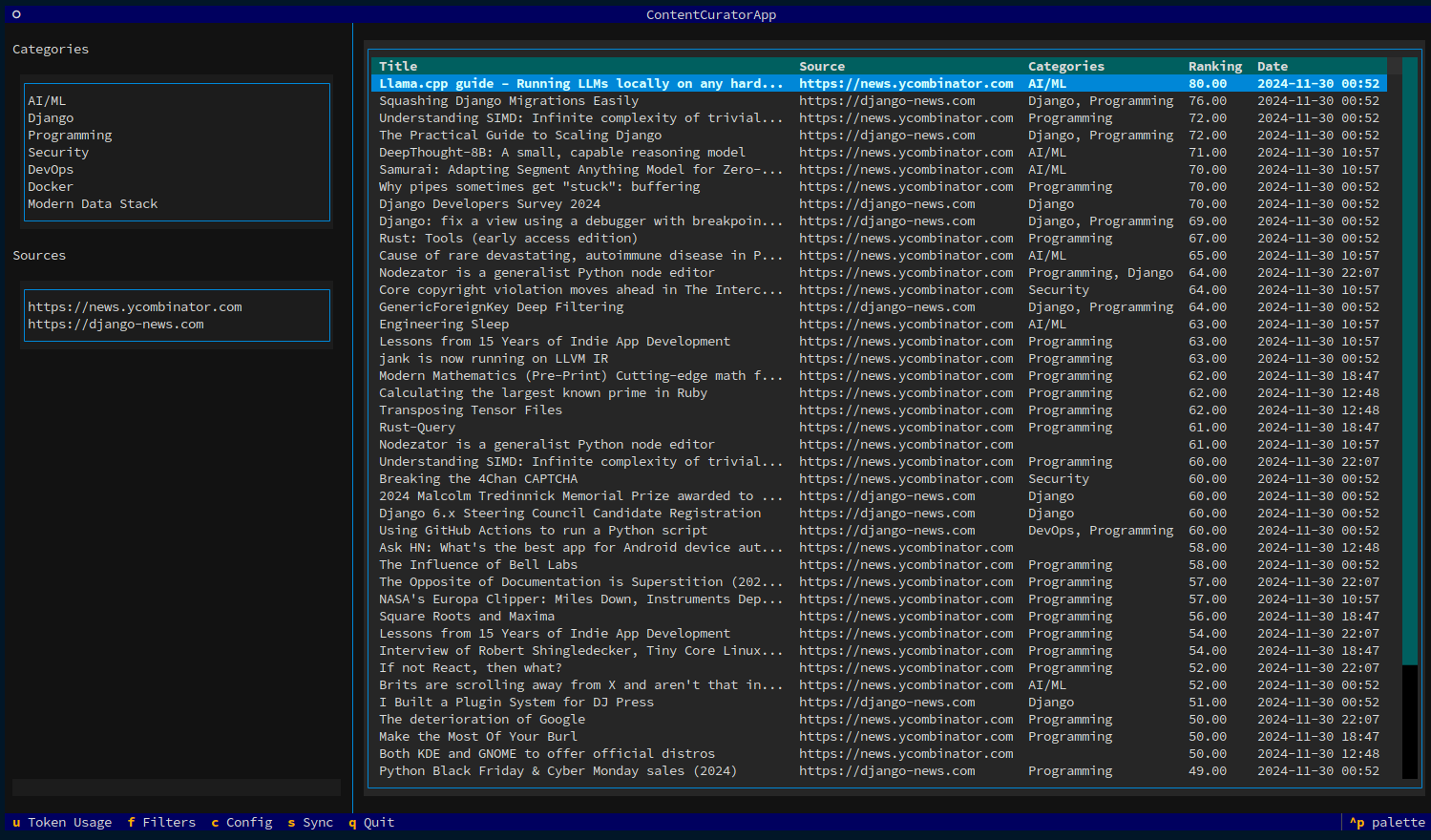
Turn information noise into meaningful signal with AI-powered content curation.
AI Signal helps you regain control over your information diet. While platforms and algorithms decide what content reaches you, AI Signal empowers you to define your own curation strategy. You set the categories, quality thresholds, and filtering criteria—ensuring the content you consume aligns with your interests and goals.
Think of it as your personal content curator, running locally on your machine, surfacing valuable information while filtering out noise.
Features
- AI-Powered Analysis - Smart categorization and ranking using OpenAI
- Custom Filters - Define categories, quality thresholds, and filtering criteria
- Multiple Sources - Support for RSS feeds, YouTube, Medium, Reddit, Hacker News
- Export & Share - Send to Obsidian vault or social media platforms
- Keyboard-Driven - Fully accessible terminal interface powered by Textual
- Cost Tracking - Monitor AI token usage and costs in real-time
Why AI Signal?
Built with a clean, event-driven architecture featuring:
- Interface-based design (ABC) for all core services
- Dependency injection with automated service resolution
- Real-time UI updates via pub/sub event bus
- 94% test coverage across core services
- Thread-safe operations ready for future multi-UI support
See Architecture Documentation for technical details.
Getting Started
Installation
# Install with pip
pip install ai-signal

# Or with pipx (recommended for global installation)
pipx install ai-signal

# Or with poetry
poetry add ai-signal
Quick Start
# Initialize configuration
aisignal init

# Edit ~/.config/aisignal/config.yaml with your:
# - OpenAI API key
# - Jina AI API key
# - Content sources
# - Categories of interest

# Run the application
aisignal run
See the Configuration Guide for detailed setup instructions.
Usage
Keyboard Shortcuts
Global: q Quit • c Config • s Sync • f Filters • u Usage stats
Navigation: ↑↓ Move • Enter Details • o Open browser
Actions: e Export to Obsidian • t Share Twitter • l Share LinkedIn
Project Status & Roadmap
Current Version: 0.11.0 • Status: Active Development
AI Signal is production-ready with all core features functional. The architecture migration is complete with 94% test coverage.
Currently: Finishing RSS/Atom feed integration (88% complete) to reduce API costs by 50-80%.
See STATUS.md for detailed project status, roadmap, and what's in development.
Contributing
We welcome contributions! Whether it's bug reports, feature requests, or code contributions, your help makes AI Signal better.
Development Setup:
# Clone the repository
git clone https://github.com/guglielmo/ai-signal.git
cd ai-signal

# Install dependencies
poetry install

# Run tests
poetry run pytest

# Run the application
poetry shell
aisignal run
See CONTRIBUTING.md for detailed contribution guidelines.
License
This project is licensed under the MIT License - see the LICENSE file for details.
Documentation
- STATUS.md - Current project status and roadmap
- VISION.md - Product vision and strategic direction
- Configuration Guide - Setup and configuration
- Architecture - Technical architecture and design
- Contributing Guide - How to contribute
Acknowledgments
Author
Guglielmo Celata
- GitHub: @guglielmo
- Mastodon: @guille@mastodon.uno
1 maintainer

Metadata
1 maintainer
Release files for ai-signal 0.11.0
For a detailed explanation of source distributions (sdists) and built distributions (wheels), please see the package formats documentation.
Source distribution (sdist)
| File | Size | Uploaded | Provenance | |
|---|---|---|---|---|
| ai_signal-0.11.0.tar.gz | 58.8 kB | Without provenance | Details |
Built distribution (wheel)
| File | Interpreter | ABI | Platform | Reset |
|---|---|---|---|---|
| ai_signal-0.11.0-py3-none-any.whl | Python 3 | none | any | Details |
Total release size: 133.6 kB
Release files / ai_signal-0.11.0.tar.gz
| Download URL | ai_signal-0.11.0.tar.gz |
|---|---|
| Size | 58.8 kB |
| Tags | Source |
|
SHA-256 checksum How to use checksums |
6d04dd110769c7dc75bef706994f77a68df15a454be8e4443ebd1d9bfab56e13
|
|
BLAKE2b-256 checksum How to use checksums |
04df6115a09dfba4b2035269564475ebbd3d0ac232f22853548e8938c5abf546
|
| Upload date | |
|
Uploaded using Trusted Publishing? What is trusted publishing? |
No |
| Uploaded via |
poetry/2.2.1 CPython/3.9.25 Linux/6.11.0-1018-azure
|
Release files / ai_signal-0.11.0-py3-none-any.whl
| Download URL | ai_signal-0.11.0-py3-none-any.whl |
|---|---|
| Size | 74.8 kB |
| Tags | Python 3 |
|
SHA-256 checksum How to use checksums |
2148a4d62435a34dc3ff764beb0ac88fcb27e93ebc1322c827bea94dc137607f
|
|
BLAKE2b-256 checksum How to use checksums |
4f0da7a1ca0ca837108ae331957b281eaa627b6f4be738ac756a11a52a9c2fe5
|
| Upload date | |
|
Uploaded using Trusted Publishing? What is trusted publishing? |
No |
| Uploaded via |
poetry/2.2.1 CPython/3.9.25 Linux/6.11.0-1018-azure
|
Security for ai-signal 0.11.0
Provenance
Provenance describes where a file came from. On PyPI, provenance is shared via attestations, which provide a verifiable record of the build or publishing details. View details, limitations and caveats.
No provenance found
None of the files in this release were uploaded with provenance metadata.
A note on package security
PyPI is a repository for distributing packages, not a service for auditing them. While third-party security researchers and our staff do their best to detect and remove malicious packages, PyPI cannot guarantee the quality, security or suitability of any given package.














