
This release is a pre-release and may not be stable for production use.
AIPerf





AIPerf is a comprehensive benchmarking tool that measures the performance of generative AI models served by your preferred inference solution. It provides detailed metrics using a command line display as well as extensive benchmark performance reports.
Quick Start
This quick start guide leverages Ollama via Docker Desktop.
Setting up a Local Server
In order to set up an Ollama server, run granite4:350m using the following commands:
docker run -d \
  --name ollama \
  -p 11434:11434 \
  -v ollama-data:/root/.ollama \
  ollama/ollama:latest
docker exec -it ollama ollama pull granite4:350m
Basic Usage
Create a virtual environment and install AIPerf:
python3 -m venv venv
source venv/bin/activate
pip install aiperf
[!NOTE] On Linux aarch64 (
arm64), one of AIPerf's dependencies (crick) ships only an sdist and needs a C compiler at install time. Install the system build toolchain beforepip install aiperf—sudo apt install build-essential(Debian/Ubuntu),sudo yum groupinstall "Development Tools"(RHEL/CentOS), or equivalent. Linux x86_64, macOS, and Windows install from pre-built wheels and need no toolchain.
Optional integrations:
pip install "aiperf[mlflow]"enables MLflow uploads and live telemetry streamingpip install "aiperf[otel]"enables OpenTelemetry metric streamingpip install "aiperf[wandb]"enables Weights & Biases result uploadspip install "aiperf[mlflow,otel,wandb]"installs all telemetry extras
To run a simple benchmark against your Ollama server:
aiperf profile \
  --model "granite4:350m" \
  --streaming \
  --endpoint-type chat \
  --tokenizer ibm-granite/granite-4.0-micro \
  --url http://localhost:11434 \
  --request-count 10
Example with Custom Configuration
aiperf profile \
  --model "granite4:350m" \
  --streaming \
  --endpoint-type chat \
  --tokenizer ibm-granite/granite-4.0-micro \
  --url http://localhost:11434 \
  --concurrency 5 \
  --request-count 10
Example output:
NOTE: The example performance is reflective of a CPU-only run and does not represent an official benchmark.
                                               NVIDIA AIPerf | LLM Metrics
┏━━━━━━━━━━━━━━━━━━━━━━━━━━━━━━━━━━━━━━┳━━━━━━━━━━━┳━━━━━━━━━━┳━━━━━━━━━━━┳━━━━━━━━━━━┳━━━━━━━━━━━┳━━━━━━━━━━━┳━━━━━━━━━━┓
┃                               Metric ┃       avg ┃      min ┃       max ┃       p99 ┃       p90 ┃       p50 ┃      std ┃
┡━━━━━━━━━━━━━━━━━━━━━━━━━━━━━━━━━━━━━━╇━━━━━━━━━━━╇━━━━━━━━━━╇━━━━━━━━━━━╇━━━━━━━━━━━╇━━━━━━━━━━━╇━━━━━━━━━━━╇━━━━━━━━━━┩
│             Time to First Token (ms) │  7,463.28 │ 7,125.81 │  9,484.24 │  9,295.48 │  7,596.62 │  7,240.23 │   677.23 │
│            Time to Second Token (ms) │     68.73 │    32.01 │    102.86 │    102.55 │     99.80 │     67.37 │    24.95 │
│      Time to First Output Token (ms) │  7,463.28 │ 7,125.81 │  9,484.24 │  9,295.48 │  7,596.62 │  7,240.23 │   677.23 │
│                 Request Latency (ms) │ 13,829.40 │ 9,029.36 │ 27,905.46 │ 27,237.77 │ 21,228.48 │ 11,338.31 │ 5,614.32 │
│             Inter Token Latency (ms) │     65.31 │    53.06 │     81.31 │     81.24 │     80.64 │     63.79 │     9.09 │
│     Output Token Throughput Per User │     15.60 │    12.30 │     18.85 │     18.77 │     18.08 │     15.68 │     2.05 │
│                    (tokens/sec/user) │           │          │           │           │           │           │          │
│      Output Sequence Length (tokens) │     95.20 │    29.00 │    295.00 │    283.12 │    176.20 │     63.00 │    77.08 │
│       Input Sequence Length (tokens) │    550.00 │   550.00 │    550.00 │    550.00 │    550.00 │    550.00 │     0.00 │
│ Output Token Throughput (tokens/sec) │      6.85 │      N/A │       N/A │       N/A │       N/A │       N/A │      N/A │
│    Request Throughput (requests/sec) │      0.07 │      N/A │       N/A │       N/A │       N/A │       N/A │      N/A │
│             Request Count (requests) │     10.00 │      N/A │       N/A │       N/A │       N/A │       N/A │      N/A │
└──────────────────────────────────────┴───────────┴──────────┴───────────┴───────────┴───────────┴───────────┴──────────┘

CLI Command: aiperf profile --model 'granite4:350m' --streaming --endpoint-type 'chat' --tokenizer 'ibm-granite/granite-4.0-micro' --url 'http://localhost:11434'
Benchmark Duration: 138.89 sec
CSV Export: /home/user/aiperf/artifacts/granite4:350m-openai-chat-concurrency1/profile_export_aiperf.csv
JSON Export: /home/user/Code/aiperf/artifacts/granite4:350m-openai-chat-concurrency1/profile_export_aiperf.json
Log File: /home/user/Code/aiperf/artifacts/granite4:350m-openai-chat-concurrency1/logs/aiperf.log
Features
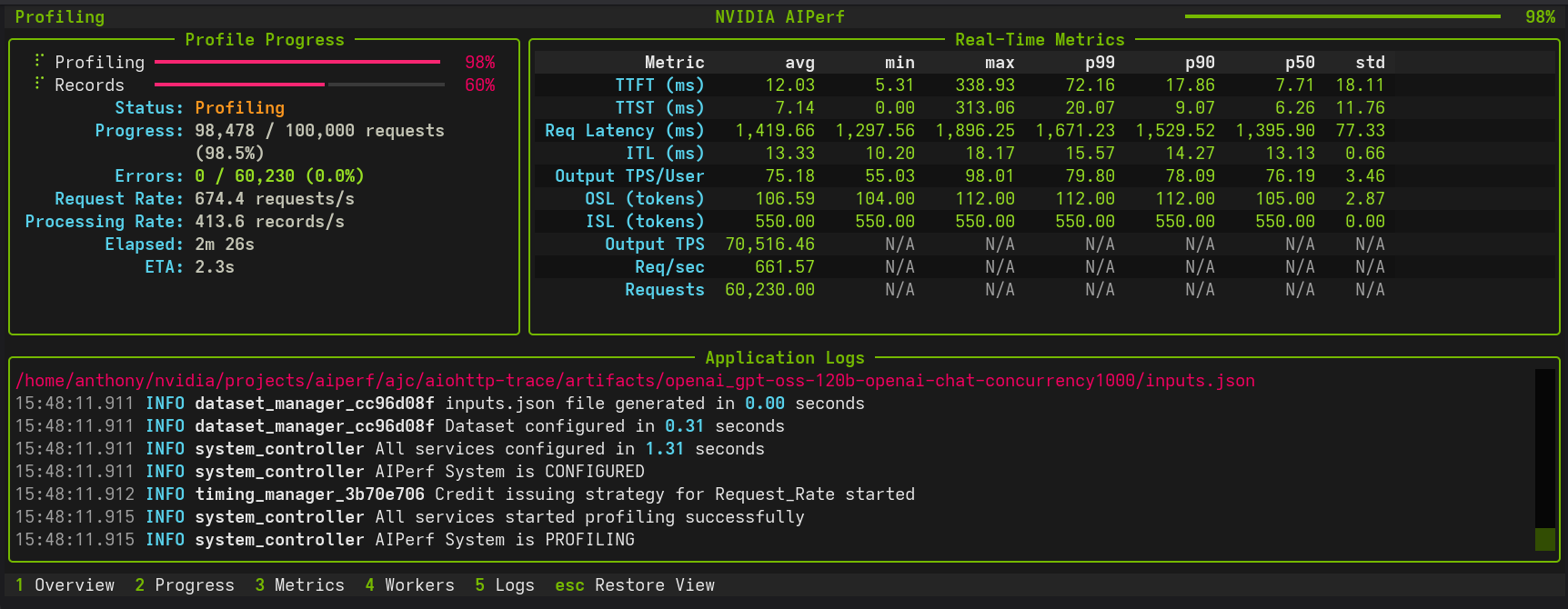
- Scalable multiprocess architecture with 10 services communicating via ZMQ
- 3 UI modes:
dashboard(real-time TUI),simple(progress bars),none(headless) - Multiple benchmarking modes: concurrency, request-rate, request-rate with max concurrency, trace replay
- Extensible plugin system for endpoints, datasets, transports, and metrics
- Public dataset support including ShareGPT and custom formats
Supported APIs
- OpenAI chat completions, completions, embeddings, audio, images
- NIM embeddings, rankings
Tutorials and Feature Guides
Getting Started
- Basic Tutorial - Profile Qwen3-0.6B with vLLM
- Comprehensive Benchmarking Guide - 5 real-world use cases
- Interactive Chat Sanity Checks - Talk to an endpoint with
aiperf chatand see per-turn TTFT/TPS/ITL - YAML Configuration Files - Drive AIPerf from a config file instead of CLI flags
- Sampling Distributions in YAML Configs - Fixed, Normal, Log-normal, Multimodal, and Empirical shapes for ISL/OSL/turns/etc.
- User Interface - Dashboard, simple, or headless
- Hugging Face TGI - Profile Hugging Face TGI models
- OpenAI Text Endpoints - Profile OpenAI-compatible text APIs
Load Control and Timing
- Request Rate with Max Concurrency - Dual request control
- Arrival Patterns - Constant, Poisson, gamma traffic
- Prefill Concurrency - Memory-safe long-context benchmarking
- Adaptive Scale - Single-run SLA boundary discovery and sustain
- Gradual Ramping - Smooth ramp-up of concurrency and request rate
- Warmup Phase - Eliminate cold-start effects
- Benchmark Control Hooks - KV-cache reset and server profiler around profiling phases
- Control Hooks by Server - vLLM, SGLang, and TensorRT-LLM path mappings
- User-Centric Timing - Per-user rate limiting for KV cache benchmarking
- Request Cancellation - Timeout and resilience testing
- Multi-URL Load Balancing - Distribute across servers
Workloads and Data
- Trace Benchmarking - Deterministic workload replay
- Bailian Traces - Bailian production trace replay
- Baseten Traces - Baseten Parquet production trace replay
- BurstGPT Traces - BurstGPT real-world bursty traffic trace replay
- SageMaker Data Capture - Replay production traffic from SageMaker endpoints
- Custom Prompt Benchmarking - Send exact prompts as-is
- Custom Dataset - Custom dataset formats
- Inline Datasets - Embed records directly in the YAML config (single_turn, multi_turn, multi-pool random_pool, traces)
- ShareGPT Dataset - Profile with ShareGPT dataset
- AIMO Dataset - Profile with AIMO math reasoning datasets (NuminaMath-TIR, NuminaMath-CoT, NuminaMath-1.5, AIME)
- MMStar Dataset - Profile vision language models with MMStar visual QA benchmark
- MMVU Dataset - Profile video language models with MMVU expert-level video understanding benchmark
- VisionArena Dataset - Profile with real-world vision conversations from Chatbot Arena
- LLaVA-OneVision Dataset - Profile with diverse multimodal instruction-following data
- SPEED-Bench Dataset - Profile speculative decoding with SPEED-Bench
- Per-Request Spec-Decode Metrics - Inline per-request acceptance length, draft rate, and pooled histogram from a normal profile run
- InstructCoder Dataset - Profile with InstructCoder code generation dataset
- SpecBench Dataset - Profile with SpecBench speculative decoding dataset
- Blazedit Dataset - Profile with Blazedit code editing dataset
- ASR Datasets - Profile ASR models with LibriSpeech, VoxPopuli, GigaSpeech, AMI, and SPGISpeech
- Synthetic Dataset Generation - Generate synthetic datasets
- Agentic Code Generator - Generate multi-turn coding-agent traces for KV cache benchmarking
- Weka Traces - Replay real agentic coding sessions with KV-cache-aware Weka traces
- TraceLab Traces - Replay the public TraceLab corpus of real agentic coding sessions
- InferenceX AgentX MVP - SemiAnalysis AgentX-MVP submission benchmark (
--scenario inferencex-agentx-mvp) - Fixed Schedule - Precise timestamp-based execution
- Time-based Benchmarking - Duration-based testing
- Sequence Distributions - Mixed ISL/OSL pairings
- Prefix Synthesis - Prefix data synthesis for KV cache testing
- Reproducibility - Deterministic datasets with
--random-seed - Template Endpoint - Custom Jinja2 request templates
- Multi-Turn Conversations - Multi-turn conversation benchmarking
- Raw Payload Replay - Verbatim JSONL payload replay (single file or directory)
- Inputs JSON Replay - Verbatim multi-turn replay of AIPerf inputs.json artifacts
- Local Tokenizer - Use local tokenizers without HuggingFace
Endpoint Types
- Embeddings - Profile embedding models
- Rankings - Profile ranking models
- OpenAI Responses API - Profile OpenAI Responses API endpoints
- Audio - Profile audio language models
- NIM Image Retrieval - Profile NIM image retrieval models
- Vision - Profile vision language models
- Image Generation - Benchmark any OpenAI-compatible image generation API
- SGLang Image Edit - Benchmark OpenAI-compatible image-to-image (image edit) endpoints
- SGLang Video Generation - Video generation benchmarking
- Synthetic Video - Synthetic video generation
Analysis and Monitoring
- Timeslice Metrics - Per-timeslice performance analysis
- Goodput - SLO-based throughput measurement
- Parameter Sweeps - YAML reference for grid/zip/scenarios sweeps + multi-run, with picker for choosing a sweep mode
- Adaptive Search - Bayesian-optimization walkthrough (single-objective + multi-objective Pareto)
- Adaptive Scale - Single-run SLA boundary discovery and sustain
- Search Recipes - Named recipe catalog including
pareto-sweep,max-throughput-ttft-sla,max-concurrency-under-sla - HTTP Trace Metrics - DNS, TCP/TLS, TTFB timing
- Multi-Run Confidence - Confidence intervals across repeated runs
- Profile Exports - Post-processing with Pydantic models
- Visualization and Plotting - PNG charts and multi-run comparison
- Auto-Plot After Profile - Run
aiperf plotautomatically afteraiperf profile - GPU Telemetry - DCGM metrics collection
- OTel + MLflow Live Telemetry - Stream metrics to OTel and MLflow in real time
- Weights & Biases Export - Upload results tables and artifacts to wandb
- Server Metrics - Prometheus-compatible metrics
Documentation
| Document | Purpose |
|---|---|
| Architecture | Three-plane architecture, core components, credit system, data flow |
| CLI Options | Complete command and option reference |
| Metrics Reference | All metric definitions, formulas, and requirements |
| Environment Variables | All AIPERF_* configuration variables |
| Plugin System | Plugin architecture, 25+ categories, creation guide |
| Creating Plugins | Step-by-step plugin tutorial |
| Accuracy Benchmarks | Accuracy evaluation against MMLU, AIME, and other benchmarks |
| Benchmark Modes | Trace replay and timing modes |
| Server Metrics | Prometheus-compatible server metrics collection |
| Tokenizer Auto-Detection | Pre-flight tokenizer detection |
| Conversation Context Mode | How conversation history accumulates in multi-turn |
| Dataset Synthesis API | Synthesis module API reference |
| Code Patterns | Code examples for services, models, messages, plugins |
| Migrating from Genai-Perf | Migration guide and feature comparison |
| Design Proposals | Enhancement proposals and discussions |
Contributing
See CONTRIBUTING.md for development setup, coding conventions, and contribution guidelines.
Known Issues
- Output sequence length constraints (
--output-tokens-mean) cannot be guaranteed unless you passignore_eosand/ormin_tokensvia--extra-inputsto an inference server that supports them. - Very high concurrency settings (typically >15,000) may lead to port exhaustion on some systems. Adjust system limits or reduce concurrency if connection failures occur.
- Startup errors caused by invalid configuration settings can cause AIPerf to hang indefinitely. Terminate the process and check configuration settings.
- Copying selected text may not work reliably in the dashboard UI. Use the
ckey to copy all logs.
1 maintainer

Release files for aiperf 0.13.0.dev20260825
For a detailed explanation of source distributions (sdists) and built distributions (wheels), please see the package formats documentation.
Built distribution (wheel)
| File | Interpreter | ABI | Platform | Reset |
|---|---|---|---|---|
| aiperf-0.13.0.dev20260825-py3-none-any.whl | Python 3 | none | any | Details |
Release files / aiperf-0.13.0.dev20260825-py3-none-any.whl
| Download URL | aiperf-0.13.0.dev20260825-py3-none-any.whl |
|---|---|
| Size | 5.2 MB |
| Tags | Python 3 |
|
SHA-256 checksum How to use checksums |
41313c64c65f1668482c902362cca5696b7798bb9adc42c23ec0c6f40344a2a0
|
|
BLAKE2b-256 checksum How to use checksums |
e7476cc752b73e113489a2c7d4771d618355e6c8bb2c8f05d2c1440e3cd0d3a1
|
| Upload date | |
|
Uploaded using Trusted Publishing? What is trusted publishing? |
No |
| Uploaded via |
twine/7.0.0 CPython/3.14.7
|














