
Amplicon Suite Aggregator
Description
Aggregates the results from AmpliconSuite
- Takes in zip files (completed results of individual or grouped Amplicon Suite runs)
- Aggregates results
- Packages results into a new file
- Outputs an aggregated .html and .csv file of results.
- Result file (in .tar.gz) is the aggregated results of all individual AmpliconSutie runs. It can be directly loaded onto AmpliconRepository.
- Can also take additional files along with the upload, provided the directory they are in contains a file named
AUX_DIR.
Parameters available on GenePattern Server
- Available at: https://genepattern.ucsd.edu/gp/pages/index.jsf?lsid=urn:lsid:genepattern.org:module.analysis:00429:4.1
- Amplicon Architect Results (required)
- Compressed (.tar.gz, .zip) files of the results from individual or grouped Amplicon Architect runs.
- project_name (required)
- Prefix for output .tar.gz. Result will be named: output_prefix.tar.gz
- Amplicon Repository Email
- If wanting to directly transfer results to AmpliconRepository.org, please enter your email.
- run amplicon classifier
- Option for users to re-run Amplicon Classifier.
- reference genome
- Reference genome used for Amplicon Architect results in the input.
- upload only
- If 'Yes', then skip aggregation / classification and upload file to AmpliconRepository as is.
- name map
- A two column file providing the current identifier for each sample (col 1) and a replacement name (col 2). Enables batch renaming of samples.
Installation
- Option 1: Git Clone
- Step 1:
git clone https://github.com/genepattern/AmpliconSuiteAggregator.git - Step 2: Install python package dependencies from list below.
- If running into dependency issues, please use the docker methods.
- Step 1:
- Option 2: Docker
- Step 1:
docker pull genepattern/amplicon-suite-aggregator
- Step 1:
Dependencies
- List of python package dependencies used: intervaltree, matplotlib, numpy, pandas, Pillow, requests, scipy, urllib3
Options when running locally
Amplicon Suite Aggregator related options
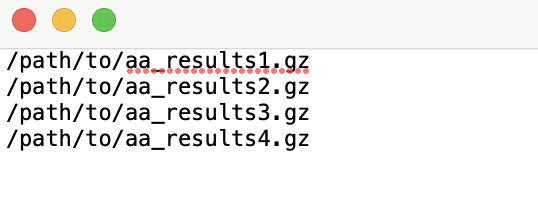
-flist/--filelist: Text file with files to use (one per line)-
Create an
input_list.txtfile in this format where each line is a filepath to compressed aa_results: -
Use this file as the input to the
-flistflag.
-
--files: List of files or directories to use. Can specify multiple paths of (.tar.gz, .zip) of Amplicon Architect results.-o/--output_name: Output Prefix. Will be used as project name for Amplicon Repository upload.--name_map: A two column file providing the current identifier for each sample (col 1) and a replacement name (col 2). Enables batch renaming of samples.-c/--run_classifier(Yes, No): If 'Yes', then run Amplicon Classifier on AA samples. If Amplicon Classifier results are already included in inputs, then they will be removed and samples will be re-classified.--ref(hg19, GRCh37, GRCh38, GRCh38_viral, mm10): Reference genome name used for alignment, one of hg19, GRCh37, GRCh38, GRCh38_viral, or mm10.
AmpliconRepository related options
-u/--username: Email address for Amplicon Repository. If specified, will trigger an attempt to upload the aggregated file to AmpliconRepository.org.--upload_only(Yes, No): If 'Yes', then skip aggregation / classification and upload file to AmpliconRepository as is.-s/--server(dev, prod, local-debug): Which server to send results to. Accepts 'dev' or 'prod' or 'local-debug'. 'prod' is what most users want. 'dev' and 'local-debug' are for development and debugging.
How to run
-
If using local CLI:
- Running aggregator:
python3 /path/to/AmpliconSuiteAggregator/path/src/AmpliconSuiteAggregator.py **options** - Using API to upload directly to AmpliconRepository without aggregation:
python3 /path/to/AmpliconSuiteAggregator/path/src/AmpliconSuiteAggregator.py --files /path/to/aggregated/file.tar.gz -o projname -u your.amplicon.repository.username@gmail.com --upload_only Yes -s prod- Log into Amplicon Repository, you should see a new project with the output prefix you specified.
- Running aggregator:
-
If using Docker:
- To Running aggregator:
docker run --rm -it -v PATH/TO/INPUTS/FOLDER:/inputs/ genepattern/amplicon-suite-aggregator python3 /opt/genepatt/AmpliconSuiteAggregator.py **options**
- Using API to upload directly to AmpliconRepository without aggregation:
docker run --rm -it -v PATH/TO/INPUTS/FOLDER:/inputs/ genepattern/amplicon-suite-aggregator python3 /opt/genepatt/AmpliconSuiteAggregator.py -flist /path/to/input_list.txt -u YOUR_AMPLICON_REPOSITORY_EMAIL -o projname -u your.amplicon.repository.username@gmail.com --upload_only Yes -s prod- Log into Amplicon Repository, you should see a new project with the output prefix you specified.
- To Running aggregator:
Programming Language
- Python
Contact
For any issues
- Edwin Huang, edh021@cloud.ucsd.edu


Release files for AmpliconSuiteAggregator 5.2.0
For a detailed explanation of source distributions (sdists) and built distributions (wheels), please see the package formats documentation.
Source distribution (sdist)
| File | Size | Uploaded | Provenance | Actions |
|---|---|---|---|---|
| ampliconsuiteaggregator-5.2.0.tar.gz | 15.5 kB | Without provenance | Details for ampliconsuiteaggregator-5.2.0.tar.gz |
Built distribution (wheel)
| File | Interpreter | ABI | Platform | Actions Reset |
|---|---|---|---|---|
| ampliconsuiteaggregator-5.2.0-py3-none-any.whl | Python 3 | none | any | Details for ampliconsuiteaggregator-5.2.0-py3-none-any.whl |
Total release size: 33.8 kB
Release files / ampliconsuiteaggregator-5.2.0.tar.gz
| Download URL | ampliconsuiteaggregator-5.2.0.tar.gz |
|---|---|
| Size | 15.5 kB |
| Tags | Source |
|
SHA-256 checksum How to use checksums |
ba5da6611693c24ff066e8b692b1201ff4b18fc81e08bb511d4abad9c000b144
|
|
BLAKE2b-256 checksum How to use checksums |
4b9ca2072fdc35b8f9f8eb6d31e3b787edce51f9d61f757733b7f3a3312abbfd
|
| Upload date | |
|
Uploaded using Trusted Publishing? What is trusted publishing? |
No |
| Uploaded via |
twine/6.1.0 CPython/3.10.18
|
Release files / ampliconsuiteaggregator-5.2.0-py3-none-any.whl
| Download URL | ampliconsuiteaggregator-5.2.0-py3-none-any.whl |
|---|---|
| Size | 18.3 kB |
| Tags | Python 3 |
|
SHA-256 checksum How to use checksums |
f18b6d6e0c54a31f0fd96cc5b35517309d2bfb5dae4f59eddf83b173f117bfe3
|
|
BLAKE2b-256 checksum How to use checksums |
14e3bdff5474941281fda6f669169412bbdcbb174e99f2e7dc31057b9cbcc8ea
|
| Upload date | |
|
Uploaded using Trusted Publishing? What is trusted publishing? |
No |
| Uploaded via |
twine/6.1.0 CPython/3.10.18
|
Security for AmpliconSuiteAggregator 5.2.0
Provenance
Provenance describes where a file came from. On PyPI, provenance is shared via attestations, which provide a verifiable record of the build or publishing details. View details, limitations and caveats.
No provenance found
None of the files in this release were uploaded with provenance metadata.
A note on package security
PyPI is a repository for distributing packages, not a service for auditing them. While third-party security researchers and our staff do their best to detect and remove malicious packages, PyPI cannot guarantee the quality, security or suitability of any given package.
To learn more about protecting yourself from malicious actors, visit our package security documentation.














