







AppRC provides typed application settings, optional user preferences, and independent application paths. An application opts in to configuration, application data, cache, and state separately; a cache-only application does not also acquire configuration files or a workspace registry.
Main dependencies:
typed-settings: Convert and validate typed application settings.python-dotenv: Read setting values from dotenv files.platformdirs: Resolve native per-user application paths.filelock: Serialize persistent configuration and resource operations.
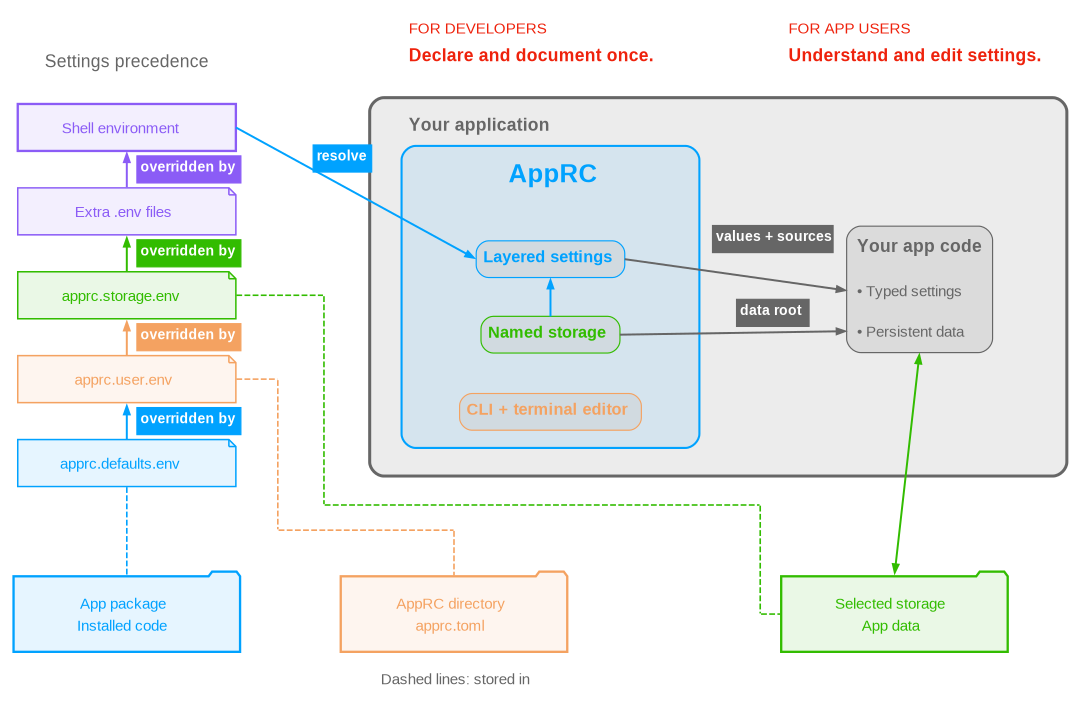 |
|---|
| Fig. 1 - Graphical Abstract: AppRC resolves typed settings from layered sources, applies optional workspace overrides, and shares one declaration across application code and configuration tools. |
Table of Contents
Installation
One-Line Install
Python 3.12 or newer is required.
| Command | Includes |
|---|---|
python -m pip install "apprc>=0.35.0,<0.36" |
Core configuration, Typer commands, prompts, and Textual editor. |
python -m pip install "apprc-core>=0.35.0,<0.36" |
Configuration and noninteractive path/maintenance APIs. |
python -m pip install "apprc-gui>=0.35.0,<0.36" |
Configuration and Gradio settings editor. |
apprc-core and apprc use import apprc; apprc-gui provides
from apprc_gui import ConfigEditor. Terminal and GUI distributions install the
matching apprc-core release.
Caution
Version 0.32 makes a breaking API and on-disk configuration cutover. Existing
Storage, storage, apprc_dir, and --storage integrations must be changed
to the new contracts described in the
upgrade guide.
AppRC does not move, rename, scan, delete, or automatically upgrade old user
files. Keep any old files as-is and deliberately configure the new paths.
CI runs on Ubuntu: core checks cover Python 3.12, 3.13, and 3.14, and GUI/browser checks cover Python 3.12. Windows and macOS runtime and installer code remain, but those platforms are unverified by this CI policy and have known native test failures.
Install from a Cloned Repository
Follow the development environment instructions for editable installs of the core and optional terminal/GUI distributions. Ordinary pip installations do not require uv.
Uninstall
Use the same Python environment as for installation. To remove all three AppRC distributions:
python -m pip uninstall apprc apprc-gui apprc-core
Remove only the distributions you no longer need. Keep apprc-core if another
installed application or library depends on it. Package removal does not purge
application configuration, data, cache, state, or workspaces; application-owned
resource maintenance is a separate, explicit operation.
Usage
Load settings
Create one AppRC, register
config sections, then build
typed settings from a ResolvedConfig:
import apprc as rc

MyRC = rc.AppRC(app_id="demo")

@MyRC.config("client", prefix="DEMO_")
class ClientSettings(rc.Config):
    timeout: int = rc.field("DEMO_TIMEOUT", default=30)

resolved = MyRC.resolve(environment={"DEMO_TIMEOUT": "10"})
settings = resolved.build(ClientSettings)
assert settings.timeout == 10
resolve() reads configuration and captures a snapshot; build() converts
values and validates required fields. Add dotenv files
or packaged defaults
when required. Provenance records which source
supplied each value. Resolution does not write files or alter os.environ.
Choose application paths
Declare only the managed components the application uses:
import apprc as rc

MyRC = rc.AppRC(
    app_id="demo",
    paths=rc.Paths(cache=True),
    layout=rc.Layout.native(),
)

paths = MyRC.paths()                   # inspect; no filesystem writes
cache_dir = MyRC.ensure_path("cache")  # create privately and record ownership
Paths independently enables config, appdata, cache, and state.
Layout.native() uses platform user locations; Layout.single_root(root) places
enabled categories beneath one explicit root. AppPaths reports disabled
locations as None; ensure_path(kind) initializes only the requested
component. See path declarations and
the path reference.
Managed installers preserve the selected layout in a durable
installation record. Reinstallation reuses
that choice; an invocation override does not rewrite it. Single-root groups the
enabled application resource directories, not the Python environment or fixed
native installation support. Plain pip install -e . remains independent of
this optional installation workflow.
Applications that need selectable named working directories declare
Workspaces(). A WorkspaceManager manages
the registry and archive operations separately from AppPaths; selecting a
workspace does not relocate configuration, cache, or state. registry=False
permits direct-directory selection without enabling config. Call
WorkspaceManager.initialize_workspace(root) or use workspace init PATH to
prepare the workspace dotenv; this writes no config or registry file.
Save user settings
user_dotenv=rc.UserDotenv() opts into apprc.user.env inside the enabled config
directory. UserDotenv requires paths=rc.Paths(config=True); it never enables
config implicitly. Obtain a ConfigManager
with MyRC.manage() for settings inspection, setup, and reviewed edits. The
saved-preference guide
contains a complete example. Saved secrets use private companion files; the
secret explanation describes their limits.
Add terminal commands
Use rc.cli.mount_app_cli(app, MyRC) to add configuration and application
maintenance alongside the host's commands. config and workspace appear when
their capabilities exist; app paths and app doctor are always available.
config setup [--adopt] [--yes/-y] initializes only enabled user configuration.
The maintenance group defaults to app and can be renamed with
maintenance_group_name. The returned mapping identifies actual mounted paths,
such as app.cache, for application extensions. See the
Typer guide
and command reference.
Resource commands are nested under app: app data backup/restore,
app cache prune/clear, and app state prune/reset appear only for supported
operations. Declaring a path alone does not enable these commands or create its
directory. app repair, app uninstall, and app migrate require
installation_management=True; app install additionally requires an explicit
installer_entrypoint callable. There are no resource init or purge CLI
aliases. Python ensure_path and maintenance purge planning remain available
with their existing ownership and safety boundaries.
Application uninstall removes the program and its managed data by default.
Use app uninstall --keep-data to retain configuration and data. Editable
repositories remain unless explicitly selected with --remove-repository;
see the removal guide.
Passing launcher_spec and launcher_handlers adds optional root launch,
which opens the existing Textual management launcher. It is separate from a
foreground application command and from saved distribution launch support.
Hosts can opt into separated root help panels with
typer.Typer(cls=rc.cli.AppRCRootGroup): host commands and options appear first
in cyan, AppRC panels follow in magenta, and common help/completion options
appear last in a dim panel. Descriptions stay neutral; nested help stays standard.
See root help and color controls.
The Textual editor and
Gradio editor edit config settings; when a
workspace registry exists, callers supply the separate WorkspaceManager.
Editors do not initialize application state merely by opening.
Add a Gradio settings page
Embed apprc_gui.ConfigEditor(manager) in an application-owned Gradio Blocks.
If the application declares registry-backed workspaces, provide
workspaces=MyRC.workspaces() as well. The
Gradio guide shows the
integration.
AppRC's optional
apprc.distribution authoring APIs
build platform-specific setup executables from complete, prebuilt project
snapshots. Final artifacts belong in ignored dist/; build intermediates stay
in .cache/apprc/, never in application source directories.
Managed installations use locked, non-editable runtime slots. The stable native
command handles installation diagnostics, repair and removal independently of
the application's environment, and forwards normal commands—including
launch—to the recorded active slot. Updates use a newer setup executable.
For development, uv run --locked <app> app install -e registers the checkout's
existing .venv and initializes declared resources without copying or owning
the checkout or its environment. Git and uv remain responsible for updating it.
See the installation guide
and native authoring requirements.
Documentation
Using the project
- Documentation — Start here for component names and learning order.
- How-to user guides — Complete specific tasks with independent examples.
- Examples — Choose and run complete application setups, including cache-only.
- Explanations — Understand components and how they connect.
- References — Look up exact APIs, files, commands, and behavior.
Contributing and maintaining
- Development — Change, verify, build, and release AppRC.
- Changelog — Current release notes and migration requirements; older releases are archived.
1 maintainer

Metadata
1 maintainer
Release files for apprc 0.35.1
For a detailed explanation of source distributions (sdists) and built distributions (wheels), please see the package formats documentation.
Source distribution (sdist)
| File | Size | Uploaded | Provenance | Actions |
|---|---|---|---|---|
| apprc-0.35.1.tar.gz | 8.5 kB | Without provenance | Details for apprc-0.35.1.tar.gz |
Built distribution (wheel)
| File | Interpreter | ABI | Platform | Actions Reset |
|---|---|---|---|---|
| apprc-0.35.1-py3-none-any.whl | Python 3 | none | any | Details for apprc-0.35.1-py3-none-any.whl |
Total release size: 16.2 kB
Release files / apprc-0.35.1.tar.gz
| Download URL | apprc-0.35.1.tar.gz |
|---|---|
| Size | 8.5 kB |
| Tags | Source |
|
SHA-256 checksum How to use checksums |
555c17574c7c4d750a229760e5543f2a267672b5c330d1e27be9d86c97a7b9e2
|
|
BLAKE2b-256 checksum How to use checksums |
cdacd03e5b5b6f7e22f5d5389b185c5d38caeb5269d9367d7ffced978084a811
|
| Upload date | |
|
Uploaded using Trusted Publishing? What is trusted publishing? |
Yes |
| Uploaded via |
uv/0.13.8 {"installer":{"name":"uv","version":"0.13.8","subcommand":["publish"]},"python":null,"implementation":{"name":null,"version":null},"distro":{"name":"Ubuntu","version":"26.04","id":"resolute","libc":null},"system":{"name":null,"release":null},"cpu":null,"openssl_version":null,"setuptools_version":null,"rustc_version":null,"ci":true}
|
Release files / apprc-0.35.1-py3-none-any.whl
| Download URL | apprc-0.35.1-py3-none-any.whl |
|---|---|
| Size | 7.7 kB |
| Tags | Python 3 |
|
SHA-256 checksum How to use checksums |
76d9e91b6431b85045619b1485439c35c6b242886c7e1857230e4d11b613dac2
|
|
BLAKE2b-256 checksum How to use checksums |
28b6fae166039f86473bc1d763e56ce077bccf6cdfbf016dec2969088e59c58b
|
| Upload date | |
|
Uploaded using Trusted Publishing? What is trusted publishing? |
Yes |
| Uploaded via |
uv/0.13.8 {"installer":{"name":"uv","version":"0.13.8","subcommand":["publish"]},"python":null,"implementation":{"name":null,"version":null},"distro":{"name":"Ubuntu","version":"26.04","id":"resolute","libc":null},"system":{"name":null,"release":null},"cpu":null,"openssl_version":null,"setuptools_version":null,"rustc_version":null,"ci":true}
|
Security for apprc 0.35.1
Provenance
Provenance describes where a file came from. On PyPI, provenance is shared via attestations, which provide a verifiable record of the build or publishing details. View details, limitations and caveats.
No provenance found
None of the files in this release were uploaded with provenance metadata.
A note on package security
PyPI is a repository for distributing packages, not a service for auditing them. While third-party security researchers and our staff do their best to detect and remove malicious packages, PyPI cannot guarantee the quality, security or suitability of any given package.
To learn more about protecting yourself from malicious actors, visit our package security documentation.














