







AppRC provides configuration, installation, and lifecycle management for Python applications. Declare typed settings, opt into independent resources such as config or cache, and add the interfaces your users need. When you ship a native installer, AppRC can also register the command, keep the app's resource locations across updates, and provide repair and uninstall.
 |
|---|
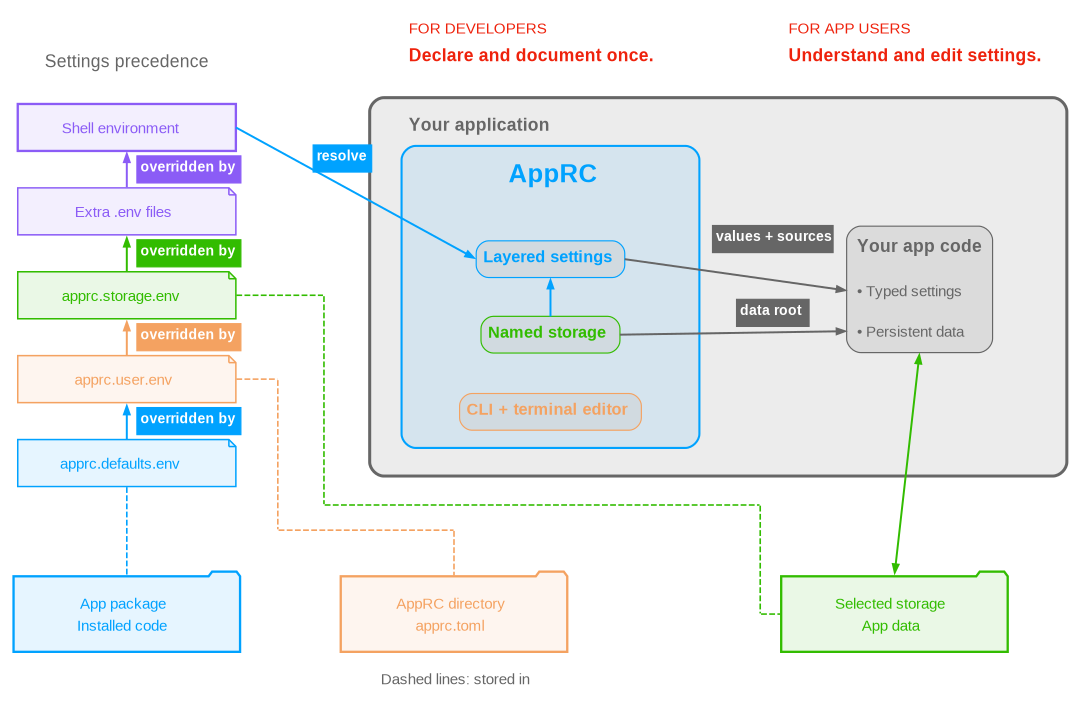
| Fig. 1 - Graphical Abstract: AppRC resolves typed settings from layered sources, applies optional workspace overrides, and shares one declaration across application code and configuration tools. |
| Use the SDK | Ship an application | Use an installed application |
|---|---|---|
| Choose your components, load settings, and connect your existing tools. | Prepare a release, build its installers, and check its lifecycle. | Install the application, launch it, and manage updates and removal. |
Table of Contents
Why AppRC?
Pydantic Settings, typed-settings, uv, and PyApp provide useful
foundations for configuration, dependency management, and executable delivery.
AppRC links those tools through one application declaration that supplies
settings, resource locations, and installation identity.
| Define once | Reuse across the application |
|---|---|
| Settings and field metadata | Typed application values, validation, help, settings editors, and source diagnostics. |
| Application resources | Known configuration, appdata, cache, and state locations with explicit ownership. |
| Installation identity and placement | Installed commands, runtime replacement, inspection, and removal. |
Your application keeps its business logic, data models, and interface. AppRC provides the configuration and lifecycle operations around them, with explicit hooks for application-specific behavior.
Installation
Install the AppRC SDK
Choose what your application needs. These commands are for application developers. If you received an application, follow its installation instructions.
The SDK requires Python 3.12 or newer.
| You need | Install | Includes |
|---|---|---|
| Configuration and management APIs | python -m pip install apprc-core |
Typed settings and noninteractive path and maintenance APIs. |
| Terminal commands and settings editing | python -m pip install apprc |
The core, Typer integration, prompts, and the Textual editor. |
| An embedded browser settings editor | python -m pip install apprc-gui |
The core and the Gradio editor. |
Choose paths, saved preferences, workspaces, and managed distribution separately. A settings-only application needs no managed files; a cache-only application needs no configuration directory. The capability model and example selector show the combinations.
Both apprc-core and apprc use import apprc. The GUI provides
from apprc_gui import ConfigEditor. Terminal and GUI distributions depend on
the matching core release and can be used together.
These commands install published SDK releases. This README and the linked
source guides describe main; an application's installer includes the
features supplied by the release that built it. See
release and upgrade guidance.
Install from a Cloned Repository
Follow the development environment instructions for editable installs of the core and optional terminal/GUI distributions. Ordinary pip installations do not require uv.
Uninstall
To remove the SDK packages from the Python environment where you installed them:
python -m pip uninstall apprc apprc-gui apprc-core
Remove only the distributions you no longer need. Keep apprc-core when another
installed application depends on it. SDK package removal leaves application
resources in place; an application's
uninstall workflow handles its program
and managed resources.
Usage
Load settings
Give a setting one definition that application code and configuration tools can share.
Create an AppRC, register a
config section, and resolve
typed values. This complete example prints 10:
import apprc as rc

MyRC = rc.AppRC(app_id="yourapp")

@MyRC.config("client", prefix="YOURAPP_")
class ClientSettings(rc.Config):
    timeout: int = rc.field(
        "YOURAPP_TIMEOUT",
        default=30,
        description="Seconds to wait for a response.",
    )

resolved = MyRC.resolve(environment={"YOURAPP_TIMEOUT": "10"})
settings = resolved.build(ClientSettings)
print(settings.timeout)
resolve() captures the configuration sources; build() converts values and
validates required fields. Resolution leaves files and os.environ unchanged.
Provenance records where a value came from,
so a surprising setting has an explanation.
Add dotenv files or packaged defaults as needed. Related sections can share a config bundle, and temporary overrides let one operation use different values without rewriting saved preferences.
Choose application paths
Know where the application's files belong. Enable config, appdata,
cache, and state independently. This complete example declares only a cache:
import apprc as rc

MyRC = rc.AppRC(
    app_id="yourapp",
    paths=rc.Paths(cache=True),
    layout=rc.Layout.native(),
)

paths = MyRC.paths()                   # inspect without creating directories
cache_dir = MyRC.ensure_path("cache")  # initialize and record ownership
Layout.native()
uses platform user locations; Layout.single_root(root) groups enabled
resource directories. Managed installation
retains the selected placement. Runtime and installation-support locations
remain separate. Optional workspaces select
working directories and configuration overrides without relocating application
resources.
Save user settings
Let users keep their choices between runs. Declare
paths=rc.Paths(config=True) and user_dotenv=rc.UserDotenv() to save user
overrides in apprc.user.env. Obtain a
ConfigManager with MyRC.manage() for
inspection, setup, and reviewed edits.
AppRC preserves unrelated dotenv entries and comments when editing settings.
Its editors use the declared types, choices, help, and editability metadata.
Fields marked restart_required=True tell users when a saved change needs a
restart. Declared secrets are masked in AppRC displays and saved in private
secret companion files.
Follow the saved-preference guide for a complete example, or use workspace settings when different projects need different overrides.
Add terminal commands
Mount configuration and maintenance commands alongside the application's Typer
commands. This integration excerpt assumes your application exposes MyRC:
import apprc as rc
import typer
from my_app.config import MyRC

app = typer.Typer(cls=rc.cli.AppRCRootGroup)
rc.cli.mount_app_cli(app, MyRC)
The complete Typer example
shows settings edits and inspection. app paths and app doctor are available;
other commands follow declared capabilities. Opting into installation management
adds editable registration and maintenance; managed installation uses native
setup or an explicit installer delegate. Resource operations require
application maintenance handlers.
The command reference covers help, grouping, and runtime options. An optional Textual launcher provides a management screen.
Add a Gradio settings page
Reuse the same settings declaration in the application's browser interface.
Embed the editor in your existing Gradio Blocks. This excerpt uses a
configuration-enabled MyRC from your application:
import gradio as gr
from apprc_gui import ConfigEditor
from my_app.config import MyRC

with gr.Blocks() as page:
    with gr.Tab("Settings"):
        ConfigEditor(MyRC.manage()).render()
The application owns the page, server, and launch behavior. For registry-backed
workspaces, pass workspace_manager=MyRC.workspaces() to ConfigEditor.
The Gradio guide
covers the complete integration and initialization behavior.
Works with your existing application
| Existing tool or component | How AppRC fits |
|---|---|
| Pydantic models | Pass resolved settings into existing application or API models through explicit construction or attribute-based validation. |
| Typer | Mount AppRC commands alongside application commands. |
| Textual and Gradio | Use the terminal editor or embed Gradio controls driven by the same fields. |
| Dependencies using AppRC | Map dependency settings into fields owned by the parent application. |
| Other runtimes and environment-based libraries | Share dotenv configuration or explicitly export file-contributed values into the process environment for those components. |
For a project that already uses Pydantic, the following continues the settings example. Matching attributes become validated model values through Pydantic's public API:
from pydantic import BaseModel

class ClientOptions(BaseModel):
    timeout: int

options = ClientOptions.model_validate(settings, from_attributes=True)
assert options.timeout == 10
This is an explicit value handoff. AppRC's registered settings classes remain
rc.Config or rc.ConfigBase; the existing Pydantic model keeps its own schema.
Ship an application
Build a release package
The distribution workflow packages a committed project snapshot and uv.lock
into a native setup executable. After verifying that executable, the recipient
runs it to prepare the locked runtime and publish the application command.
To add distribution to an existing application:
- Declare the runtime and command metadata in
pyproject.tomlusing the native application declarations. - Compose the public snapshot and native distribution builders in your application's authored build module, and register its authoring backend.
- Prepare the native setup toolchain and commit the source and lockfile you want to distribute.
- Build and check the setup for the chosen targets.
For a configured application whose command is yourapp, run these from its checkout:
uv run --locked yourapp dist build -t
uv run --locked yourapp dist check -t
-t selects the current platform. Final setup executables and SHA256SUMS
appear in ignored dist/; build intermediates stay in .cache/apprc/.
Follow the release package guide
for target requirements and artifact verification. Compiler failures include
Cargo diagnostics in the reported error.
For applications with a static web frontend, prepare the assets during authoring and include them in the project snapshot. Recipients then use those built assets without installing the frontend build tools. Dependency acquisition follows uv and may require network access or private repository credentials.
Verify installation, update, and removal
Check the experience your users will actually receive. In a checkout with
distribution authoring and installation management enabled, dist test guides
you through the selected lifecycle:
| Command | What it exercises |
|---|---|
yourapp dist test |
Register an editable installation, check it, and uninstall it. |
yourapp dist test --managed |
Install a built release, check it, and uninstall it. |
yourapp dist test --update-from OLD_SETUP |
Install the supplied older setup, update to the current checked setup, verify, and uninstall. |
Run these through uv run --locked in the application checkout. The workflow
performs real installation and removal and writes its report under
.cache/apprc/dist-test/. Automated checks and manual observations are recorded
separately. The validation guide
explains the prompts, update checks, and reports.
Publish one-line install scripts
Publish the setup executables and SHA256SUMS as application release assets.
You can also generate One-line install scripts (OLIS) for Bash and PowerShell
and host them at a trusted URL. For a public GitHub release:
Bash
RELEASE_PUBLIC=true uv run --locked yourapp dist build --olis-repo OWNER/REPO
PowerShell
$env:RELEASE_PUBLIC = "true"
uv run --locked yourapp dist build --olis-repo OWNER/REPO
Private releases use RELEASE_PUBLIC=false and require authenticated GitHub
access. Supply the application's release repository with --olis-repo or
RELEASE_REPO_OLIS. The published script selects, downloads, verifies, and
launches setup from the latest published release. For an analysis tied to a
specific release, share that release's identified setup. See the
script generation guide.
Use an installed application
Choose an installation route
The application publisher supplies the download, command name, and setup instructions. Choose the route matching what you received:
| What you have | Route | Result |
|---|---|---|
| A published install command | One-line installer (OLI) | Download, verify, and run the released setup. |
| A downloaded setup executable | Released Binary Executable (RBE) | Install the release directly. |
| A development checkout to keep editing | Editable Source Checkout (eSC) | Register the checkout's command and reuse its existing environment. |
| A checkout from which to install a release | Source Build (SB) | Build or reuse the setup, then install a release. |
Native setup shows the installed and incoming versions before reporting its resolved paths, result, and application-supplied next step. On Windows, a double-clicked setup keeps its result visible until you press Enter.
Run the application
Use the installed command or an installed shortcut. The application chooses what a bare command does, such as opening a browser interface or starting a local server.
Setup can create a desktop shortcut; editable registration also accepts
yourapp app install -e --desktop. If setup changed user PATH, open a new terminal
before using the command. The launch guide
covers command publication, shortcuts, and Windows application registration.
Maintain the application
Update the application
From an installation that supports updates, stop the application and run:
yourapp app update
The shorter yourapp update alias is enabled by default. A host with its own
root update command can set AppRC(update_alias=False) and keep the nested
yourapp app update command.
Managed updates use the publisher's configured release source. You can also run a newer verified setup. The update guide explains release selection, version checks, and the Git/uv workflow for editable checkouts. Update support depends on the version the application ships.
Keep the installation's saved placement
Managed setup prepares and validates a replacement runtime before activating it. Successful activation keeps the saved resource locations. A failed candidate is not activated; AppRC restores its changes or reports the recovery state. Application-specific data migrations and external service effects remain the application's responsibility.
The installation explanation describes activation, recovery, and retained runtimes.
Inspect before choosing a recovery action
Use yourapp app paths --json to inspect placement and yourapp app doctor --json
for structured diagnostics. The inspection and repair guide
explains which recovery action applies. Managed app repair rebuilds the
recorded project without selecting a newer source or changing its placement.
Try a preview beside the regular application
An opted-in preview has its own application identity, command, registration, and managed resources. It can run alongside the regular installation.
| Command | Result |
|---|---|
<setup> --preview |
Install or update the preview and leave it installed. |
<setup> --smoke |
Install a fresh preview, verify its runtime, and wait for uninstall to finish. |
<preview-command> app uninstall |
Remove the preview through its ordinary uninstall workflow. |
An opted-in checkout also offers these options in yourapp app install --help
for a Source Build.
For applications that run servers, give regular and preview instances different
configurable TCP ports or socket paths. The application also owns its external
service and shared database settings.
Follow the preview guide for shell-specific commands and smoke requirements. Authors should also follow the preview identity and endpoint policy.
Review removal and keep configuration
Stop the application, including running servers. For an installed application
named yourapp:
yourapp app uninstall --keep-config --dry-run
yourapp app uninstall --keep-config
The dry run shows Delete and Keep targets. --keep-config retains
configuration, including saved settings and secrets, for a later reinstall.
An update keeps configuration in place. An uninstall that removes configuration
leaves the next install to configure the application again.
Interactive uninstall offers to keep existing configuration. Unattended
--yes removes configuration unless --keep-config is also supplied.
Appdata, cache, and state remain removal targets. Back up needed application
data outside the listed targets before confirming removal. Editable uninstall
preserves the checkout and development environment by default.
The removal guide defines the retention choices, ownership checks, and explicit repository removal.
Documentation
Using the project
- Documentation: Choose a reader journey and find the right page.
- How-to user guides: Complete tasks with independent examples.
- Examples: Choose and run complete application setups.
- Explanations: Understand components and their relationships.
- References: Look up APIs, files, commands, and exact behavior.
Contributing and maintaining
- Development: Change, verify, build, and release AppRC.
- Documentation checks and README maintenance: Preserve the documentation contracts and Buildben presentation.
- Changelog: Release history and migration requirements.
Built on
typed-settings: Typed conversion and validation.python-dotenv: Dotenv input.platformdirs: Native per-user application paths.filelock: Serialized persistent configuration and resource operations.- uv and PyApp: Dependency installation and native runtime bootstrapping.
Release context and upgrades
Existing integrations should follow the migration guide, including the 0.32 API and on-disk configuration changes. AppRC does not automatically move or convert old user files; preserve them and configure the new paths deliberately.
CI runs on Ubuntu for core Python 3.12, 3.13, and 3.14 and GUI/browser Python 3.12. Native platform follow-ups are tracked in the platform status and shortcut validation entries.
1 maintainer

Metadata
1 maintainer
Release files for apprc 0.39.0
For a detailed explanation of source distributions (sdists) and built distributions (wheels), please see the package formats documentation.
Source distribution (sdist)
| File | Size | Uploaded | Provenance | Actions |
|---|---|---|---|---|
| apprc-0.39.0.tar.gz | 20.1 kB | Without provenance | Details for apprc-0.39.0.tar.gz |
Built distribution (wheel)
| File | Interpreter | ABI | Platform | Actions Reset |
|---|---|---|---|---|
| apprc-0.39.0-py3-none-any.whl | Python 3 | none | any | Details for apprc-0.39.0-py3-none-any.whl |
Total release size: 31.5 kB
Release files / apprc-0.39.0.tar.gz
| Download URL | apprc-0.39.0.tar.gz |
|---|---|
| Size | 20.1 kB |
| Tags | Source |
|
SHA-256 checksum How to use checksums |
242d991363d74d5289a22dd39e1e3cd8abc9de53c66e99879fa2bfdc6a4cf091
|
|
BLAKE2b-256 checksum How to use checksums |
82ae6e5c5ff9c64b26b0d73e3dcc4fccdd189255d4744d99c6ba3bddf19ae652
|
| Upload date | |
|
Uploaded using Trusted Publishing? What is trusted publishing? |
Yes |
| Uploaded via |
uv/0.13.9 {"installer":{"name":"uv","version":"0.13.9","subcommand":["publish"]},"python":null,"implementation":{"name":null,"version":null},"distro":{"name":"Ubuntu","version":"26.04","id":"resolute","libc":null},"system":{"name":null,"release":null},"cpu":null,"openssl_version":null,"setuptools_version":null,"rustc_version":null,"ci":true}
|
Release files / apprc-0.39.0-py3-none-any.whl
| Download URL | apprc-0.39.0-py3-none-any.whl |
|---|---|
| Size | 11.4 kB |
| Tags | Python 3 |
|
SHA-256 checksum How to use checksums |
72b3479056e9fcbaa380c64b5b8c7120cd4951baca61c4d196a4df829c910596
|
|
BLAKE2b-256 checksum How to use checksums |
96b3a65ca887f2d9b0e14ef882824bebe4aadc833a45a5a059e4c8139d39d473
|
| Upload date | |
|
Uploaded using Trusted Publishing? What is trusted publishing? |
Yes |
| Uploaded via |
uv/0.13.9 {"installer":{"name":"uv","version":"0.13.9","subcommand":["publish"]},"python":null,"implementation":{"name":null,"version":null},"distro":{"name":"Ubuntu","version":"26.04","id":"resolute","libc":null},"system":{"name":null,"release":null},"cpu":null,"openssl_version":null,"setuptools_version":null,"rustc_version":null,"ci":true}
|
Security for apprc 0.39.0
Provenance
Provenance describes where a file came from. On PyPI, provenance is shared via attestations, which provide a verifiable record of the build or publishing details. View details, limitations and caveats.
No provenance found
None of the files in this release were uploaded with provenance metadata.
A note on package security
PyPI is a repository for distributing packages, not a service for auditing them. While third-party security researchers and our staff do their best to detect and remove malicious packages, PyPI cannot guarantee the quality, security or suitability of any given package.
To learn more about protecting yourself from malicious actors, visit our package security documentation.














