
Aquiles-Image.

Project description
Aquiles-Image

Easy, fast and cheap Diffusion Models that work for everyone.
🚀 FastAPI • Diffusers • Compatible with the OpenAI client





🔥 What's New in Aquiles-Image
| Feature | Description |
|---|---|
| ⚡ 3x Faster | Advanced inference optimizations |
| 🎨 More Models | Support for FLUX, SD3-3.5, Flux2 and more |
| 🔧 Better DevX | Improved CLI and monitoring capabilities |
| 🔌 OpenAI Compatible | Drop-in replacement for OpenAI's image APIs |
📋 Prerequisites
- Python 3.8+
- CUDA-compatible GPU with 24GB+ VRAM
- 10GB+ free disk space
Generating an image with stabilityai/stable-diffusion-3.5-medium
https://github.com/user-attachments/assets/00e18988-0472-4171-8716-dc81b53dcafa
Generating an image with black-forest-labs/FLUX.1-Krea-dev
https://github.com/user-attachments/assets/00d4235c-e49c-435e-a71a-72c36040a8d7
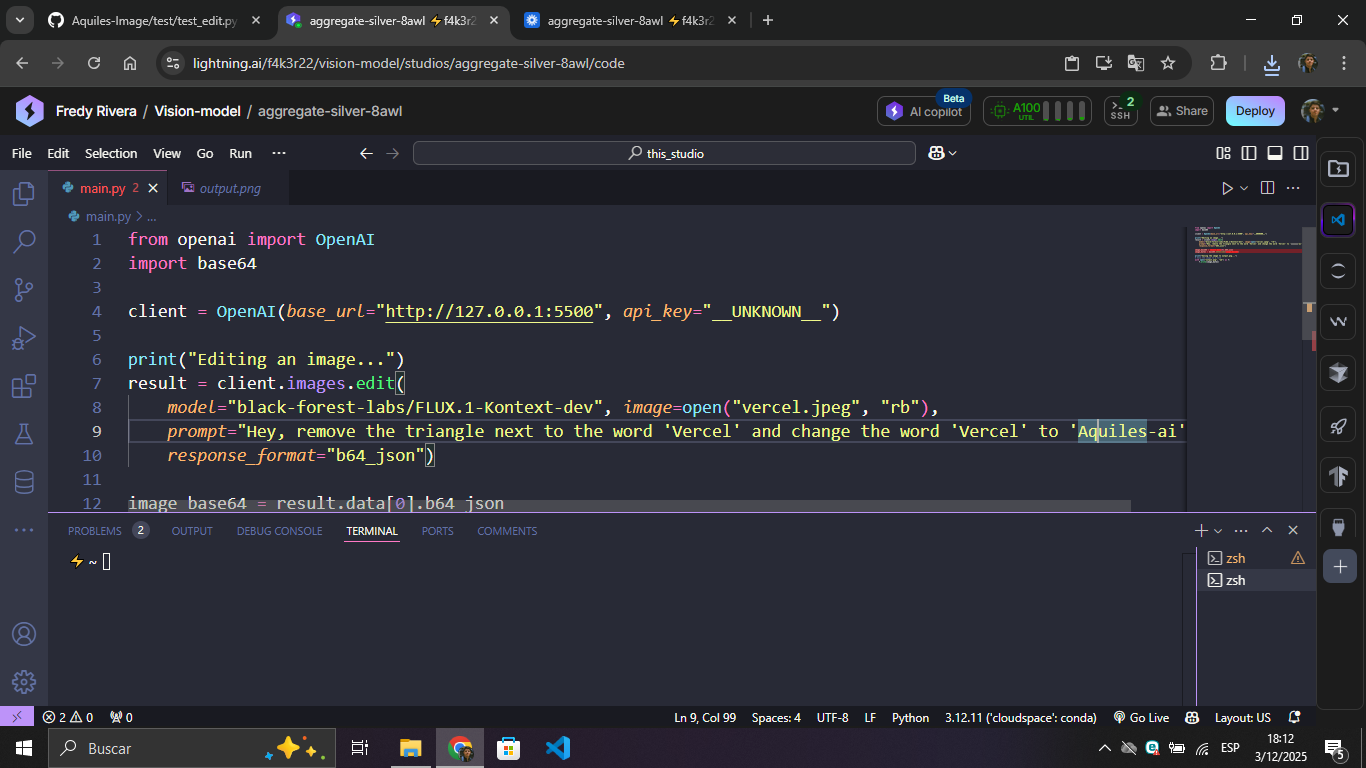
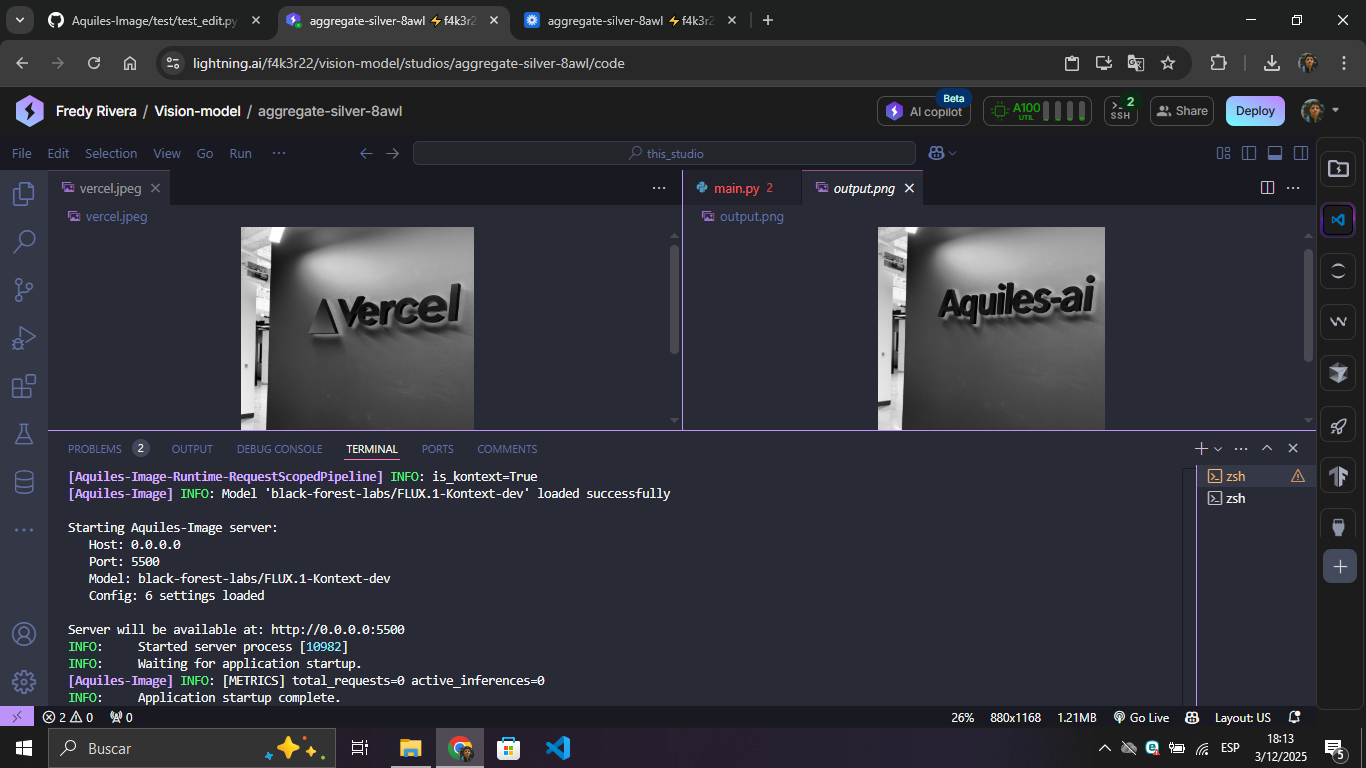
Editing an image with black-forest-labs/FLUX.1-Kontext-dev
| Edit Script | Result |
|---|---|
 |
 |
⚙️ Installation
From Pypi
uv pip install aquiles-image
From source
git clone https://github.com/Aquiles-ai/Aquiles-Image.git
cd Aquiles-Image
uv pip install .
🚀 Launch your Aquiles-Image server
aquiles-image serve --host "0.0.0.0" --port 5500 --model "stabilityai/stable-diffusion-3.5-medium"
🎨 Supported Models
| Model | Endpoint |
|---|---|
stabilityai/stable-diffusion-3-medium |
/images/generations |
stabilityai/stable-diffusion-3.5-medium |
/images/generations |
stabilityai/stable-diffusion-3.5-large |
/images/generations |
stabilityai/stable-diffusion-3.5-large-turbo |
/images/generations |
black-forest-labs/FLUX.1-dev |
/images/generations |
black-forest-labs/FLUX.1-schnell |
/images/generations |
black-forest-labs/FLUX.1-Krea-dev |
/images/generations |
diffusers/FLUX.2-dev-bnb-4bit |
/images/generations |
black-forest-labs/FLUX.2-dev |
/images/generations |
Tongyi-MAI/Z-Image-Turbo |
/images/generations |
black-forest-labs/FLUX.1-Kontext-dev |
/images/edits |
⚠️ VRAM Requirements: Most models require 24GB+ VRAM with an additional ~10GB free for processing.
🧪 Experimental: AutoPipeline Support



Aquiles-Image now supports running additional models through the experimental AutoPipeline feature. This allows you to use any model compatible with AutoPipelineForText2Image from Hugging Face's Diffusers library.
What is AutoPipeline?
AutoPipeline automatically detects and loads compatible diffusion models without requiring manual configuration. While this provides greater flexibility, it comes with some trade-offs.
Supported Models
Any model that can be loaded with AutoPipelineForText2Image without extra configurations, including:
stable-diffusion-v1-5/stable-diffusion-v1-5stabilityai/stable-diffusion-xl-base-1.0- And many more from HuggingFace Hub
Usage
aquiles-image serve --host "0.0.0.0" --port 5500 \
  --model "stabilityai/stable-diffusion-xl-base-1.0" \
  --set-steps 30 \
  --auto-pipeline
Example with OpenAI Python Client
from openai import OpenAI
import base64

client = OpenAI(base_url="http://127.0.0.1:5500", api_key="__UNKNOWN__")

result = client.images.generate(
    model="stabilityai/stable-diffusion-xl-base-1.0",
    prompt="a beautiful sunset over mountains",
    size="1024x1024"
)

print(f"Generated image: {result.data[0].url}")

# Download the image
image_bytes = base64.b64decode(result.data[0].b64_json)
with open("output.png", "wb") as f:
    f.write(image_bytes)
More Examples
Using Stable Diffusion v1.5:
aquiles-image serve --model "stable-diffusion-v1-5/stable-diffusion-v1-5" --set-steps 40 --auto-pipeline
Using SDXL Base:
aquiles-image serve --model "stabilityai/stable-diffusion-xl-base-1.0" --set-steps 30 --auto-pipeline
With custom port and API key:
aquiles-image serve \
  --model "stabilityai/stable-diffusion-xl-base-1.0" \
  --set-steps 30 \
  --auto-pipeline \
  --port 5500 \
  --api-key "your-secret-key"
⚠️ Important Limitations
| Limitation | Description |
|---|---|
| 🐌 Slower Inference | AutoPipeline models may have longer inference times compared to optimized native implementations |
| 🚫 No LoRA Support | LoRA adapters are not currently supported |
| 🚫 No Adapters | Other adapter types (ControlNet, T2I-Adapter, etc.) are not supported |
| 🧪 Experimental | This feature is in active development and may have stability issues |
| 📦 Limited Configs | Only models that work out-of-the-box with default AutoPipelineForText2Image settings |
Troubleshooting
If you encounter errors with AutoPipeline:
-
Check model compatibility: Ensure the model supports
AutoPipelineForText2Image# Test locally first from diffusers import AutoPipelineForText2Image pipe = AutoPipelineForText2Image.from_pretrained("model-name")
-
Verify VRAM: Some models may require more VRAM than expected
- Check model card on Hugging Face for requirements
- Monitor GPU memory usage during inference
-
Use native implementations: For supported models (FLUX, SD3, etc.), use the optimized native pipelines instead
# Instead of --auto-pipeline, use native support
aquiles-image serve --model "stabilityai/stable-diffusion-3.5-medium"
-
Check logs: Enable verbose logging to see detailed error messages
# The server logs will show detailed error information
# Look for errors starting with "X" emoji
💡 Tip: If a model is frequently used in your workflow, consider requesting native support by opening an issue on our GitHub repository.
Reporting Issues
When reporting AutoPipeline issues, please include:
- Model name and HuggingFace URL
- Full error message and logs
- GPU model and VRAM amount
- Aquiles-Image version (
pip show aquiles-image)
Create an issue at: https://github.com/Aquiles-ai/Aquiles-Image/issues
💻 Start your Aquiles-Image server in dev mode without loading models
Dev mode allows you to start the server without loading any AI models, ideal for rapid development, integration testing, or endpoint validation without requiring GPU or heavy computational resources.
aquiles-image serve --host "0.0.0.0" --port 5500 --no-load-model
What does dev mode do?
- No model loading: Server starts instantly without downloading or loading AI models
- Functional endpoints: All endpoints respond normally with test images
- Realistic responses: Returns valid images that simulate model responses
- Same format: Responses maintain the exact API format (URLs, base64, metadata)
Use cases
- API integration development
- Endpoint testing without GPU
- Workflow validation
- CI/CD environment testing
- Development on machines without GPU resources
Note: Dev mode is for development only. For production, use the normal server with loaded models.
🎉 Generate your first image with Aquiles-Image
from openai import OpenAI
import requests

client = OpenAI(base_url="http://127.0.0.1:5500", api_key="__UNKNOWN__")

result = client.images.generate(
    model="stabilityai/stable-diffusion-3.5-medium",
    prompt="a white siamese cat",
    size="1024x1024"
)

print(f"URL of the generated image: {result.data[0].url}\n")

image_url = result.data[0].url
response = requests.get(image_url)

with open("image.png", "wb") as f:
    f.write(response.content)

print(f"Image downloaded successfully\n")
🎯 Perfect For
| Use Case | Description |
|---|---|
| 🚀 AI Startups | Building image generation features |
| 👨💻 Developers | Prototyping with Image Generation Models |
| 🏢 Enterprises | Scalable image AI infrastructure |
| 🔬 Researchers | Experimenting with multiple models |
Built with ❤️ for the AI community
Release history Release notifications | RSS feed


Download files
Download the file for your platform. If you're not sure which to choose, learn more about installing packages.
Source Distribution
Built Distribution
Filter files by name, interpreter, ABI, and platform.
If you're not sure about the file name format, learn more about wheel file names.
Copy a direct link to the current filters
File details
Details for the file aquiles_image-0.1.90.tar.gz.
File metadata
- Download URL: aquiles_image-0.1.90.tar.gz
- Upload date:
- Size: 2.6 MB
- Tags: Source
- Uploaded using Trusted Publishing? No
- Uploaded via: twine/6.1.0 CPython/3.12.3
File hashes
| Algorithm | Hash digest | |
|---|---|---|
| SHA256 |
f80b8f999c1144887efa9b11d04132adfb2dc106a96027e367420e50cd14b8f4
|
|
| MD5 |
1330610afc72875524d47378e095d115
|
|
| BLAKE2b-256 |
8f8e1047b0c8a65041fd98fa14ad2cab1262d4cc811d760690676aa5dada77b3
|
File details
Details for the file aquiles_image-0.1.90-py3-none-any.whl.
File metadata
- Download URL: aquiles_image-0.1.90-py3-none-any.whl
- Upload date:
- Size: 2.7 MB
- Tags: Python 3
- Uploaded using Trusted Publishing? No
- Uploaded via: twine/6.1.0 CPython/3.12.3
File hashes
| Algorithm | Hash digest | |
|---|---|---|
| SHA256 |
85307c10902572588f32b80b6632dc284363f1c7058e7c30551dcea0121fc000
|
|
| MD5 |
65c5a7f6d3fb54224eef1000df4ba3ca
|
|
| BLAKE2b-256 |
4026ff0ccb1a51feaa69d2d0d6ce88809df35bae2bc987b0f8b6ad7acae43e5f
|






