
A high-performance, memory-efficient inference server for diffusion models, compatible with the OpenAI client

Project description
Aquiles-Image

Self-hosted image generation with OpenAI-compatible APIs
🚀 FastAPI • Diffusers • Drop-in replacement for OpenAI






🎯 What is Aquiles-Image?
Aquiles-Image is a production-ready API server that lets you run state-of-the-art image generation models on your own infrastructure. OpenAI-compatible by design, you can switch from external services to self-hosted in under 5 minutes.
Why Aquiles-Image?
| Challenge | Aquiles-Image Solution |
|---|---|
| 💸 Expensive external APIs | Run models locally with unlimited usage |
| 🔒 Data privacy concerns | Your images never leave your server |
| 🐌 Slow inference | Advanced optimizations for 3x faster generation |
| 🔧 Complex setup | One command to run any supported model |
| 🚫 Vendor lock-in | OpenAI-compatible, switch without rewriting code |
Key Features
- 🔌 OpenAI Compatible - Use the official OpenAI client with zero code changes
- ⚡ 3x Faster - Advanced inference optimizations out of the box
- 🎨 10+ Models - FLUX.1, FLUX.2, SD3.5, and more preconfigured
- 🛠️ Superior DevX - Simple CLI, dev mode for testing, built-in monitoring
- 🎬 Experimental Video - Text-to-video generation support (Wan2.2)
🚀 Quick Start
Installation
# From PyPI (recommended)
pip install aquiles-image

# From source
git clone https://github.com/Aquiles-ai/Aquiles-Image.git
cd Aquiles-Image
pip install .
Launch Server
aquiles-image serve --model "stabilityai/stable-diffusion-3.5-medium"
Generate Your First Image
from openai import OpenAI

client = OpenAI(base_url="http://127.0.0.1:5500", api_key="not-needed")

result = client.images.generate(
    model="stabilityai/stable-diffusion-3.5-medium",
    prompt="a white siamese cat",
    size="1024x1024"
)

print(f"Image URL: {result.data[0].url}")
That's it! You're now generating images with the same API you'd use for OpenAI.
🎨 Supported Models
Text-to-Image (/images/generations)
stabilityai/stable-diffusion-3-mediumstabilityai/stable-diffusion-3.5-mediumstabilityai/stable-diffusion-3.5-largestabilityai/stable-diffusion-3.5-large-turboblack-forest-labs/FLUX.1-devblack-forest-labs/FLUX.1-schnellblack-forest-labs/FLUX.1-Krea-devblack-forest-labs/FLUX.2-devdiffusers/FLUX.2-dev-bnb-4bitTongyi-MAI/Z-Image-Turbo
Image-to-Image (/images/edits)
black-forest-labs/FLUX.1-Kontext-devdiffusers/FLUX.2-dev-bnb-4bit
Text-to-Video (/videos) - Experimental
Wan-AI/Wan2.2-T2V-A14B(High quality, 40 steps - requires H100/A100-80G, start with--model "wan2.2")Aquiles-ai/Wan2.2-Turbo⚡ 9.5x faster - Same quality in 4 steps! (requires H100/A100-80G, start with--model "wan2.2-turbo")
VRAM Requirements: Most models need 24GB+ VRAM. Video generation requires 80GB+ (H100/A100-80G).
💡 Examples
Generating Images
https://github.com/user-attachments/assets/00e18988-0472-4171-8716-dc81b53dcafa
https://github.com/user-attachments/assets/00d4235c-e49c-435e-a71a-72c36040a8d7
Editing Images
| Input + Prompt | Result |
|---|---|
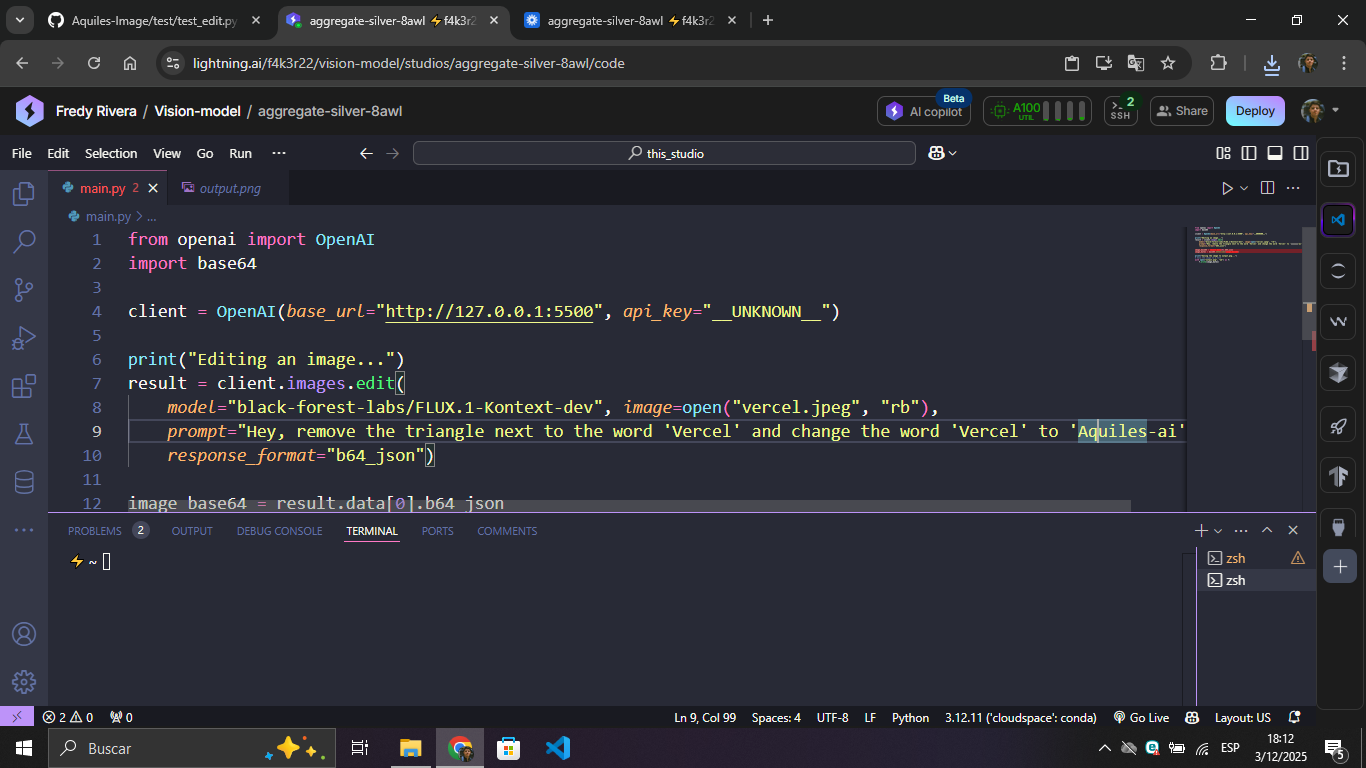 |
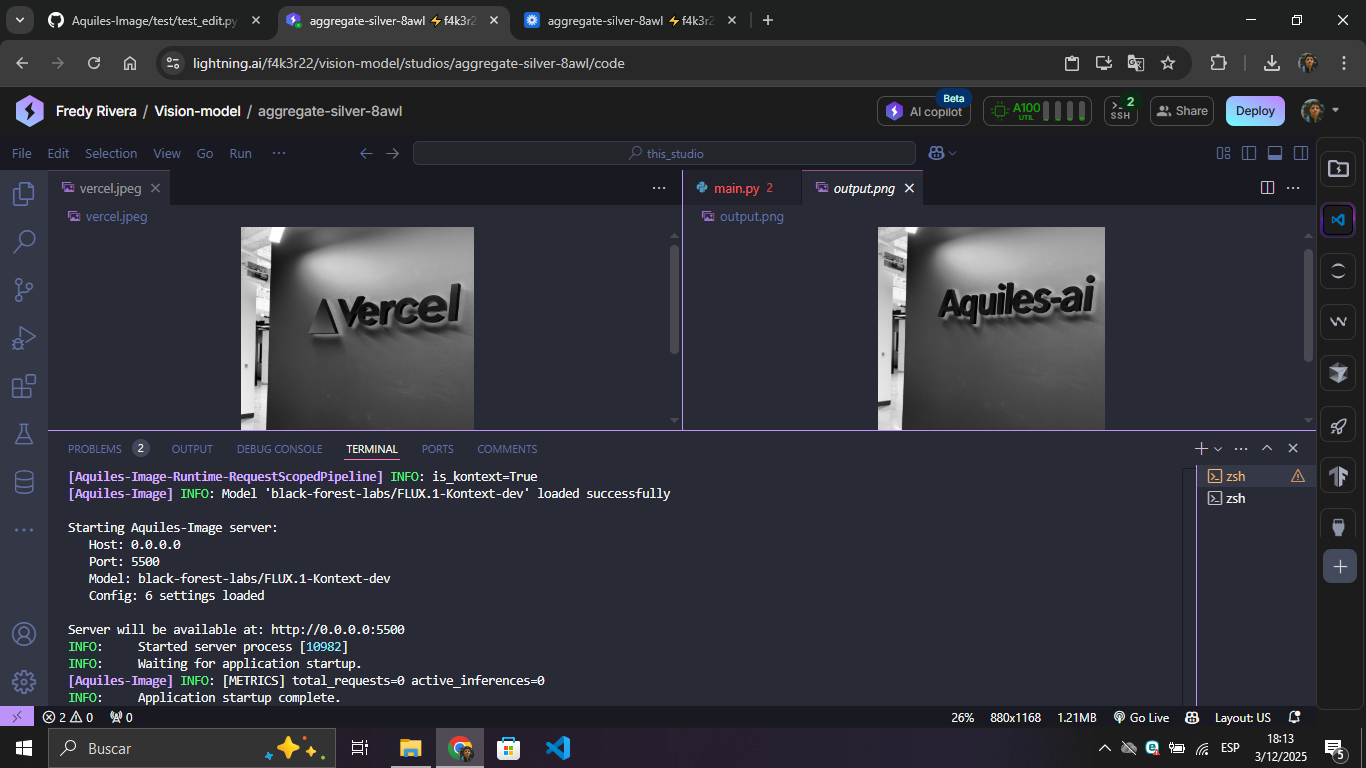 |
Generating Videos (Experimental)
https://github.com/user-attachments/assets/7b1270c3-b77b-48df-a0fe-ac39b2320143
Note: Video generation with
wan2.2takes ~30 minutes on H100. Withwan2.2-turbo, it takes only ~3 minutes! Only one video can be generated at a time.
🧪 Advanced Features
AutoPipeline - Run Any Diffusers Model
Run any model compatible with AutoPipelineForText2Image from HuggingFace:
aquiles-image serve \
  --model "stabilityai/stable-diffusion-xl-base-1.0" \
  --auto-pipeline \
  --set-steps 30
Supported models include:
stable-diffusion-v1-5/stable-diffusion-v1-5stabilityai/stable-diffusion-xl-base-1.0- Any HuggingFace model compatible with
AutoPipelineForText2Image
Trade-offs:
- ⚠️ Slower inference than native implementations
- ⚠️ No LoRA or adapter support
- ⚠️ Experimental - may have stability issues
Dev Mode - Test Without Loading Models
Perfect for development, testing, and CI/CD:
aquiles-image serve --no-load-model
What it does:
- Starts server instantly without GPU
- Returns test images that simulate real responses
- All endpoints functional with realistic formats
- Same API structure as production
🎯 Use Cases
| Who | What |
|---|---|
| 🚀 AI Startups | Build image generation features without API costs |
| 👨💻 Developers | Prototype with multiple models using one interface |
| 🏢 Enterprises | Scalable, private image AI infrastructure |
| 🔬 Researchers | Experiment with cutting-edge models easily |
📋 Prerequisites
- Python 3.8+
- CUDA-compatible GPU with 24GB+ VRAM (most models)
- 10GB+ free disk space
📚 Documentation
⭐ Star this project • 🐛 Report issues
Built with ❤️ for the AI community
Release history Release notifications | RSS feed


Download files
Download the file for your platform. If you're not sure which to choose, learn more about installing packages.
Source Distribution
Built Distribution
Filter files by name, interpreter, ABI, and platform.
If you're not sure about the file name format, learn more about wheel file names.
Copy a direct link to the current filters
File details
Details for the file aquiles_image-0.2.5.tar.gz.
File metadata
- Download URL: aquiles_image-0.2.5.tar.gz
- Upload date:
- Size: 2.7 MB
- Tags: Source
- Uploaded using Trusted Publishing? No
- Uploaded via: twine/6.1.0 CPython/3.12.3
File hashes
| Algorithm | Hash digest | |
|---|---|---|
| SHA256 |
f53823f856e00f9576d370b04037311f31f99d17eba7f827dc0f5d41f218cc9a
|
|
| MD5 |
48f968be70f8f7966c66fbabf58c99fb
|
|
| BLAKE2b-256 |
50449adb91e40994bef0137f575c7966c6b4be9b5bd7ea8aa1cce64014dd26a4
|
File details
Details for the file aquiles_image-0.2.5-py3-none-any.whl.
File metadata
- Download URL: aquiles_image-0.2.5-py3-none-any.whl
- Upload date:
- Size: 2.7 MB
- Tags: Python 3
- Uploaded using Trusted Publishing? No
- Uploaded via: twine/6.1.0 CPython/3.12.3
File hashes
| Algorithm | Hash digest | |
|---|---|---|
| SHA256 |
3f69dbd3994448455ecc61c621a14e06b8f24776818cc7e4a12e5963b9885726
|
|
| MD5 |
674c37df3398989f6ba3adde7d5ee851
|
|
| BLAKE2b-256 |
46897eb0109d23f85eca7e65c47ca3c20cbbd4bb27690f4c6ff15718aaecd637
|






