
A high-performance, memory-efficient inference server for diffusion models, compatible with the OpenAI client

Project description
Aquiles-Image

Self-hosted image/video generation with OpenAI-compatible APIs
🚀 FastAPI • Diffusers • Drop-in replacement for OpenAI








🎯 What is Aquiles-Image?
Aquiles-Image is a production-ready API server that lets you run state-of-the-art image generation models on your own infrastructure. OpenAI-compatible by design, you can switch from external services to self-hosted in under 5 minutes.
Why Aquiles-Image?
| Challenge | Aquiles-Image Solution |
|---|---|
| 💸 Expensive external APIs | Run models locally with unlimited usage |
| 🔒 Data privacy concerns | Your images never leave your server |
| 🐌 Slow inference | Advanced optimizations for 3x faster generation |
| 🔧 Complex setup | One command to run any supported model |
| 🚫 Vendor lock-in | OpenAI-compatible, switch without rewriting code |
Key Features
- 🔌 OpenAI Compatible - Use the official OpenAI client with zero code changes
- ⚡ Intelligent Batching - Automatic request grouping by shared parameters for maximum throughput on single or multi-GPU setups
- 🎨 30+ Optimized Models - 18 image (FLUX, SD3.5, Qwen) + 12 video models (Wan2.x, HunyuanVideo) + unlimited via AutoPipeline (Only T2I)
- 🚀 Multi-GPU Support - Distributed inference with dynamic load balancing across GPUs (image models) for horizontal scaling
- 🛠️ Superior DevX - Simple CLI, dev mode for testing, built-in monitoring
- 🎬 Advanced Video - Text-to-video with Wan2.x and HunyuanVideo series (+ Turbo variants)
🚀 Quick Start
Installation
# From PyPI (recommended)
pip install aquiles-image

# From source
git clone https://github.com/Aquiles-ai/Aquiles-Image.git
cd Aquiles-Image
pip install .
Launch Server
Single-Device Mode (Default)
aquiles-image serve --model "stabilityai/stable-diffusion-3.5-medium"
Multi-GPU Distributed Mode (Image Models Only)
aquiles-image serve --model "stabilityai/stable-diffusion-3.5-medium" --dist-inference
Distributed Inference Note: Enable multi-GPU mode by adding the
--dist-inferenceflag. Each GPU will load a copy of the model, so ensure each GPU has sufficient VRAM. The system automatically balances load across GPUs and groups requests with shared parameters for maximum throughput.
Generate Your First Image
from openai import OpenAI

client = OpenAI(base_url="http://127.0.0.1:5500", api_key="not-needed")

result = client.images.generate(
    model="stabilityai/stable-diffusion-3.5-medium",
    prompt="a white siamese cat",
    size="1024x1024"
)

print(f"Image URL: {result.data[0].url}")
That's it! You're now generating images with the same API you'd use for OpenAI.
🎨 Supported Models
Text-to-Image (/images/generations)
stabilityai/stable-diffusion-3-mediumstabilityai/stable-diffusion-3.5-mediumstabilityai/stable-diffusion-3.5-largestabilityai/stable-diffusion-3.5-large-turboblack-forest-labs/FLUX.1-devblack-forest-labs/FLUX.1-schnellblack-forest-labs/FLUX.1-Krea-devblack-forest-labs/FLUX.2-dev*diffusers/FLUX.2-dev-bnb-4bitTongyi-MAI/Z-Image-TurboQwen/Qwen-ImageQwen/Qwen-Image-2512black-forest-labs/FLUX.2-klein-4Bblack-forest-labs/FLUX.2-klein-9B
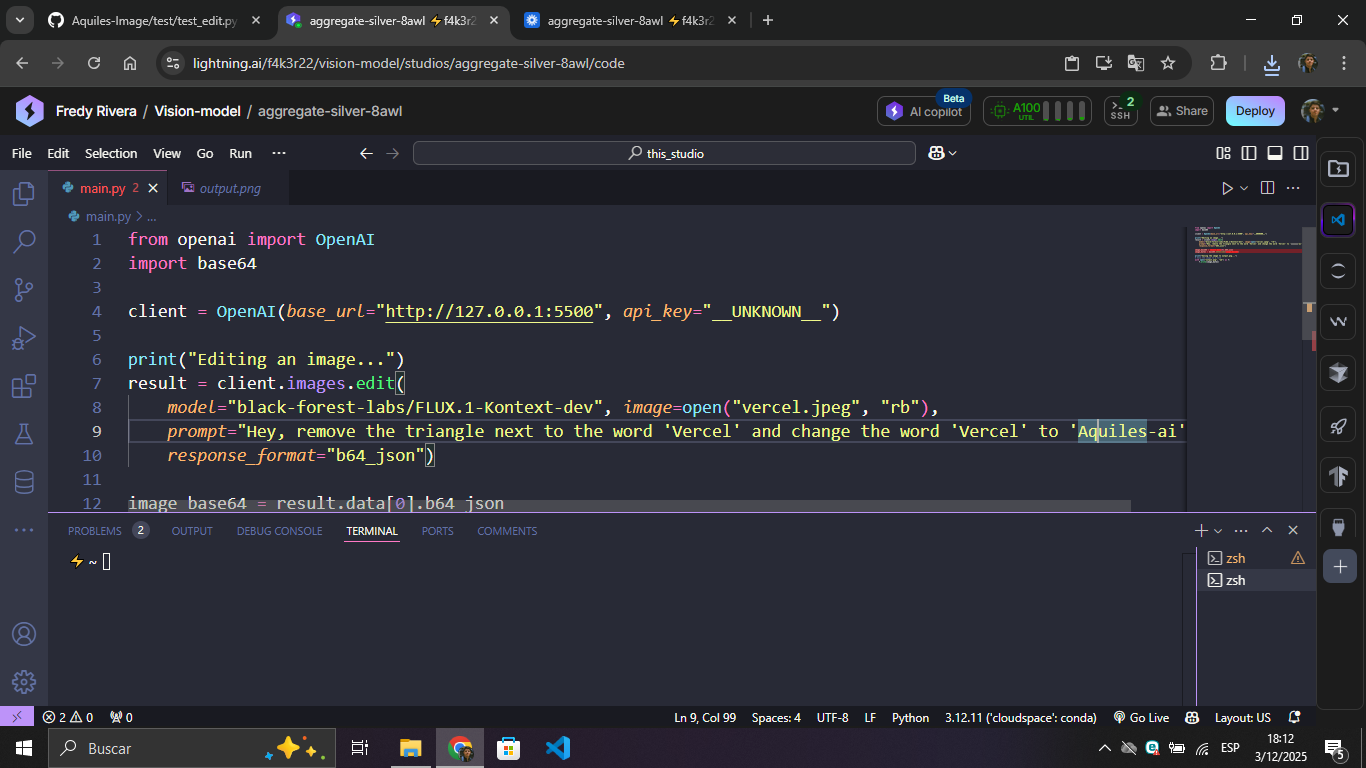
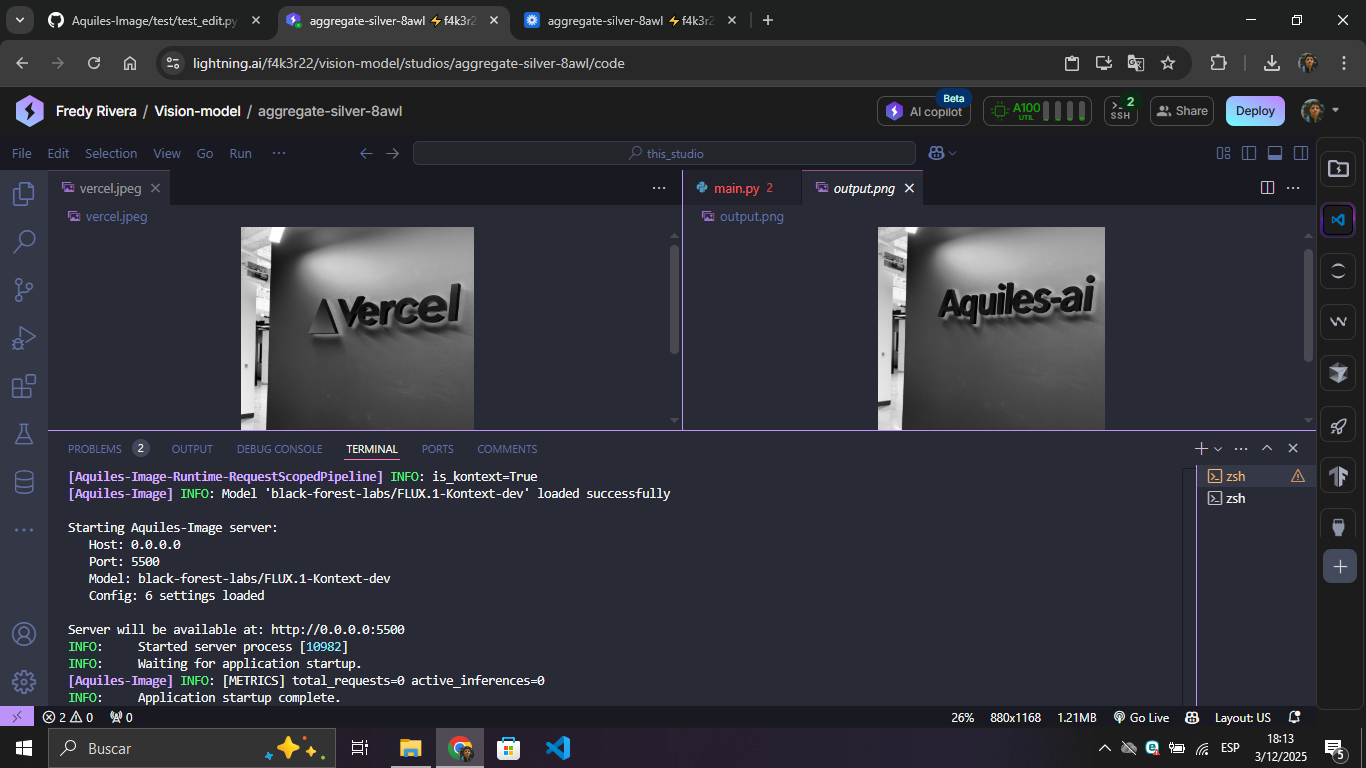
Image-to-Image (/images/edits)
black-forest-labs/FLUX.1-Kontext-devdiffusers/FLUX.2-dev-bnb-4bit- Supports multi-image editing. Maximum 10 input images.black-forest-labs/FLUX.2-dev* - Supports multi-image editing. Maximum 10 input images.Qwen/Qwen-Image-EditQwen/Qwen-Image-Edit-2509- Supports multi-image editing. Maximum 3 input images.Qwen/Qwen-Image-Edit-2511- Supports multi-image editing. Maximum 3 input images.black-forest-labs/FLUX.2-klein-4B- Supports multi-image editing. Maximum 10 input images.black-forest-labs/FLUX.2-klein-9B- Supports multi-image editing. Maximum 10 input images.
* Note on FLUX.2-dev: Requires NVIDIA H200.
Text-to-Video (/videos)
Wan2.2 Series
Wan-AI/Wan2.2-T2V-A14B(High quality, 40 steps - start with--model "wan2.2")Aquiles-ai/Wan2.2-Turbo⚡ 9.5x faster - Same quality in 4 steps! (start with--model "wan2.2-turbo")
Wan2.1 Series
Wan-AI/Wan2.1-T2V-14B(High quality, 40 steps - start with--model "wan2.1")Aquiles-ai/Wan2.1-Turbo⚡ 9.5x faster - Same quality in 4 steps! (start with--model "wan2.1-turbo")Wan-AI/Wan2.1-T2V-1.3B(Lightweight version, 40 steps - start with--model "wan2.1-3B")Aquiles-ai/Wan2.1-Turbo-fp8⚡ 9.5x faster + FP8 optimized - 4 steps (start with--model "wan2.1-turbo-fp8")
HunyuanVideo-1.5 Series
Standard Resolution (480p)
Aquiles-ai/HunyuanVideo-1.5-480p(50 steps - start with--model "hunyuanVideo-1.5-480p")Aquiles-ai/HunyuanVideo-1.5-480p-fp8(50 steps, FP8 optimized - start with--model "hunyuanVideo-1.5-480p-fp8")Aquiles-ai/HunyuanVideo-1.5-480p-Turbo⚡ 12.5x faster - 4 steps! (start with--model "hunyuanVideo-1.5-480p-turbo")Aquiles-ai/HunyuanVideo-1.5-480p-Turbo-fp8⚡ 12.5x faster + FP8 optimized - 4 steps (start with--model "hunyuanVideo-1.5-480p-turbo-fp8")
High Resolution (720p)
Aquiles-ai/HunyuanVideo-1.5-720p(50 steps - start with--model "hunyuanVideo-1.5-720p")Aquiles-ai/HunyuanVideo-1.5-720p-fp8(50 steps, FP8 optimized - start with--model "hunyuanVideo-1.5-720p-fp8")
LTX-2 (Joint Audio-Visual Generation - Experimental)
Lightricks/ltx-2-19b-dev(40 steps - start with--model "ltx-2")
Special Features: LTX-2 is the first open-source model supporting synchronized audio-video generation in a single model, comparable to closed models like Sora-2 and Veo 3.1. For best results with this model, please follow the prompts guide provided by the Lightricks team.
VRAM Requirements: Most models need 24GB+ VRAM. All video models require H100/A100-80GB. FP8 optimized versions offer better memory efficiency.
📖 Full models documentation and more models in 🎬 Aquiles-Studio
💡 Examples
Generating Images
https://github.com/user-attachments/assets/00e18988-0472-4171-8716-dc81b53dcafa
https://github.com/user-attachments/assets/00d4235c-e49c-435e-a71a-72c36040a8d7
Editing Images
| Input + Prompt | Result |
|---|---|
 |
 |
Generating Videos
https://github.com/user-attachments/assets/7b1270c3-b77b-48df-a0fe-ac39b2320143
Note: Video generation with
wan2.2takes ~30 minutes on H100. Withwan2.2-turbo, it takes only ~3 minutes! Only one video can be generated at a time.
Video and audio generation
https://github.com/user-attachments/assets/b7104dc3-5306-4e6a-97e5-93a6c1e73f54
🧪 Advanced Features
AutoPipeline - Run Any Diffusers Model
Run any model compatible with AutoPipelineForText2Image from HuggingFace:
aquiles-image serve \
  --model "stabilityai/stable-diffusion-xl-base-1.0" \
  --auto-pipeline \
  --set-steps 30
Supported models include:
stable-diffusion-v1-5/stable-diffusion-v1-5stabilityai/stable-diffusion-xl-base-1.0- Any HuggingFace model compatible with
AutoPipelineForText2Image
Trade-offs:
- ⚠️ Slower inference than native implementations
- ⚠️ No LoRA or adapter support
- ⚠️ Experimental - may have stability issues
Dev Mode - Test Without Loading Models
Perfect for development, testing, and CI/CD:
aquiles-image serve --no-load-model
What it does:
- Starts server instantly without GPU
- Returns test images that simulate real responses
- All endpoints functional with realistic formats
- Same API structure as production
📊 Monitoring & Stats
Aquiles-Image provides a custom /stats endpoint for real-time monitoring:
import requests

# Get server statistics
stats = requests.get("http://localhost:5500/stats",
                    headers={"Authorization": "Bearer YOUR_API_KEY"}).json()

print(f"Total requests: {stats['total_requests']}")
print(f"Total images generated: {stats['total_images']}")
print(f"Queued: {stats['queued']}")
print(f"Completed: {stats['completed']}")
Response Formats
The response varies depending on the model type and configuration:
Image Models - Single-Device Mode
{
  "mode": "single-device",
  "total_requests": 150,
  "total_batches": 42,
  "total_images": 180,
  "queued": 3,
  "completed": 147,
  "failed": 0,
  "processing": true,
  "available": false
}
Image Models - Distributed Mode (Multi-GPU)
{
  "mode": "distributed",
  "devices": {
    "cuda:0": {
      "id": "cuda:0",
      "available": true,
      "processing": false,
      "can_accept_batch": true,
      "batch_size": 4,
      "max_batch_size": 8,
      "images_processing": 0,
      "images_completed": 45,
      "total_batches_processed": 12,
      "avg_batch_time": 2.5,
      "estimated_load": 0.3,
      "error_count": 0,
      "last_error": null
    },
    "cuda:1": {
      "id": "cuda:1",
      "available": true,
      "processing": true,
      "can_accept_batch": false,
      "batch_size": 2,
      "max_batch_size": 8,
      "images_processing": 2,
      "images_completed": 38,
      "total_batches_processed": 10,
      "avg_batch_time": 2.8,
      "estimated_load": 0.7,
      "error_count": 0,
      "last_error": null
    }
  },
  "global": {
    "total_requests": 150,
    "total_batches": 42,
    "total_images": 180,
    "queued": 3,
    "active_batches": 1,
    "completed": 147,
    "failed": 0,
    "processing": true
  }
}
Video Models
{
  "total_tasks": 25,
  "queued": 2,
  "processing": 1,
  "completed": 20,
  "failed": 2,
  "available": false,
  "max_concurrent": 1
}
Key Metrics:
total_requests/tasks- Total number of generation requests receivedtotal_images- Total images generated (image models only)queued- Requests waiting to be processedprocessing- Currently processing requestscompleted- Successfully completed requestsfailed- Failed requestsavailable- Whether server can accept new requestsmode- Operation mode for image models:single-deviceordistributed
🎯 Use Cases
| Who | What |
|---|---|
| 🚀 AI Startups | Build image generation features without API costs |
| 👨💻 Developers | Prototype with multiple models using one interface |
| 🏢 Enterprises | Scalable, private image AI infrastructure |
| 🔬 Researchers | Experiment with cutting-edge models easily |
📋 Prerequisites
- Python 3.8+
- CUDA-compatible GPU with 24GB+ VRAM (most models)
- 10GB+ free disk space
📚 Documentation
⭐ Star this project • 🐛 Report issues
Built with ❤️ for the AI community
Release history Release notifications | RSS feed


Download files
Download the file for your platform. If you're not sure which to choose, learn more about installing packages.
Source Distribution
Built Distribution
Filter files by name, interpreter, ABI, and platform.
If you're not sure about the file name format, learn more about wheel file names.
Copy a direct link to the current filters
File details
Details for the file aquiles_image-0.4.0.tar.gz.
File metadata
- Download URL: aquiles_image-0.4.0.tar.gz
- Upload date:
- Size: 56.2 kB
- Tags: Source
- Uploaded using Trusted Publishing? No
- Uploaded via: twine/6.1.0 CPython/3.12.3
File hashes
| Algorithm | Hash digest | |
|---|---|---|
| SHA256 |
35a2454a98b623f03f6b21c2716f09c14aedaaa0564d3116881785d76de436f6
|
|
| MD5 |
b0988379048b562ddde056a3c41c62fd
|
|
| BLAKE2b-256 |
48a379e20658d07b8bda401589c9caf1a95f2b212d991c69c065df5029fe4fa9
|
File details
Details for the file aquiles_image-0.4.0-py3-none-any.whl.
File metadata
- Download URL: aquiles_image-0.4.0-py3-none-any.whl
- Upload date:
- Size: 61.0 kB
- Tags: Python 3
- Uploaded using Trusted Publishing? No
- Uploaded via: twine/6.1.0 CPython/3.12.3
File hashes
| Algorithm | Hash digest | |
|---|---|---|
| SHA256 |
9ae386fda63de02e8e5d7016d8b2731fec843184bd39c8633105bafcb5ba2a31
|
|
| MD5 |
bcbfbc3f93e4d68bc2cb64377132acc3
|
|
| BLAKE2b-256 |
24334a7f405d2e0a201429a34c2cb0b8852f20317ba573eb252ae5a853939a7d
|






