
ArchSketch
A Python CLI tool that scans any project directory and automatically infers its system architecture from common project files, then displays a beautiful ASCII diagram in your terminal.
No configuration needed. Just point it at a folder.
Quick Start
# Clone the repo
git clone https://github.com/yourusername/archsketch.git
cd archsketch

# Set up Python environment
python -m venv venv

# Activate (Windows)
venv\Scripts\activate

# Activate (macOS/Linux)
source venv/bin/activate

# Install
pip install -e .

# Run on any project!
archsketch analyze /path/to/your/project
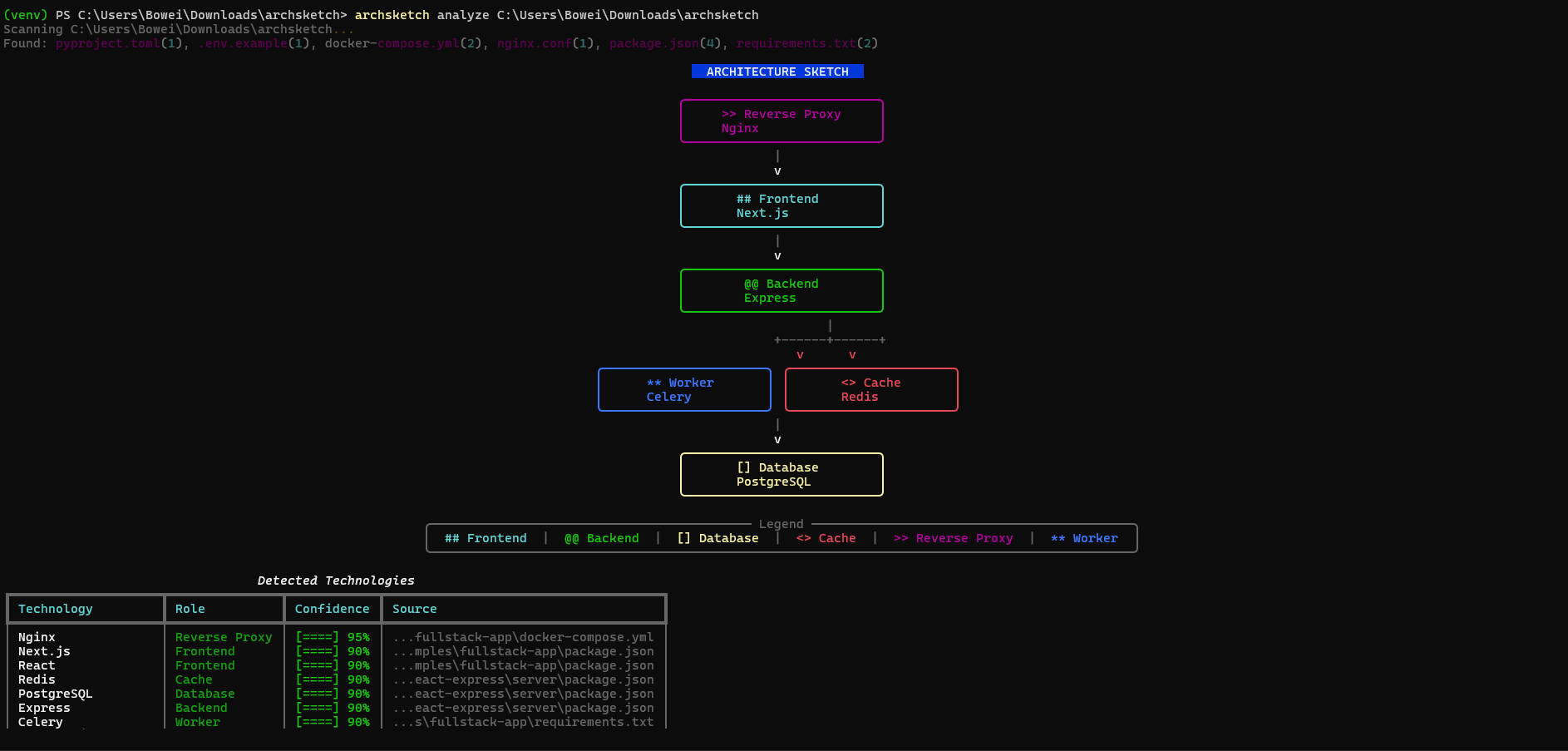
Example Output
                          ARCHITECTURE SKETCH

                    +--------------------------+
                    |     >> Reverse Proxy     |
                    |          Nginx           |
                    +--------------------------+
                                 |
                                 v
                    +--------------------------+
                    |       ## Frontend        |
                    |         Next.js          |
                    +--------------------------+
                                 |
                                 v
                    +--------------------------+
                    |       @@ Backend         |
                    |         FastAPI          |
                    +--------------------------+
                          |            |
                          v            v
              +----------------+ +----------------+
              |   [] Database  | |    <> Cache   |
              |   PostgreSQL   | |     Redis     |
              +----------------+ +----------------+

+------------------------ Legend -------------------------+
|  ## Frontend | @@ Backend | [] Database | <> Cache | >> Proxy |
+---------------------------------------------------------+
Screenshots
Terminal output (analyze)
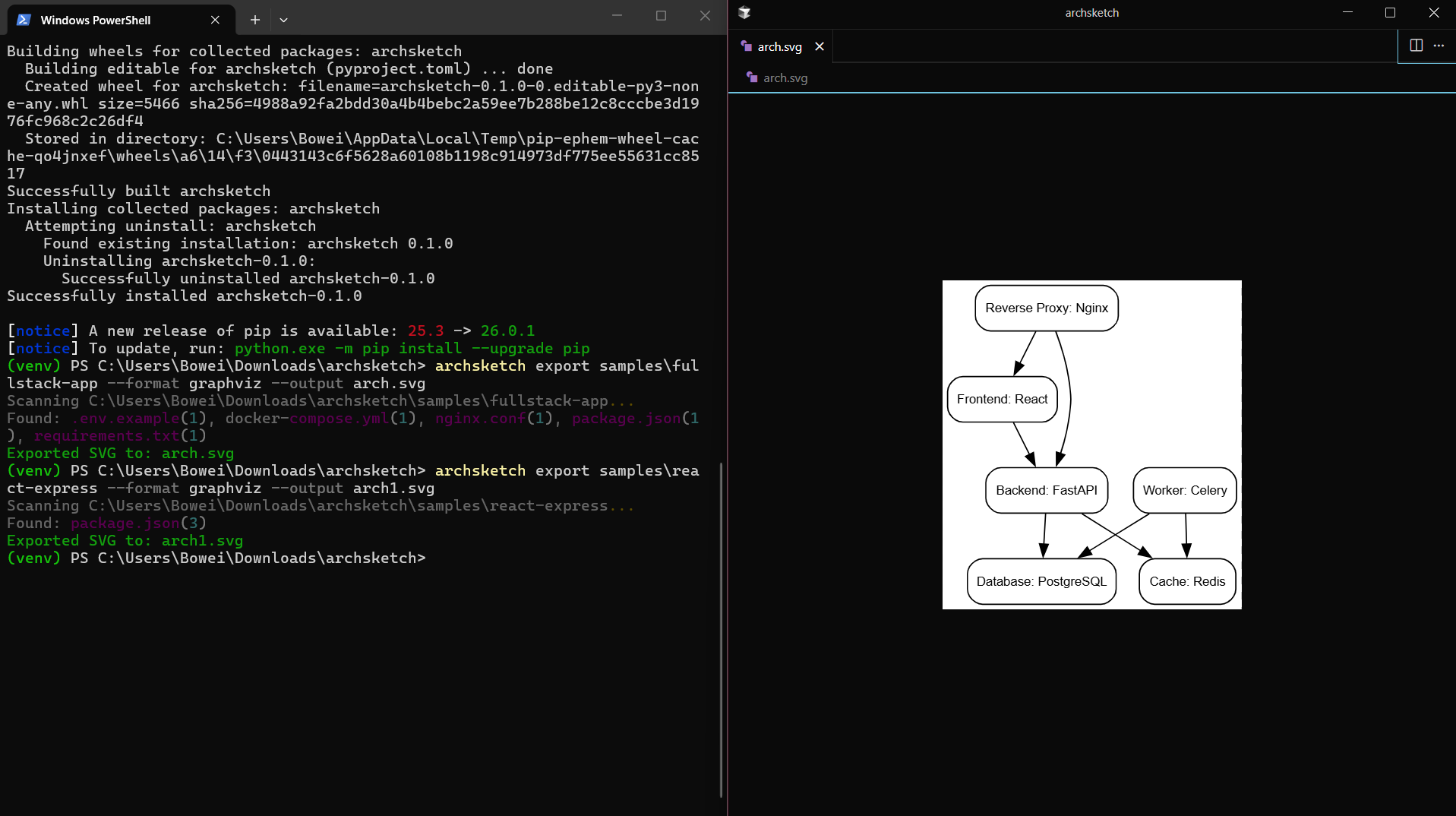
Exported SVG
Usage
Analyze any project
archsketch analyze .                           # Current directory
archsketch analyze /path/to/your/project       # Any project folder
archsketch analyze ~/code/my-app               # Home directory path
archsketch analyze . --compact                 # Diagram only, no detections table
archsketch analyze . --no-table                # Same as --compact
Export to Mermaid
archsketch export /path/to/project --format mermaid --output architecture.mmd
Export to SVG (shareable image)
# Requires: pip install graphviz AND Graphviz binaries (https://graphviz.org/download/)
archsketch export . --format graphviz --output architecture.svg

# Or export DOT file (no binary needed), then convert: dot -Tsvg architecture.dot -o architecture.svg
archsketch export . --format dot --output architecture.dot
Generates:
graph TD
  frontend[Frontend: Next.js]
  backend[Backend: FastAPI]
  database[Database: PostgreSQL]
  cache[Cache: Redis]

  frontend --> backend
  backend --> database
  backend --> cache
JSON output
archsketch analyze /path/to/project --json
Show Mermaid in terminal
archsketch show /path/to/project
Compare architecture between git refs (diff)
Requires: pip install gitpython
archsketch diff main feature-branch
archsketch diff HEAD~1 HEAD ./src
Shows added/removed components and edges (e.g. + Cache: Redis, - Database: MySQL).
Explain in the diagram
- ASCII: Each node box shows a short "From: ..." source line when available.
- Mermaid: Comments in the
.mmdfile document which file each node came from. - JSON: Each node has
sourcesandexplanationfor CI/scripting.
Stable JSON for CI
Export includes $schema, version, and consistent shape. Schema: schema/architecture.json.
archsketch analyze . --output architecture.json
What It Detects
ArchSketch reads these files to understand your stack:
| File | What it detects |
|---|---|
package.json |
React, Next.js, Vue, Express, NestJS, Prisma, Redis, Remix, Astro, Hono, Supabase |
requirements.txt |
FastAPI, Flask, Django, Celery, psycopg2, redis, Supabase |
pyproject.toml |
Same as requirements.txt |
pom.xml |
Spring Boot, PostgreSQL, Redis, Kafka, Micronaut, Quarkus |
build.gradle / build.gradle.kts |
Spring Boot, PostgreSQL, Redis (Gradle) |
docker-compose.yml |
PostgreSQL, MySQL, Redis, Nginx, RabbitMQ, custom services |
Dockerfile |
Base images (node, python, nginx) |
.env |
Database URLs, Redis URLs, service connections |
nginx.conf |
Nginx, upstream backends, SSL, WebSocket |
Procfile |
web/worker process types, Gunicorn, Celery, Next.js |
deployment.yaml, service.yaml, k8s/*.yaml |
Kubernetes Deployments, Services, Ingress, container images |
*.tf |
Terraform (AWS RDS, Lambda, SQS, GCP, Azure resources) |
Detected Technologies
| Role | Technologies |
|---|---|
| Frontend | React, Next.js, Vue.js, Nuxt.js, Angular, Svelte, Remix, Astro, SolidJS, Qwik, Preact |
| Backend | Express, NestJS, FastAPI, Flask, Django, Fastify, Hono, Elysia, Spring Boot (pom.xml), Micronaut, Quarkus |
| Database | PostgreSQL, MySQL, MongoDB, SQLite, Supabase |
| Cache | Redis, Memcached |
| Reverse Proxy | Nginx, Traefik, Caddy |
| Worker | Celery, Bull, RQ |
| Queue | RabbitMQ, Kafka |
How It Works
Your Project          ArchSketch Pipeline              Output
    │                        │                           │
    ├─ package.json    ──►   │                           │
    ├─ requirements.txt ──►  │  1. Scan files            │
    ├─ docker-compose.yml ►  │  2. Detect technologies   │  ──► ASCII Diagram
    ├─ Dockerfile      ──►   │  3. Infer relationships   │  ──► Mermaid Export
    └─ .env            ──►   │  4. Build graph           │  ──► JSON Data
                             │  5. Render                 │
- Scanner - Walks your project, finds architecture-related files
- Detectors - Parse each file type, extract technology signals
- Inference Engine - Apply rules to determine roles and connections
- Renderer - Output as ASCII art or Mermaid diagram
Try It On Popular Projects
# Clone any open source project and analyze it
git clone https://github.com/tiangolo/full-stack-fastapi-template
archsketch analyze full-stack-fastapi-template

# Or your own projects
archsketch analyze ~/code/my-saas-app
Development
Run tests
pip install -e ".[dev]"
pytest
Project structure
archsketch/
├── archsketch/
│   ├── main.py              # CLI commands
│   ├── scanner.py           # File discovery
│   ├── models.py            # Data structures
│   ├── detectors/           # Technology detection
│   │   ├── package_json.py
│   │   ├── requirements_txt.py
│   │   ├── docker_compose.py
│   │   └── dockerfile.py
│   ├── inference/
│   │   └── engine.py        # Architecture inference rules
│   └── renderers/
│       ├── ascii_renderer.py
│       └── mermaid_renderer.py
├── schema/
│   └── architecture.json   # JSON schema for export (CI/scripting)
├── tests/                  # 60+ tests
├── samples/                 # Example projects
└── pyproject.toml
Requirements
- Python 3.9+
- No external services needed
- Works offline
Troubleshooting
archsketch command not found after pip install archsketch
On Windows, if Python's Scripts folder isn't on your PATH (common with user installs or Windows Store Python), use:
python -m archsketch analyze .
This runs archsketch as a Python module and works without adding anything to PATH.
Alternatively, add your Python Scripts folder to PATH, e.g.:
C:\Users\<You>\AppData\Roaming\Python\Python3XX\Scripts (replace XX with your Python version).
License
MIT
1 maintainer

Metadata
1 maintainer
Release files for archsketch 0.2.0
For a detailed explanation of source distributions (sdists) and built distributions (wheels), please see the package formats documentation.
Source distribution (sdist)
| File | Size | Uploaded | |
|---|---|---|---|
| archsketch-0.2.0.tar.gz | 53.3 kB | Details |
Built distribution (wheel)
| File | Interpreter | ABI | Platform | Reset |
|---|---|---|---|---|
| archsketch-0.2.0-py3-none-any.whl | Python 3 | none | any | Details |
Total release size: 108.5 kB
Release files / archsketch-0.2.0.tar.gz
| Download URL | archsketch-0.2.0.tar.gz |
|---|---|
| Size | 53.3 kB |
| Tags | Source |
|
SHA-256 checksum How to use checksums |
a621e80108409ee10a80f03f213e42f99bb529568ebad20b71bbe1c841795789
|
|
BLAKE2b-256 checksum How to use checksums |
6202fe142c27bb1a889ad9c29f3b10df36e92683c751d81451aba04bf463db7d
|
| Upload date | |
|
Uploaded using Trusted Publishing? What is trusted publishing? |
No |
| Uploaded via |
twine/6.2.0 CPython/3.14.3
|
Release files / archsketch-0.2.0-py3-none-any.whl
| Download URL | archsketch-0.2.0-py3-none-any.whl |
|---|---|
| Size | 55.1 kB |
| Tags | Python 3 |
|
SHA-256 checksum How to use checksums |
8a8df95b8e6bdb25d8d785bfbfab54b6892e3436f8c232b1ca53810a02da2838
|
|
BLAKE2b-256 checksum How to use checksums |
01dc04ba82178df543f911de3f8d4c740712bd069089b84db224badc2f9b6848
|
| Upload date | |
|
Uploaded using Trusted Publishing? What is trusted publishing? |
No |
| Uploaded via |
twine/6.2.0 CPython/3.14.3
|














