
A CLI tool that scans a project and infers system architecture

Project description
ArchSketch
A Python CLI tool that scans any project directory and automatically infers its system architecture from common project files, then displays a beautiful ASCII diagram in your terminal.
No configuration needed. Just point it at a folder.
Quick Start
# Clone the repo
git clone https://github.com/yourusername/archsketch.git
cd archsketch

# Set up Python environment
python -m venv venv

# Activate (Windows)
venv\Scripts\activate

# Activate (macOS/Linux)
source venv/bin/activate

# Install
pip install -e .

# Run on any project!
archsketch analyze /path/to/your/project
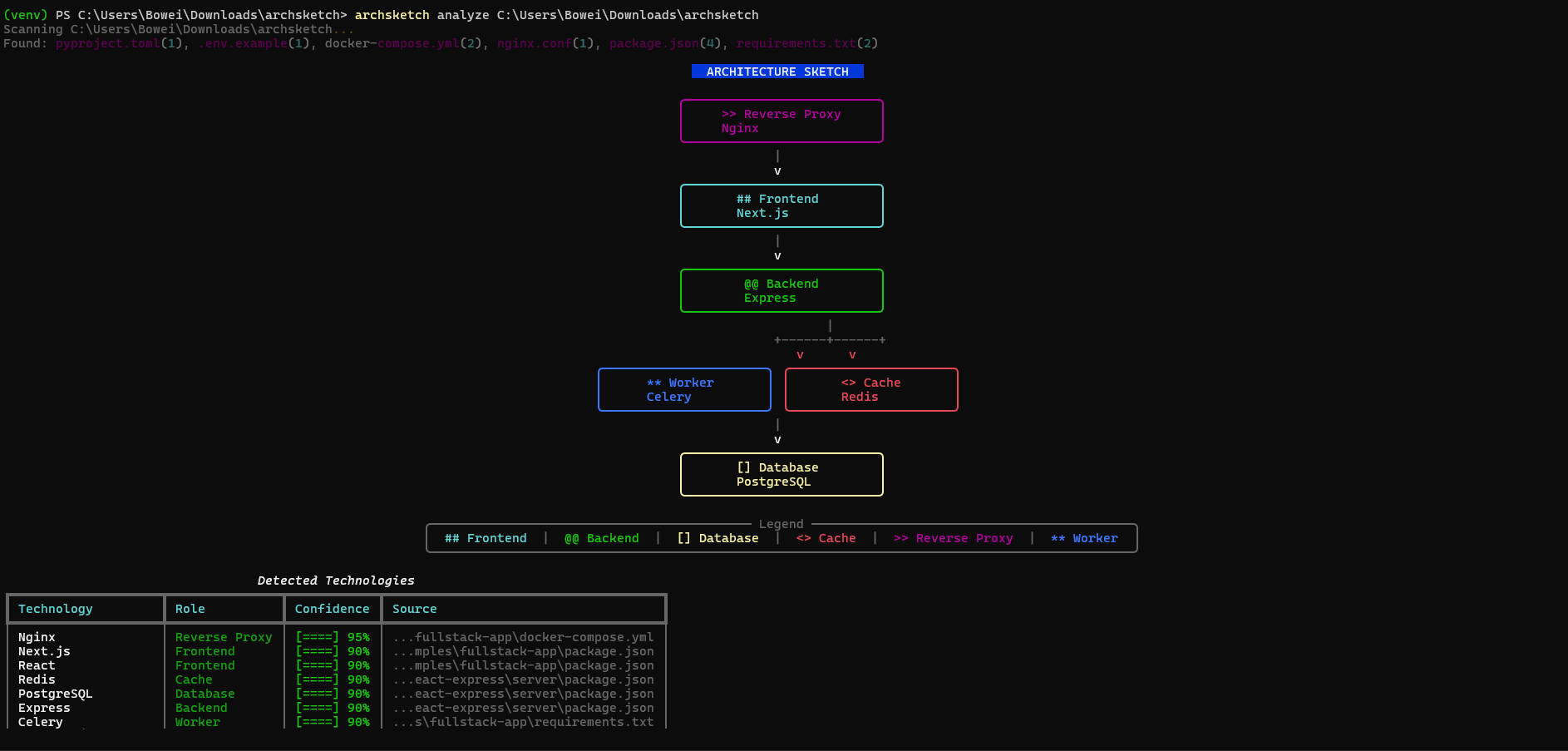
Example Output
                          ARCHITECTURE SKETCH

                    +--------------------------+
                    |     >> Reverse Proxy     |
                    |          Nginx           |
                    +--------------------------+
                                 |
                                 v
                    +--------------------------+
                    |       ## Frontend        |
                    |         Next.js          |
                    +--------------------------+
                                 |
                                 v
                    +--------------------------+
                    |       @@ Backend         |
                    |         FastAPI          |
                    +--------------------------+
                          |            |
                          v            v
              +----------------+ +----------------+
              |   [] Database  | |    <> Cache   |
              |   PostgreSQL   | |     Redis     |
              +----------------+ +----------------+

+------------------------ Legend -------------------------+
|  ## Frontend | @@ Backend | [] Database | <> Cache | >> Proxy |
+---------------------------------------------------------+
Screenshots
Terminal output (analyze)
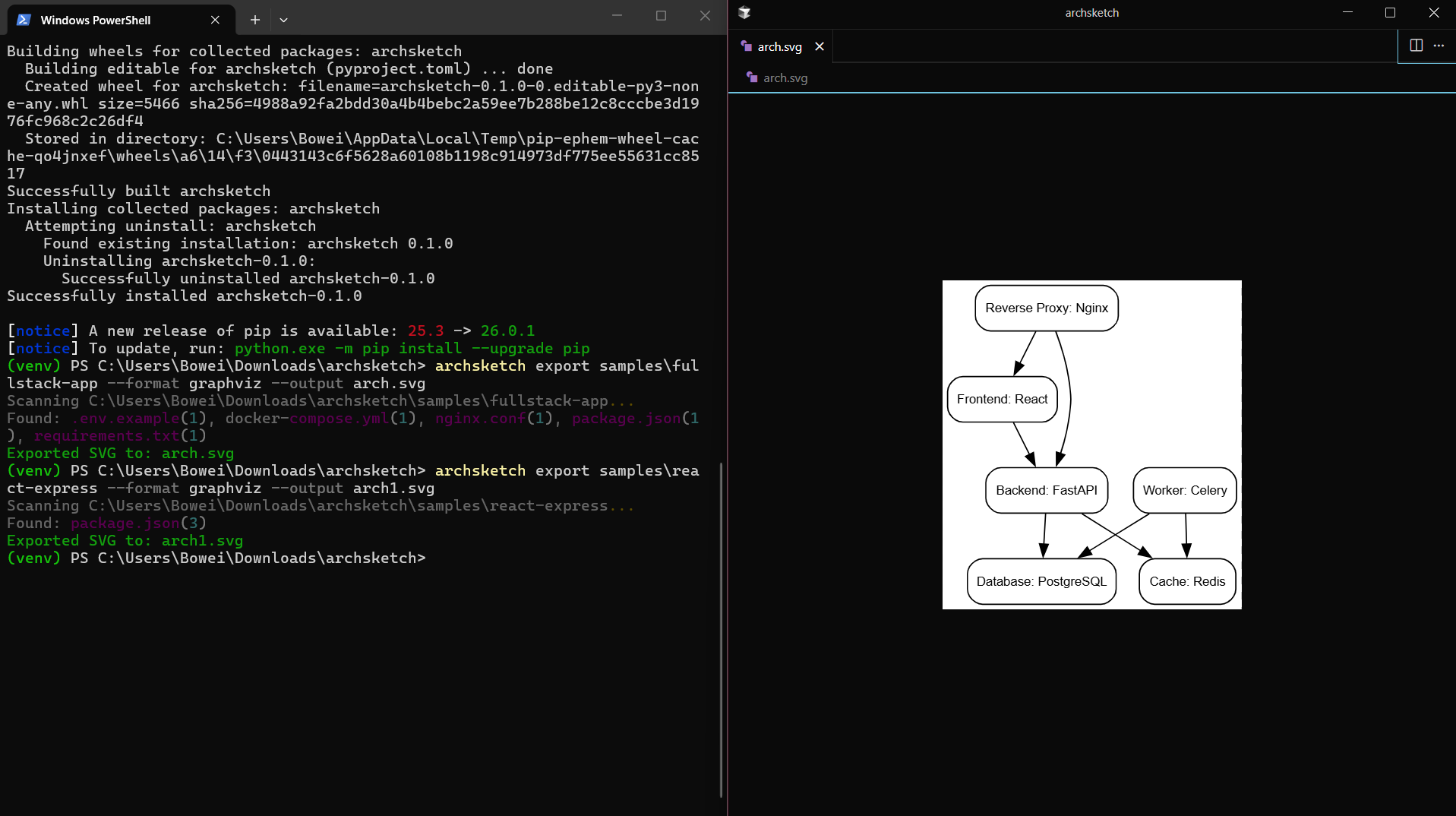
Exported SVG
Usage
Analyze any project
archsketch analyze .                           # Current directory
archsketch analyze /path/to/your/project       # Any project folder
archsketch analyze ~/code/my-app               # Home directory path
archsketch analyze . --compact                 # Diagram only, no detections table
archsketch analyze . --no-table                # Same as --compact
Export to Mermaid
archsketch export /path/to/project --format mermaid --output architecture.mmd
Export to SVG (shareable image)
# Requires: pip install graphviz AND Graphviz binaries (https://graphviz.org/download/)
archsketch export . --format graphviz --output architecture.svg

# Or export DOT file (no binary needed), then convert: dot -Tsvg architecture.dot -o architecture.svg
archsketch export . --format dot --output architecture.dot
Generates:
graph TD
  frontend[Frontend: Next.js]
  backend[Backend: FastAPI]
  database[Database: PostgreSQL]
  cache[Cache: Redis]

  frontend --> backend
  backend --> database
  backend --> cache
JSON output
archsketch analyze /path/to/project --json
Show Mermaid in terminal
archsketch show /path/to/project
Compare architecture between git refs (diff)
Requires: pip install gitpython
archsketch diff main feature-branch
archsketch diff HEAD~1 HEAD ./src
Shows added/removed components and edges (e.g. + Cache: Redis, - Database: MySQL).
Explain in the diagram
- ASCII: Each node box shows a short "From: ..." source line when available.
- Mermaid: Comments in the
.mmdfile document which file each node came from. - JSON: Each node has
sourcesandexplanationfor CI/scripting.
Stable JSON for CI
Export includes $schema, version, and consistent shape. Schema: schema/architecture.json.
archsketch analyze . --output architecture.json
What It Detects
ArchSketch reads these files to understand your stack:
| File | What it detects |
|---|---|
package.json |
React, Next.js, Vue, Express, NestJS, Prisma, Redis, Remix, Astro, Hono, Supabase |
requirements.txt |
FastAPI, Flask, Django, Celery, psycopg2, redis, Supabase |
pyproject.toml |
Same as requirements.txt |
pom.xml |
Spring Boot, PostgreSQL, Redis, Kafka, Micronaut, Quarkus |
build.gradle / build.gradle.kts |
Spring Boot, PostgreSQL, Redis (Gradle) |
docker-compose.yml |
PostgreSQL, MySQL, Redis, Nginx, RabbitMQ, custom services |
Dockerfile |
Base images (node, python, nginx) |
.env |
Database URLs, Redis URLs, service connections |
nginx.conf |
Nginx, upstream backends, SSL, WebSocket |
Procfile |
web/worker process types, Gunicorn, Celery, Next.js |
deployment.yaml, service.yaml, k8s/*.yaml |
Kubernetes Deployments, Services, Ingress, container images |
*.tf |
Terraform (AWS RDS, Lambda, SQS, GCP, Azure resources) |
Detected Technologies
| Role | Technologies |
|---|---|
| Frontend | React, Next.js, Vue.js, Nuxt.js, Angular, Svelte, Remix, Astro, SolidJS, Qwik, Preact |
| Backend | Express, NestJS, FastAPI, Flask, Django, Fastify, Hono, Elysia, Spring Boot (pom.xml), Micronaut, Quarkus |
| Database | PostgreSQL, MySQL, MongoDB, SQLite, Supabase |
| Cache | Redis, Memcached |
| Reverse Proxy | Nginx, Traefik, Caddy |
| Worker | Celery, Bull, RQ |
| Queue | RabbitMQ, Kafka |
How It Works
Your Project          ArchSketch Pipeline              Output
    │                        │                           │
    ├─ package.json    ──►   │                           │
    ├─ requirements.txt ──►  │  1. Scan files            │
    ├─ docker-compose.yml ►  │  2. Detect technologies   │  ──► ASCII Diagram
    ├─ Dockerfile      ──►   │  3. Infer relationships   │  ──► Mermaid Export
    └─ .env            ──►   │  4. Build graph           │  ──► JSON Data
                             │  5. Render                 │
- Scanner - Walks your project, finds architecture-related files
- Detectors - Parse each file type, extract technology signals
- Inference Engine - Apply rules to determine roles and connections
- Renderer - Output as ASCII art or Mermaid diagram
Try It On Popular Projects
# Clone any open source project and analyze it
git clone https://github.com/tiangolo/full-stack-fastapi-template
archsketch analyze full-stack-fastapi-template

# Or your own projects
archsketch analyze ~/code/my-saas-app
Development
Run tests
pip install -e ".[dev]"
pytest
Project structure
archsketch/
├── archsketch/
│   ├── main.py              # CLI commands
│   ├── scanner.py           # File discovery
│   ├── models.py            # Data structures
│   ├── detectors/           # Technology detection
│   │   ├── package_json.py
│   │   ├── requirements_txt.py
│   │   ├── docker_compose.py
│   │   └── dockerfile.py
│   ├── inference/
│   │   └── engine.py        # Architecture inference rules
│   └── renderers/
│       ├── ascii_renderer.py
│       └── mermaid_renderer.py
├── schema/
│   └── architecture.json   # JSON schema for export (CI/scripting)
├── tests/                  # 60+ tests
├── samples/                 # Example projects
└── pyproject.toml
Requirements
- Python 3.9+
- No external services needed
- Works offline
Troubleshooting
archsketch command not found after pip install archsketch
On Windows, if Python's Scripts folder isn't on your PATH (common with user installs or Windows Store Python), use:
python -m archsketch analyze .
This runs archsketch as a Python module and works without adding anything to PATH.
Alternatively, add your Python Scripts folder to PATH, e.g.:
C:\Users\<You>\AppData\Roaming\Python\Python3XX\Scripts (replace XX with your Python version).
License
MIT


Download files
Download the file for your platform. If you're not sure which to choose, learn more about installing packages.
Source Distribution
Built Distribution
Filter files by name, interpreter, ABI, and platform.
If you're not sure about the file name format, learn more about wheel file names.
Copy a direct link to the current filters
File details
Details for the file archsketch-0.1.1.tar.gz.
File metadata
- Download URL: archsketch-0.1.1.tar.gz
- Upload date:
- Size: 36.5 kB
- Tags: Source
- Uploaded using Trusted Publishing? No
- Uploaded via: twine/6.2.0 CPython/3.14.3
File hashes
| Algorithm | Hash digest | |
|---|---|---|
| SHA256 |
4e159fc2a309b45bf5beb088a91c4364965afa621891635c5d72a7037823e515
|
|
| MD5 |
07f0cc032f78dd13a29c36d85ebfb880
|
|
| BLAKE2b-256 |
348056d26102e275c898033c786a7d32975b242d062379133bf1f646896a5e45
|
File details
Details for the file archsketch-0.1.1-py3-none-any.whl.
File metadata
- Download URL: archsketch-0.1.1-py3-none-any.whl
- Upload date:
- Size: 39.4 kB
- Tags: Python 3
- Uploaded using Trusted Publishing? No
- Uploaded via: twine/6.2.0 CPython/3.14.3
File hashes
| Algorithm | Hash digest | |
|---|---|---|
| SHA256 |
9a2b377d0c31b8a9377e2fffa3ca1b331bb213ec7bf08b5b2d62a90de8911964
|
|
| MD5 |
900bbf71ff708b735a28cf93cbce41c6
|
|
| BLAKE2b-256 |
eec27b9863ea53c710a2fb6d662273fb922ef10ab1f8ad1ca093e65ea58a74c5
|






