
Production readiness platform for AI agent pipelines — detects silent failures, captures full state, enables step-level replay.

Project description




Catch silent failures in AI agent pipelines before production.
Your LangGraph pipeline runs fine — no exception. But three nodes later, something crashes with a KeyError. The real cause? A node upstream silently dropped a field. ARGUS catches this.
Install
pip install argus-agents
Getting Started (AI-Powered Setup)
The fastest way to set up ARGUS — let your AI assistant handle the integration:
1. Go to arguslabs.in
2. Click on "AI Setup Prompt"
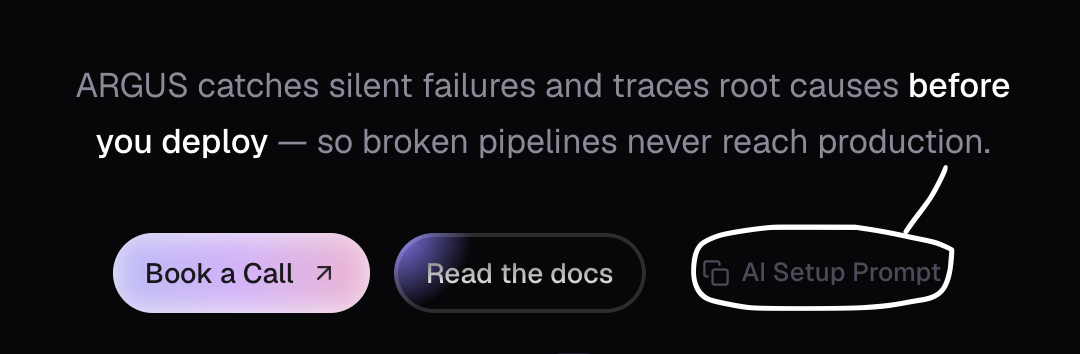
3. Copy the prompt and paste it into your AI assistant (Claude, ChatGPT, Cursor, etc.) — it will handle the full setup for you. This is the most important step.
4. Log in to ARGUS
argus login
Sign in with your Google account to enable cloud sync and the dashboard.
5. Open the dashboard
argus ui
That's it. ARGUS is set up and ready to go.
After Setup
- Run your LangChain/LangGraph pipeline as usual (in terminal)
- Check the dashboard for your recent run (takes 1–2 seconds to appear — refresh if needed)
Quick Start
from argus import ArgusWatcher

watcher = ArgusWatcher(graph)       # attach to your StateGraph
app = graph.compile()
result = app.invoke(initial_state)
watcher.finalize()                  # persist the run to .argus/runs/
ARGUS monitors every node, detects failures, and saves the run. No changes to your node functions.
Always call
watcher.finalize()afterapp.invoke(). Required for cyclic graphs, safe for all. Without it the run stays in memory and won't appear inargus listor the dashboard.
What It Catches
| Problem | Example |
|---|---|
| Silent failures | Node returns {} or drops a required field — no exception, pipeline keeps running broken |
| Semantic failures | Output structure is fine but values are wrong (placeholders, refusals, degraded text) |
| Loop stalls | Agent retries 5 times producing identical output — stuck loop burning tokens |
| Unnecessary retries | Loop produces correct answer on attempt 2, but validator forces 3 more iterations |
| Crash root cause | Traces KeyError at node 5 back to the upstream node that actually dropped the field |
| Contract violations | Output types don't match the next node's expected input schema |
| Latency degradation | Node takes 95%+ of timeout, or suspiciously fast LLM call (likely cached/empty) |
| Conditional path confusion | Unchosen branches correctly shown as "skipped" — not false "crashed" |
Detection Layers
Runs in order, each more expensive — only fires when needed:
- Heuristics — 150+ failure signatures (placeholders, empty results, error keys, semantic degradation). Zero cost.
- Validators — custom per-node business-logic constraints. Deterministic.
- Anomaly detector — statistical checks for output size anomalies, timing outliers. Deterministic.
- Correlator — traces failure propagation across nodes. Points at the origin, not the crash site.
- LLM semantic judge — evidence-aware final ruling. Receives all signals from layers 1–4 before deciding. Cannot override validator failures or critical anomalies.
- LLM investigator — root cause explanations and debugging suggestions. Only on ambiguous failures.
- Loop analyzer — LLM analysis for looped nodes: summarizes iterations, detects stalls, flags wasted retries.
Loop-Aware Inspection
Pipelines with loops (LLM -> compiler -> if fail, retry) get special treatment:
- Earlier iterations that self-corrected are marked
retried(not counted as failures) - Only the final iteration determines pass/fail
- LLM analyzes every loop: what went wrong, what changed between attempts, whether retries were necessary
- Dashboard shows iteration badges, collapse/expand, and natural-language loop summaries
Replay
Fix a bug, re-run from the failing node. Skip upstream nodes entirely:
argus replay <run-id> node_7          # re-run from node_7 onward
argus replay <run-id> node_7 --only   # just that one node
argus diff <rerun-id>                 # compare vs original
External API calls (OpenAI, etc.) are recorded by default — replays are free and deterministic.
Semantic Judge
For subtle quality issues that pattern matching can't catch:
watcher = ArgusWatcher(graph, semantic_judge=True) # enabled by default
LLM evaluates output quality on every node. Catches wrong tone, unhelpful responses, outdated info. Requires OPENAI_API_KEY.
The judge receives all prior evidence — validator failures, anomaly signals, inspection results — so it rules with full context, not just input/output. Every decision includes an audit trail:
{
  "pass": false,
  "reason": "Validator correctly identified missing resolution_ticket",
  "confidence": 0.85,
  "evidence_considered": ["validator:payment_check", "anomaly:BA-003"],
  "overridden_signals": []
}
evidence_considered— which prior signals the LLM weighedoverridden_signals— which signals the LLM disagreed with (passed despite the flag)
Custom Validators
watcher = ArgusWatcher(graph, validators={
    "classify": lambda o: (o.get("label") in ["yes", "no"], "unexpected label"),
    "*":        lambda o: ("error" not in o, "error key present"),  # runs on every node
})
Validator failures cannot be overridden by the LLM judge — they are hard constraints.
Configuration
from argus import ArgusWatcher, ArgusConfig

config = ArgusConfig(
    semantic_judge=True,           # LLM judge on every node (default: True)
    judge_model="gpt-4o",          # model for the judge
    node_timeout_ms=30000,         # flag outputs at ≥95% of this
    min_expected_ms=500,           # flag suspiciously fast LLM nodes
    sample_rate=0.5,               # persist 50% of clean runs (save disk)
    persist_failures=True,         # always persist failed runs
)

watcher = ArgusWatcher(graph, config=config)
CLI
argus list                           # all recorded runs
argus show last                      # most recent run
argus show <id>                      # inspect a specific run
argus inspect <id> --step <node>     # dump raw input/output for a node
argus replay <id> <node>             # re-run from a node
argus diff <id-a> <id-b>             # compare two runs
argus stats                          # signature hit stats, disable/enable/dispute signatures
argus ui                             # web dashboard
argus doctor                         # check setup health
argus login                          # sign in for cloud sync
argus logout                         # clear stored credentials
argus whoami                         # show current login status
argus update                         # check for newer release
Web Dashboard
argus ui # opens at localhost:7842
Shows all runs, node-level detail, AI analysis, replay diffs, loop iteration badges, and comparison views. No account needed for local use.
- Distinct failure colors — crashed (red), silent failure (amber), semantic fail (purple), degraded input (orange), skipped (gray)
- Evidence audit trail — see exactly which signals the LLM judge considered and which it overrode
- Side-by-side diff — compare any two runs node-by-node
Without LangGraph
from argus import ArgusSession

session = ArgusSession()
session.set_edges({"fetch": ["classify"], "classify": ["process"]})

fetch    = session.wrap("fetch",    fetch_fn)
classify = session.wrap("classify", classify_fn)
process  = session.wrap("process",  process_fn)

state = fetch(initial_state)
state = classify(state)
state = process(state)
session.finalize()
Works with any framework — Prefect, Temporal, plain Python.
Requirements
- Python 3.9+
- LangGraph 0.2+ (only for
ArgusWatcher) OPENAI_API_KEYin env for semantic features (optional — all heuristic detection works without it)
For AI setup prompts and integration guides, visit arguslabs.in.
v0.8.6 — changelog
Release history Release notifications | RSS feed


Download files
Download the file for your platform. If you're not sure which to choose, learn more about installing packages.
Source Distribution
Built Distribution
Filter files by name, interpreter, ABI, and platform.
If you're not sure about the file name format, learn more about wheel file names.
Copy a direct link to the current filters
File details
Details for the file argus_agents-0.8.9.tar.gz.
File metadata
- Download URL: argus_agents-0.8.9.tar.gz
- Upload date:
- Size: 2.9 MB
- Tags: Source
- Uploaded using Trusted Publishing? No
- Uploaded via: twine/6.2.0 CPython/3.9.6
File hashes
| Algorithm | Hash digest | |
|---|---|---|
| SHA256 |
c3425116b73a86514a3df7b48ddd88be947fe49b64969232392a3d81a617dcac
|
|
| MD5 |
08ac4200354bf7575eebb37d04a0a6ed
|
|
| BLAKE2b-256 |
9afc1eefb3d09d65768e0d1ffe173cbb4a32126b490f78ae8d316cbca4548ea7
|
File details
Details for the file argus_agents-0.8.9-py3-none-any.whl.
File metadata
- Download URL: argus_agents-0.8.9-py3-none-any.whl
- Upload date:
- Size: 2.9 MB
- Tags: Python 3
- Uploaded using Trusted Publishing? No
- Uploaded via: twine/6.2.0 CPython/3.9.6
File hashes
| Algorithm | Hash digest | |
|---|---|---|
| SHA256 |
1dcc3a3904f3da4c73359a6db6b897f899a5e49a59e40e519b3c8f5d3beb2291
|
|
| MD5 |
de5abb15c0fb822f95526699cf3a0c3c
|
|
| BLAKE2b-256 |
eb99215ceec99252528674c58354f57ad5079c67f37665151c3aa8ba884392ef
|






