
Atlas Mind





It's your mind, not someone else's.
Notion, and every hosted notes app, ask you to pour your thinking into their structure, on their servers, in their format. You rent the space; they hold the keys. Atlas Mind inverts that: your knowledge is plain files in your own git repository, served by an engine you can read line by line and throw away without losing a single note. Your AI comes to your library through an open protocol; it never pulls your brain into its own.
Own the data. Own the engine. Own the mind.
🔗 Try the live demo → (offline build, some features missing) · What is Atlas Mind?
Atlas Mind is a self-hostable wiki / knowledge base engine, and an external brain you share with your AI. It serves a single-page viewer from a folder of documents (a mind), keeping the engine (the code) cleanly decoupled from your content (your notes, in their own git repository). Built on three ideas:
- Multi-format, not just Markdown. Markdown is first-class (rendered, linked, searched). Standalone HTML decks and dashboards, PDFs, and Word
.docxare previewed inline, converted to readable HTML in your browser, nothing uploaded anywhere. - AI-native. It exposes an MCP endpoint (twenty-nine tools to read, write, triage, map, rewind and audit your mind), and
atlas initscaffolds the conventions (AGENTS.md,agents/,ai-sessions/) so an assistant knows how to use your mind. - Lightweight & self-contained. A single Python HTTP server on the standard library: no database, accounts and share links live as plain JSON on disk, frontend libraries and fonts are vendored. A running instance never sends your content anywhere: your mind never leaves your disk, and nothing you write trains anyone's model. Its only outbound request by default is reading an MCP client's public metadata when you connect that client over OAuth (switchable off).
It is not a multi-tenant SaaS, a real-time collaborative editor, or a plugin marketplace. One focused mind per instance, fully yours.
Install
Installing puts a self-contained atlas command on your PATH (the viewer assets ship inside the package, no separate download).
# Easy way: uv or pipx (isolated env, no virtualenv to manage)
uv tool install atlas-mind        # or: pipx install atlas-mind
atlas serve ~/my-mind

# Run once without installing, straight from PyPI
uvx atlas-mind serve ~/my-mind    # or: pipx run atlas-mind serve ~/my-mind

# With pip (a virtualenv is recommended)
pip install atlas-mind
Requires Python >= 3.11 and a git repository for your content.
Quick start
atlas init ~/my-mind     # scaffold a mind: atlas.toml, example docs, AGENTS.md, git init
atlas serve ~/my-mind    # build once if needed, then serve on http://127.0.0.1:8765
init is never destructive (it refuses a non-empty directory without --force and keeps any file already present). serve listens on 127.0.0.1:8765 with authentication off by default. To produce the static viewer without serving: atlas build ~/my-mind [--offline].
See atlas --help for all commands (user, token, share, deploy).
Use it with your AI (MCP)
Atlas Mind is designed to be the external memory your assistant reads and writes. On a deployed instance, point your assistant at https://<your-atlas>/mcp and it connects over OAuth: you sign in to your Atlas (2FA included), review what the assistant asks for (read, inbox, write — untick what you don't want to grant) and allow it. The connection shows up in Settings → Tokens, where you can revoke it; it renews itself silently, and only asks again after 30 days unused.
Clients either register themselves (dynamic client registration) or identify by the URL of a public metadata document, which Atlas fetches when you connect them; [oauth] client_metadata_fetch = false in atlas.toml turns that fetch off.
You can also mint a token yourself, from the web UI — Settings → Tokens, bound to your account — which prints a URL with the token in it. Locally (or to script it), the CLI does the same:
atlas token create ~/my-mind --label claude
# → prints the MCP URL: https://<your-atlas>/mcp/<token>
The MCP endpoint exposes twenty-nine tools in six groups:
- read:
brief(a context pack on a topic: the best sections, within a token budget),search_docs(ranked, each hit with its section and how far to trust it: last editor, AI or human, stale, contested),grep_docs(exact lines),read_doc(whole doc, a line range or one section),list_tree,recent_docs,changes_since(what changed since a cursor the agent keeps) - write:
create_doc,edit_doc(returns the diff;dry_run, and abase_versionguard so a concurrent change is never overwritten),move_doc(fixes incoming[[backlinks]]),delete_doc(soft-delete to.trash/) - graph:
get_links,get_backlinks,list_by_tag,get_mind_topology - time-travel (your mind is a git repo):
doc_history,doc_at,doc_diff,search_history,changelog,doc_blame,doc_revert - activity (the attribution layer's read side):
activity(who changed what, with AI-author detection),agent_runs+undo_run(an agent's work session, undone as one commit),stale(docs untouched for months: obsolescence),contradictions(same-topic doc pairs to review),judge_contradiction(record a verdict on a pair) - inbox:
create_inbox_item(an agent stages a ready-to-file item in your inbox for triage)
It also serves prompts you start by name (a / command in Claude Code): built-ins computed live — weekly-review (what moved, what is going stale, the contradictions to settle), triage-contradictions, new-doc (from one of your templates) — and your own, one Markdown file each under content/agents/prompts/, editable from the viewer, with {{arguments}} and {{include path/doc.md}}. And every document is a resource, doc://<path>, that you can attach to the conversation (@atlas:doc://notes/x.md in Claude Code); search hits link to theirs.
In Claude Code, name the connection short — claude mcp add --transport http atlas https://<your-atlas>/mcp — and the prompts read /atlas:weekly-review, /atlas:new-doc decision "Pricing".
atlas init scaffolds AGENTS.md + content/agents/ + content/ai-sessions/, and the endpoint hands your AGENTS.md to every client as its server instructions, so any assistant follows your conventions the moment it connects. Tools carry read-only / destructive hints (clients can run reads without asking), a token can be limited to read, inbox and/or write (an agent fed untrusted mail never needs to edit), and the endpoint speaks both the stateless MCP 2026-07-28 revision and the earlier initialize-based ones. There is also a REST API v1 (Bearer tokens, create-only writes) with a published OpenAPI 3.1 spec.
Features
- Reading: GitHub-flavoured Markdown (TOC, syntax highlighting, reading time, tag bar), inline preview of standalone HTML decks/dashboards, PDF, and
.docx(converted in-browser, read-only). Download any file as its original. - Navigation: collapsible tree, full-text search (server-side online, fuzzy MiniSearch offline),
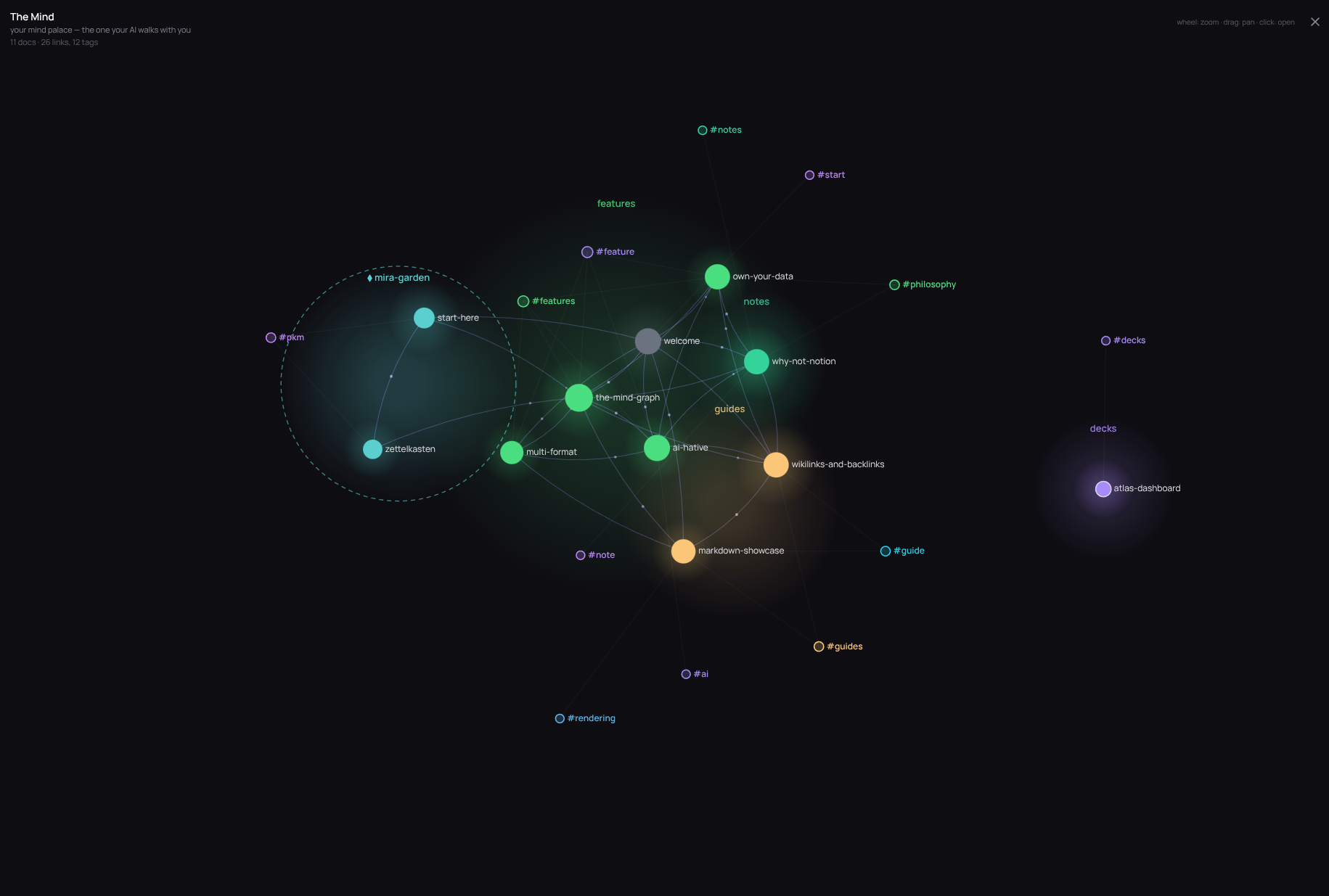
[[wikilinks]]+ backlinks + "same subject", folder/frontmatter tags, mind-wide task rollup, command palette (Ctrl-K), pinned and recent docs. - The Mind: a force-directed mind palace where every document and tag is a navigable node, colour-grouped by folder, recent nodes glowing, orphans dimmed.
- Editing: create / edit / rename / move / delete from the viewer (moving rewrites the wikilinks pointing at a doc), document templates, interactive task checkboxes, a categorised todos widget.
- History: every document git-versioned, with a revision list, clean diffs, view/restore of past versions (restore is a new commit), renames and moves followed.
- Activity: a home card over the attributed git history — a journal of who-changed-what (with AI-author detection and a per-doc history peek), a constellation of contributors, and a Health view that surfaces stale documents (obsolescence) and same-topic contradiction candidates for your AI to review.
- Inbox: a per-person triage lane on the home for the items your agents staged via MCP. One focused card at a time; keep (filed to a suggested folder and tags), trash or snooze, by click or keyboard (K / X / S / J).
- Annotations: notes anchored to a text selection, re-anchored on later visits, with one-click copy-all-notes as Markdown.
- Sharing: per-document access in cloud mode (private / shared with people or groups / common to the team), plus HMAC-signed public share links with optional expiry.
- Offline & PWA: a self-contained
index-offline.htmlthat works fromfile://, an installable PWA via service worker, live reload over SSE. - i18n: French and English, a single carefully-built dark theme, re-skinnable via a CSS extension.
Self-hosting
- Cloud mode: accounts and login (admin / member roles), per-document access control, cookie sessions, optional TOTP 2FA with recovery codes, per-account lockout and per-IP login rate limiting, full CSRF defence.
- Deployment:
atlas deploy ~/my-mind --target compose|systemd|fly;fly --wizarddeploys end-to-end. - Configuration: a small
atlas.toml(brand prefix, port, auth, content paths). - Updating: engine and content update independently, and upgrading the engine never touches your notes.
Documentation
The documentation is itself an Atlas mind — browse it in the live demo → (the guides/ and features/ sections).
Licence
AGPL v3, see LICENSE. The "Atlas" + "Mind" branding in the viewer and login page is a fixed part of the project.
1 maintainer

Metadata
1 maintainer
Release files for atlas-mind 1.3.0
For a detailed explanation of source distributions (sdists) and built distributions (wheels), please see the package formats documentation.
Source distribution (sdist)
| File | Size | Uploaded | Provenance | Actions |
|---|---|---|---|---|
| atlas_mind-1.3.0.tar.gz | 1.3 MB | Without provenance | Details for atlas_mind-1.3.0.tar.gz |
Built distribution (wheel)
| File | Interpreter | ABI | Platform | Actions Reset |
|---|---|---|---|---|
| atlas_mind-1.3.0-py3-none-any.whl | Python 3 | none | any | Details for atlas_mind-1.3.0-py3-none-any.whl |
Total release size: 2.5 MB
Release files / atlas_mind-1.3.0.tar.gz
| Download URL | atlas_mind-1.3.0.tar.gz |
|---|---|
| Size | 1.3 MB |
| Tags | Source |
|
SHA-256 checksum How to use checksums |
de6b4c77e51177c23f8e9c43a13764d97491f10a31739d3a26d9ae5df612c9f9
|
|
BLAKE2b-256 checksum How to use checksums |
82cf3349c766f14f4aea56934acbdd801d26ea09b8eb8ff5f20365630c4199dd
|
| Upload date | |
|
Uploaded using Trusted Publishing? What is trusted publishing? |
No |
| Uploaded via |
twine/6.2.0 CPython/3.14.0
|
Release files / atlas_mind-1.3.0-py3-none-any.whl
| Download URL | atlas_mind-1.3.0-py3-none-any.whl |
|---|---|
| Size | 1.2 MB |
| Tags | Python 3 |
|
SHA-256 checksum How to use checksums |
4d9dad7b4a13743dae206b84185b83f37ce7d0fe940127ba82b40c6eb52e23e8
|
|
BLAKE2b-256 checksum How to use checksums |
af9f8d39df9532dd70b205e59369385fe574a3805b81c189f78314ea1ffa40a1
|
| Upload date | |
|
Uploaded using Trusted Publishing? What is trusted publishing? |
No |
| Uploaded via |
twine/6.2.0 CPython/3.14.0
|
Security for atlas-mind 1.3.0
Provenance
Provenance describes where a file came from. On PyPI, provenance is shared via attestations, which provide a verifiable record of the build or publishing details. View details, limitations and caveats.
No provenance found
None of the files in this release were uploaded with provenance metadata.
A note on package security
PyPI is a repository for distributing packages, not a service for auditing them. While third-party security researchers and our staff do their best to detect and remove malicious packages, PyPI cannot guarantee the quality, security or suitability of any given package.
To learn more about protecting yourself from malicious actors, visit our package security documentation.














