
Batchata


Unified Python API for AI Batch requests with cost tracking, Pydantic responses, citation mapping and parallel execution.
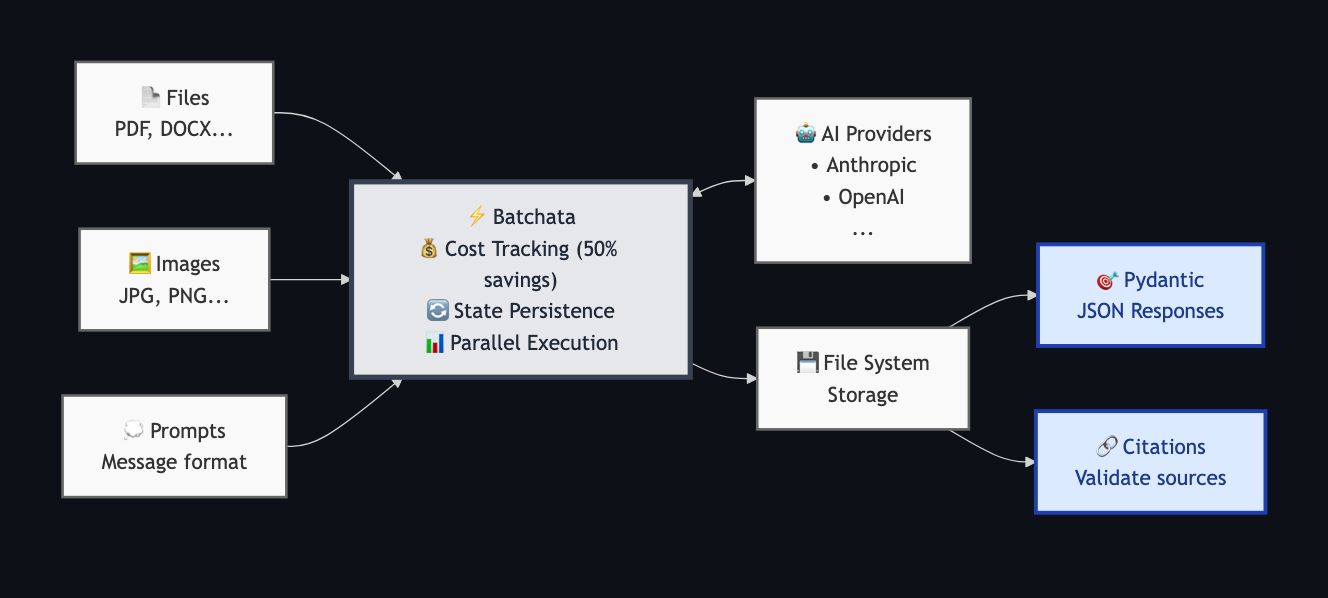
This library is currently in beta - so there will be breaking changes
Why AI-batching?
AI providers offer batch APIs that process requests asynchronously at 50% reduced cost compared to real-time APIs. This is ideal for offline or batch processing tasks. However, managing batch jobs across providers, tracking costs, handling failures, and mapping citations back to source documents quickly becomes complex - that's where Batchata comes in.
Batchata Features
- Native batch processing (50% cost savings via provider APIs)
- Set
max_cost_usdlimits for batch requests - Dry run mode for cost estimation and job planning
- Time limit control with
.add_time_limit(seconds=, minutes=, hours=) - State persistence in case of network interruption
- Structured output
.jsonformat with Pydantic models - Citation support and field mapping (Anthropic only)
- Multiple provider support (Anthropic, OpenAI, Google Gemini)
Installation
pip
pip install batchata
uv
uv add batchata
Quick Start
from batchata import Batch

# Simple batch processing
batch = Batch(results_dir="./output")
    .set_default_params(model="claude-sonnet-4-20250514")  # or "gpt-4.1-2025-04-14" or "gemini-2.5-flash"
    .add_cost_limit(usd=5.0)

for file in files:
    batch.add_job(file=file, prompt="Summarize")

run = batch.run()

results = run.results()  # {"completed": [JobResult], "failed": [JobResult], "cancelled": [JobResult]}

# Or preview costs first with dry run
run = batch.run(dry_run=True)  # Shows cost estimates without executing
Complete Example
from batchata import Batch
from pydantic import BaseModel
from dotenv import load_dotenv

load_dotenv()  # Load API keys from .env

# Define structured output
class InvoiceAnalysis(BaseModel):
    invoice_number: str
    total_amount: float
    vendor: str
    payment_status: str

# Create batch configuration
batch = Batch(
        results_dir="./invoice_results",
        max_parallel_batches=1,
        items_per_batch=3
    )
    .set_state(file="./invoice_state.json", reuse_state=False)
    .set_default_params(model="claude-sonnet-4-20250514", temperature=0.0)
    .add_cost_limit(usd=5.0)
    .add_time_limit(minutes=10)  # Time limit of 10 minutes
    .set_verbosity("warn")

# Add jobs with structured output and citations
invoice_files = ["path/to/invoice1.pdf", "path/to/invoice2.pdf", "path/to/invoice3.pdf"]
for invoice_file in invoice_files:
    batch.add_job(
        file=invoice_file,
        prompt="Extract the invoice number, total amount, vendor name, and payment status.",
        response_model=InvoiceAnalysis,
        enable_citations=True
    )

# Execute with rich progress display
print("Starting batch processing...")
run = batch.run(print_status=True)

# Or use custom progress callback
run = batch.run(print_status=True)

# Get results
results = run.results()

# Process successful results
for result in results["completed"]:
    analysis = result.parsed_response
    citations = result.citation_mappings
    print(f"\nInvoice: {analysis.invoice_number} (page: {citations.get("invoice_number").page})")
    print(f"  Vendor: {analysis.vendor} (page: {citations.get("vendor").page})")
    print(f"  Total: ${analysis.total_amount:.2f} (page: {citations.get("total_amount").page})")
    print(f"  Status: {analysis.payment_status} (page: {citations.get("payment_status").page})")

    # Save each result to JSON file
    result.save_to_json(f"./invoice_results/{result.job_id}.json")

# Process failed/cancelled results
for result in results["failed"]:
    print(f"\nJob {result.job_id} failed: {result.error}")

for result in results["cancelled"]:
    print(f"\nJob {result.job_id} was cancelled: {result.error}")
Interactive Progress Display
Batchata provides an interactive real-time progress display when using print_status=True:
run = batch.run(print_status=True)

The interactive display shows:
- Job Progress: Completed/total jobs with progress bar
- Batch Status: Provider batch completion status
- Real-time Cost: Current spend vs limit (if set)
- Elapsed Time: Time since batch started
- Live Updates: Refreshes automatically as jobs complete
File Structure
./results/
├── job-abc123.json
├── job-def456.json
├── job-ghi789.json
└── raw_files/
    └── responses/
        ├── job-abc123_raw.json
        ├── job-def456_raw.json
        └── job-ghi789_raw.json

./batch_state.json  # Batch state
Supported Providers
| Feature | Anthropic | OpenAI | Google Gemini |
|---|---|---|---|
| Models | All Claude models | All GPT models | Gemini models |
| Batch Discount | 50% | 50% | 50% |
| Polling Interval | 1s | 5s | 2s |
| Citations | ✅ | ❌ | ❌ |
| Structured Output | ✅ | ✅ | ✅ |
| File Types | PDF, TXT, DOCX, Images | PDF, Images | PDF, TXT, Images |
Configuration
Set your API keys as environment variables:
export ANTHROPIC_API_KEY="your-key"
export OPENAI_API_KEY="your-key"
export GOOGLE_API_KEY="your-key"  # For Gemini models
You can also use a .env file in your project root (requires python-dotenv):
from dotenv import load_dotenv
load_dotenv()

from batchata import Batch
# Your API keys will now be loaded from .env
Limitations
- Field/citation mapping is heuristic, which means it isn't perfect.
- Citation mapping only works with flat Pydantic models (no nested BaseModel fields).
- Cost tracking is not precise as the actual usage is only known after the batch is complete, try setting
items_per_batchto a lower value for more accurate cost tracking.
License
MIT License - see LICENSE file for details.
1 maintainer

Metadata
1 maintainer
Release files for batchata 0.4.7
For a detailed explanation of source distributions (sdists) and built distributions (wheels), please see the package formats documentation.
Source distribution (sdist)
| File | Size | Uploaded | |
|---|---|---|---|
| batchata-0.4.7.tar.gz | 283.8 kB | Details |
Built distribution (wheel)
| File | Interpreter | ABI | Platform | Reset |
|---|---|---|---|---|
| batchata-0.4.7-py3-none-any.whl | Python 3 | none | any | Details |
Total release size: 357.9 kB
Release files / batchata-0.4.7.tar.gz
| Download URL | batchata-0.4.7.tar.gz |
|---|---|
| Size | 283.8 kB |
| Tags | Source |
|
SHA-256 checksum How to use checksums |
97897d2ce9d6a680546e118f4d1e381322f5503d83dc375f005b514b62081221
|
|
BLAKE2b-256 checksum How to use checksums |
4a65a2ce618642317744571704497b0904b794d36fe82d17b4f81378789419f0
|
| Upload date | |
|
Uploaded using Trusted Publishing? What is trusted publishing? |
Yes |
| Uploaded via |
twine/6.1.0 CPython/3.12.9
|
Provenance
Provenance describes where a file came from. On PyPI, provenance is shared via attestations, which provide a verifiable record of the build or publishing details. View details, limitations and caveats.


PyPI Publish Attestation
PyPI verified that this artifact, at this checksum, originated from the publisher listed below.
Signed by GitHub Actions, verified by PyPI on Aug 20, 2025.
Transparency logRelease files / batchata-0.4.7-py3-none-any.whl
| Download URL | batchata-0.4.7-py3-none-any.whl |
|---|---|
| Size | 74.0 kB |
| Tags | Python 3 |
|
SHA-256 checksum How to use checksums |
01a01c2fd8cf6b312684607cf88227a487136ac4535e5f5fd904a09b5e8e0445
|
|
BLAKE2b-256 checksum How to use checksums |
056fb4ad21cea0e8c9821b2a1a958145751f7351afc4f9046a9520af65e549cd
|
| Upload date | |
|
Uploaded using Trusted Publishing? What is trusted publishing? |
Yes |
| Uploaded via |
twine/6.1.0 CPython/3.12.9
|
Provenance
Provenance describes where a file came from. On PyPI, provenance is shared via attestations, which provide a verifiable record of the build or publishing details. View details, limitations and caveats.
PyPI Publish Attestation
PyPI verified that this artifact, at this checksum, originated from the publisher listed below.
Signed by GitHub Actions, verified by PyPI on Aug 20, 2025.
Transparency log













