
Batch processing for AI models with cost tracking and state persistence

Project description
Batchata


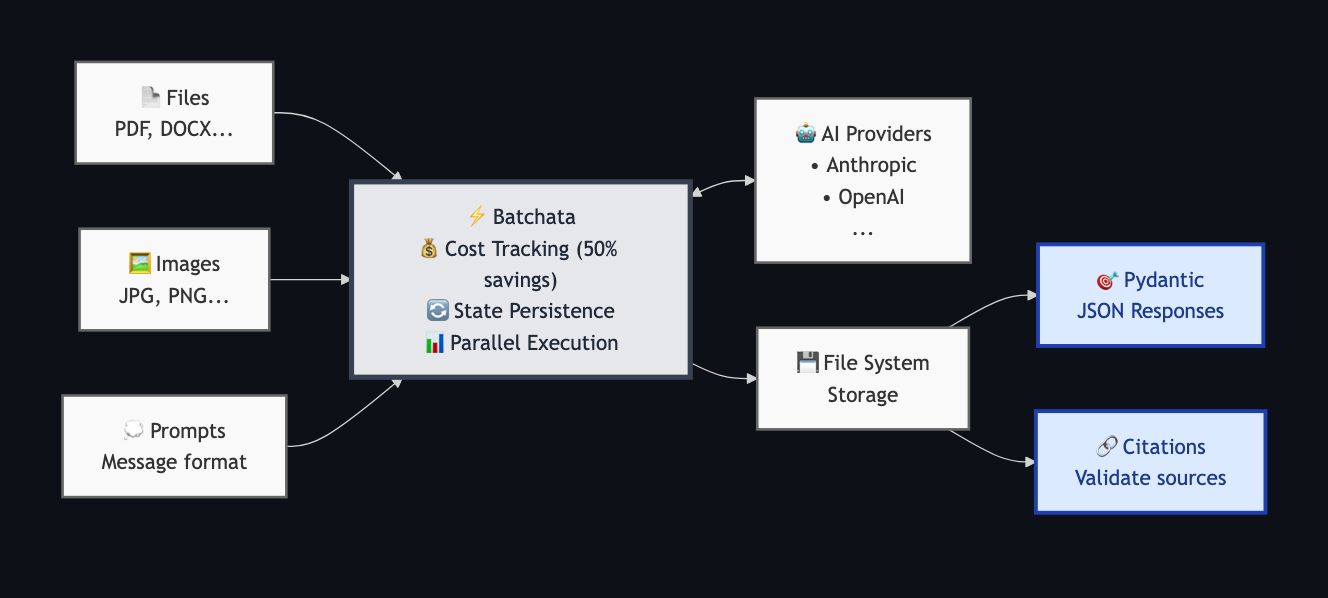
Unified Python API for AI Batch requests with cost tracking, Pydantic responses, citation mapping and parallel execution.
This library is currently in alpha - so there will be breaking changes
Why AI-batching?
AI providers offer batch APIs that process requests asynchronously at 50% reduced cost compared to real-time APIs. This is ideal for workloads like document processing, data analysis, and content generation where immediate responses aren't required. However, managing batch jobs across providers, tracking costs, handling failures, and mapping citations back to source documents quickly becomes complex - that's where Batchata comes in.
Batchata Features
- Native batch processing (50% cost savings via provider APIs)
- Set
max_cost_usdlimits for batch requests - Time limit control with
.add_time_limit(seconds=, minutes=, hours=) - State persistence in case of network interruption
- Structured output
.jsonformat with Pydantic models - Citation support and field mapping (Anthropic only)
- Multiple provider support (Anthropic, OpenAI)
Installation
pip
pip install batchata
uv
uv add batchata
Quick Start
from batchata import Batch

# Simple batch processing
batch = Batch(results_dir="./output")
    .set_default_params(model="claude-sonnet-4-20250514")  # or "gpt-4.1-2025-04-14"
    .add_cost_limit(usd=5.0)

for file in files:
    batch.add_job(file=file, prompt="Summarize")

run = batch.run()

results = run.results()  # {"completed": [JobResult], "failed": [JobResult], "cancelled": [JobResult]}
Complete Example
from batchata import Batch
from pydantic import BaseModel
from dotenv import load_dotenv

load_dotenv()  # Load API keys from .env

# Define structured output
class InvoiceAnalysis(BaseModel):
    invoice_number: str
    total_amount: float
    vendor: str
    payment_status: str

# Create batch configuration
batch = Batch(
        results_dir="./invoice_results",
        max_parallel_batches=1,
        items_per_batch=3
    )
    .set_state(file="./invoice_state.json", reuse_previous=False)
    .set_default_params(model="claude-sonnet-4-20250514", temperature=0.0)
    .add_cost_limit(usd=5.0)
    .add_time_limit(minutes=10)  # Time limit of 10 minutes
    .set_verbosity("warn")

# Add jobs with structured output and citations
invoice_files = ["path/to/invoice1.pdf", "path/to/invoice2.pdf", "path/to/invoice3.pdf"]
for invoice_file in invoice_files:
    batch.add_job(
        file=invoice_file,
        prompt="Extract the invoice number, total amount, vendor name, and payment status.",
        response_model=InvoiceAnalysis,
        enable_citations=True
    )

# Execute with rich progress display
print("Starting batch processing...")
run = batch.run(print_status=True)

# Or use custom progress callback
run = batch.run(
    on_progress=lambda s, t, b: print(
        f"\rProgress: {s['completed']}/{s['total']} jobs | "
        f"Batches: {s['batches_completed']}/{s['batches_total']} | "
        f"Cost: ${s['cost_usd']:.3f}/{s['cost_limit_usd']} | "
        f"Time: {t:.1f}s",
        end=""
    )
)

# Get results
results = run.results()

# Process successful results
for result in results["completed"]:
    analysis = result.parsed_response
    citations = result.citation_mappings
    print(f"\nInvoice: {analysis.invoice_number} (page: {citations.get("invoice_number").page})")
    print(f"  Vendor: {analysis.vendor} (page: {citations.get("vendor").page})")
    print(f"  Total: ${analysis.total_amount:.2f} (page: {citations.get("total_amount").page})")
    print(f"  Status: {analysis.payment_status} (page: {citations.get("payment_status").page})")

# Process failed/cancelled results
for result in results["failed"]:
    print(f"\nJob {result.job_id} failed: {result.error}")

for result in results["cancelled"]:
    print(f"\nJob {result.job_id} was cancelled: {result.error}")
API
Batch
Batch(
    results_dir: str,
    max_parallel_batches: int = 10,
    items_per_batch: int = 10,
    raw_files: Optional[bool] = None
)
results_dir: Directory to store individual job resultsmax_parallel_batches: Maximum parallel batch requests (default: 10)items_per_batch: Number of jobs per provider batch (affects cost tracking accuracy, default: 10)raw_files: Whether to save debug files (raw API requests/responses) in the results dir (default: True if results_dir is set)
Methods:
.set_state(file: Optional[str] = None, reuse_previous: bool = True)
Set state file configuration for recovery in case of network interruption.
file: Path to save batch state (default: None, uses temp file)reuse_previous: Whether to resume from existing state file (default: True)
.set_default_params(**kwargs)
Set default parameters for all jobs. Common parameters:
model: Model name (e.g., "claude-sonnet-4-20250514", "gpt-4.1-2025-04-14")temperature: Sampling temperature 0.0-1.0 (default: 0.7)max_tokens: Maximum tokens to generate (default: 1000)
.add_cost_limit(usd: float)
Set maximum spend limit. Batch will stop accepting new jobs when limit is reached.
.set_verbosity(level: str)
Set logging verbosity level. Useful for production environments.
- Levels: "debug", "info" (default), "warn", "error"
- Example:
batch.set_verbosity("error")for production
.add_time_limit(seconds=, minutes=, hours=)
Set maximum execution time for the entire batch. When time limit is reached, all active provider batches are cancelled and remaining jobs are marked as failed.
seconds: Time limit in seconds (optional)minutes: Time limit in minutes (optional)hours: Time limit in hours (optional)- Minimum: 10 seconds, Maximum: 24 hours
- Can combine units:
.add_time_limit(hours=1, minutes=30, seconds=15) - No exceptions thrown - jobs that exceed time limit appear in failed results
.add_job(...)
Add a job to the batch. Parameters:
messages: Chat messages (list of dicts with "role" and "content")file: Path to file for file-based input (supports string paths, Path objects, and PDF files)prompt: Prompt to use with file inputmodel: Override default modeltemperature: Override default temperature (0.0-1.0)max_tokens: Override default max tokensresponse_model: Pydantic model for structured outputenable_citations: Extract citations from response (default: False)
Note: Provide either messages OR file+prompt, not both.
PDF Citation Validation: When using Anthropic models with enable_citations=True on PDF files, Batchata automatically validates that the PDF contains extractable text. Image-only or scanned PDFs will raise a ValidationError since citations cannot be extracted from them. This validation is Anthropic-specific and doesn't affect other providers.
.run(on_progress: Callable = None, print_status: bool = False)
Execute the batch. Returns a BatchRun object.
on_progress: Optional progress callback function that receives(stats_dict, elapsed_time, batch_data)print_status=True: Enable rich progress display with real-time updates

BatchRun
Object returned by batch.run():
.status(print_status: bool = False)- Get current batch status.results()- Get all results organized by status:{"completed": [JobResult], "failed": [JobResult], "cancelled": [JobResult]}.get_failed_jobs()- Get failed jobs as Dict[str, str] (deprecated, use.results()["failed"]instead).wait(timeout: float = None)- Wait for batch completion.on_progress(callback, interval=3.0)- Set progress monitoring callback.shutdown(wait_for_active: bool = True)- Gracefully shutdown
The progress callback receives three parameters:
stats_dict: Progress statistics containing:batch_id: Current batch identifiertotal: Total number of jobspending: Jobs waiting to startactive: Jobs currently processingcompleted: Successfully completed jobsfailed: Failed jobscancelled: Cancelled jobs (e.g., via Ctrl+C)cost_usd: Current total costcost_limit_usd: Cost limit (if set)is_complete: Whether batch is finishedbatches_completed: Number of completed batchesbatches_total: Total number of batchesbatches_pending: Number of pending batchesitems_per_batch: Items per batch setting
elapsed_time: Time elapsed since batch started (in seconds)batch_data: Dictionary mapping batch_id to batch information
JobResult
job_id: Unique identifierraw_response: Raw text responseparsed_response: Structured data (if response_model used)citations: List of Citation objects (if enabled)citation_mappings: Dict[str, List[Citation]] - Maps field names to relevant citations (not 100% accurate, only with response_model)input_tokens: Input token countoutput_tokens: Output token countcost_usd: Cost for this joberror: Error message (if failed)is_success: Property that returns True if job completed successfullytotal_tokens: Property that returns total tokens used (input + output)
Citation
Each Citation object contains:
text: The cited textsource: Source identifier (e.g., file name)page: Page number if applicable (for PDFs)metadata: Additional metadata dict
File Structure
./results/
├── job-abc123.json
├── job-def456.json
└── job-ghi789.json

./batch_state.json  # Batch state
Supported Providers
| Feature | Anthropic | OpenAI |
|---|---|---|
| Models | Claude Sonnet 4, Haiku | GPT-4.1, GPT-4o-mini, o3, o4-mini |
| Batch Discount | 50% | 50% |
| Polling Interval | 1s | 5s |
| Citations | ✅ | ❌ |
| Structured Output | ✅ | ✅ |
| File Types | PDF, Images | PDF, Images |
Configuration
Set your API keys as environment variables:
export ANTHROPIC_API_KEY="your-key"
export OPENAI_API_KEY="your-key"
You can also use a .env file in your project root (requires python-dotenv):
from dotenv import load_dotenv
load_dotenv()

from batchata import Batch
# Your API keys will now be loaded from .env
Limitations
- Field/citation mapping is heuristic, which means it isn't perfect.
- Citation mapping only works with flat Pydantic models (no nested BaseModel fields).
- No Gemini or Groq support yet.
- Cost tracking is not precise as the actual usage is only known after the batch is complete, try setting
items_per_batchto a lower value for more accurate cost tracking.
License
MIT License - see LICENSE file for details.
Release history Release notifications | RSS feed


Download files
Download the file for your platform. If you're not sure which to choose, learn more about installing packages.
Source Distribution
Built Distribution
Filter files by name, interpreter, ABI, and platform.
If you're not sure about the file name format, learn more about wheel file names.
Copy a direct link to the current filters
File details
Details for the file batchata-0.3.5.tar.gz.
File metadata
- Download URL: batchata-0.3.5.tar.gz
- Upload date:
- Size: 146.0 kB
- Tags: Source
- Uploaded using Trusted Publishing? Yes
- Uploaded via: twine/6.1.0 CPython/3.12.9
File hashes
| Algorithm | Hash digest | |
|---|---|---|
| SHA256 |
21121e33d237419d13ba843bf624afea03f0a9793e8da9018f3c637c187bc6d2
|
|
| MD5 |
fdbc0e7941d157ffddf96912c1286091
|
|
| BLAKE2b-256 |
15727bd452d5112ded63976a2bb4b57a7f0039fc86001a0d7d40325a56534468
|
Provenance
The following attestation bundles were made for batchata-0.3.5.tar.gz:
Publisher:
publish.yml on agamm/batchata
-
Statement:
-
Statement type:
https://in-toto.io/Statement/v1 -
Predicate type:
https://docs.pypi.org/attestations/publish/v1 -
Subject name:
batchata-0.3.5.tar.gz -
Subject digest:
21121e33d237419d13ba843bf624afea03f0a9793e8da9018f3c637c187bc6d2 - Sigstore transparency entry: 296205617
- Sigstore integration time:
-
Permalink:
agamm/batchata@9b8cae409a9c6a5c4cc585e95ee3a16b24893a81 -
Branch / Tag:
refs/tags/v0.3.5 - Owner: https://github.com/agamm
-
Access:
public
-
Token Issuer:
https://token.actions.githubusercontent.com -
Runner Environment:
github-hosted -
Publication workflow:
publish.yml@9b8cae409a9c6a5c4cc585e95ee3a16b24893a81 -
Trigger Event:
release
-
Statement type:
File details
Details for the file batchata-0.3.5-py3-none-any.whl.
File metadata
- Download URL: batchata-0.3.5-py3-none-any.whl
- Upload date:
- Size: 58.3 kB
- Tags: Python 3
- Uploaded using Trusted Publishing? Yes
- Uploaded via: twine/6.1.0 CPython/3.12.9
File hashes
| Algorithm | Hash digest | |
|---|---|---|
| SHA256 |
73292d5ce185be4d0d7215391fd6719e14c466d84c166ad1a542ddba2b923a2a
|
|
| MD5 |
ede1bc084b64b3329b0aa85692829192
|
|
| BLAKE2b-256 |
bd3996b0c733343c775df1c7ef20e11a7f7c9abdb807441973b506f786296456
|
Provenance
The following attestation bundles were made for batchata-0.3.5-py3-none-any.whl:
Publisher:
publish.yml on agamm/batchata
-
Statement:
-
Statement type:
https://in-toto.io/Statement/v1 -
Predicate type:
https://docs.pypi.org/attestations/publish/v1 -
Subject name:
batchata-0.3.5-py3-none-any.whl -
Subject digest:
73292d5ce185be4d0d7215391fd6719e14c466d84c166ad1a542ddba2b923a2a - Sigstore transparency entry: 296205633
- Sigstore integration time:
-
Permalink:
agamm/batchata@9b8cae409a9c6a5c4cc585e95ee3a16b24893a81 -
Branch / Tag:
refs/tags/v0.3.5 - Owner: https://github.com/agamm
-
Access:
public
-
Token Issuer:
https://token.actions.githubusercontent.com -
Runner Environment:
github-hosted -
Publication workflow:
publish.yml@9b8cae409a9c6a5c4cc585e95ee3a16b24893a81 -
Trigger Event:
release
-
Statement type:






