
best-engine-ai-helper
Pick and pull the best local large language model (LLM) or vision-language model (VLM) for the hardware in the current machine.
The tool detects available memory (Apple Silicon unified pool, NVIDIA VRAM, or system RAM), consults a bundled model catalog, and selects the highest-scoring model that fits within a configurable safety headroom. After selection, it pulls the model via Ollama and puts it through two quality gates before trusting it: does it catch and fix a known flaw seeded into a short text (the Ralph Loop), and does it spot an obvious visual defect seeded into a small test image (the Ralph Eyeball Loop)? Only a model that passes both gets its environment file written, the file downstream projects read to find the chosen model.
The Promise
best-engine-ai-helper is designed to run entirely offline once the weights
are downloaded. Two honest cases:
- Guaranteed local. Hardware detection, model selection, the quality gates, and writing the environment file all run on your machine. No telemetry, no account, no dependency on a cloud service.
- The only caveat: the initial download. The
pullcommand downloads the model weights via Ollama (a normal download from Ollama's servers). After that, everything runs offline. Refreshing the catalog (catalog update) is also online, but optional: the bundled catalog is enough for everyday use.
A minimal browser GUI (best-engine-ai-helper gui) covers the read-only half
of this flow (the hardware snapshot and the task-to-engine recommendation)
without touching the terminal. The page is bilingual: French by default,
English via /gui?lang=en, with a header link to switch. See
GUI.md.
In production
This package sits at the base of the AI Helpers suite's model-selection layer: three other published packages (md2star, standpoint, vocal-helper) route every LLM and VLM call through it instead of hardcoding a model name. It ships on PyPI with a green CI gate on every push (ruff, mypy, and a pytest suite held above 90% coverage), and every release is a semantic-version tag on GitHub.
Documentation
Requirements
- Python 3.10 or later
- Ollama (needed for
pull,validate,env; not fordetect,recommend, orreport) - Everything else installs automatically: os-helper (hardware detection),
PyYAML, click, requests, langdetect, and the FastAPI/MCP surfaces
(
fastapi,uvicorn,fastapi-mcp). The CLI, GUI, HTTP API, and MCP server are all part of the default install, nothing extra to opt into. - Optional:
[cloud]for cloud-provider mode (retry, caching, pseudonymization, an OS-keychain fallback for API keys) and[filtered]for real NSFW classifiers (a DistilBERT text model; LAION's CLIP-based image detector, viatransformersfor the CLIP encoder and a bundledonnxruntimemodel for the classifier head). See Two modes: local (free) and cloud (paid) below and EXAMPLES.md'sresolvesection for the full story; both degrade gracefully (a keyword heuristic, or an "unavailable" verdict) when absent, never a hard failure.
Installation
The package is pure Python (Python 3.10+). The only platform-specific pieces
are Python itself and the optional Ollama runtime (needed only for
pull / validate / env, not for detect, recommend, report, the GUI,
or the MCP surface). Pick your OS below.
🍎 macOS
# 1. Python 3.10+ (skip if you already have it: python3 --version)
brew install python

# 2. Install into an isolated virtual environment (recommended)
python3 -m venv .venv
source .venv/bin/activate
pip install --upgrade pip
pip install best-engine-ai-helper

# 3. Optional: Ollama, only if you'll run `pull`
brew install ollama          # then: ollama serve
Hardware detection uses the built-in system_profiler (Apple Silicon unified
memory), so nothing extra is needed.
🐧 Ubuntu / Debian
# 1. Python 3.10+ with venv support
sudo apt update
sudo apt install -y python3 python3-venv python3-pip

# 2. Install into an isolated virtual environment (recommended)
python3 -m venv .venv
source .venv/bin/activate
pip install --upgrade pip
pip install best-engine-ai-helper

# 3. Optional: Ollama, only if you'll run `pull`
curl -fsSL https://ollama.com/install.sh | sh   # then: ollama serve
GPU detection is automatic when the vendor tools are on PATH: nvidia-smi
(ships with the NVIDIA driver) for NVIDIA VRAM, rocm-smi (ROCm stack) for
AMD. With no GPU it falls back to system RAM.
🪟 Windows (PowerShell)
# 1. Python 3.10+ (skip if you already have it: py --version)
winget install Python.Python.3.12

# 2. Install into an isolated virtual environment (recommended)
py -m venv .venv
.\.venv\Scripts\Activate.ps1
python -m pip install --upgrade pip
pip install best-engine-ai-helper

# 3. Optional: Ollama, only if you'll run `pull`
winget install Ollama.Ollama
NVIDIA VRAM is detected via nvidia-smi (installed with the driver).
From source (any OS)
git clone https://github.com/warith-harchaoui/best-engine-ai-helper
cd best-engine-ai-helper
pip install -e .
Verify the install
best-engine-ai-helper --version
best-engine-ai-helper detect     # prints this machine's hardware as JSON
Every command is also available through an argparse twin,
best-engine-ai-helper-argparse (same flags, same output): the suite's
zero-extra-runtime-dependency CLI surface (click is a core dependency here,
so best-engine-ai-helper stays the primary entry point; the argparse twin
is the added surface, not a replacement).
Quick start
# See what hardware this machine has
best-engine-ai-helper detect

# See which models would be selected (no download)
best-engine-ai-helper recommend

# Recommend the best engine(s) for a task, as a report (Markdown + JSON)
best-engine-ai-helper report --task "product descriptions and image-quality checks" --out engine

# Browse the full catalog
best-engine-ai-helper catalog show

# Browse the hardware chip table
best-engine-ai-helper hardware show

# Launch the browser GUI
best-engine-ai-helper gui

# Who's calling what, and at what cost (local SQLite ledger)
best-engine-ai-helper activity
The same /api/system, /api/recommend, and /api/activity endpoints are
also reachable as MCP tools for any MCP-aware agent host:
best-engine-ai-helper-mcp # -> http://127.0.0.1:8000 (MCP at /mcp)
See EXAMPLES.md for runnable recipes with expected output, and GUI.md for the browser GUI.
GUI
best-engine-ai-helper gui serves a single-page browser GUI (FastAPI +
vanilla JS, no build step) at http://127.0.0.1:8000/gui: the same hardware
snapshot as detect, and a task-description box that returns the same
recommendation as report, with no terminal needed. The page is bilingual
(French by default, English at /gui?lang=en), with a header link to switch.
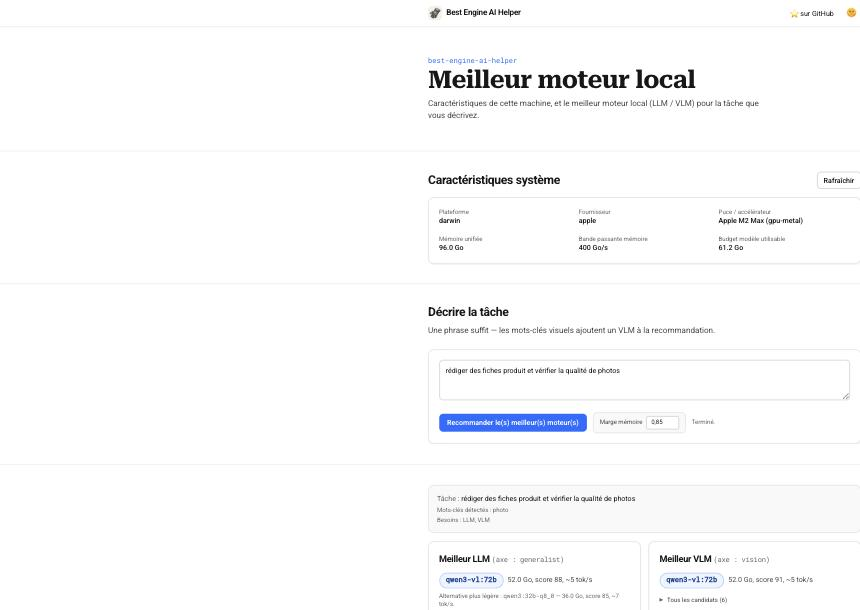
See GUI.md for the full write-up, the JSON API it's built on, and
how the favicon / touch-icon set is generated from assets/logo.png.
Activity ledger
Every llm.chat() call, whether from this tool's own pull/validate gates
or from any downstream project that imports best_engine_ai_helper.llm, can
be recorded to a local, append-only SQLite ledger
(~/.best-engine-ai-helper/usage.db): who called it (BEST_ENGINE_USER env
var, else the OS login name), which model and backend, latency,
success/failure, and an estimated cost for paid backends (always 0.0 for
local Ollama/vLLM). Built for the "one company, several users on a shared
machine" case: answer "who is calling what, how often, at what cost" without
a separate telemetry stack. Local only, no network call, no third-party
service.
best-engine-ai-helper activity              # table
best-engine-ai-helper activity --format json
The CLI, GUI, and MCP server all enable recording by default; opt out with
BEST_ENGINE_NO_LEDGER=1. The GUI's Activity section and GET /api/activity
read the same ledger. See best_engine_ai_helper.observe for the library API
(enable(), as_user(name), Ledger.summary()).
How selection works
Selection weighs four factors, each made explicit in the report output so the
recommendation is reproducible and can be argued with.
1. Structured-output capability (can it be driven by a schema?)
The AI-Helpers suite routes every task through a JSON schema (intent parsing,
edit proposals, visual critique). Some open-weight models cannot honour Ollama's
grammar-constrained structured output and return an empty response under it (the
Qwen3-VL family does this, verified on qwen3-vl:8b). A model marked
structured_output: false in the catalog is never auto-selected, however high
its raw benchmark, and it still appears lower in the ranked list so an explicit
non-schema task can find it. Entries with no such marker are assumed capable.
2. Memory fit (will it run on the accelerator?)
Available memory comes from the highest-priority probe that succeeds: Apple
Silicon unified memory (system_profiler), NVIDIA VRAM (nvidia-smi), AMD VRAM
(rocm-smi), else half of system RAM as a conservative CPU-only estimate.
The usable budget is not the whole pool. On Apple Silicon, Metal caps GPU
allocations at about 66% of unified memory at or below 36 GB and about
75% above it (recommendedMaxWorkingSetSize); past that, work spills to the
CPU and slows sharply. An extra safety headroom (default 0.5, the hard
ceiling: a larger value is clamped down to it) is applied
on top, reserving room for the OS, your own application, and a model's own
working memory: as a conversation or prompt gets longer, a model keeps a
running cache of everything it has already read so it does not recompute it
on every new word (the KV cache), and that cache keeps growing as context
fills. A catalog entry's ram_gb is already a peak-inference estimate
(weights plus a moderate KV cache; roughly weights ÷ 0.7, since weights are only
about 70% of runtime memory and can approach 2× at long context). A model fits
when that ram_gb is at most the budget.
3. Task fit (is it good at the job?)
A task, even a vague phrase like "retail descriptions and image-quality
checks", maps to a benchmark axis (generalist, code, math, ocr,
vision) and to the model kinds it needs (text implies an LLM, anything visual
implies a VLM).
Among fitting models, the highest benchmark on that axis wins.
4. Throughput (how fast will it generate?)
Token generation is memory-bandwidth bound: each token reads the active
model from memory once, so the ceiling is bandwidth ÷ model-size, derated to
about 65% for KV-cache reads and overhead. report estimates tokens/s per
candidate from the chip's memory bandwidth, and offers a lighter, faster
alternative when one is nearly as strong. Bigger is not automatically better: a
72B model that technically fits may run at a few tokens/s, while an 8-14B model
leaves headroom and runs several times faster.
When nothing fits, the tool falls back to the smallest model and says so.
5. Live server load (optional, --live)
The four factors above describe the machine's theoretical capacity. Add
--live (recommend/report; live: true on POST /api/recommend) to also
weigh what else is happening on it right now: current free RAM, CPU/GPU/disk
usage, and how many engines (Ollama models, vLLM servers) are already running.
A busy or already-loaded machine gets a smaller, more realistic budget than an
idle one with identical hardware. Off by default: it adds a short live probe
(~0.1-0.5s: nvidia-smi/ioreg, a local Ollama ping, a psutil sample) and
makes the recommendation depend on this exact moment rather than being a
deterministic function of the hardware alone, which matters for reproducible
reports and CI.
Sources. Apple Metal working-set cap (Apple developer docs / apple-specs);
inference-memory breakdown weights + KV (15-20%) + overhead (5-10%) (local-LLM
sizing guides); bandwidth-bound decode tok/s ≈ bandwidth ÷ active-bytes × 0.5-0.8
(llama.cpp / MLX community benchmarks). The exact ratios live as documented
constants in score.py.
Measured throughput, and why the estimate needed correcting
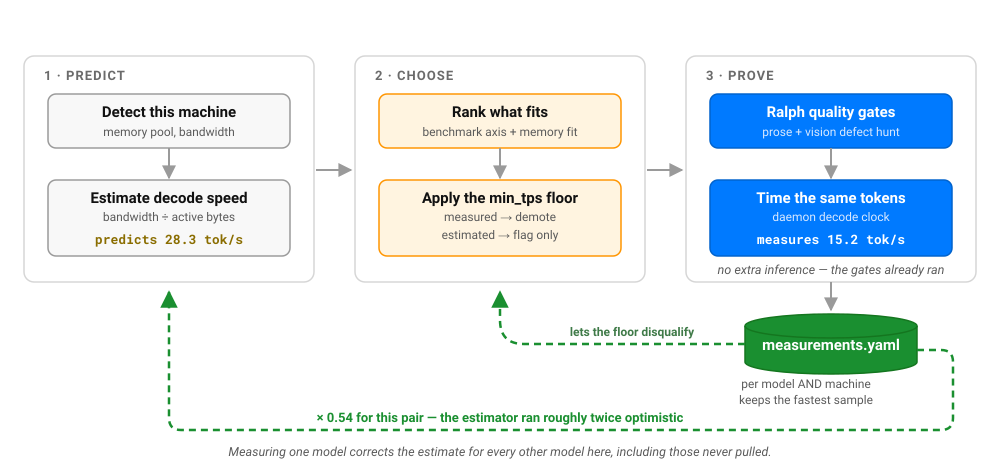
Everything above is an estimate. For a tool whose argument is that you should
measure rather than assume, that was the one place it assumed — so pull and
validate now measure it.
The measurement costs nothing extra. Both commands already pull a candidate and
put it through two Ralph gates, which means the tokens have already been
generated; all that was missing was a stopwatch. The figure lands in
~/.best-engine-ai-helper/measurements.yaml, keyed by model and machine,
since tokens per second is a property of both.
It is timed with Ollama's eval_duration — the decode phase as the daemon
measures it — rather than wall-clock time around the call, which also contains
prompt processing, HTTP, and any queueing. Each measurement records which clock
produced it, and only the daemon's clock is allowed to disqualify a model: wall
time understates decode speed, and understating is what would reject a model
that runs perfectly well.
Re-measuring the same model keeps the fastest sample rather than the latest,
which is a correctness requirement rather than optimism. The quantity being
calibrated is a memory-bandwidth ceiling, and a busy machine can only ever
make an observation look slower than the hardware really is. This was learned
from the behaviour itself: gemma3:12b measured 15.2 tok/s on an idle machine
and 8.7 tok/s with three test suites running — and the contended sample alone
would have yielded a correction of 0.31 against the idle run's 0.54, skewing
every estimate on the machine. samples records how much evidence stands behind
the stored figure.
Three things follow, and the third is the interesting one:
-
A measured figure beats an estimate wherever both exist.
recommendmarks it with*. -
min_tpsbecame a real constraint. Every usage brief already carried a throughput floor and it only ever sorted. A model measured below the floor is now demoted out of auto-selection, exactly as one that does not fit in memory is. A model merely estimated below it is flagged and left alone, so a machine that has never runpullbehaves exactly as it did before. -
Measuring one model improves the estimate for all the others. The ratio of measured to estimated is a property of the machine far more than of the model, so it transfers. On the Apple M2 Max this was developed against,
gemma3:12bdecodes at 15.2 tok/s where the bandwidth model predicted 28.3. That ratio is applied to every subsequent estimate on this machine, including for models that were never pulled.That claim is tested rather than asserted —
scripts/validate_calibration.pycalibrates on one model, predicts another, and reports whether it beat the raw estimate. It did, in every direction tried, cutting the error from 64-118% down to 17-25%. Worth stating both halves: the correction is large and it is not precision. Ratios ranged about 0.46 to 0.61 across models and across repeated runs of the same model, which is why the factor is a median over several measurements rather than one, and why a real measurement still outranks a calibrated estimate wherever one exists. Calibration moves an estimate from wrong by a factor of two to wrong by about a fifth; it does not make it right.
Point 3 is also why the comfort floor mattered more than it looked: COMFORT_TPS
is 15 tok/s, so an uncorrected estimate of 28.3 sails past it while the real
15.2 only just clears it. The correction is the difference between a
recommendation that sounds comfortable and one that is.
Available commands
| Command | Description |
|---|---|
detect |
Print the detected hardware as JSON |
recommend |
Rank candidates for this hardware (no download) |
report |
Recommend the best engine(s) for a task (Markdown + JSON) |
resolve |
Turn a committed usage brief into this machine's llm.engine.yaml |
doctor |
Compare what the engine file resolved against what the daemon can serve |
storage |
Plan capacity: what fits on disk, and what fits in memory together |
providers |
Which cloud providers are usable right now, and for the others, the variable to set |
catalog show |
Print the merged model catalog |
catalog update |
Refresh the model cache (--ollama for pullable tags from the official library, --arena to merge LM Arena ratings, --limit N for a partial refresh) |
hardware show |
Print the known hardware chip table |
hardware update |
Record this machine's chip and memory in the hardware cache |
pull |
Download the best model and run the Ralph gates |
validate |
Run the Ralph gates on the currently configured model |
env |
Print the shell export block ready for ~/.zshrc |
gui |
Launch the browser GUI |
activity |
Summarize the local activity/cost ledger (calls, cost, by user/model, errors) |
usages list |
List usage profiles and families (needs only, never a model) |
usages show <profile> |
Show one profile's needs (task, structured output, floors) |
usages resolve <profile> |
Resolve a profile (or --family) to the model best-engine picks here |
Model catalog
The bundled seed catalog (models.yaml) covers the Qwen 3, Qwen 2.5, Qwen 2.5-Coder, and Gemma 3 families (from 3B to 72B parameters, across Q4_K_M and Q8_0), plus a small set of kind: embed text embedders for the retrieval index. The catalog tracks on-disk size, estimated peak RAM, and benchmark scores from the Open LLM Leaderboard v2, the OpenVLM Leaderboard, EvalPlus (code), and MTEB (embedding retrieval). This is the search space best-engine picks from: it is never a per-usage choice.
catalog update refreshes the cache from the ApXML LLM directory (open-weight models with their per-quant VRAM needs, consulted regularly). It fetches the specs, normalizes them to catalog entries, and merges them into ~/.best-engine-ai-helper/catalog_cache.yaml by id (the bundled seed is never modified). Use --limit N for a quick partial refresh. ApXML's static pages carry specs but no numeric leaderboard scores, so refreshed entries keep null benchmarks (and rank low) until a scored source, such as the Open LLM Leaderboard v2 or the OpenVLM Leaderboard, fills them.
--ollama widens the catalog from the official Ollama library instead of ApXML, and it exists because the servable catalog was stuck at twenty models for a reason that was never about scoring. ApXML can add hundreds of entries, but it names them by the paper's slug (qwen36-35b-a3b), which is a HuggingFace repo name that ollama pull cannot resolve — so those entries are vLLM-only. The library instead publishes families, their capabilities, and the sizes each one ships, and a family plus a size is a pull tag: qwen3 plus 8b is qwen3:8b, exactly the spelling the seed already uses. 256 families expand to roughly 420 pull tags, from a single request.
These entries carry no benchmark scores, because the library publishes sizes and descriptions rather than leaderboard results. They therefore rank below every scored model until a scored source fills them in. That is the point rather than a limitation: it widens what the tool can size and pull without changing what it recommends, and an invented score would be worse than an absent one — a null ranks low and is honest, a guess ranks wrongly and looks authoritative.
Sizes are derived from a constant measured against the seed's own fourteen Q4 entries, not guessed: 0.646 GB per billion parameters for text models and 0.714 for vision ones, since an image tower is genuinely heavier per parameter. That lands within about 5% of the seed's known-good figures. A family listing no size at all is skipped rather than recorded as zero, which would have made it appear to fit every machine.
--arena additionally merges conversational ratings from LM Arena mirrors, and two measured facts about that axis are worth knowing before you reach for it.
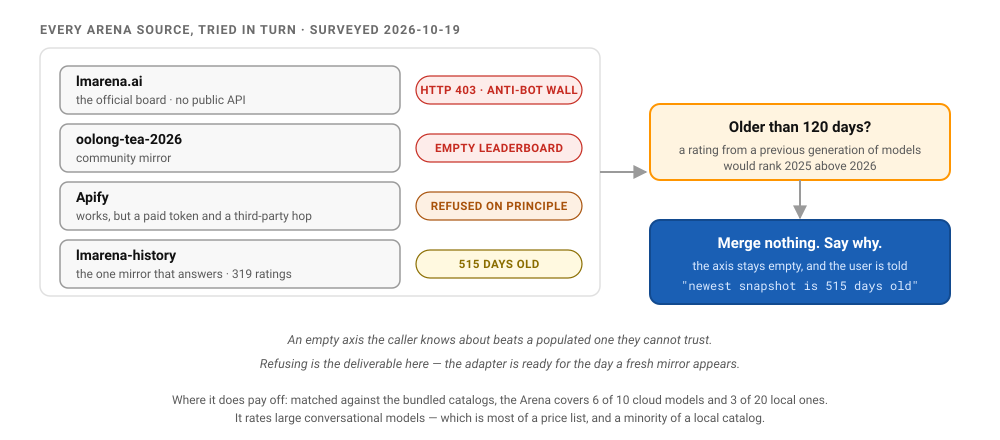
It serves the cloud catalog, not the local one. Arena rates what its voters can chat with. Matched against the bundled catalogs (measured 2026-10-19 against the freshest working mirror), it covered 6 of the 10 cloud models in pricing.yaml but only 3 of the 20 local models in models.yaml.
The three local hits say more than the ratio does: they were qwen2.5-coder:32b, qwen3:32b-q4_k_m and qwen3:32b-q8_0 — every match was a 32B build, and nothing smaller matched at all. The four embedding models (nomic-embed-text, mxbai-embed-large, snowflake-arctic-embed2, bge-m3) cannot match by construction: nobody chats with an embedder, so no leaderboard of chat preferences will ever rate one. So the axis is not simply "cloud-biased" — it rates large conversational models, which is most of a cloud price list and a minority of a local catalog. That is the opposite of what most people expect from a "model leaderboard", and it is the difference between using the axis well and waiting for it to break ties it will never see. The command prints its own matched/total every run, so you never have to take this paragraph's word for it.
It may well return nothing at all. Arena publishes no API, so every source here is a third-party scrape, and scrapes rot: as of 2026-10 the official site answers 403, one mirror returns empty leaderboards, and the freshest working mirror is more than a year stale. The adapter refuses a snapshot past its staleness bar and names the reason rather than merging it, because an Elo from a previous generation of models would rank 2025's models above 2026's — strictly worse than no Elo. When that happens the command says so and leaves the axis empty; it does not report a success that enriched nothing.
Hardware table
hardware.yaml lists known GPU and Apple Silicon chip configurations with their usable memory (physical pool minus OS and driver overhead). There is no public specs API spanning every chip, so hardware update records ground truth for the machine it runs on instead: it detects this machine's chip, memory pool, and Ollama-usable share, and upserts that row into ~/.best-engine-ai-helper/hardware_cache.yaml (keyed on chip + memory tier).
Downstream integration
There are two ways to consume the selected model. Use the first when every tool on the machine should share one model. Use the second when a project has its own idea of the job and wants the pick that fits that job, not a generic one.
Pattern A: one shared model for the whole machine
After best-engine-ai-helper pull completes, it writes ~/.best-engine-ai-helper/env.sh. pull picks one model that clears both quality gates and points the text and vision slots at it, so both tags match (the exact tag depends on your hardware):
export BEST_LLM_TEXT=gemma3:12b
export BEST_LLM_VISION=gemma3:12b
export BEST_LLM_BACKEND=ollama
export BEST_LLM_BASE_URL=http://localhost:11434
Projects that consume the selected model source this file or read the companion config.json.
Pattern B: a per-project engine resolved from a tuned brief
A project usually knows its job more precisely than a machine-wide default can, and the quality of the pick depends on how well that job is described: the task text is what maps to a scoring axis and decides whether a VLM is needed (see How selection works). So the project keeps a committed brief describing the job and resolves it, per machine, into a gitignored engine file that names the backend and model to use. No DEFAULT_MODEL constant lives in the project: the model is always read from the resolved engine file.
-
Commit the brief:
llm.brief.yamlin the repo, hardware-independent:kind: both # llm | vlm | both headroom: 0.5 # max fraction of usable accelerator memory (clamped to 0.5) min_tps: 15 # comfort throughput floor (tokens/s) structured_output: true # the job needs schema-constrained output task: >- Name PCA axis poles as schema-constrained JSON, write a short analysis in the table's own language, and sanity-check the rendered chart image.
-
Resolve it, per machine: writes a gitignored
llm.engine.yaml:best-engine-ai-helper resolve --brief llm.brief.yaml --out llm.engine.yaml
The backend is chosen by a three-branch decision tree, matching what each backend actually supports well rather than what it merely runs on:
- macOS -> Ollama. vLLM ships no native macOS runtime.
- CPU-only (Linux or macOS) -> Ollama. vLLM's CPU-only path — notably on Linux — is its own reported weak spot; Ollama's CPU path is the well-trodden one.
- Discrete GPU (NVIDIA/AMD) on Linux — the real production case -> vLLM, chiefly for the request-batching/concurrency handling it offers under real load, which Ollama does not match.
Windows falls back to Ollama too (no native vLLM wheel, WSL-only), so in short: vLLM only on Linux with a discrete GPU; Ollama everywhere else. The pick is deliberately conservative in other ways too: the memory headroom is capped at 0.5, and among models within a few benchmark points of the best it takes the leanest and fastest, not the largest that merely fits. vLLM picks are sized against full FP16 weights (heavier than the Ollama Q4 estimate), so a vLLM pick is realistic on the real GPU. The output is hardware-specific; add it to
.gitignore:backend: ollama base_url: http://localhost:11434 llm: {model: gemma3:12b, ram_gb: 9.2, est_tokens_per_s: 28.3, structured_output: true} vlm: {model: gemma3:12b, ram_gb: 9.2, est_tokens_per_s: 28.3, structured_output: true} serve: [ollama pull gemma3:12b]
-
Consume it, no constant: read the engine at call time and let the transport route to the right backend:
from best_engine_ai_helper import ensure, llm

# loads llm.engine.yaml, or resolves it from llm.brief.yaml on first use
engine = ensure(".")
summary = llm.chat(prompt, engine=engine, kind="llm")
critique = llm.chat(prompt, engine=engine, kind="vlm", images=[png], json_schema=SCHEMA)
chatreads the backend and model from the engine file and dispatches to Ollama (/api/generate) or vLLM (OpenAI-compatible/v1/chat/completions) transparently, with schema-constrained structured output on both.
Missing-file policy. The brief is committed, so its absence is a real bug and ensure raises loudly with the command to run. The engine file is gitignored and machine-specific, so its absence is normal: ensure resolves it from the brief on first use. This keeps the model out of any variable: the resolved engine file is the single source of truth.
The suite's consumers, Standpoint, vocal-helper, and md2star, follow this pattern; each ships an llm.brief.yaml describing its own job (Standpoint's, for instance, names schema-constrained JSON, so the structured-output gate rules out higher-scoring vision models that cannot honour a schema and picks the strongest one that can) and reads the model only from the resolved engine file.
Two modes: local (free) and cloud (paid)
Every brief picks one of two modes with mode: local (the default) or mode: cloud. Both resolve to the same shape of engine file and the same llm.chat(engine=..., kind=...) call site downstream: only the transport and the cost change.
Local (free, default)
mode: local, or no mode field at all, is the promise: hardware detection, model selection, and every quality gate run on this machine against a model already pulled via Ollama or served via vLLM. Every call costs $0.0, always, with no paid API call to price (see Activity ledger).
Cloud (paid)
mode: cloud routes through a paid provider instead: OpenAI, Mistral, OpenRouter, Together, or Azure OpenAI (all OpenAI-compatible), plus Anthropic and Gemini (their own wire formats), while keeping the exact same llm.chat(engine=..., kind=...) call site downstream. Two ways to pick the model:
- Pin it: name
providerandmodelexplicitly in the brief, exactly as before. - Auto-pick it: omit
model(andprovider, to search every provider) and best-engine picks the best paid model from a small bundled catalog (pricing.yaml, extended with benchmark scores per model), the same way local mode auto-picks frommodels.yaml, except that the resource being budgeted is price, not memory, since every paid model fits on any machine. Aquality_vs_costknob (0..1, default 0.7) tips the pick:1.0picks purely on benchmark score,0.0picks purely on price, and the default leans quality with price as a tiebreaker.
mode: cloud
kind: both
quality_vs_cost: 0.7           # optional, 0..1; auto-pick only, default 0.7
task: extract structured line items from an invoice PDF's OCR text
Three further keys exist for the pinned case, and the brief is the only place they can be set. vlm_model pins the vision slot separately — with kind: both and only model given, the same model serves both. base_url overrides the provider's endpoint (for a proxy or a regional deployment), and api_key_env overrides the NAME of the environment variable the key is read from, which defaults to the provider's conventional one. Neither ever holds the key itself.
best-engine-ai-helper resolve --brief llm.brief.yaml --out llm.engine.yaml
# Wrote llm.engine.yaml
#   backend: openai  (llm=gpt-4o, vlm=gpt-4o)
Preview the auto-pick for any task before writing a brief, side by side with the local pick, with no API key and no network call:
best-engine-ai-helper report --task "extract line items from an invoice"
# ... local section ...
# ## Best cloud VLM (axis: ocr)
# **→ `gpt-4o`** (openai) — score 69, ~$6.25/1M tokens (blended)
(--no-cloud skips that section; --quality-vs-cost and --cloud-provider tune it.)
Every cloud engine also carries an embedded local fallback, resolved from the SAME brief, so a failed paid call degrades to the always-available local model: paid → local, the one safe direction (a local engine never silently escalates to a paid call). Four more things happen automatically at the llm.chat() call site once engine= is a cloud descriptor:
| Concern | Default | Opt out / configure |
|---|---|---|
| API key | the NAME in api_key_env (never the key value) is looked up in one pass (settings.yaml, then any .env file, then the process environment), then the OS keychain via keyring |
pip install 'best-engine-ai-helper[cloud]' for the keyring fallback |
| Safety scan | every prompt/image scanned outbound, every response scanned inbound, for BOTH local and cloud (a content-policy concern, not a cloud-only risk) | chat(..., safety=False) |
| Pseudonymization | off; when on, scrubs personal data with the LOCAL fallback model before the prompt leaves the machine, restores it in the response | chat(..., pseudonymize=True), needs [cloud] |
| Retry + cache | off; retry replays a transient transport failure before failing over, cache memoizes identical calls so a repeat never pays twice | chat(..., retries=3, cache=True), cache needs [cloud] |
| Cost tracking | every call, local or paid, appended to the local activity ledger, priced from real provider token counts when reported, else a character estimate | best-engine-ai-helper activity, opt out with BEST_ENGINE_NO_LEDGER=1 |
See EXAMPLES.md's resolve section for the full worked recipe (settings.yaml, keyring, structured output, the failover chain) and GUI.md for the activity dashboard.
Usages / task profiles
Where a brief is written per repo, the recurring eight workloads are named once in a bundled usage catalog (usages.yaml). Each profile, text2sql, rag-answer, embeddings, text2sql-figures, report-bluf, classification, pii-rgpd, persona, states only its needs: task type (text / code / vision / embeddings), whether it needs structured output, a throughput floor, a memory headroom, an advisory quality bar, and a context-length hint. A profile is, at heart, a named brief, so it is resolved by the same four-criteria picker as any brief.
A profile never names a model. best-engine is the sole decider: it reads the needs, probes the machine, and chooses the concrete local model, writing that choice only into a generated engine file (llm.engine*.yaml) that is gitignored and machine-specific, never a committed literal. That is the whole point of the tool.
Profiles are grouped into families: the usages that can share one model, so a machine need not hold eight:
| Family | What it needs | Profiles |
|---|---|---|
| F1: constrained generation | code + reliable structured output (SQL / JSON), deterministic | text2sql, text2sql-figures, classification, pii-rgpd |
| F2: prose generation | faithful FR/EN prose over long context | rag-answer, report-bluf, persona |
| F3: embeddings | multilingual, multi-granular retrieval vectors (never a chat model) | embeddings |
Resolving a family yields one model for the group; resolving a single profile yields the possibly-specialised model for that job when the hardware allows it. On a roomy machine best-engine may specialise; on a tight one a family collapses onto one model.
Discover and resolve through the existing CLI / library surface:
best-engine-ai-helper usages list                 # every profile + family (needs, no models)
best-engine-ai-helper usages show text2sql        # one profile's needs
best-engine-ai-helper usages resolve text2sql     # -> the model best-engine picks here
best-engine-ai-helper usages resolve --family F1 --out llm.engine.F1.yaml
from best_engine_ai_helper import resolve_usage, resolve_family, list_usages

for u in list_usages():
    print(u["name"], u["family"], u["status"])

engine = resolve_usage("text2sql")  # best-engine chooses the model for THIS machine
family = resolve_family("F1")  # one model for the whole constrained-generation group
best-engine writes the retained models into the gitignored llm.engine*.yaml for this machine (the extension of the env.sh it already emits); the app reads that file and re-resolution re-decides if the hardware changes. Adding a profile is a few lines in usages.yaml; a user overlay at ~/.best-engine-ai-helper/usages_cache.yaml overrides by name.
Use it as an agent skill
skills/best-engine-ai-helper/ packages best-engine-ai-helper as a Claude Skill and an OpenCode
skill, so an agent can reach for it on your behalf. See
skills/README.md to install it (symlink into
~/.claude/skills/ and ~/.opencode/skills/), and
TRIGGERS.md for the exhaustive trigger catalogue —
scripts/check_triggers.py keeps the skill's description in sync with it, and
the test suite fails if a capability stops being named.
Author
Acknowledgements
Special thanks to Victor Favreau for fruitful discussions.
License
BSD-3-Clause. Copyright 2026 Warith Harchaoui.
1 maintainer

Metadata
1 maintainer
Release files for best-engine-ai-helper 1.7.0
For a detailed explanation of source distributions (sdists) and built distributions (wheels), please see the package formats documentation.
Source distribution (sdist)
| File | Size | Uploaded | Provenance | |
|---|---|---|---|---|
| best_engine_ai_helper-1.7.0.tar.gz | 1.6 MB | Without provenance | Details |
Built distribution (wheel)
| File | Interpreter | ABI | Platform | Reset |
|---|---|---|---|---|
| best_engine_ai_helper-1.7.0-py3-none-any.whl | Python 3 | none | any | Details |
Total release size: 3.1 MB
Release files / best_engine_ai_helper-1.7.0.tar.gz
| Download URL | best_engine_ai_helper-1.7.0.tar.gz |
|---|---|
| Size | 1.6 MB |
| Tags | Source |
|
SHA-256 checksum How to use checksums |
7fda8562093ecf574f0765db3b7467be03dd90b6b02f0f208b92a53580252b31
|
|
BLAKE2b-256 checksum How to use checksums |
e17b98c3ea11937a44e5cabbbf86314000642490324d8b03d9551a8652f2ac3d
|
| Upload date | |
|
Uploaded using Trusted Publishing? What is trusted publishing? |
No |
| Uploaded via |
twine/7.0.0 CPython/3.13.13
|
Release files / best_engine_ai_helper-1.7.0-py3-none-any.whl
| Download URL | best_engine_ai_helper-1.7.0-py3-none-any.whl |
|---|---|
| Size | 1.5 MB |
| Tags | Python 3 |
|
SHA-256 checksum How to use checksums |
8cd01f6c42e41ff676a4708ee8ab2c4b6f0fe524104eb0e54a4dca88a290f625
|
|
BLAKE2b-256 checksum How to use checksums |
361c8ae68ff934f42557aedfaaf71dadec4df6724c8c7cf16c8729013a3116ec
|
| Upload date | |
|
Uploaded using Trusted Publishing? What is trusted publishing? |
No |
| Uploaded via |
twine/7.0.0 CPython/3.13.13
|
Security for best-engine-ai-helper 1.7.0
Provenance
Provenance describes where a file came from. On PyPI, provenance is shared via attestations, which provide a verifiable record of the build or publishing details. View details, limitations and caveats.
No provenance found
None of the files in this release were uploaded with provenance metadata.
A note on package security
PyPI is a repository for distributing packages, not a service for auditing them. While third-party security researchers and our staff do their best to detect and remove malicious packages, PyPI cannot guarantee the quality, security or suitability of any given package.














