
Binex
Open-source visual orchestrator for AI agent workflows
Build, run, debug, and replay multi-agent pipelines — 100% locally.







Demo
1. Start in seconds

Install, run
binex ui, and you're building workflows
2. Build & run custom workflows

Drag & drop nodes, configure models, run with human input
3. Explore & debug results

Debug, trace, diff, lineage — full post-mortem inspection
What is Binex?
Binex is an open-source, fully local runtime for AI agent workflows. No cloud. No telemetry. No vendor lock-in.
pip install binex
binex ui
That's it. Browser opens. You're building AI workflows.
Why Binex?
- 100% local — your data never leaves your machine
- 100% open source — MIT licensed, audit every line
- Zero telemetry — no tracking, no analytics, no surprises
- Full debuggability — every input, output, prompt, and cost is visible
- Any model — OpenAI, Anthropic, Google, Ollama, OpenRouter, DeepSeek, and 40+ more via LiteLLM
How it compares
LangGraph, CrewAI, and AutoGen are frameworks for building agents. Binex is a debuggable runtime — it competes on everything after "run": trace, cost, diff, bisect, replay, and regression gates, all local.
| Capability | Binex | LangGraph | CrewAI | AutoGen |
|---|---|---|---|---|
| Built-in trace / replay / diff / bisect | ✅ | ⚠️ hosted (LangSmith) | ❌ | ❌ |
| Per-node / per-call cost tracking | ✅ | ⚠️ | ⚠️ | ⚠️ |
| Regression safety net (eval + golden-run diff) | ✅ | ❌ | ❌ | ❌ |
| Visual editor and CLI | ✅ | ⚠️ Studio | ❌ | ⚠️ Studio |
| YAML workflows | ✅ | ❌ | ⚠️ | ❌ |
| Debug an existing run without migrating | ✅ observer | ❌ | ❌ | ❌ |
| Local-first, no cloud | ✅ | ✅ | ✅ | ✅ |
They also compose — point Binex's observe() at an existing CrewAI/LangGraph
run to get its debugging without migrating. Full breakdown, including where each
tool shines, in docs/comparison.md.
Installation
Requires Python 3.11+
pip install binex
With extras:
pip install binex[langchain]    # LangChain Runnables
pip install binex[crewai]       # CrewAI Crews
pip install binex[autogen]      # AutoGen Teams
pip install binex[telemetry]    # OpenTelemetry tracing
pip install binex[rich]         # Rich colored CLI output
Docker
Prefer a container? Run the CLI and Web UI without touching your Python environment:
# From the repo root — builds the frontend + installs Binex, serves the Web UI.
docker compose -f docker/docker-compose.webui.yml up --build
# → open http://localhost:8420
Runs, artifacts, and workspaces persist in the binex-data volume. Pass API keys
via the environment (or a .env file), e.g. OPENAI_API_KEY=… docker compose ….
For a fully-local setup, add the bundled Ollama sidecar with --profile local.
Run one-off CLI commands against the same image:
docker build -f docker/Dockerfile.webui -t binex .
docker run --rm -v binex-data:/data binex binex run workflow.yaml
The separate
docker/docker-compose.ymlis a different deployment — the A2A agent-server mesh (planner/researcher/… + Ollama + LiteLLM), not the Web UI.
Web UI
Launch the visual workflow editor:
binex ui
Visual Drag & Drop Editor
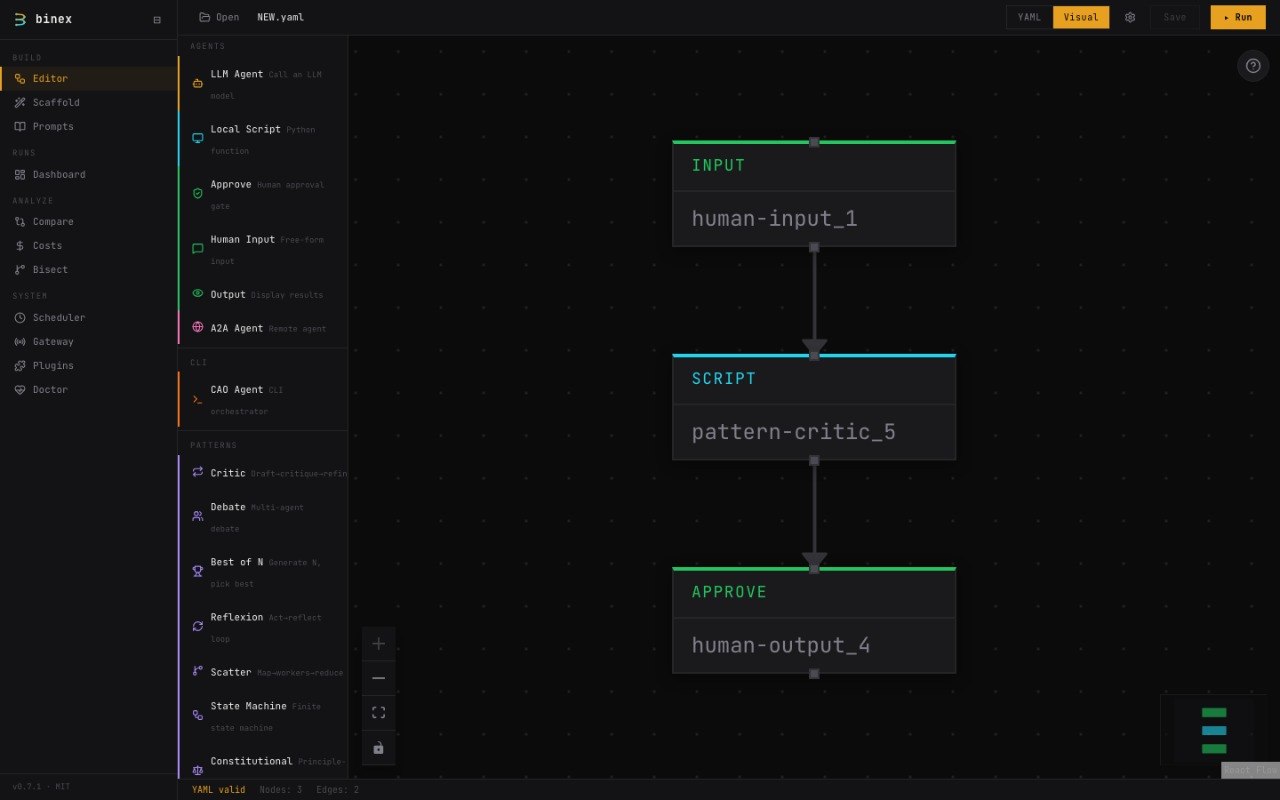
Collapsible node sections, tool picker with 10 built-in tools, MCP config, Visual ↔ YAML sync
6 node types: LLM Agent, Local Script, Human Input, Human Approve, Human Output, A2A Agent
- 20+ preset models including 8 free OpenRouter models
- Built-in prompt library (Planner, Researcher, Analyzer, Writer, Reviewer, Summarizer)
- Tool Picker — 10 built-in tools, MCP server integration, custom Python tools
- Collapsible sections — Model, Prompt, Tools, Advanced per LLM node
- Workflow Settings panel — configure MCP servers (stdio/HTTP) and cron schedules
- Switch between Visual and YAML modes — changes sync both ways (including tools & MCP)
- Real-time cost estimation as you build
- Custom model input — use any litellm-compatible model
Dashboard
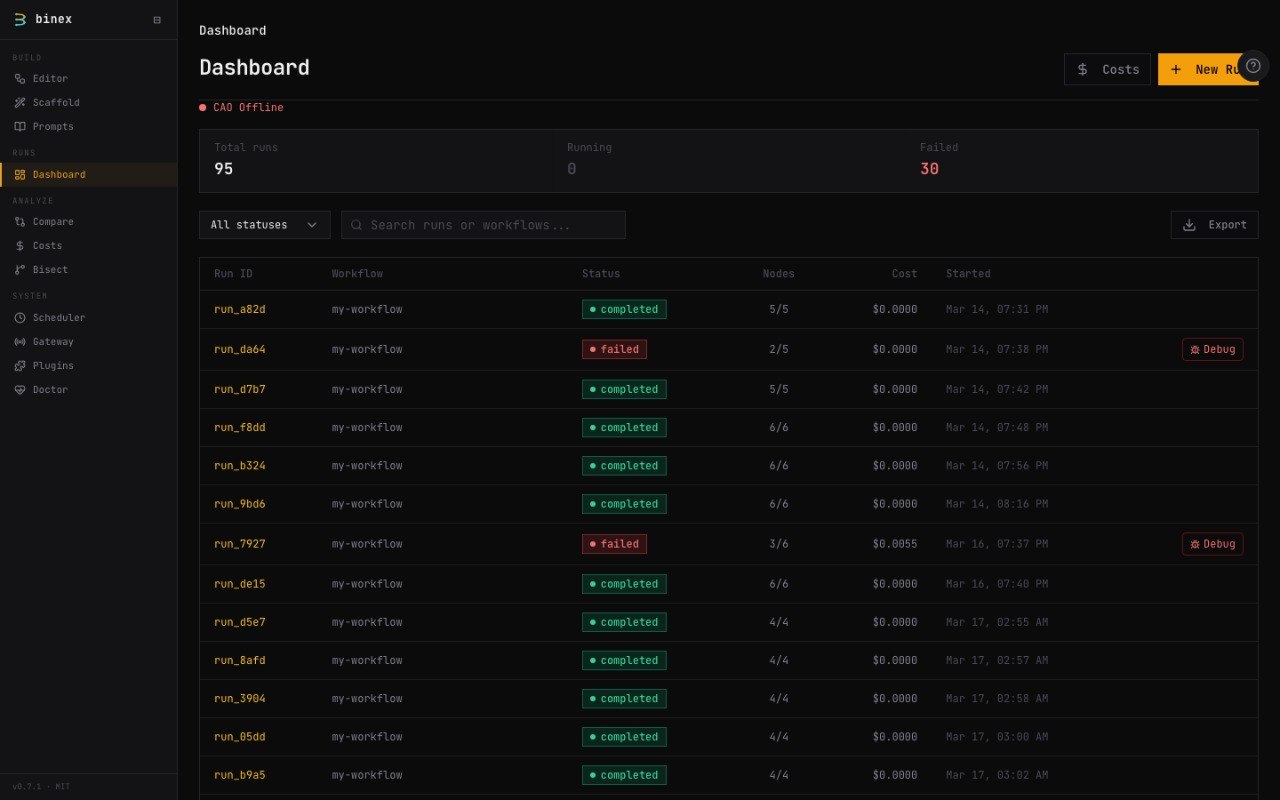
All runs at a glance — status, cost, duration
Debugging & Analysis
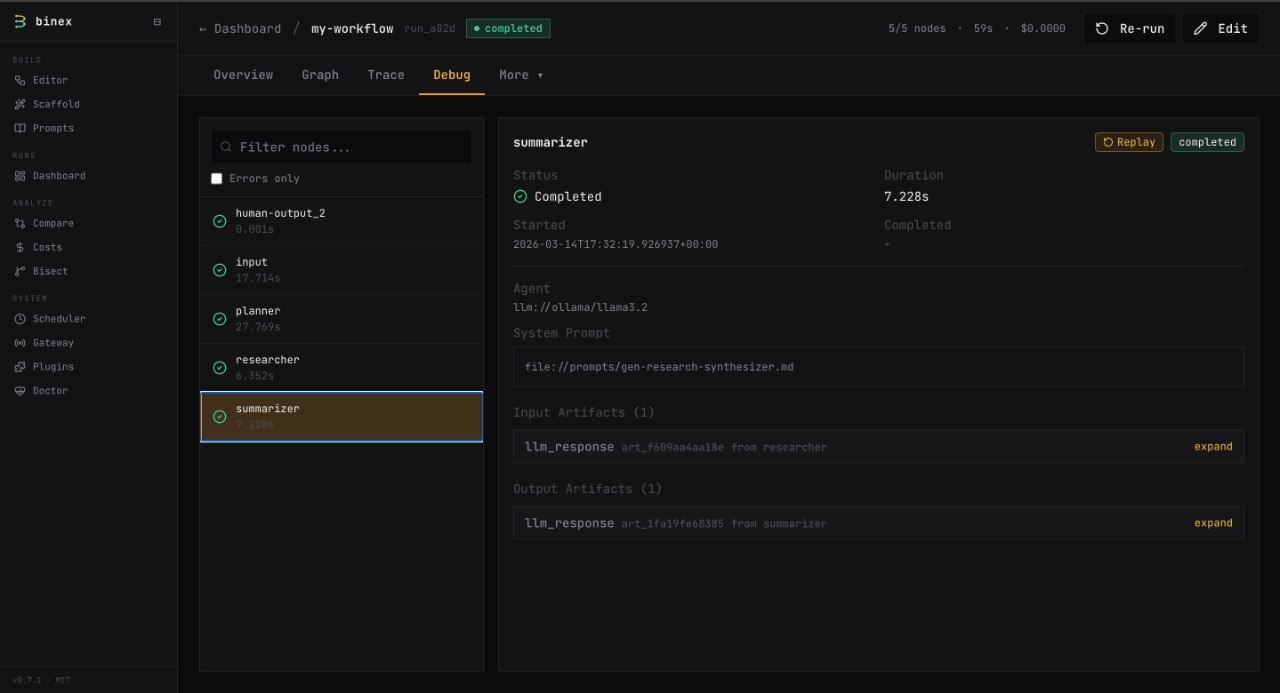
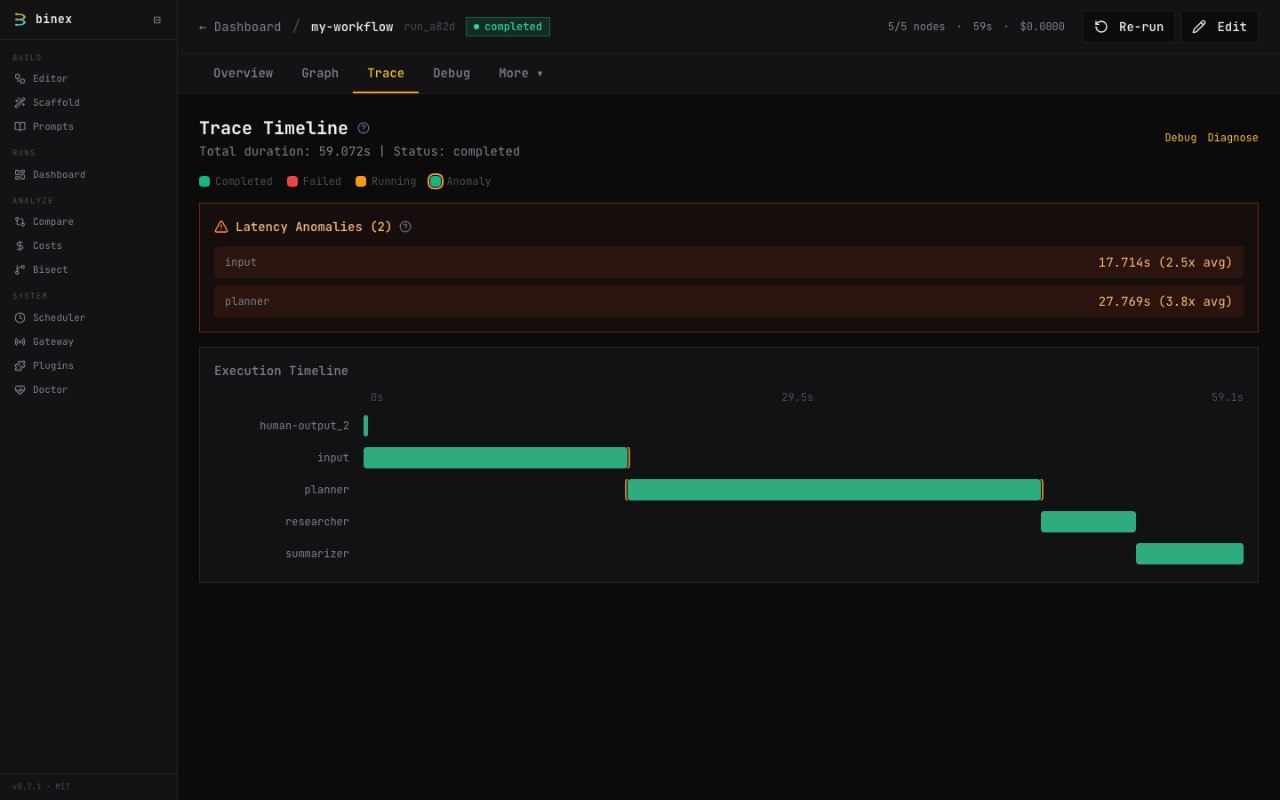
Left: Node-by-node debug inspection. Right: Gantt timeline with anomaly detection.
Run Comparison
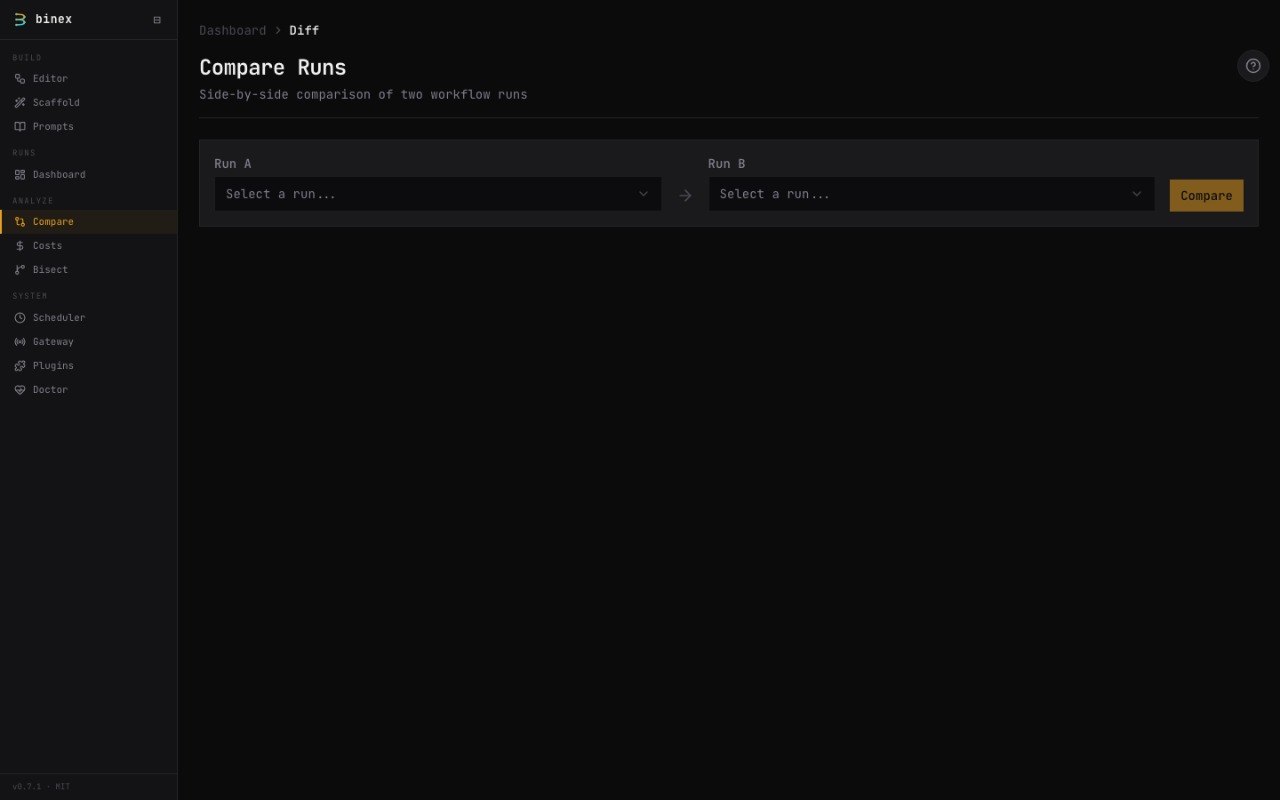
Side-by-side diff with filtering: changed, failed, cost delta
20 Pages — Full CLI Parity
| Category | Pages |
|---|---|
| Workflows | Browse, Visual Editor (with tool picker & MCP config), Scaffold Wizard |
| Runs | Dashboard, RunLive (SSE), RunDetail |
| Analysis | Debug (input/output artifacts), Trace (Gantt timeline), Diagnose (root-cause), Lineage (artifact graph), Eval (suite results & baselines) |
| Comparison | Diff (side-by-side with filter bar, compare with previous run), Bisect (NodeMap, DAG visualization, divergence metrics) |
| Costs | Cost Dashboard (charts), Budget Management |
| System | Doctor (health), Plugins, Gateway, Export, Scheduler (cron) |
Navigation
Sidebar organized into 4 groups: Build (Editor, Scaffold), Runs (Dashboard), Analyze (Compare, Bisect), System (Gateway, Plugins, Doctor). Run-specific pages (Debug, Trace, Diagnose, Lineage, Costs) open from run context.
Replay
Debug any node → click Replay → swap the model or prompt → re-run just that node. No re-running the entire pipeline.
Quickstart
CLI
# Zero-config demo
binex hello
Tip: Runs a 2-node demo workflow (producer → consumer), no API keys needed.
# Run a workflow
binex run examples/simple.yaml
Tip: Uses your configured LLM provider. Set
OPENAI_API_KEYor useollamafor fully local runs.
# Inspect the run
binex debug latest
binex trace latest
Tip:
debugshows per-node inputs/outputs.traceshows the execution timeline as a Gantt chart.
Web UI
binex ui
Tip: Opens the browser automatically. Use
--port 9000to change the port,--no-browserto skip auto-open.
Create a Workflow
name: research-pipeline
nodes:
  input:
    agent: "human://input"
    outputs: [output]

  planner:
    agent: "llm://gemini/gemini-2.5-flash"
    system_prompt: "Break this topic into research questions"
    tools:
      - "builtin://web_search"
      - "builtin://calculator"
    depends_on: [input]
    outputs: [output]

  researcher:
    agent: "llm://openrouter/google/gemma-3-27b-it:free"
    system_prompt: "Investigate and report findings"
    tools:
      - "builtin://fetch_url"
    depends_on: [planner]
    outputs: [output]

  output:
    agent: "human://output"
    depends_on: [researcher]
    outputs: [output]
Features
Agent Adapters
| Prefix | Description |
|---|---|
local:// |
In-process Python callable |
llm:// |
LLM via LiteLLM (40+ providers) |
a2a:// |
Remote agent via A2A protocol |
human://input |
Free-text input from user |
human://approve |
Approval gate with conditional branching |
human://output |
Display results to user |
builtin:// |
10 built-in tools (calculator, web_search, shell_command, etc.) |
mcp:// |
MCP server tools (stdio or HTTP transport) |
python:// |
Custom Python function as tool |
langchain:// |
LangChain Runnable (plugin) |
crewai:// |
CrewAI Crew (plugin) |
autogen:// |
AutoGen Team (plugin) |
CLI Commands
| Command | Description |
|---|---|
binex run |
Execute a workflow |
binex ui |
Launch Web UI |
binex debug |
Post-mortem inspection |
binex trace |
Execution timeline |
binex replay |
Re-run with agent swaps |
binex diff |
Compare two runs |
binex diagnose |
Root-cause failure analysis |
binex bisect |
Find first divergence between two runs |
binex cost show |
Cost breakdown per node |
binex explore |
Interactive TUI dashboard |
binex scaffold |
Generate workflow from DSL |
binex export |
Export to CSV/JSON |
binex doctor |
System health check |
binex hello |
Zero-config demo |
binex list |
List available workflows |
binex start |
Create a new project interactively |
binex init |
Deprecated alias for binex start |
binex validate |
Validate workflow YAML |
binex cancel |
Cancel a running workflow |
binex artifacts |
Inspect artifacts |
binex dev |
Local development environment |
binex gateway |
A2A Gateway management |
binex plugins |
Manage adapter plugins |
binex workflow |
Workflow versioning & inspection |
binex scheduler start |
Start cron-based workflow scheduler |
binex scheduler list |
List scheduled workflows |
binex scheduler add/remove |
Register/unregister workflow files |
binex eval run |
Run an eval suite against blessed baselines |
binex eval bless |
Approve current outputs as the new baseline |
binex eval golden |
Run a workflow and gate on assertions / a golden run |
binex import otel |
Import an OTLP/JSON trace as a Binex run |
binex collect |
Live OTLP/JSON collector endpoint |
binex mcp serve |
Expose Binex as an MCP server |
Eval — Regression Testing for Agent Pipelines
Write a YAML test suite, bless a baseline, then catch regressions in CI:
binex eval run examples/eval/research-eval.yaml      # run an eval suite
binex eval bless examples/eval/research-eval.yaml    # approve outputs as the baseline
binex eval golden workflow.yaml --baseline run_abc   # gate one workflow on a golden run
A suite pairs inputs with assertions (contains, regex, JSON path, LLM judge). In CI, add
binex eval run suite.yaml --format github --strict-baseline. You can also import
production traces from any agent framework as runs: binex import otel trace.json.
Use Binex from Your Coding Agent
claude mcp add binex -- binex mcp serve
Exposes runs, evals, and artifacts as MCP tools (binex_debug, binex_eval_run,
binex_diff) for Claude Code, Cursor, or any MCP-compatible agent.
Pattern Nodes
9 built-in agentic patterns that expand into sub-DAG pipelines at runtime:
| Pattern | Description |
|---|---|
critic |
draft → critique → refine (self-improvement loop) |
debate |
pro → con → judge (adversarial reasoning) |
best_of_n |
N parallel candidates → selector |
reflexion |
act → evaluate → reflect (iterative self-reflection) |
scatter |
mapper → N parallel workers → reducer (fan-out/fan-in) |
fsm |
finite state machine with configurable states and terminal |
constitutional |
draft → critique-per-principle → revise |
chain_of_verification |
draft → verify claims → synthesize |
plan_execute |
planner → N executors → aggregator |
nodes:
  review:
    pattern: critic
    model: gpt-4o
    config:
      rounds: 2
    steps:
      critique:
        model: gpt-4o          # override per step
LLM Providers
OpenAI · Anthropic · Google Gemini · Ollama · OpenRouter · Groq · Mistral · DeepSeek · Together AI
Built With





Examples
29 example workflows in examples/. Highlights:
| Example | What it demonstrates |
|---|---|
simple.yaml |
Minimal two-node pipeline |
diamond.yaml |
Diamond dependency pattern |
fan-out-fan-in.yaml |
Parallel execution with aggregation |
human-in-the-loop.yaml |
Approval gates and conditional branching |
human-feedback.yaml |
Human feedback loop |
conditional-routing.yaml |
Conditional node execution |
multi-provider-demo.yaml |
Multiple LLM providers in one workflow |
ollama-research.yaml |
Full research pipeline with Ollama + OpenRouter |
budget-hard-limit.yaml |
Budget enforcement with hard stop |
budget-per-node.yaml |
Per-node budget allocation |
a2a-multi-agent.yaml |
A2A protocol multi-agent workflow |
langchain-summarizer.yaml |
LangChain Runnable in a pipeline |
crewai-research-crew.yaml |
CrewAI Crew as a workflow node |
autogen-coding-team.yaml |
AutoGen Team for code generation |
mixed-framework-pipeline.yaml |
LangChain + CrewAI + AutoGen in one pipeline |
Architecture
src/binex/
├── adapters/        # Agent backends (local, LLM, A2A, human, frameworks)
├── agents/          # Agent definitions and configuration
├── cli/             # Click CLI commands
├── gateway/         # A2A Gateway server and routing
├── graph/           # DAG construction + topological scheduling
├── models/          # Pydantic v2 domain models
├── plugins/         # Plugin registry for custom adapters
├── prompts/         # 112 built-in prompt templates
├── registry/        # Provider and adapter registry
├── runtime/         # Orchestrator, dispatcher, replay engine
├── patterns/        # PatternExpander + 9 pattern templates
├── scheduler/       # Cron-based workflow scheduling
├── stores/          # SQLite execution + filesystem artifacts
├── tools/           # @tool decorator, 10 built-in tools, MCP client
├── trace/           # Debug, lineage, timeline, diffing
├── ui/              # FastAPI backend + React frontend
│   ├── api/         # 32 REST endpoints
│   └── static/      # Pre-built React app
└── workflow_spec/   # YAML loader + validator
Documentation
Full docs at alexli18.github.io/binex
Contributing
Contributions are welcome! If you find this useful:
- Star the repo — it takes 1 second and helps more than you know
- Open issues — tell me what's broken or what you need
- Submit PRs — let's build this together
I'm a solo developer building this in the open. Every star, issue, and PR makes a real difference.
- Fork the Project
- Create your Feature Branch (
git checkout -b feature/AmazingFeature) - Commit your Changes (
git commit -m 'Add some AmazingFeature') - Push to the Branch (
git push origin feature/AmazingFeature) - Open a Pull Request
Configuration
Binex can be configured via environment variables:
| Variable | Default | Description |
|---|---|---|
BINEX_STORE_PATH |
.binex |
Directory for SQLite database and artifacts |
BINEX_DEFAULT_DEADLINE_MS |
120000 |
Default node timeout in milliseconds |
BINEX_DEFAULT_MAX_RETRIES |
1 |
Default retry count for failed nodes |
BINEX_DEFAULT_BACKOFF |
exponential |
Retry backoff strategy (fixed or exponential) |
BINEX_REGISTRY_URL |
http://localhost:8000 |
Default A2A agent registry URL |
All data is stored in .binex/ (gitignored by default):
.binex/binex.db— SQLite database (runs, execution records, cost records).binex/artifacts/— JSON artifact files
License
Distributed under the MIT License. See LICENSE for more information.
No cloud. No telemetry. No surprises. Just debuggable AI workflows.
1 maintainer

Metadata
1 maintainer
Release files for binex 0.8.1
For a detailed explanation of source distributions (sdists) and built distributions (wheels), please see the package formats documentation.
Source distribution (sdist)
| File | Size | Uploaded | Provenance | Actions |
|---|---|---|---|---|
| binex-0.8.1.tar.gz | 1.2 MB | Without provenance | Details for binex-0.8.1.tar.gz |
Built distribution (wheel)
| File | Interpreter | ABI | Platform | Actions Reset |
|---|---|---|---|---|
| binex-0.8.1-py3-none-any.whl | Python 3 | none | any | Details for binex-0.8.1-py3-none-any.whl |
Total release size: 2.6 MB
Release files / binex-0.8.1.tar.gz
| Download URL | binex-0.8.1.tar.gz |
|---|---|
| Size | 1.2 MB |
| Tags | Source |
|
SHA-256 checksum How to use checksums |
71ca76a571a8284953d63b1c607c454cb9f9e1e7dd53c53a0f83210c297382ef
|
|
BLAKE2b-256 checksum How to use checksums |
6841e929db4dfeeb1357f731a020e01c3906c7b9c3b4916450b495ac2a76454b
|
| Upload date | |
|
Uploaded using Trusted Publishing? What is trusted publishing? |
No |
| Uploaded via |
twine/7.0.0 CPython/3.11.17
|
Release files / binex-0.8.1-py3-none-any.whl
| Download URL | binex-0.8.1-py3-none-any.whl |
|---|---|
| Size | 1.4 MB |
| Tags | Python 3 |
|
SHA-256 checksum How to use checksums |
78d56bd38a369d391961f43c7c61e82d93f931f45ae9ba1636d262c297ee1946
|
|
BLAKE2b-256 checksum How to use checksums |
1b25b16a8a53ab010041c61f1b201206535dcdaf9bb8d3af752f083521d6a5a3
|
| Upload date | |
|
Uploaded using Trusted Publishing? What is trusted publishing? |
No |
| Uploaded via |
twine/7.0.0 CPython/3.11.17
|
Security for binex 0.8.1
Provenance
Provenance describes where a file came from. On PyPI, provenance is shared via attestations, which provide a verifiable record of the build or publishing details. View details, limitations and caveats.
No provenance found
None of the files in this release were uploaded with provenance metadata.
A note on package security
PyPI is a repository for distributing packages, not a service for auditing them. While third-party security researchers and our staff do their best to detect and remove malicious packages, PyPI cannot guarantee the quality, security or suitability of any given package.
To learn more about protecting yourself from malicious actors, visit our package security documentation.














