
Debuggable runtime for AI agent pipelines

Project description
Binex
Debuggable runtime for AI agent pipelines
Orchestrate multi-agent workflows. Trace every step. Replay and diff runs.




What is Binex?
Binex is a debuggable runtime for AI agent workflows.
It executes DAG-based pipelines of agents (LLM, local, remote A2A, or human), tracks artifacts between steps, and allows replaying and inspecting runs.
Key features:
- DAG-based execution — define agent pipelines as readable YAML, not tangled code
- Artifact lineage — every input and output tracked across the entire pipeline
- Replayable workflows — re-run with agent swaps, compare results
- Full tracing — every node call, every artifact, every millisecond recorded
- Post-mortem debugging — inspect any run after the fact with rich reports
- Run diffing — compare two executions side-by-side to spot regressions
- Human-in-the-loop — approval gates and free-text input with conditional branching
- Budget & cost tracking — per-node cost records, budget enforcement (stop/warn), CLI cost inspection
- CLI-first DX — everything accessible from the terminal
Installation
Install from PyPI:
pip install binex
For rich colored output:
pip install binex[rich]
Quickstart
Run the built-in demo (no config needed):
binex hello
Create a workflow file workflow.yaml:
name: hello
nodes:
  greet:
    agent: "local://echo"
    inputs:
      msg: "hello world"
    outputs: [response]

  respond:
    agent: "local://echo"
    inputs:
      greeting: "${greet.response}"
    depends_on: [greet]
Run it:
binex run workflow.yaml
Inspect the run:
binex debug latest
binex trace latest
See it in action
$ binex hello

Running built-in hello-world workflow...

  [1/2] greeter ...
  [greeter] -> result:
Hello from Binex!

  [2/2] responder ...
  [responder] -> result:
{"greeter": "Hello from Binex!"}

Run completed (2/2 nodes)
Run ID: run_d71c9a50

Next steps:
  binex debug run_d71c9a50    — inspect the run
  binex init                  — create your own project
  binex run examples/simple.yaml — try a workflow file
Demo
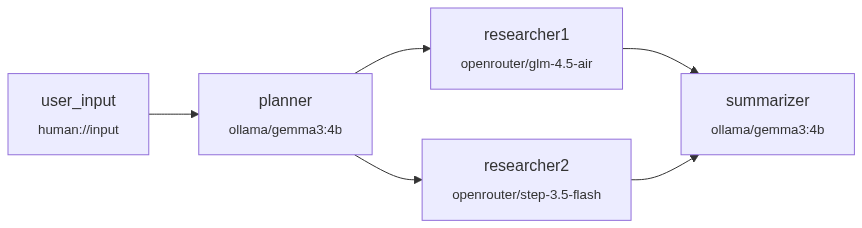
A multi-provider research pipeline: Ollama runs locally for planning and summarization, OpenRouter calls cloud models for parallel research — all in one YAML file.
Requirements to run this demo
- Ollama installed and running locally
- Model pulled:
ollama pull gemma3:4b - Free OpenRouter API key (set
OPENROUTER_API_KEYin.env) - Binex installed:
pip install binex
# examples/multi-provider-demo.yaml
name: multi-provider-research

nodes:
  user_input:
    agent: "human://input"

  planner:
    agent: "llm://ollama/gemma3:4b"
    system_prompt: "Create a structured research plan with 3 subtopics..."
    inputs: { topic: "${user_input.result}" }
    depends_on: [user_input]

  researcher1:
    agent: "llm://openrouter/z-ai/glm-4.5-air:free"
    inputs: { plan: "${planner.result}" }
    depends_on: [planner]

  researcher2:
    agent: "llm://openrouter/stepfun/step-3.5-flash:free"
    inputs: { plan: "${planner.result}" }
    depends_on: [planner]

  summarizer:
    agent: "llm://ollama/gemma3:4b"
    inputs: { research1: "${researcher1.result}", research2: "${researcher2.result}" }
    depends_on: [researcher1, researcher2]

Trace & Debug
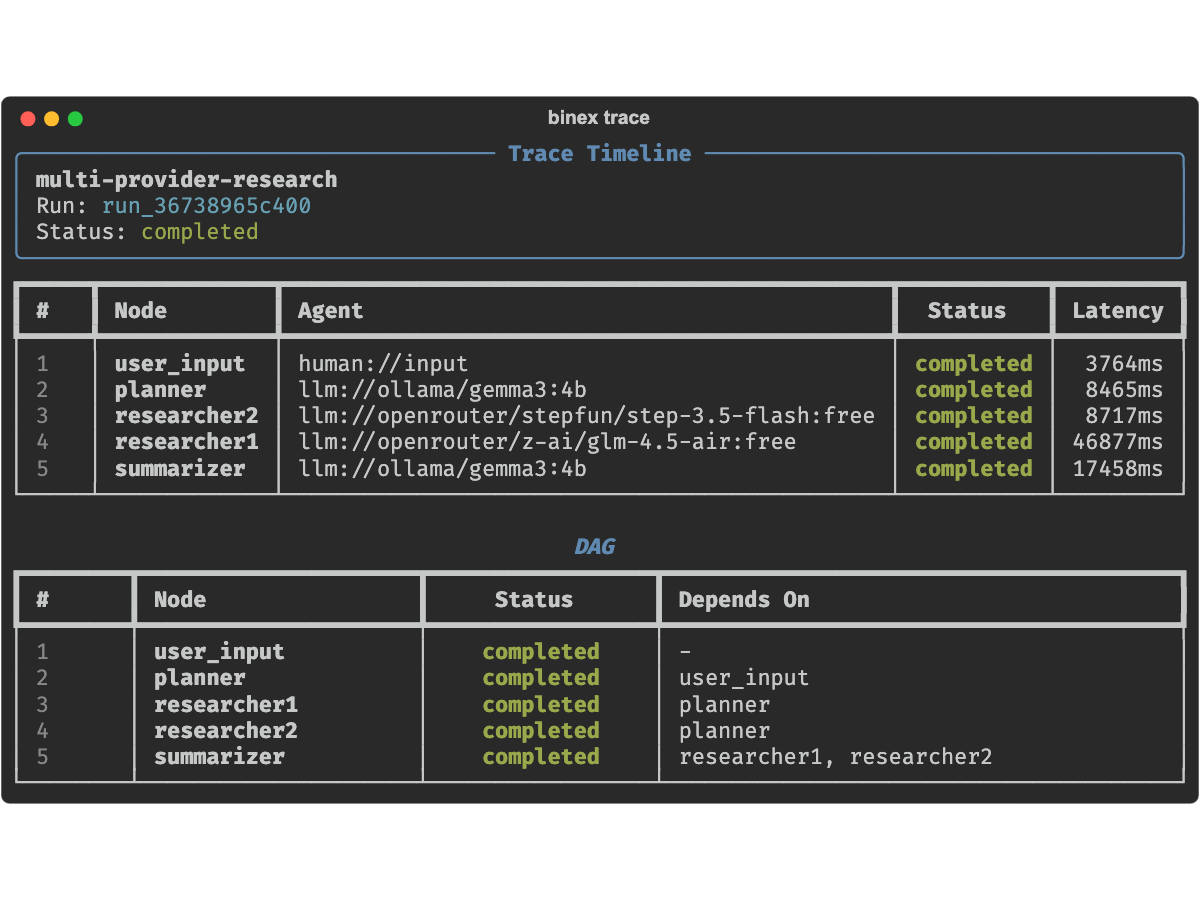
Every run is fully recorded. Inspect the execution timeline and DAG:
binex trace <run-id>
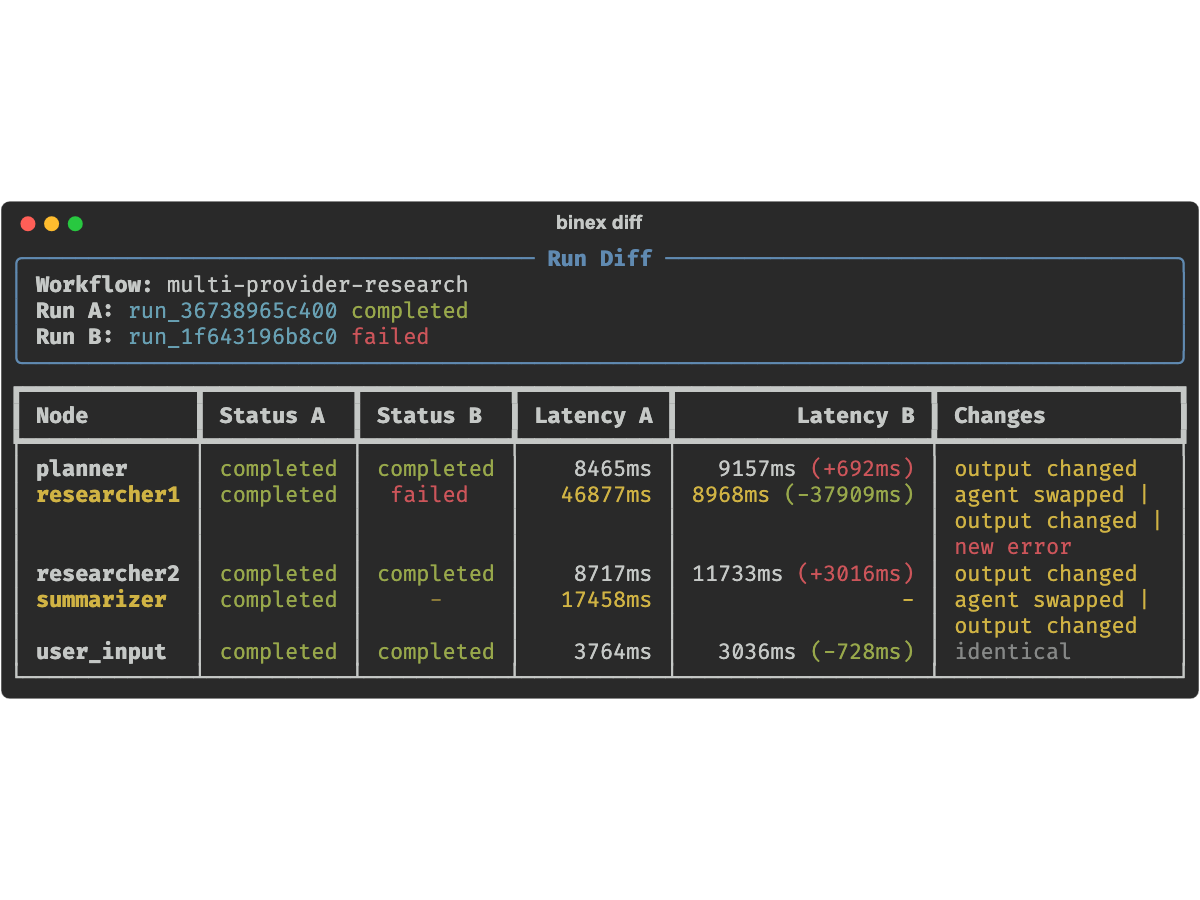
Compare two runs side-by-side:
binex diff <run-a> <run-b>
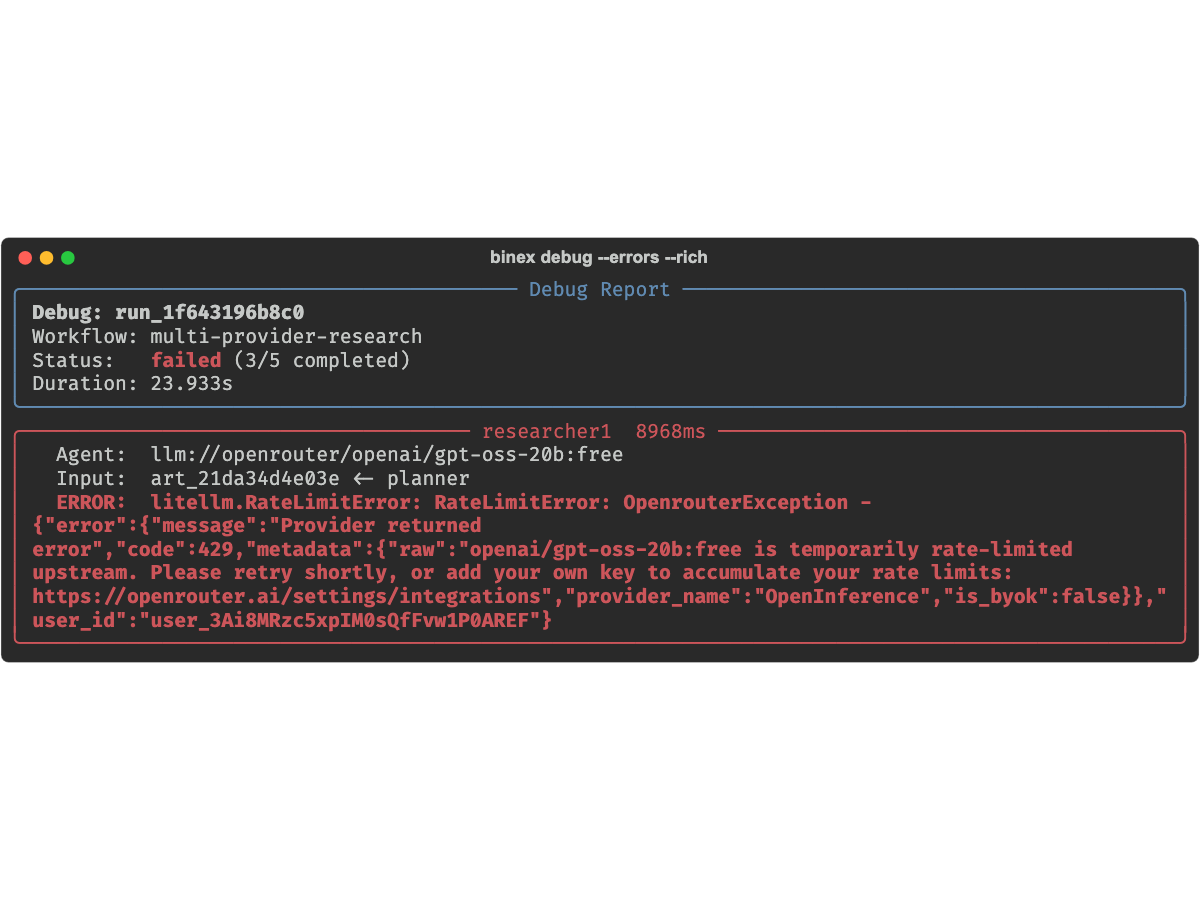
Post-mortem debug:
binex debug <run-id> --errors --rich
How It Works
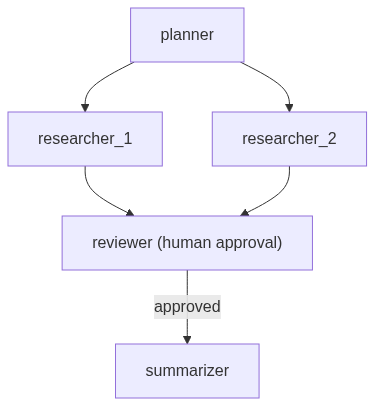
Define a workflow in YAML. Binex builds a DAG, schedules nodes respecting dependencies, dispatches each to the right agent adapter, and records everything.
name: research-pipeline
description: "Fan-out research with human approval"

nodes:
  planner:
    agent: "llm://openai/gpt-4"
    system_prompt: "Break this topic into 3 research questions"
    inputs:
      topic: "${user.topic}"
    outputs: [questions]

  researcher_1:
    agent: "llm://anthropic/claude-sonnet-4-20250514"
    inputs: { question: "${planner.questions}" }
    outputs: [findings]
    depends_on: [planner]

  researcher_2:
    agent: "a2a://localhost:8001"
    inputs: { question: "${planner.questions}" }
    outputs: [findings]
    depends_on: [planner]

  reviewer:
    agent: "human://approve"
    inputs:
      draft: "${researcher_1.findings}"
    outputs: [decision]
    depends_on: [researcher_1, researcher_2]

  summarizer:
    agent: "llm://openai/gpt-4"
    inputs:
      research: "${researcher_1.findings}"
    outputs: [summary]
    depends_on: [reviewer]
    when: "${reviewer.decision} == approved"
Architecture
Features
Agent Adapters
| Prefix | Adapter | Description |
|---|---|---|
local:// |
LocalPythonAdapter | In-process Python callable |
llm:// |
LLMAdapter | LLM completion via LiteLLM (40+ providers) |
a2a:// |
A2AAgentAdapter | Remote agent via A2A protocol |
human://input |
HumanInputAdapter | Terminal prompt for free-text input |
human://approve |
HumanApprovalAdapter | Approval gate with conditional branching |
CLI Commands
| Command | Description |
|---|---|
binex run <workflow.yaml> |
Execute a workflow |
binex debug <run-id|latest> |
Post-mortem inspection (--json, --errors, --node, --rich) |
binex trace <run-id> |
Execution timeline, node details, or DAG graph |
binex replay <run-id> |
Re-run with optional agent swaps |
binex diff <run1> <run2> |
Compare two runs side-by-side |
binex artifacts list <run-id> |
List artifacts with lineage tracking |
binex validate <workflow.yaml> |
Validate YAML before execution |
binex scaffold workflow "A -> B" |
Generate workflow from DSL shorthand |
binex init |
Interactive project setup |
binex dev up |
Start Docker dev stack |
binex doctor |
Check system health |
binex cost show <run-id> |
Cost breakdown per node (--json) |
binex cost history <run-id> |
Chronological cost events (--json) |
binex explore |
Interactive browser for runs and artifacts |
binex hello |
Zero-config demo |
LLM Providers
Out-of-the-box support for 9 providers via LiteLLM:
OpenAI · Anthropic · Google Gemini · Ollama · OpenRouter · Groq · Mistral · DeepSeek · Together AI
Examples
Example workflows are available in the examples/ directory:
| Example | What it demonstrates |
|---|---|
simple.yaml |
Minimal two-node pipeline |
diamond.yaml |
Diamond dependency pattern |
fan-out-fan-in.yaml |
Parallel execution with aggregation |
human-in-the-loop.yaml |
Approval gates and conditional branching |
multi-provider-demo.yaml |
Multiple LLM providers in one workflow |
a2a-multi-agent.yaml |
Remote agents via A2A protocol |
conditional-routing.yaml |
Branch based on node output |
map-reduce.yaml |
MapReduce-style aggregation |
Documentation
Full documentation is available at alexli18.github.io/binex:
- Quickstart — install and run your first workflow
- Concepts — agents, workflows, artifacts, execution model
- CLI Reference — every command with options and examples
- Architecture — runtime internals and design decisions
- Workflow Format — complete YAML schema reference
Project Structure
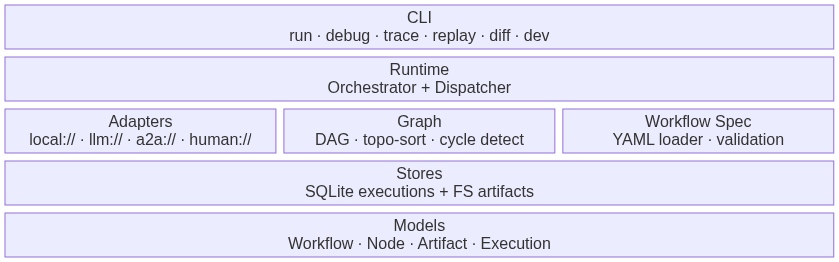
src/binex/
├── adapters/        # Agent execution backends (local, LLM, A2A, human)
├── agents/          # Built-in agent implementations
├── cli/             # Click CLI commands
├── graph/           # DAG construction + topological scheduling
├── models/          # Pydantic v2 domain models
├── registry/        # FastAPI agent registry service
├── runtime/         # Orchestrator, dispatcher, lifecycle
├── stores/          # SQLite execution + filesystem artifact persistence
├── trace/           # Debug reports, lineage, timeline, diffing
├── workflow_spec/   # YAML loader + validator + variable resolution
└── tools.py         # Tool calling support (@tool decorator)
Roadmap
See ROADMAP.md for upcoming features.
Contributing
Contributions are welcome! See CONTRIBUTING.md for development setup and guidelines.
License
Distributed under the MIT License. See LICENSE for more information.
Release history Release notifications | RSS feed


Download files
Download the file for your platform. If you're not sure which to choose, learn more about installing packages.
Source Distribution
Built Distribution
Filter files by name, interpreter, ABI, and platform.
If you're not sure about the file name format, learn more about wheel file names.
Copy a direct link to the current filters
File details
Details for the file binex-0.2.0a1.tar.gz.
File metadata
- Download URL: binex-0.2.0a1.tar.gz
- Upload date:
- Size: 5.5 MB
- Tags: Source
- Uploaded using Trusted Publishing? No
- Uploaded via: twine/6.2.0 CPython/3.13.2
File hashes
| Algorithm | Hash digest | |
|---|---|---|
| SHA256 |
6a9794353a94b0d4c1eb20f720cd07d479f4d5b4b6c4a8596fdb3a25fedc31f9
|
|
| MD5 |
0fe95f04b691b4fddac6c58c48d60594
|
|
| BLAKE2b-256 |
e964d18f279421fa73b19034d8d28a2860ef2f907382d71bb77c5c8346008c4d
|
File details
Details for the file binex-0.2.0a1-py3-none-any.whl.
File metadata
- Download URL: binex-0.2.0a1-py3-none-any.whl
- Upload date:
- Size: 210.5 kB
- Tags: Python 3
- Uploaded using Trusted Publishing? No
- Uploaded via: twine/6.2.0 CPython/3.13.2
File hashes
| Algorithm | Hash digest | |
|---|---|---|
| SHA256 |
53c4b63d7a08b2bf0107860b1f0b0ec22fb776518c3c7ba9a5dd59d6a7bb0a42
|
|
| MD5 |
8129c1f18cc2fd1f331a79f8c8100442
|
|
| BLAKE2b-256 |
ee0e43b310530fdaf6d84b855262b09589208f33c998f612725cd30117e8e1f5
|






