









⚡ OSINT Intelligence Framework ⚡
🩸 Blood is the Key 🩸
A comprehensive OSINT toolkit for cybersecurity professionals, penetration testers, bug bounty hunters, and digital forensics investigators.
🎉 What's New in v2.0.0
- 🎨 One professional palette — a restrained steel-blue/cyan design system that adapts to every module's output
- 🖥️ Auto color control — colors disable automatically for pipes,
NO_COLOR, andTERM=dumb; force withBLOODRECON_FORCE_COLOR=1, disable with--no-color - 🏗️ Registry-driven architecture — menu, CLI flags and dispatch come from one
table (
modules/registry.py) - 🚀 34 working modules — real CT-log subdomain enumeration, Wayback CDX history, Shodan-compatible favicon hashing, TLS 1.0–1.3 probing, concurrent scanning, RDAP WHOIS fallback, and zero simulated results
- 🐍
python -m bloodreconentry point
v1.2.0 release notes
🎉 What's New in v1.2.0
🚀 Enhanced Shodan Integration
We've completely revamped the Shodan integration with powerful new features that make API key management effortless!
✨ Key Improvements:
🔧 Command Line API Management
# Set your Shodan API key instantly - no more interactive prompts!
python3 bloodrecon.py --shodan-api "your_api_key_here"
📁 Streamlined Configuration
- New Location:
~/.config-vritrasecz/bloodrecon-shodan.json - Auto Directory Creation: Tool creates config directories automatically
- JSON-Only Storage: Simplified, reliable configuration management
🔒 Smart API Key Handling
- Automatic Replacement: New API keys seamlessly replace existing ones
- Input Validation: Enhanced validation prevents empty or invalid keys
- Better Error Messages: Clear, actionable feedback for users
⚡ Improved User Experience
- One-Command Setup: Get Shodan running with a single command
- Non-Interactive Mode: Perfect for automation and scripting
- Cleaner Output: More intuitive and professional interface
🛠️ Quick Setup Example:
# 1. Set your API key (one time setup)
python3 bloodrecon.py --shodan-api "your_shodan_api_key"

# 2. Start using Shodan immediately
python3 bloodrecon.py --shodan 8.8.8.8
python3 bloodrecon.py --shodan google.com
💡 Pro Tip: Your API key is saved securely and will be used automatically for all future Shodan queries!
📋 What Changed:
- Moved from
~/.osint_shodan_configto organized~/.config-vritrasecz/directory - Removed dual config.py file management for simplified workflow
- Enhanced error handling and user feedback
- Added
--shodan-apicommand line argument
🔗 Get Started: View complete changelog • API Configuration Guide
📖 Table of Contents
- 🎯 Overview
- ✨ Key Features
- 🛠️ Installation
- 🚀 Usage
- 🔧 Modules
- 🔑 API Key Configuration
- 📸 Screenshots
- 📁 Folder Structure
- ⚖️ Legal Disclaimer
- 👨💻 Author
- 🤝 Contributing
- 📄 License
🎯 Overview
BloodRecon is a state-of-the-art OSINT (Open Source Intelligence) framework that provides cybersecurity professionals with 34+ specialized modules for comprehensive reconnaissance and intelligence gathering. Built with Python 3.x, it offers both interactive menu-driven and command-line interfaces for maximum flexibility.
✨ Key Features
🔍 34 Specialized OSINT Modules
🌐 Network & Infrastructure Analysis (IP, DNS, WHOIS, SSL, Ports)
🔒 Web Application Security Testing (Headers, Robots, Directories)
👥 Social Media & Personal Intelligence (GitHub, Social Platforms)
📄 Document & Metadata Analysis (EXIF, Document Properties)
🔎 Advanced Search Capabilities (Google Dorking, Wayback Machine)
📞 Communication Intelligence (Email, Phone Number Analysis)
🛡️ Threat Intelligence Integration (Shodan)
💾 Data Breach & Leak Detection
🎨 Interactive CLI Interface with Target Input Examples
🌈 Colored Terminal Output for Enhanced Readability
🛠️ Installation
From PyPI (recommended)
pip install bloodrecon

# Run — all three entry points work
bloodrecon --interactive
python -m bloodrecon --interactive
bloodrecon --dns google.com
From source (Linux)
# Clone the repository
git clone https://github.com/MrHacker-X/BloodRecon.git

# Navigate to the project directory
cd BloodRecon

# Install as a package (editable, with dev tools)
pip install -e .

# ...or classic script style
pip install -r requirements.txt
chmod +x bloodrecon.py

# Run the tool
bloodrecon --interactive          # console script
python -m bloodrecon --interactive # module style
python bloodrecon.py --interactive # legacy launcher
Termux Installation
# Update packages and install dependencies
pkg update && pkg upgrade
pkg install git python

# Clone the repository
git clone https://github.com/MrHacker-X/BloodRecon.git

# Navigate to the project directory
cd BloodRecon

pip install .
bloodrecon --interactive
Dependencies
BloodRecon requires the following Python packages:
colorama==0.4.6
dnspython==2.7.0
mmh3==5.1.0
phonenumbers==9.0.10
Pillow==11.3.0
requests==2.32.4
urllib3==2.5.0
whois==1.20240129.2
Note: the
shodanclient library is no longer needed — BloodRecon talks to the Shodan REST API directly viarequests.
🚀 Usage
Interactive Mode
Launch BloodRecon in interactive mode for a user-friendly menu experience:
python bloodrecon.py --interactive
Command Line Usage
BloodRecon supports extensive command-line options for automation and scripting:
Basic Usage Examples
# IP Address Analysis
python bloodrecon.py --ip 8.8.8.8

# Domain WHOIS Lookup
python bloodrecon.py --whois example.com

# DNS Records Analysis
python bloodrecon.py --dns google.com

# HTTP Headers Analysis
python bloodrecon.py --headers https://example.com

# Social Media Username Check
python bloodrecon.py --social username123

# Email Validation
python bloodrecon.py --email test@example.com

# Phone Number Intelligence
python bloodrecon.py --phone +1234567890

# Shodan Intelligence Lookup
python bloodrecon.py --shodan 8.8.8.8
Advanced Usage Examples
# Google Dorking
python bloodrecon.py --dork "site:example.com filetype:pdf"

# Subdomain Discovery
python bloodrecon.py --subdomains example.com

# SSL Certificate Analysis
python bloodrecon.py --ssl example.com:443

# Directory Bruteforcing
python bloodrecon.py --dir-brute https://example.com

# JavaScript Endpoint Scanner
python bloodrecon.py --js-endpoints https://example.com

# IP Range Scanner
python bloodrecon.py --ip-scan 192.168.1.0/24

# Wayback Machine Search
python bloodrecon.py --wayback example.com

# GitHub Intelligence
python bloodrecon.py --github octocat
Tool Information
# Display detailed tool information
python bloodrecon.py --about

# Show developer contact information
python bloodrecon.py --connect

# Show version
python bloodrecon.py --version

# Display help
python bloodrecon.py --help
🔧 Modules
BloodRecon features 34+ specialized OSINT modules organized into categories:
Network & Infrastructure
| Module | Description | Usage Example |
|---|---|---|
| 🌐 IP Lookup | Comprehensive IP address intelligence including geolocation, ISP, ASN | --ip 8.8.8.8 |
| 🔍 WHOIS Lookup | Domain registration information and ownership details | --whois example.com |
| 📋 DNS Lookup | DNS records analysis (A, AAAA, MX, TXT, NS) | --dns google.com |
| 🔄 Reverse DNS | Reverse DNS lookup for IP addresses | --reverse 8.8.8.8 |
| 🔌 Port Scanner | Network port scanning and service detection | --ports 192.168.1.1 |
| 🔐 SSL Scanner | SSL/TLS certificate analysis and security assessment | --ssl example.com:443 |
| 🌍 IP Range Scanner | Scan IP ranges for active hosts | --ip-scan 192.168.1.0/24 |
| 🏢 ASN Resolver | Resolve ASN numbers to IP ranges | --asn AS15169 |
| 🌐 ISP Tracker | Track IP addresses to ISP information | --isp 8.8.8.8 |
Web Application Security
| Module | Description | Usage Example |
|---|---|---|
| 📄 HTTP Headers | HTTP security headers analysis | --headers https://example.com |
| 🤖 Robots Scanner | Robots.txt file analysis and discovery | --robots https://example.com |
| 📁 Directory Bruteforce | Web directory and file discovery | --dir-brute https://example.com |
| 🗺️ Sitemap Parser | XML sitemap parsing and analysis | --sitemap https://example.com |
| ⚡ JS Endpoint Scanner | JavaScript file analysis for API endpoints | --js-endpoints https://example.com |
| 🎨 Favicon Hash | Generate favicon hashes for fingerprinting | --favicon https://example.com |
| 🔧 Tech Fingerprint | Web technology stack identification | --tech https://example.com |
| 🔍 URL Analyzer | URL threat analysis and reputation check | --url https://suspicious-site.com |
| 🌐 User-Agent Detector | User-Agent string analysis and detection | --useragent "Mozilla/5.0..." |
Social Media & Personal Intel
| Module | Description | Usage Example |
|---|---|---|
| 👥 Social Checker | Username availability across social platforms | --social johndoe |
| 🐙 GitHub Intel | GitHub user and repository intelligence | --github octocat |
| 📱 Phone Intel | Phone number intelligence and carrier info | --phone +1234567890 |
| 📧 Email Validator | Email address validation and domain analysis | --email test@example.com |
| 🗑️ Temp Email Checker | Temporary/disposable email detection | --temp-email test@tempmail.com |
Document & Metadata Analysis
| Module | Description | Usage Example |
|---|---|---|
| 📷 EXIF Extractor | Image metadata and EXIF data extraction | --exif image.jpg |
| 📄 Doc Metadata | Document metadata extraction (PDF, DOCX, etc.) | --metadata document.pdf |
Search & Discovery
| Module | Description | Usage Example |
|---|---|---|
| 🔍 Google Dorking | Advanced Google search queries | --dork "site:example.com filetype:pdf" |
| 🌐 Subdomain Finder | Subdomain discovery and enumeration | --subdomains example.com |
| ⏰ Wayback Machine | Historical website data from Internet Archive | --wayback example.com |
| 🕷️ Common Crawl | Search Common Crawl web archive data | --common-crawl example.com |
| 📋 Pastebin Search | Search Pastebin for data dumps and leaks | --pastebin searchterm |
| 💾 Leak Search | Data breach and leak detection | --leak email@example.com |
| 📂 Google Drive Leaks | Search for leaked Google Drive files | --gdrive folderID |
| 🗺️ Maps Parser | Parse and analyze Google Maps links | --maps "https://maps.google.com/..." |
Threat Intelligence
| Module | Description | Usage Example |
|---|---|---|
| 🛡️ Shodan Lookup | Shodan API integration for host intelligence | --shodan 8.8.8.8 |
🔑 API Key Configuration
Some modules require API keys for enhanced functionality. BloodRecon now offers multiple convenient ways to configure your API keys:
Shodan API Key
🚀 Recommended Method: Command Line Setup (v1.2.0+)
- Get your free API key at Shodan.io
- Set it instantly with one command:
# Set your Shodan API key (replaces any existing key)
python3 bloodrecon.py --shodan-api "your_shodan_api_key_here"
- Start using Shodan immediately:
# Your API key is now saved and ready to use!
python3 bloodrecon.py --shodan 8.8.8.8
python3 bloodrecon.py --shodan google.com
📁 Configuration Details
- Storage Location:
~/.config-vritrasecz/bloodrecon-shodan.json - Auto Directory Creation: Config directories are created automatically
- Key Replacement: New keys seamlessly replace existing ones
- Persistent Storage: API key is saved for all future sessions
🔄 Alternative Methods
Environment Variable:
export SHODAN_API_KEY="your_api_key_here"
python3 bloodrecon.py --shodan 8.8.8.8
Legacy config.py (still supported):
# modules/config.py
SHODAN_API_KEY = 'your_shodan_api_key_here'
Interactive Mode:
- The tool will prompt for the key if not configured
- Entered keys are automatically saved for future use
API Key Security
🔒 Security Best Practices:
- ✅ Use the
--shodan-apicommand for secure local storage - ✅ Use environment variables for server deployments
- ❌ Never commit API keys to version control
- ❌ Avoid hardcoding keys in scripts
💡 Pro Tip: The new JSON config system in v1.2.0 provides the most reliable and user-friendly API key management!
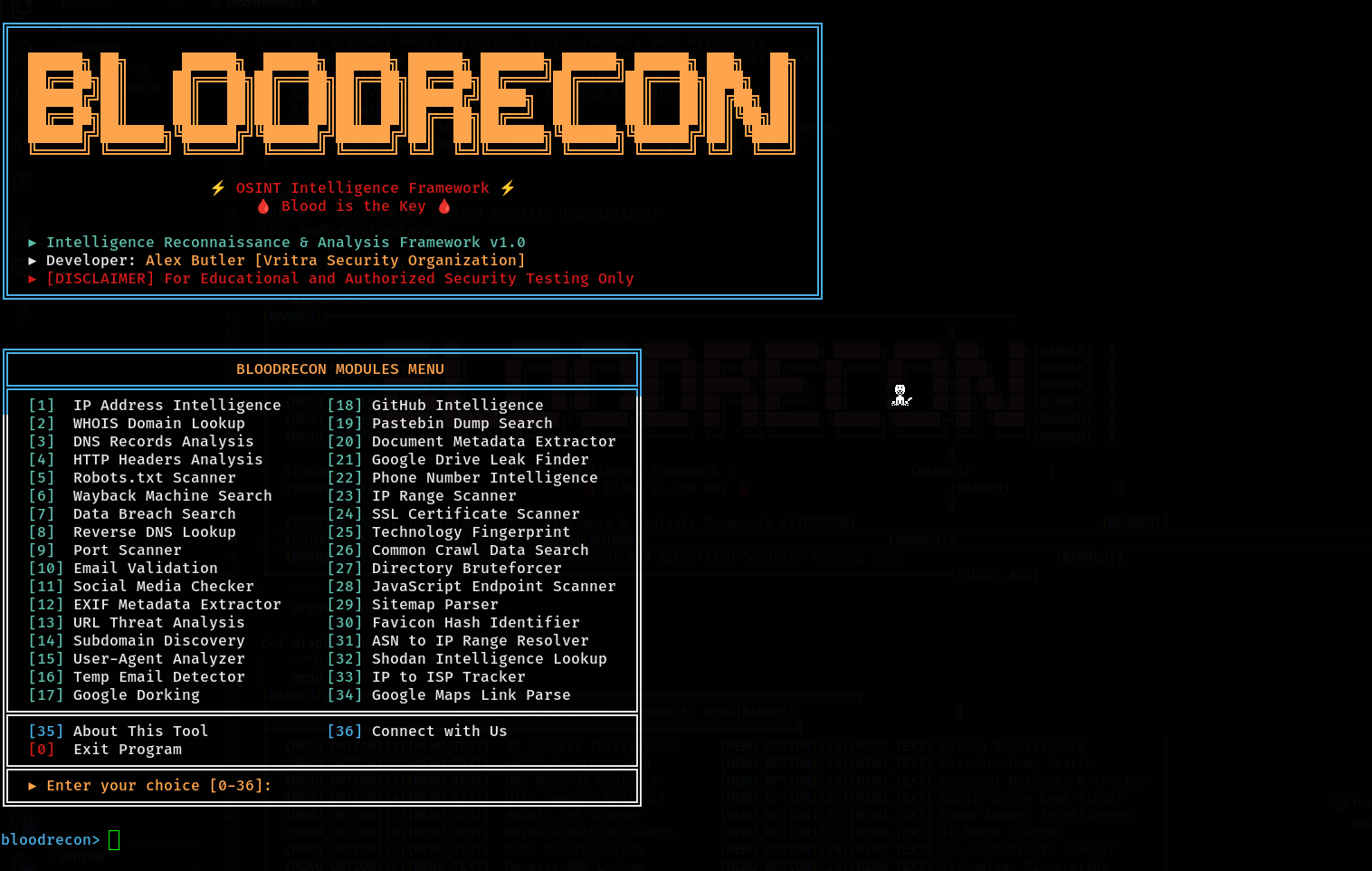
📸 Screenshots
Interactive Menu
📁 Folder Structure
BloodRecon/
│
├── 📄 bloodrecon.py             # Main application file
├── 📄 requirements.txt          # Python dependencies
├── 📄 LICENSE                   # License File
├── 📄 README.md                 # This file
├── 📄 CHANGELOG.md              # Version history and changes
│
└── 📁 modules/                  # OSINT modules directory
    ├── 📁 list-imp/             # Important list
    │   ├── 📄 common.txt        # Password list for Dir Bruteforce
    │   └── 📄 temp-domains.txt  # Temp mail domain list
    │
    ├── 📄 __init__.py           # Module initialization
    ├── 📄 colors.py             # Color management and styling
    ├── 📄 config.py             # Configuration file (API keys)
    │
    ├── 🌐 Network & Infrastructure
    ├── 📄 ip_lookup.py          # IP address intelligence
    ├── 📄 whois_lookup.py       # WHOIS domain lookup
    ├── 📄 dns_lookup.py         # DNS records analysis
    ├── 📄 reverse_dns.py        # Reverse DNS lookup
    ├── 📄 port_scanner.py       # Port scanning functionality
    ├── 📄 ssl_scanner.py        # SSL certificate analysis
    ├── 📄 ip_range_scanner.py   # IP range scanning
    ├── 📄 asn_resolver.py       # ASN to IP range resolution
    ├── 📄 isp_tracker.py        # ISP tracking
    │
    ├── 🔒 Web Application Security
    ├── 📄 http_headers.py       # HTTP headers analysis
    ├── 📄 robots_scanner.py     # Robots.txt scanner
    ├── 📄 directory_bruteforce.py # Directory bruteforcing
    ├── 📄 sitemap_parser.py     # Sitemap analysis
    ├── 📄 js_endpoint_scanner.py # JavaScript endpoint discovery
    ├── 📄 favicon_hash.py       # Favicon hash generation
    ├── 📄 tech_fingerprint.py   # Technology fingerprinting
    ├── 📄 url_analyzer.py       # URL threat analysis
    ├── 📄 useragent_detector.py # User-Agent analysis
    │
    ├── 👥 Social & Personal Intel
    ├── 📄 social_checker.py     # Social media username check
    ├── 📄 github_intel.py       # GitHub intelligence
    ├── 📄 phone_intel.py        # Phone number analysis
    ├── 📄 email_validator.py    # Email validation
    ├── 📄 temp_email_checker.py # Temporary email detection
    │
    ├── 📄 Document & Metadata Analysis
    ├── 📄 exif_extractor.py     # EXIF metadata extraction
    ├── 📄 doc_metadata.py       # Document metadata analysis
    │
    ├── 🔍 Search & Discovery
    ├── 📄 google_dorking.py     # Google dorking
    ├── 📄 subdomain_finder.py   # Subdomain discovery
    ├── 📄 wayback_machine.py    # Wayback Machine search
    ├── 📄 common_crawl.py       # Common Crawl search
    ├── 📄 pastebin_search.py    # Pastebin searching
    ├── 📄 leak_search.py        # Data breach search
    ├── 📄 google_drive_leaks.py # Google Drive leak search
    ├── 📄 maps_parser.py        # Google Maps link parser
    └── 📄 shodan_lookup.py   # Shodan API integration
⚖️ Legal Disclaimer
⚠️ IMPORTANT: This tool is designed exclusively for educational purposes and authorized security testing.
✅ Authorized Uses
- Educational purposes and learning OSINT techniques
- Authorized penetration testing and security assessments
- Bug bounty programs with proper scope authorization
- Digital forensics investigations by authorized personnel
- Security research within legal boundaries
❌ Prohibited Uses
- Unauthorized surveillance or stalking
- Illegal data collection or privacy violations
- Malicious reconnaissance or attack preparation
- Any activity violating local, state, or federal laws
Users are solely responsible for ensuring compliance with applicable laws and regulations in their jurisdiction.
🧪 Testing
python -m bloodrecon --version          # entry point check
python bloodrecon.py --help             # full CLI tree
python bloodrecon.py --temp-email test@10minutemail.com   # offline module
python bloodrecon.py --dns google.com   # live network module
All modules accept arbitrary input without crashing (fail-soft design), colors are automatically stripped when output is piped, and all 34 CLI flags are verified to dispatch to their modules.
👨💻 Author

Alex Butler
Vritra Security Organization
🌐 Connect With Us









🤝 Contributing
Contributions are welcome! Here's how you can help:
- 🍴 Fork the repository
- 🌿 Create a feature branch (
git checkout -b feature/AmazingFeature) - 💾 Commit your changes (
git commit -m 'Add some AmazingFeature') - 📤 Push to the branch (
git push origin feature/AmazingFeature) - 🔄 Open a Pull Request
💡 Ways to Contribute
- 🐛 Report bugs and issues
- 💡 Suggest new features or modules
- 📖 Improve documentation
- 🔧 Add new OSINT modules
- 🧪 Write tests
- 🌍 Translate to other languages
📄 License
🏷️ MIT License — Permissions, Limitations & Requirements
✅ Permissions




❌ Limitations


⚠️ Requirements

⭐ If you found BloodRecon useful, please consider giving it a star!
Made with ❤️ by Alex Butler1 maintainer

Metadata
1 maintainer
Release files for bloodrecon 2.0.1
For a detailed explanation of source distributions (sdists) and built distributions (wheels), please see the package formats documentation.
Source distribution (sdist)
| File | Size | Uploaded | |
|---|---|---|---|
| bloodrecon-2.0.1.tar.gz | 149.1 kB | Details |
Built distribution (wheel)
| File | Interpreter | ABI | Platform | Reset |
|---|---|---|---|---|
| bloodrecon-2.0.1-py3-none-any.whl | Python 3 | none | any | Details |
Total release size: 304.5 kB
Release files / bloodrecon-2.0.1.tar.gz
| Download URL | bloodrecon-2.0.1.tar.gz |
|---|---|
| Size | 149.1 kB |
| Tags | Source |
|
SHA-256 checksum How to use checksums |
8ab1f399d5ed983ababa94db769d63331e1df165c6b14568b58af9b1b560619b
|
|
BLAKE2b-256 checksum How to use checksums |
727a3f13191aba826ce3dc2c36a73a3b78173dec97e1173efc1aeb67fc521e64
|
| Upload date | |
|
Uploaded using Trusted Publishing? What is trusted publishing? |
No |
| Uploaded via |
twine/6.1.0 CPython/3.13.14
|
Release files / bloodrecon-2.0.1-py3-none-any.whl
| Download URL | bloodrecon-2.0.1-py3-none-any.whl |
|---|---|
| Size | 155.5 kB |
| Tags | Python 3 |
|
SHA-256 checksum How to use checksums |
3166887edb73bf7e6e4e3e1db7de8a3d23ac4b78d0f3f744777fc506aac1ed5c
|
|
BLAKE2b-256 checksum How to use checksums |
dc8bb59c9ab653bc6072c21fcefbc0f40ad424ee3de9f70212bf65662fc31b3a
|
| Upload date | |
|
Uploaded using Trusted Publishing? What is trusted publishing? |
No |
| Uploaded via |
twine/6.1.0 CPython/3.13.14
|














