









⚡ OSINT Intelligence Framework ⚡
🩸 Blood is the Key 🩸
A comprehensive OSINT toolkit for cybersecurity professionals, penetration testers, bug bounty hunters, and digital forensics investigators.
🎉 What's New in v2.1.3
- 📦 Package hardening — secrets (
config.py, Shodan JSON) stay out of git and PyPI wheels - ⌨️ Interactive pause — About / Connect / Theme wait for Enter before redrawing the menu
- 🔑 Shodan keys outside the tree —
~/.config-vritrasecz/only (legacy in-treeconfig.pyread-only) - 📚 Docs sync — README, layout, and install paths match the
bloodrecon/package
v2.0.1 / v2.0.0 / v1.2.0 release notes
v2.0.1 — single professional palette, menu alignment fixes, --list, interactive aliases. See CHANGELOG.md.
v2.0.0 — themeable redesign, package entry points, registry architecture, and module hardening.
v1.2.0 — Shodan --shodan-api CLI setup and ~/.config-vritrasecz/bloodrecon-shodan.json storage.
📖 Table of Contents
- 🎯 Overview
- ✨ Key Features
- 🛠️ Installation
- 🚀 Usage
- 🔧 Modules
- 🔑 API Key Configuration
- 📸 Screenshots
- 📁 Folder Structure
- 🧪 Testing
- ⚖️ Legal Disclaimer
- 👨💻 Author
- 🤝 Contributing
- 📄 License
🎯 Overview
BloodRecon is an OSINT (Open Source Intelligence) framework with 34 specialized modules for reconnaissance and intelligence gathering. It ships as a Python package with an interactive menu and a full CLI.
✨ Key Features
🔍 34 specialized OSINT modules
🌐 Network & infrastructure — IP, DNS, WHOIS, SSL, ports, ASN, ISP
🔒 Web application recon — headers, robots, directories, JS endpoints, tech stack
👥 People & social intel — GitHub, username checks, phone analysis
📄 Document & metadata — EXIF, document properties
🔎 Search & discovery — Google dorking, Wayback, Common Crawl, leaks
📞 Communication intel — email validation, temp-mail detection
🛡️ Threat intelligence — Shodan host lookup
🎨 Interactive CLI — examples, colored output, --list / --about / --connect
🛠️ Installation
From PyPI (recommended)
pip install bloodrecon

bloodrecon --interactive
python -m bloodrecon --interactive
bloodrecon --dns google.com
From source (Linux / Windows)
git clone https://github.com/MrHacker-X/BloodRecon.git
cd BloodRecon

# editable install (dev)
pip install -e ".[dev]"

# or runtime only
pip install -r requirements.txt
pip install .

bloodrecon --interactive          # console script
python -m bloodrecon --interactive
python bloodrecon.py --interactive  # legacy launcher
Termux
pkg update && pkg upgrade
pkg install git python
git clone https://github.com/MrHacker-X/BloodRecon.git
cd BloodRecon
pip install .
bloodrecon --interactive
Dependencies
colorama==0.4.6
dnspython==2.7.0
mmh3==5.1.0
phonenumbers==9.0.10
Pillow==11.3.0
requests==2.32.4
urllib3==2.5.0
whois==1.20240129.2
The
shodanclient library is not required — BloodRecon talks to the Shodan REST API viarequests.
🚀 Usage
Interactive Mode
bloodrecon                 # default: interactive menu
bloodrecon --interactive   # same
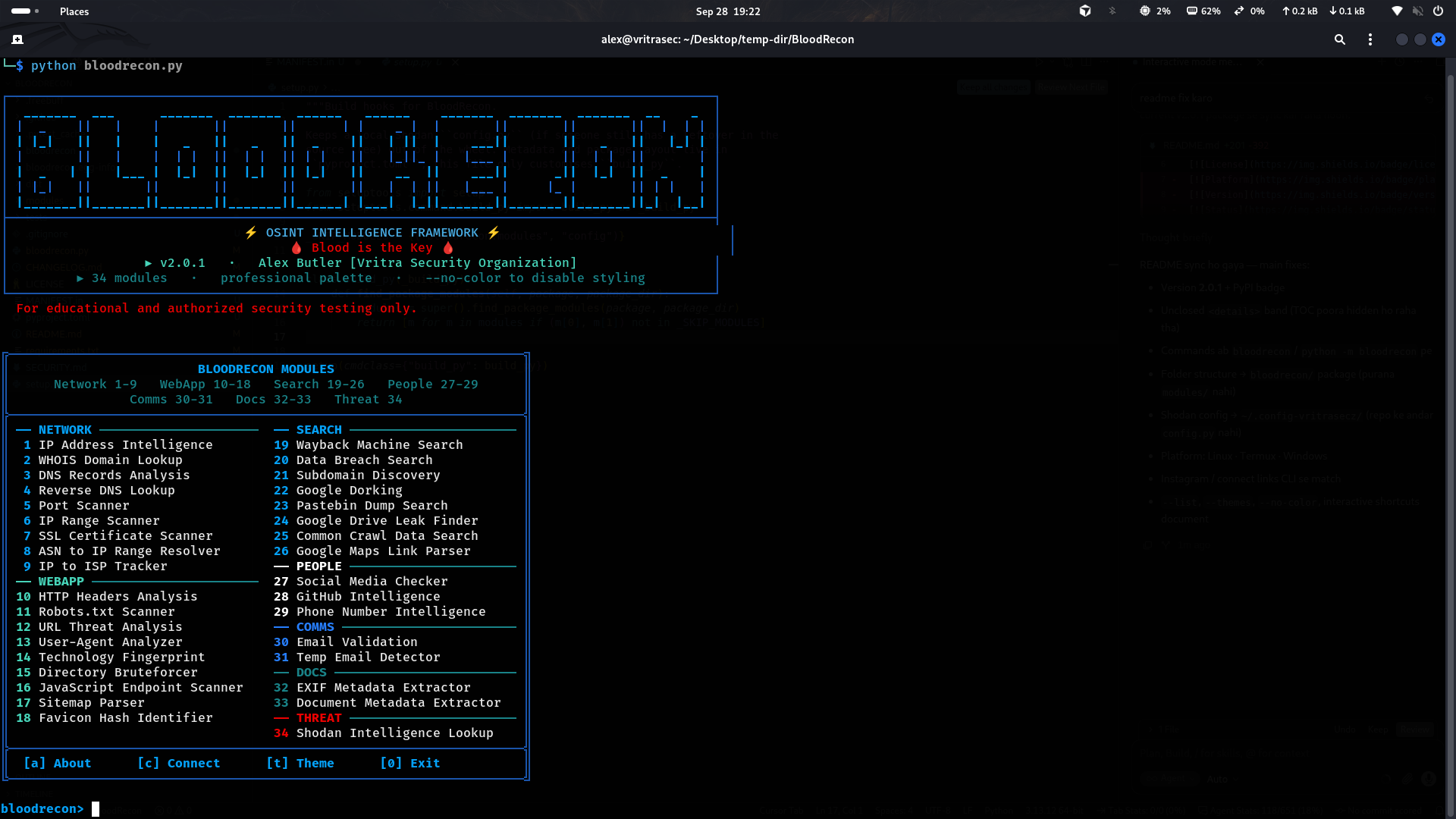
Menu shortcuts: module number · [a] About · [c] Connect · [t] Palette · ? / help list · 0 / q quit.
Command Line
# Core examples
bloodrecon --ip 8.8.8.8
bloodrecon --whois example.com
bloodrecon --dns google.com
bloodrecon --headers https://example.com
bloodrecon --social username123
bloodrecon --email test@example.com
bloodrecon --phone +1234567890
bloodrecon --shodan 8.8.8.8

# Advanced
bloodrecon --dork "site:example.com filetype:pdf"
bloodrecon --subdomains example.com
bloodrecon --ssl example.com:443
bloodrecon --dir-brute https://example.com
bloodrecon --js-endpoints https://example.com
bloodrecon --ip-scan 192.168.1.0/24
bloodrecon --wayback example.com
bloodrecon --github octocat

# Meta
bloodrecon --list          # all modules / flags / examples
bloodrecon --about
bloodrecon --connect
bloodrecon --themes        # active palette
bloodrecon --no-color
bloodrecon --version
bloodrecon --help
python bloodrecon.py … and python -m bloodrecon … accept the same flags.
🔧 Modules
34 modules from bloodrecon/modules/registry.py:
Network & Infrastructure
| Module | Description | Example |
|---|---|---|
| IP Lookup | Geolocation, ISP, ASN | --ip 8.8.8.8 |
| WHOIS Lookup | Domain registration / ownership | --whois example.com |
| DNS Lookup | A, AAAA, MX, TXT, NS | --dns google.com |
| Reverse DNS | PTR lookup | --reverse 8.8.8.8 |
| Port Scanner | Open ports / services | --ports scanme.nmap.org |
| SSL Scanner | Certificate & TLS assessment | --ssl example.com:443 |
| IP Range Scanner | Active hosts in a range | --ip-scan 192.168.1.0/24 |
| ASN Resolver | ASN → IP ranges | --asn AS15169 |
| ISP Tracker | IP → ISP | --isp 8.8.8.8 |
Web Application Security
| Module | Description | Example |
|---|---|---|
| HTTP Headers | Security headers | --headers https://example.com |
| Robots Scanner | robots.txt |
--robots https://example.com |
| Directory Bruteforce | Path discovery | --dir-brute https://example.com |
| Sitemap Parser | XML sitemaps | --sitemap https://example.com |
| JS Endpoint Scanner | API endpoints in JS | --js-endpoints https://example.com |
| Favicon Hash | mmh3 favicon fingerprint | --favicon https://example.com |
| Tech Fingerprint | Stack identification | --tech https://example.com |
| URL Analyzer | URL structure / risk signals | --url https://example.com |
| User-Agent Detector | UA string analysis | --useragent "Mozilla/5.0..." |
People & Social / Communication
| Module | Description | Example |
|---|---|---|
| Social Checker | Username across platforms | --social johndoe |
| GitHub Intel | User / repo intel | --github octocat |
| Phone Intel | Carrier / region | --phone +14155552671 |
| Email Validator | Format + domain checks | --email user@example.com |
| Temp Email Checker | Disposable mail detection | --temp-email test@10minutemail.com |
Document & Metadata
| Module | Description | Example |
|---|---|---|
| EXIF Extractor | Image metadata | --exif /path/to/photo.jpg |
| Doc Metadata | PDF / Office metadata | --metadata /path/to/document.pdf |
Search & Discovery
| Module | Description | Example |
|---|---|---|
| Google Dorking | Advanced search queries | --dork "site:example.com filetype:pdf" |
| Subdomain Finder | Subdomain enumeration | --subdomains example.com |
| Wayback Machine | Archive.org history | --wayback example.com |
| Common Crawl | CC index search | --common-crawl example.com |
| Pastebin Search | Paste dumps | --pastebin password |
| Leak Search | Breach / leak signals | --leak user@example.com |
| Google Drive Leaks | Public Drive finds | --gdrive folderID |
| Maps Parser | Google Maps link parse | --maps "https://maps.google.com/..." |
Threat Intelligence
| Module | Description | Example |
|---|---|---|
| Shodan Lookup | Host intel via Shodan API | --shodan 8.8.8.8 |
🔑 API Key Configuration
Shodan (recommended)
# one-time setup
bloodrecon --shodan-api "your_shodan_api_key_here"

# then use
bloodrecon --shodan 8.8.8.8
- Storage:
~/.config-vritrasecz/bloodrecon-shodan.json - Directory is created automatically; new keys replace old ones
- Get a key at account.shodan.io
Alternatives
# environment variable
export SHODAN_API_KEY="your_api_key_here"
bloodrecon --shodan 8.8.8.8
Optional file (outside the package tree):
# ~/.config-vritrasecz/config.py
SHODAN_API_KEY = 'your_shodan_api_key_here'
If no key is configured, interactive mode prompts and saves it.
📸 Screenshots
Interactive Menu
📁 Folder Structure
BloodRecon/
├── bloodrecon.py                 # Legacy launcher
├── pyproject.toml                # Package / PyPI metadata
├── setup.py                      # Wheel build hook (excludes local secrets)
├── MANIFEST.in
├── requirements.txt
├── LICENSE
├── README.md
├── CHANGELOG.md
├── SECURITY.md
├── .github/                      # CI + issue templates
├── tests/                        # Offline pytest suite
└── bloodrecon/                   # Installable package
    ├── __init__.py
    ├── __main__.py               # python -m bloodrecon
    ├── cli.py                    # Banner, menu, argparse, dispatch
    └── modules/
        ├── registry.py           # Single source of truth for modules
        ├── colors.py
        ├── list-imp/
        │   ├── common.txt        # Dir-bruteforce wordlist
        │   └── temp_domains.txt  # Disposable-mail domains
        └── *.py                  # 34 OSINT modules
🧪 Testing
pip install -e ".[dev]"
pytest -q

bloodrecon --version
bloodrecon --help
bloodrecon --list
bloodrecon --temp-email test@10minutemail.com   # offline-friendly
bloodrecon --dns google.com                     # live network
⚖️ Legal Disclaimer
This tool is for educational use and authorized security testing only.
Authorized
- Learning OSINT techniques
- Authorized pentests and assessments
- In-scope bug bounty work
- Authorized digital forensics / security research
Prohibited
- Unauthorized surveillance or stalking
- Illegal data collection or privacy violations
- Malicious recon or attack preparation
- Anything that violates applicable law
You are responsible for lawful use in your jurisdiction.
👨💻 Author

Alex Butler
Vritra Security Organization
Connect









🤝 Contributing
- Fork the repository
- Create a branch (
git checkout -b feature/AmazingFeature) - Commit (
git commit -m 'Add some AmazingFeature') - Push (
git push origin feature/AmazingFeature) - Open a Pull Request
Ideas: bug reports, new modules (add one row in registry.py), docs, tests.
📄 License
MIT — Permissions, Limitations & Requirements
Permissions




Limitations


Requirements

See LICENSE.
⭐ If you found BloodRecon useful, please consider giving it a star!
Made with ❤️ by Alex Butler1 maintainer

Metadata
1 maintainer
Release files for bloodrecon 2.1.3
For a detailed explanation of source distributions (sdists) and built distributions (wheels), please see the package formats documentation.
Source distribution (sdist)
| File | Size | Uploaded | |
|---|---|---|---|
| bloodrecon-2.1.3.tar.gz | 147.3 kB | Details |
Built distribution (wheel)
| File | Interpreter | ABI | Platform | Reset |
|---|---|---|---|---|
| bloodrecon-2.1.3-py3-none-any.whl | Python 3 | none | any | Details |
Total release size: 303.9 kB
Release files / bloodrecon-2.1.3.tar.gz
| Download URL | bloodrecon-2.1.3.tar.gz |
|---|---|
| Size | 147.3 kB |
| Tags | Source |
|
SHA-256 checksum How to use checksums |
dc268f9e998e833f916f11288b5ec840f1479dcc6a3171d169394e951566fc8e
|
|
BLAKE2b-256 checksum How to use checksums |
00d50342b296b4c3bbbe571e8ba148e048a8b7bed487b1542ad3fa9601990c83
|
| Upload date | |
|
Uploaded using Trusted Publishing? What is trusted publishing? |
No |
| Uploaded via |
twine/6.1.0 CPython/3.13.14
|
Release files / bloodrecon-2.1.3-py3-none-any.whl
| Download URL | bloodrecon-2.1.3-py3-none-any.whl |
|---|---|
| Size | 156.6 kB |
| Tags | Python 3 |
|
SHA-256 checksum How to use checksums |
667a53e0e7a6ff4ca70e612594125761482d814e0055556c49fcf6a759460cc8
|
|
BLAKE2b-256 checksum How to use checksums |
daba071973ae8f02808b101a63f9ee629fdd252c50bee5f3dbc763751526b352
|
| Upload date | |
|
Uploaded using Trusted Publishing? What is trusted publishing? |
No |
| Uploaded via |
twine/6.1.0 CPython/3.13.14
|














