
Bloody Terminal
A simple piece of code to help structure your console outputs. BT makes use of colorama to provide a few options to create a consistent console output “theme”.
from bloodyterminal import btext

btext.success("your string")
btext.info("your string")
btext.warning("your string")
btext.error("your string")
btext.debug("your string")
btext.custom("your prefix", "your string")
Will result in something like this:
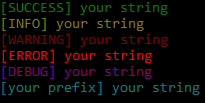
To test this you can also use btext.demo() to get these outputs.
NOTE: There seems to be a problem with the pycharm debugger not displaying the colors. You’d have to use the terminal.
NOTE: I did not create the coloring functionality! Credit for that goes to colorama
1 maintainer

Metadata
1 maintainer
Release files for bloodyterminal 4.0
For a detailed explanation of source distributions (sdists) and built distributions (wheels), please see the package formats documentation.
Source distribution (sdist)
| File | Size | Uploaded | |
|---|---|---|---|
| bloodyterminal-4.0.tar.gz | 1.9 kB | Details |
Release files / bloodyterminal-4.0.tar.gz
| Download URL | bloodyterminal-4.0.tar.gz |
|---|---|
| Size | 1.9 kB |
| Tags | Source |
|
SHA-256 checksum How to use checksums |
591fdd2b4639c25199b89913dabf5f46b032d33144f59a6bd41e1610b3d7bd87
|
|
BLAKE2b-256 checksum How to use checksums |
14d19cbc37ba8e6edbe1e9004f94a7301b4a70694d2b90e045be2cd836fd4362
|
| Upload date | |
|
Uploaded using Trusted Publishing? What is trusted publishing? |
No |
| Uploaded via |
twine/1.12.1 pkginfo/1.4.2 requests/2.21.0 setuptools/40.6.3 requests-toolbelt/0.8.0 tqdm/4.28.1 CPython/3.7.1
|














