
A little helper to structure your terminal output

Project description
A simple piece of code to help structure your console outputs. BT makes use of colorama to provide a few options to create a consistent console output “theme”.
As of v1.5 Bloody Terminal now also provides options for windows 10 toast notifications.
from bloodyterminal import btext

btext.success("your string")
bt.info("your string")
bt.warning("your string")
bt.debug("your string")
bt.custom("your prefix", "your string")
Will result in something like this:
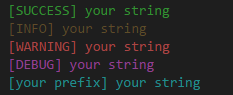
The [INFO] prefix has a more vibrant yellow color in most terminals.
To test this you can also use btext.demo() to get these outputs.
NOTE: I did not create the coloring functionality! Credit for that goes to colorama
Release history Release notifications | RSS feed


Download files
Download the file for your platform. If you're not sure which to choose, learn more about installing packages.
Source Distribution
bloodyterminal-2.1.tar.gz
(2.1 kB
view details)
File details
Details for the file bloodyterminal-2.1.tar.gz.
File metadata
- Download URL: bloodyterminal-2.1.tar.gz
- Upload date:
- Size: 2.1 kB
- Tags: Source
- Uploaded using Trusted Publishing? No
File hashes
| Algorithm | Hash digest | |
|---|---|---|
| SHA256 |
9d41ac9952fd527900207f7f444439e6bf9b03456e390e64a9d1ffb6b591b345
|
|
| MD5 |
ce200b143276a16f0984d3152dbd74c8
|
|
| BLAKE2b-256 |
6813d36c5cfc8495b65733911c3d8657734af6237eac88eb37288e9b82431535
|






