
A little helper to structure your terminal output

Project description
A simple piece of code to help structure your console outputs. BT makes use of colorama to provide a few options to create a consistent console output “theme”.
from bloodyterminal import btext

btext.success("your string")
btext.info("your string")
btext.warning("your string")
btext.error("your string")
btext.debug("your string")
btext.custom("your prefix", "your string")
Will result in something like this:
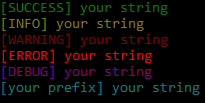
To test this you can also use btext.demo() to get these outputs.
NOTE: There seems to be a problem with the pycharm debugger not displaying the colors. You’d have to use the terminal. NOTE: I did not create the coloring functionality! Credit for that goes to colorama
Release history Release notifications | RSS feed


Download files
Download the file for your platform. If you're not sure which to choose, learn more about installing packages.
Source Distribution
bloodyterminal-3.2.tar.gz
(1.9 kB
view details)
File details
Details for the file bloodyterminal-3.2.tar.gz.
File metadata
- Download URL: bloodyterminal-3.2.tar.gz
- Upload date:
- Size: 1.9 kB
- Tags: Source
- Uploaded using Trusted Publishing? No
File hashes
| Algorithm | Hash digest | |
|---|---|---|
| SHA256 |
e648567989323203bfa7203e80275ec6fb084e51e9194230eef3b842d22acc9f
|
|
| MD5 |
810e4331ff518ed0996161bb31d0eb78
|
|
| BLAKE2b-256 |
c1dc0809e4f28f30d8e51c10dba79bd236c0b3a71e8a88ed3bd651c87ce9cf55
|






