

Brain Framework 🧠
🧠 Brain Framework: from information to informed actions.
A second brain for you, your team and your AI agents, on your own computer. Gather what matters from every tool you work with, connect it into one knowledge graph and open your agent there, so it acts with everything you know instead of starting from scratch.


Try it · How it works · Agents · Your tools · Good to know · Documentation
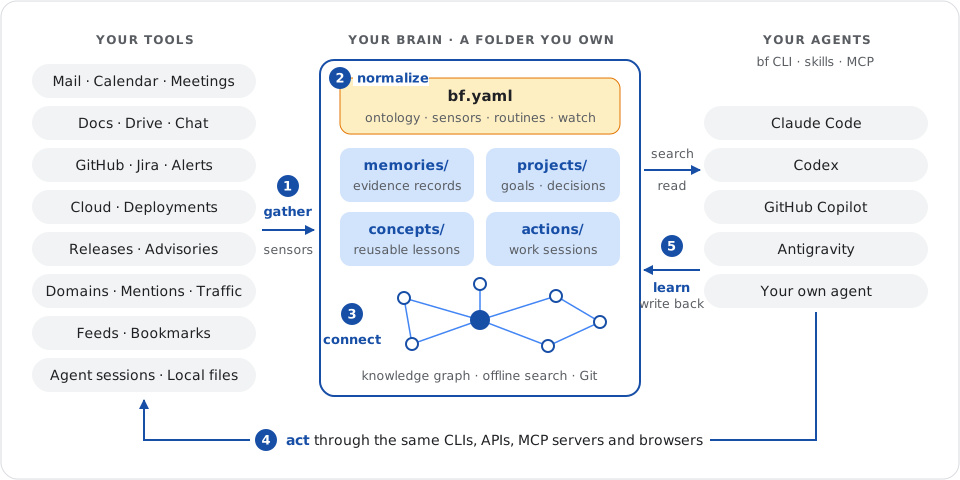
Stop starting from scratch
Open an agent anywhere on your computer and it knows nothing: not your projects, not last week's decisions, not what changed overnight. It asks you to paste context, queries the same APIs again and forgets its conclusion when the session ends.
Brain Framework (BF) changes the starting point. Create a brain, a plain folder, and let small programs called sensors fill it with evidence from your tools. Open your agent there: it searches your projects, decisions and collected records, cites where each fact comes from, acts through the tools you already use and writes the outcome back for the next session.
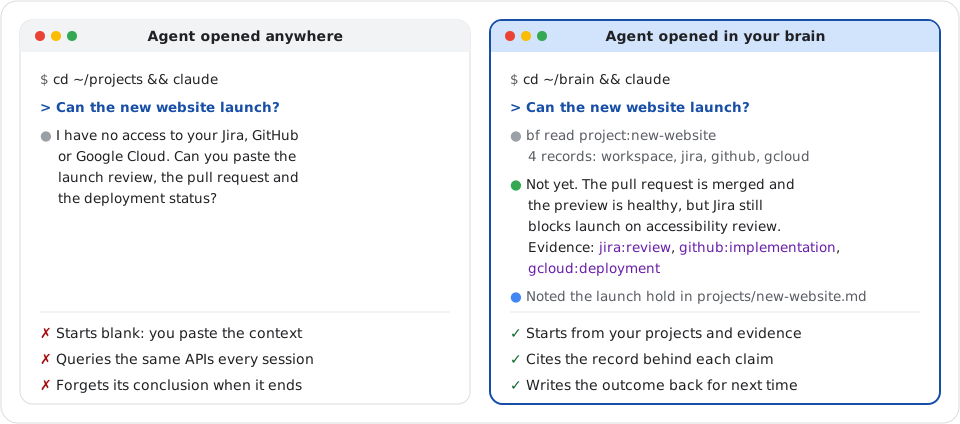
Once you write or adapt a sensor for each source, questions that took a tour of your tools become one prompt:
| Ask your agent | Gathered from |
|---|---|
| “Can the new website launch?” | The brief in Google Drive, the review in Jira, the pull request in GitHub and the deployment in Google Cloud. |
| “Prepare my two o'clock meeting.” | The Calendar event, the last meeting notes, the attendees' recent mail and chat threads. |
| “Where did we leave the migration?” | The last action's next step, the spec and the latest commits. |
| “What changed in my stack this week?” | Release notes, security advisories, Dependabot alerts and model deprecation pages. |
Try it
You need Linux or macOS and uv. No model or provider account is required.
uv tool install --python 3.14 brain-framework
bf init ~/brain
cd ~/brain
Save a decision as projects/new-website.md:
---
type: project
status: draft
updated: 2026-11-01
summary: Launch a product website that helps visitors understand the product.
---

# New website

## Decision

Start with a single product page because visitors need a clear explanation before signing up.

## Next actions

- [ ] Draft the product page.
Find its reason, then read the exact section:
bf search "visitors clear explanation"
bf read projects/new-website.md#decision
Search prints compact JSON on one line; selected fields:
{
  "items": [
    {
      "ref": "projects/new-website.md#decision",
      "title": "New website — Decision",
      "excerpt": "Start with a single product page because visitors need a clear explanation before signing up."
    }
  ]
}
Getting started continues with validation and a first collected source. The four-tool walkthrough runs the whole loop on fictional Workspace, Jira, GitHub and Gcloud records.
How it works
A brain is a detective's case file in plain files: evidence bags labeled with where and when each item was collected, case notes with the current theory and next step, and string from each conclusion to its evidence. Five steps run in a loop: gather → normalize → organize and connect → act → learn.
| Folder | Holds | Example |
|---|---|---|
memories/ |
One JSON file per collected item: what a source said, its URL and its time. | The Jira launch review, as collected on Tuesday. |
sensors/ |
Programs you review that print JSON records from a tool. | A script that lists the Jira issues of your projects. |
projects/ |
One Markdown note per project: goal, current state, decisions and tasks. | “Start with a single product page because visitors need…” |
concepts/ |
Knowledge you will reuse elsewhere, with its evidence and limits. | “Explain the product before asking for signup.” |
actions/ |
One work session: objective, inputs, outputs, outcome and next step. | actions/2026-09-27_website-review/ACTION.md, resumed the next day. |
routines/ |
Deterministic programs you review, run on demand or on a schedule. | A weekly review that lists projects to revisit. |
Notes are Markdown with YAML metadata, records are JSON, and bf validate checks both. The search cache in .bf/ is disposable and rebuilds itself from the files. Assistants, channels and retrieval checks have their own folders: see the directory reference.
bf.yaml declares what the brain knows how to name, collect and check:
# https://fmind.github.io/brain-framework/docs/configuration/
version: 8
name: brain
fields: # the ontology: shared fields and typed relations
  project: { type: identity, cardinality: one, relation: true, description: Project the source names. }
  kind: { type: string, cardinality: one, description: Common kind of item. }
  status: { type: string, cardinality: one, description: The item's state in its own tool. }
sensors: # what to collect, how often, mapped into the ontology
  jira:
    command: [sensors/jira.py]
    mode: snapshot
    refresh: 3600
    fields:
      project: { path: /attributes/workstream }
      kind: { value: issue }
      status: { path: /attributes/status }
routines: # deterministic reviews and checks
  weekly-review:
    command: [routines/weekly-review.py, "{{brain}}", "{{end}}"]
    refresh: 604800
    output: action
watch: # keep sources fresh and alert on failure
  interval: 300
  notifications: failure
BF runs each program without a shell, bounds its time and output, validates what it prints and keeps its stderr in logs/. A failed run preserves the evidence already saved. See sensors, routines and assistants and channels.
One vocabulary, set at collection
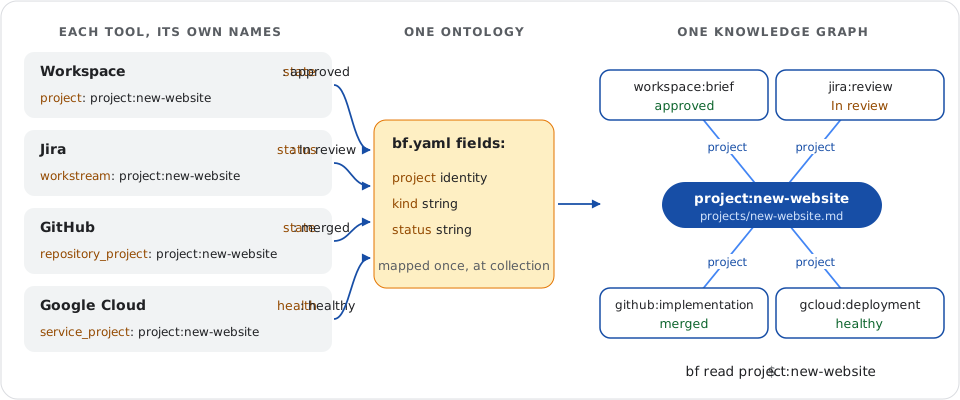
Each tool names things its own way. BF translates once, at the door: each sensor maps its provider's fields into the shared fields: of bf.yaml, and BF validates every value before saving the record. Because project is a relation, records from all four tools point to the same identity, project:new-website. People and repositories work the same way. Mappings are explicit: BF never decides that two similar names are the same subject. See shared fields and sensor mappings.
A knowledge graph across sources
Grep finds words, not connections. BF indexes every explicit connection (Markdown links, declared identities and relation fields) into a knowledge graph, so one read assembles a subject across sources:
bf read project:new-website
The reply holds the project note and its backlinks, grouped by relation: the Jira review In review, the GitHub pull request merged, the Gcloud deployment healthy and the Workspace brief approved. Each claim keeps the note section or record that asserted it, so an answer can always cite its evidence. See links and relations.
Act, then learn
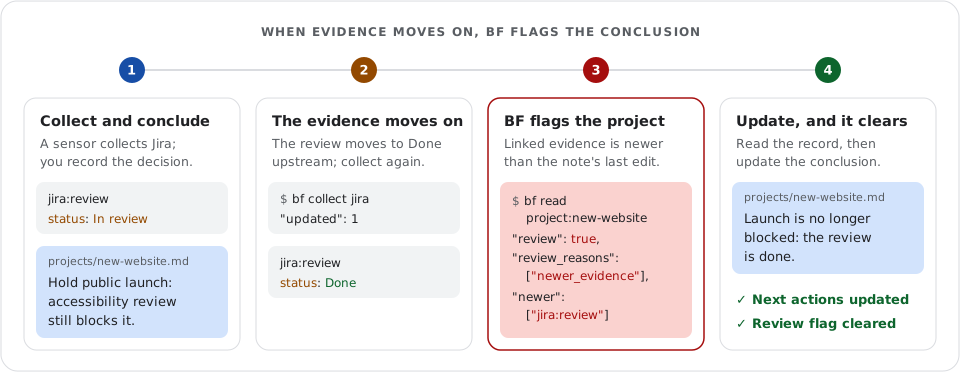
People and agents do the work through the CLIs, APIs and MCP servers they already use. An action keeps each session's objective, inputs, outputs and next step, so the next session resumes instead of starting over. When a linked record changes after a project's last edit, bf read flags the project for review and names the record to read first, so a decision does not silently outlive its evidence. Try it in the four-tool walkthrough.
Open your agent in your brain
Use the brain with Claude Code, Codex, GitHub Copilot or any agent that can run a command. Start it in ~/brain and ask:
Use the bf CLI. Find why we chose a single product page. Read the source, cite its ref and tell me the project's next action.
It should cite projects/new-website.md#decision and name “Draft the product page.” For ongoing use, install the packaged skills into your host's skills folder, such as ~/.claude/skills for Claude Code:
bf skills ~/.agents/skills
| Skill | Teaches your agent to… |
|---|---|
bf-use |
Find evidence, cite it, and keep projects and concepts current. |
bf-action |
Start, resume and hand off a tracked work session: /bf-action website-review. |
bf-setup |
Install BF, create a brain, connect the agent and choose sources worth adding. |
bf-maintain |
Run sensors, routines and assistants, check the brain and upgrade it safely. |
Working in a code repository instead? The session hook prints the project that declares the repository and its next task. Hosts that prefer tools can call search and read through MCP. See the agent guide.
Bring your tools
A sensor is a small program that prints JSON: wrap a CLI such as gh, gws or gcloud, call an API, drive a browser, query a database or parse an export. Start with a reviewed sensor, copy it into your brain's sensors/ and adapt it:
| Source | Starting point |
|---|---|
| Local files, highlights and Git | Document, highlight and Git history sensors. |
| Google Calendar, Gmail and Drive | Calendar, Gmail headers and Drive folder sensors using gws. |
| GitHub, Jira, Confluence and Google Cloud | The GitHub history sensor, or your own using acli, gcloud or their APIs. |
| Anything you can script | An API, a database query, a browser session or an export: any source you can script becomes a sensor. |
The author's own brain runs more than 80 sensors and holds about 50,000 records (counted on 2026-10-16): mail, calendar, documents, chat, commits and pull requests, past agent sessions, release notes and advisories, mentions and site traffic. These are personal sensors, not bundled connectors; the bf-setup skill helps your agent connect a new source.
After reviewing your sensors, run bf watch to keep them refreshed and see failures as they happen, in a terminal or as a systemd or launchd service:
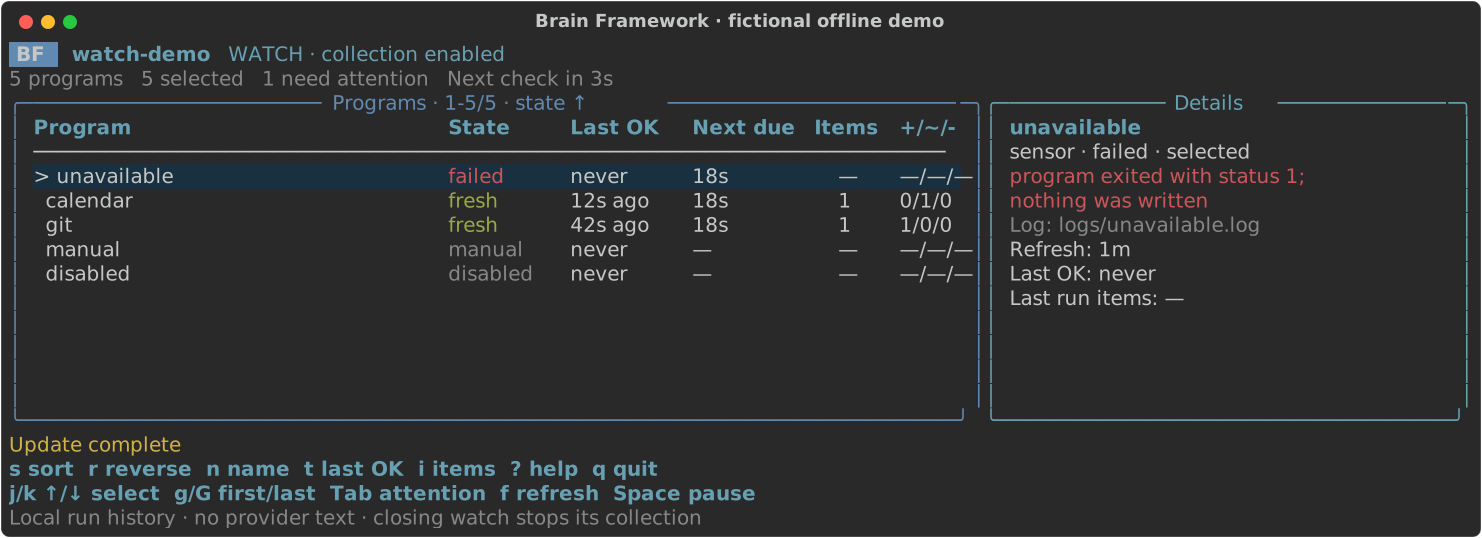
The dashboard shows the offline watch demo, which needs no provider account.
Good to know
- Your data stays on your computer. A brain is a folder on your disk. BF has no account, server or telemetry, and search and read work offline. Sensors collect while your machine is on.
- Your agent does the reasoning. BF never runs a model: it collects, validates, searches and connects, and its assistants launch your agent harness. What your agent reads reaches that harness's provider; see privacy and security for a fully local setup.
- Git gives history and sharing. Notes and programs are plain files: commit them for history, rollback and review. By default, collected records stay out of Git. A team brain is a private repository with one clone per teammate, and a personal brain can include it in its searches. See team setup.
- It takes some setup. Each source needs its access, such as
gh auth loginorgcloudauthentication, then a sensor you review. Sensors, routines and the ontology are files you can read, edit or ask your agent to adapt. - It finds what was said and linked, not what was meant. Search matches words and explicit identities, without embeddings, and incomplete results say so. Collect again when you need newer evidence. See what BF does not do.
Browse the commands · Report an issue · Contribute · MIT licensed · Third-party notices
1 maintainer

Metadata
1 maintainer
Release files for brain-framework 20.1.0
For a detailed explanation of source distributions (sdists) and built distributions (wheels), please see the package formats documentation.
Source distribution (sdist)
| File | Size | Uploaded | Provenance | Actions |
|---|---|---|---|---|
| brain_framework-20.1.0.tar.gz | 320.0 kB | With provenance | Details for brain_framework-20.1.0.tar.gz |
Built distribution (wheel)
| File | Interpreter | ABI | Platform | Actions Reset |
|---|---|---|---|---|
| brain_framework-20.1.0-py3-none-any.whl | Python 3 | none | any | Details for brain_framework-20.1.0-py3-none-any.whl |
Total release size: 666.3 kB
Release files / brain_framework-20.1.0.tar.gz
| Download URL | brain_framework-20.1.0.tar.gz |
|---|---|
| Size | 320.0 kB |
| Tags | Source |
|
SHA-256 checksum How to use checksums |
f34a37ad14d8f1bc8257ec2efbe934dbeb1f17ffde724276c24ed760b0b87aa2
|
|
BLAKE2b-256 checksum How to use checksums |
808b70b121366043c8470862dbc0a051c6a74f96507112146020d558ebd8c344
|
| Upload date | |
|
Uploaded using Trusted Publishing? What is trusted publishing? |
Yes |
| Uploaded via |
twine/7.0.0 CPython/3.13.16
|
Provenance
Provenance describes where a file came from. On PyPI, provenance is shared via attestations, which provide a verifiable record of the build or publishing details. View details, limitations and caveats.


PyPI Publish Attestation
PyPI verified that this artifact, at this checksum, originated from the publisher listed below.
Signed by GitHub Actions, verified by PyPI on Nov 1, 2026.
Transparency logRelease files / brain_framework-20.1.0-py3-none-any.whl
| Download URL | brain_framework-20.1.0-py3-none-any.whl |
|---|---|
| Size | 346.4 kB |
| Tags | Python 3 |
|
SHA-256 checksum How to use checksums |
77a8808c9b6c3d0397957d6d54faccbe97363bb8f6068167625c034fa21a234b
|
|
BLAKE2b-256 checksum How to use checksums |
c6857d1830d9ea50d3fb117997318903d96bc54905781a0fc7a0de08eec79fd7
|
| Upload date | |
|
Uploaded using Trusted Publishing? What is trusted publishing? |
Yes |
| Uploaded via |
twine/7.0.0 CPython/3.13.16
|
Provenance
Provenance describes where a file came from. On PyPI, provenance is shared via attestations, which provide a verifiable record of the build or publishing details. View details, limitations and caveats.
PyPI Publish Attestation
PyPI verified that this artifact, at this checksum, originated from the publisher listed below.
Signed by GitHub Actions, verified by PyPI on Nov 1, 2026.
Transparency logSecurity for brain-framework 20.1.0
Provenance
Provenance describes where a file came from. On PyPI, provenance is shared via attestations, which provide a verifiable record of the build or publishing details. View details, limitations and caveats.
Full provenance
Both files in this release have been uploaded with provenance metadata.
Attestation for brain_framework-20.1.0.tar.gz
PyPI Publish Attestation
PyPI verified that this artifact, at this checksum, originated from the publisher listed below.
Signed by GitHub Actions, verified by PyPI on Nov 1, 2026.
Transparency logA note on package security
PyPI is a repository for distributing packages, not a service for auditing them. While third-party security researchers and our staff do their best to detect and remove malicious packages, PyPI cannot guarantee the quality, security or suitability of any given package.
To learn more about protecting yourself from malicious actors, visit our package security documentation.














