
📊 B-vista
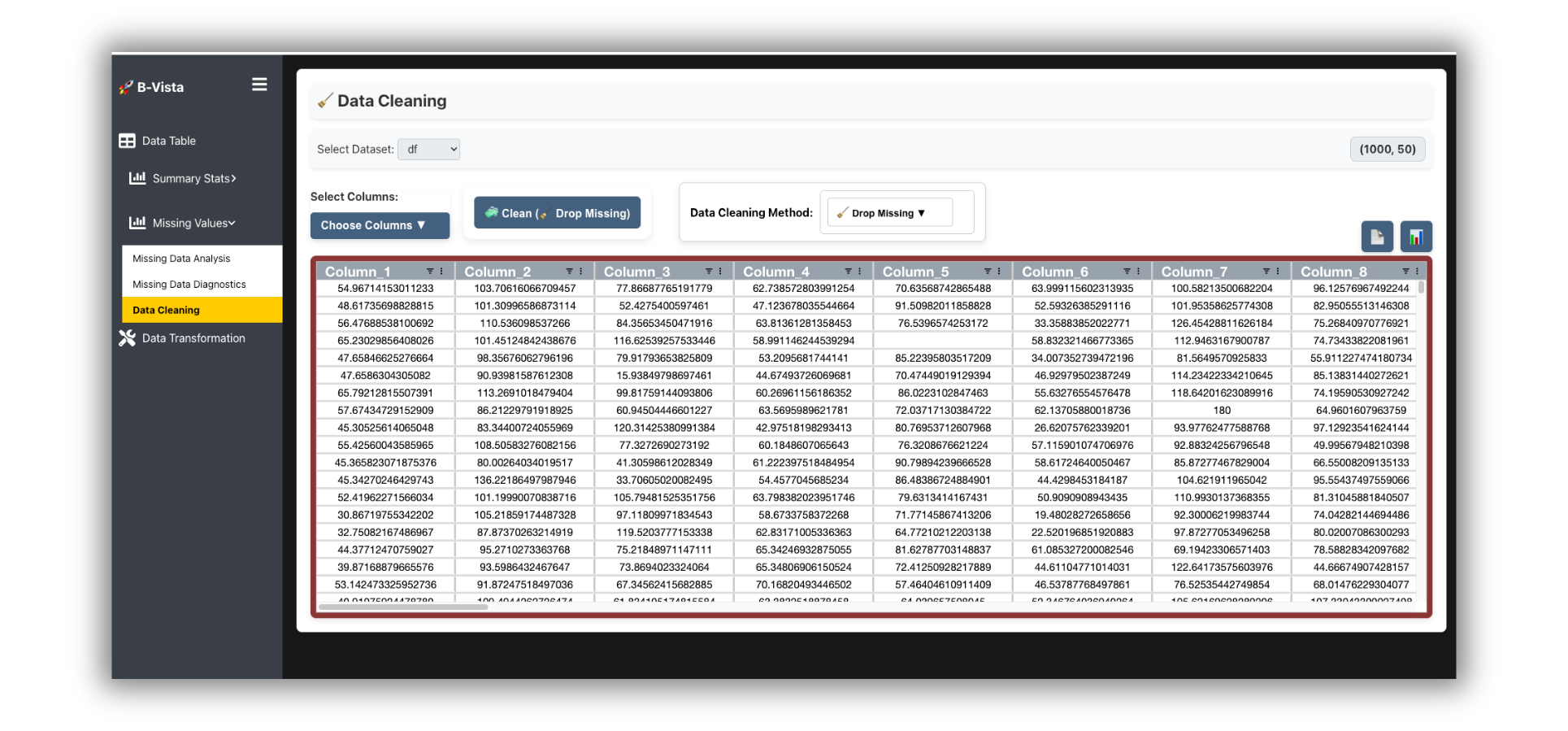
Visual, Scalable, and Real-Time Exploratory Data Analysis for pandas DataFrames.
B-Vista is a high-performance EDA (Exploratory Data Analysis) toolkit that connects your pandas DataFrame to a dynamic, modern browser UI powered by Flask and WebSockets. Ideal for Jupyter notebooks, Google Colab, Kaggle, or standalone use.
🔧 Getting Started
Installation
Install via PyPI:
pip install bvista
Or via Conda:
conda install -c conda-forge bvista
Launch in Notebook
import bvista
import pandas as pd

df = pd.read_csv("your_dataset.csv")
bvista.show(df)
By default, B-Vista will auto-launch a backend server and open the interface inline (Jupyter) or in the browser.
🌟 Core Concepts
Sessions
Each DataFrame uploaded creates a unique session. Sessions are isolated, reusable, and persistent while the backend is alive.
Backend Auto-Start
B-Vista auto-launches a Flask server the first time you call bvista.show(df). No extra configuration needed.
Notebook vs Browser
- In Jupyter/Colab, B-Vista embeds via iframe.
- In Python scripts or terminals, the default is to open in your system browser.
📊 Main Function: bvista.show()
bvista.show(
    df,                  # pandas DataFrame
    name=None,           # Optional session name
    session_id=None,     # Reconnect to previous session
    open_browser=True,   # Force open in web browser
    silent=False         # Suppress logs
)
Examples
bvista.show(df)

bvista.show(df, name="marketing_campaign")

bvista.show(session_id="abc123")  # Reconnect to saved session
🔄 Session Management
Upload New Dataset
Each call to show(df) creates a new session unless a session_id is provided.
Reconnect to Old Session
bvista.show(session_id="session_id_you_saved")
💡 Key Features
B-Vista gives you:
- Descriptive statistics (skew, kurtosis, normality)
- Correlation heatmaps (7+ methods)
- Distributions with auto binning + log scaling
- Missing value visualizations (matrix, heatmap, MCAR/MAR/NMAR diagnostics)
- Smart cleaning tools (mean/mode/knn/autoencoder...)
- Column transforms (rename, reorder, format)
- Duplicate detection and resolution
- Cell-level editing with real-time WebSocket sync
📒 API Reference
bvista.show()
Launches the UI interface. Must pass either:
- A pandas DataFrame (
df), or - A session ID (
session_id)
bvista.start_backend()
Programmatically start the backend server if needed.
from bvista.server_manager import start_backend
start_backend()
📎 Integration
Google Colab
!pip install bvista --quiet
import bvista, pandas as pd
df = pd.read_csv("...")
bvista.show(df)
Kaggle
Works out-of-the-box. Use same pattern as Colab.
🛠️ Troubleshooting
| Issue | Fix |
|---|---|
| Backend failed to start | Ensure port 5050 is free. Restart kernel. |
| Browser doesn't open | Set open_browser=True or open http://localhost:5050 manually. |
| Nothing displays in iframe (Colab) | Try bvista.show(..., open_browser=True) to open in full browser. |
| Port already in use | Kill other apps on port 5050 or change via env var BVISTA_PORT. |
🛋️ Deployment
Docker Usage
docker pull baciak/bvista:latest
docker run --platform linux/amd64 -p 8501:5050 baciak/bvista:latest
Then visit http://localhost:8501 in your browser.
🔹 Final Notes
✨ consider starring the repo or sharing with your team!
1 maintainer

Metadata
1 maintainer
Release files for bvista 1.1.1
For a detailed explanation of source distributions (sdists) and built distributions (wheels), please see the package formats documentation.
Source distribution (sdist)
| File | Size | Uploaded | |
|---|---|---|---|
| bvista-1.1.1.tar.gz | 11.2 MB | Details |
Built distribution (wheel)
| File | Interpreter | ABI | Platform | Reset |
|---|---|---|---|---|
| bvista-1.1.1-py3-none-any.whl | Python 3 | none | any | Details |
Total release size: 22.5 MB
Release files / bvista-1.1.1.tar.gz
| Download URL | bvista-1.1.1.tar.gz |
|---|---|
| Size | 11.2 MB |
| Tags | Source |
|
SHA-256 checksum How to use checksums |
7fffa12bab9f85205dfd34b18ace8804bbd3c1ee660f03887d99fe8f856a9385
|
|
BLAKE2b-256 checksum How to use checksums |
c64084c2dfb40bfe7d9baa1f500fb8d4e5aa5384c5b536c6f61064883a88d9e8
|
| Upload date | |
|
Uploaded using Trusted Publishing? What is trusted publishing? |
No |
| Uploaded via |
twine/6.1.0 CPython/3.12.9
|
Release files / bvista-1.1.1-py3-none-any.whl
| Download URL | bvista-1.1.1-py3-none-any.whl |
|---|---|
| Size | 11.3 MB |
| Tags | Python 3 |
|
SHA-256 checksum How to use checksums |
5802229c4efaeefe2f493357a056b8e0302b0774e48a32f1f18a727472869214
|
|
BLAKE2b-256 checksum How to use checksums |
27438e2db02110d40b06e6713b75e7ab10757fc4a908cc90435407bc54f47db6
|
| Upload date | |
|
Uploaded using Trusted Publishing? What is trusted publishing? |
No |
| Uploaded via |
twine/6.1.0 CPython/3.12.9
|














