
B-Vista: A powerful data visualization and exploration tool for pandas DataFrames.

Project description
📊 B-vista
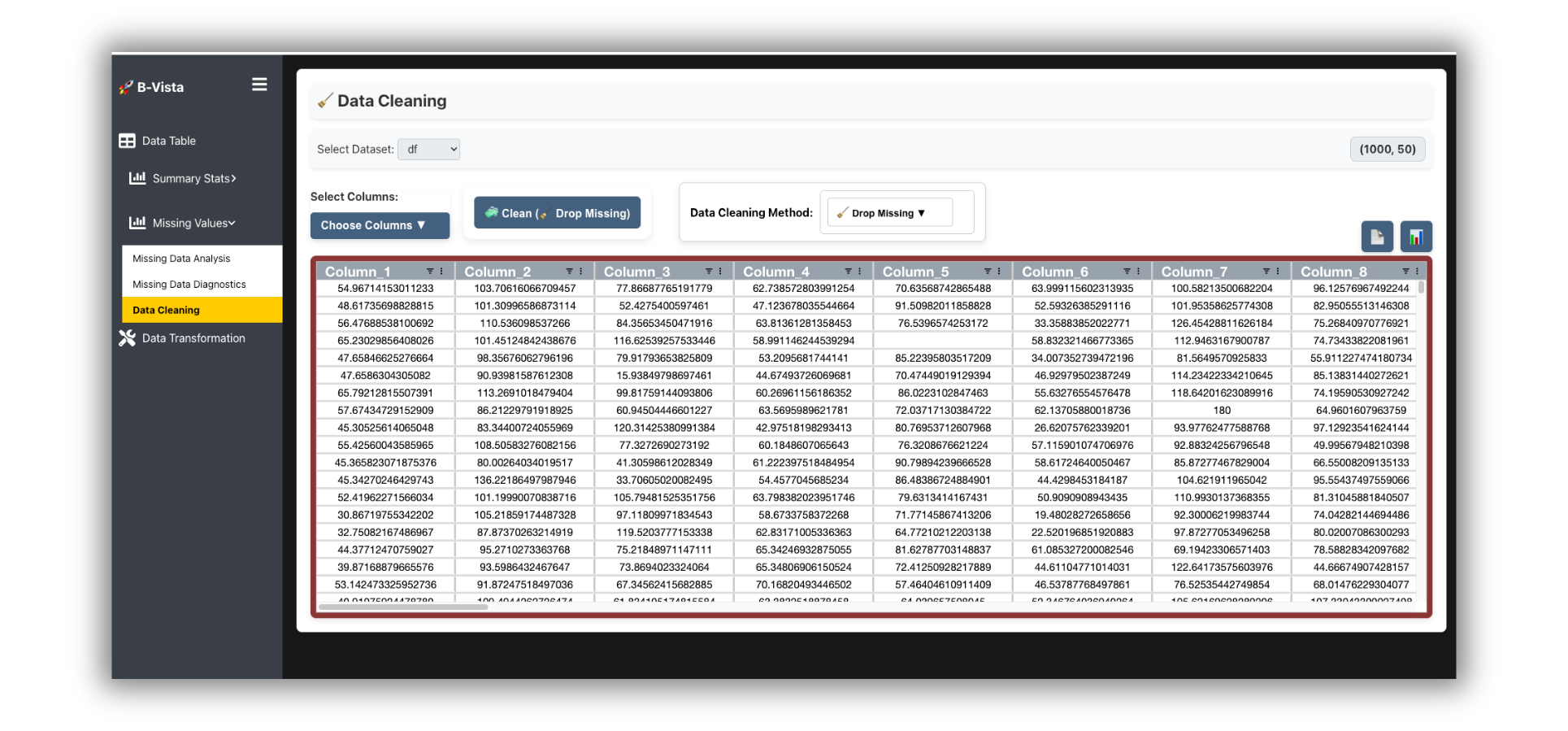
Visual, Scalable, and Real-Time Exploratory Data Analysis for pandas DataFrames.
B-Vista is a high-performance EDA (Exploratory Data Analysis) toolkit that connects your pandas DataFrame to a dynamic, modern browser UI powered by Flask and WebSockets. Ideal for Jupyter notebooks, Google Colab, Kaggle, or standalone use.
🔧 Getting Started
Installation
Install via PyPI:
pip install bvista
Or via Conda:
conda install -c conda-forge bvista
Launch in Notebook
import bvista
import pandas as pd

df = pd.read_csv("your_dataset.csv")
bvista.show(df)
By default, B-Vista will auto-launch a backend server and open the interface inline (Jupyter) or in the browser.
🌟 Core Concepts
Sessions
Each DataFrame uploaded creates a unique session. Sessions are isolated, reusable, and persistent while the backend is alive.
Backend Auto-Start
B-Vista auto-launches a Flask server the first time you call bvista.show(df). No extra configuration needed.
Notebook vs Browser
- In Jupyter/Colab, B-Vista embeds via iframe.
- In Python scripts or terminals, the default is to open in your system browser.
📊 Main Function: bvista.show()
bvista.show(
    df,                  # pandas DataFrame
    name=None,           # Optional session name
    session_id=None,     # Reconnect to previous session
    open_browser=True,   # Force open in web browser
    silent=False         # Suppress logs
)
Examples
bvista.show(df)

bvista.show(df, name="marketing_campaign")

bvista.show(session_id="abc123")  # Reconnect to saved session
🔄 Session Management
Upload New Dataset
Each call to show(df) creates a new session unless a session_id is provided.
Reconnect to Old Session
bvista.show(session_id="session_id_you_saved")
💡 Key Features
B-Vista gives you:
- Descriptive statistics (skew, kurtosis, normality)
- Correlation heatmaps (7+ methods)
- Distributions with auto binning + log scaling
- Missing value visualizations (matrix, heatmap, MCAR/MAR/NMAR diagnostics)
- Smart cleaning tools (mean/mode/knn/autoencoder...)
- Column transforms (rename, reorder, format)
- Duplicate detection and resolution
- Cell-level editing with real-time WebSocket sync
📒 API Reference
bvista.show()
Launches the UI interface. Must pass either:
- A pandas DataFrame (
df), or - A session ID (
session_id)
bvista.start_backend()
Programmatically start the backend server if needed.
from bvista.server_manager import start_backend
start_backend()
📎 Integration
Google Colab
!pip install bvista --quiet
import bvista, pandas as pd
df = pd.read_csv("...")
bvista.show(df)
Kaggle
Works out-of-the-box. Use same pattern as Colab.
🛠️ Troubleshooting
| Issue | Fix |
|---|---|
| Backend failed to start | Ensure port 5050 is free. Restart kernel. |
| Browser doesn't open | Set open_browser=True or open http://localhost:5050 manually. |
| Nothing displays in iframe (Colab) | Try bvista.show(..., open_browser=True) to open in full browser. |
| Port already in use | Kill other apps on port 5050 or change via env var BVISTA_PORT. |
🛋️ Deployment
Docker Usage
docker pull baciak/bvista:latest
docker run --platform linux/amd64 -p 8501:5050 baciak/bvista:latest
Then visit http://localhost:8501 in your browser.
🔹 Final Notes
✨ consider starring the repo or sharing with your team!
Release history Release notifications | RSS feed


Download files
Download the file for your platform. If you're not sure which to choose, learn more about installing packages.
Source Distribution
Built Distribution
Filter files by name, interpreter, ABI, and platform.
If you're not sure about the file name format, learn more about wheel file names.
Copy a direct link to the current filters
File details
Details for the file bvista-1.1.1.tar.gz.
File metadata
- Download URL: bvista-1.1.1.tar.gz
- Upload date:
- Size: 11.2 MB
- Tags: Source
- Uploaded using Trusted Publishing? No
- Uploaded via: twine/6.1.0 CPython/3.12.9
File hashes
| Algorithm | Hash digest | |
|---|---|---|
| SHA256 |
7fffa12bab9f85205dfd34b18ace8804bbd3c1ee660f03887d99fe8f856a9385
|
|
| MD5 |
f4e0478b8484908a818b700ceffdd9ff
|
|
| BLAKE2b-256 |
c64084c2dfb40bfe7d9baa1f500fb8d4e5aa5384c5b536c6f61064883a88d9e8
|
File details
Details for the file bvista-1.1.1-py3-none-any.whl.
File metadata
- Download URL: bvista-1.1.1-py3-none-any.whl
- Upload date:
- Size: 11.3 MB
- Tags: Python 3
- Uploaded using Trusted Publishing? No
- Uploaded via: twine/6.1.0 CPython/3.12.9
File hashes
| Algorithm | Hash digest | |
|---|---|---|
| SHA256 |
5802229c4efaeefe2f493357a056b8e0302b0774e48a32f1f18a727472869214
|
|
| MD5 |
3266f152f59cc291f4c44c4910844fdf
|
|
| BLAKE2b-256 |
27438e2db02110d40b06e6713b75e7ab10757fc4a908cc90435407bc54f47db6
|






