
B-Vista: A powerful data visualization and exploration tool for pandas DataFrames.

Project description
📊 B-vista
Visual, Scalable, and Real-Time Exploratory Data Analysis — Built for modern notebooks and the browser.
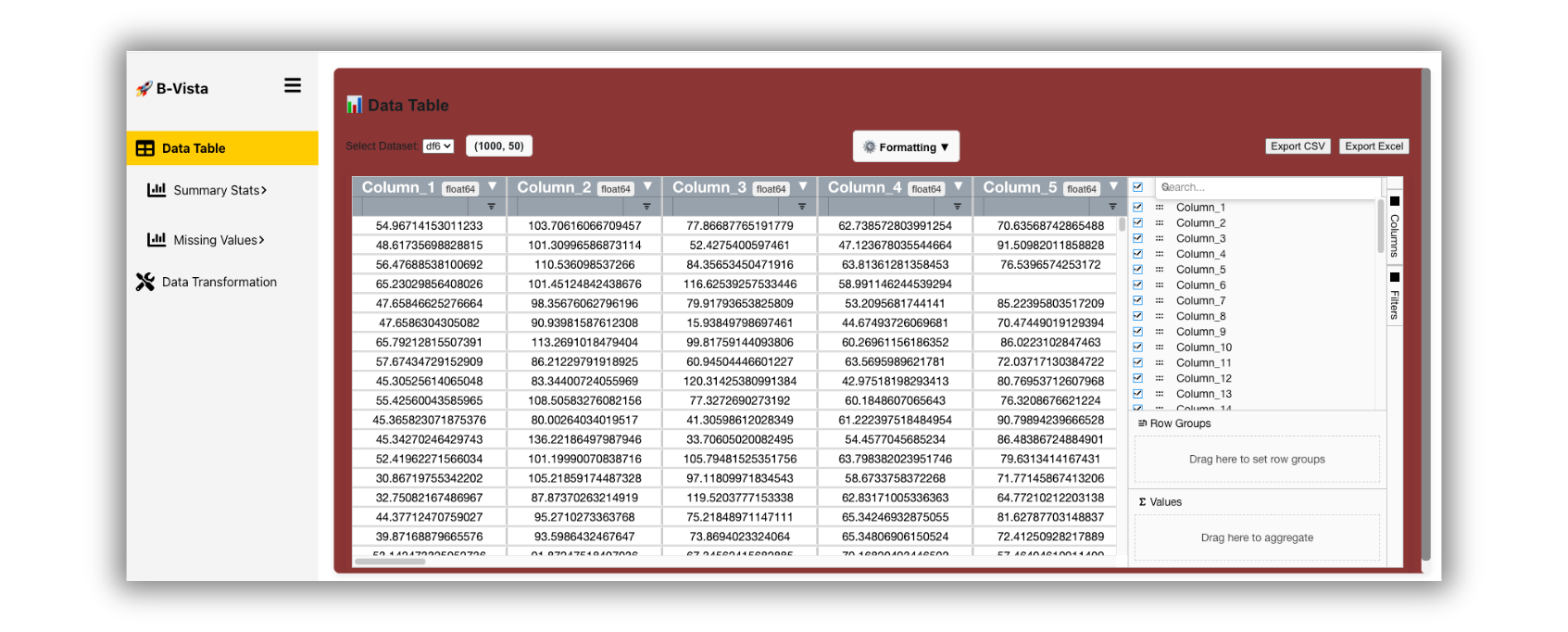
What is it?
B-vista is a full-stack Exploratory Data Analysis (EDA) interface for pandas DataFrames. It connects a Flask + WebSocket backend to a dynamic React frontend, offering everything from descriptive stats to missing data diagnostics — in real-time.
| Testing |    |
|---|---|
| Package |    |
| Meta |    |
🎯 Designed for
Data Scientists · Analysts · Educators
Teams collaborating over datasets
📚 Contents
- ✨ Main Features
- 📦 Installation
- 🐳 Docker Quickstart
- 🚀 Quickstart
- ⚙️ Advanced Usage
- 🔁 Reconnect to a Previous Session
- 🐳 Environment & Compatibility
- 📘 Documentation
- 🖥️ UI
- 💡 In the News & Inspiration
- 🔗 Related Tools & Inspiration
- 📂 Project Structure
- 📂 Dataset
- 🔖 Versioning
- 🧑💻 Developer Setup & Contributing
- 🧑💻 Security
- 📄 License
✨ Main Features
B-vista transforms how you explore and clean pandas DataFrames. With just a few clicks or lines of code, you get a comprehensive, interactive EDA experience tailored for effecient workflows.
-
📊 Descriptive Statistics
Summarize distributions with enhanced stats including skewness, kurtosis, Shapiro-Wilk normality, and z-scores—beyond standard.describe(). -
🔗 Correlation Matrix Explorer
Instantly visualize relationships using Pearson, Spearman, Kendall, Mutual Info, Partial, Robust, and Distance correlations. -
📈 Distribution Analysis
Generate histograms, KDE plots, box plots (with auto log-scaling), and QQ plots for deep insight into variable spread and outliers. -
🧼 Missing Data Diagnostics
Visualize missingness (matrix, heatmap, dendrogram), identify patterns, and classify gaps using MCAR/MAR/NMAR inference methods. -
🛠️ Smart Data Cleaning
Drop or impute missing values with Mean, Median, Mode, Forward/Backward Fill, Interpolation, KNN, Iterative, Regression, or Autoencoder. -
🔁 Data Transformation Engine
Cast column types, format as time or currency, normalize/standardize, rename or reorder columns—all with audit-safe tracking. -
🧬 Duplicate Detection & Resolution
Automatically detect, isolate, or remove duplicate rows with real-time filtering. -
🔄 Inline Cell Editing & Updates
Update any cell in-place and sync live across sessions via WebSocket-powered pipelines. -
📂 Seamless Dataset Upload
Drag-and-drop or API-based DataFrame ingestion using secure, session-isolated pickle transport.
Where to get it
the source code is currently hosted on Github at → Source code.
Binary installers for the latest released version are available at the → Python Package Index (PyPI)
📦 Installation
#PYPI
pip install bvista
#Conda
conda install -c conda-forge bvista
🐳 Docker Quickstart
B-Vista is available as a ready-to-run Docker image on → Docker Hub:
docker pull baciak/bvista:latest
✅ Works on Linux, Windows, and macOS
✅ On Apple Silicon (M1/M2/M3), use:--platform linux/amd64
▶️ Run the App
To launch the B-Vista web app locally:
docker run --platform linux/amd64 -p 8501:5050 baciak/bvista:latest
Then open your browser and go to:
http://localhost:8501
🚀 Quickstart
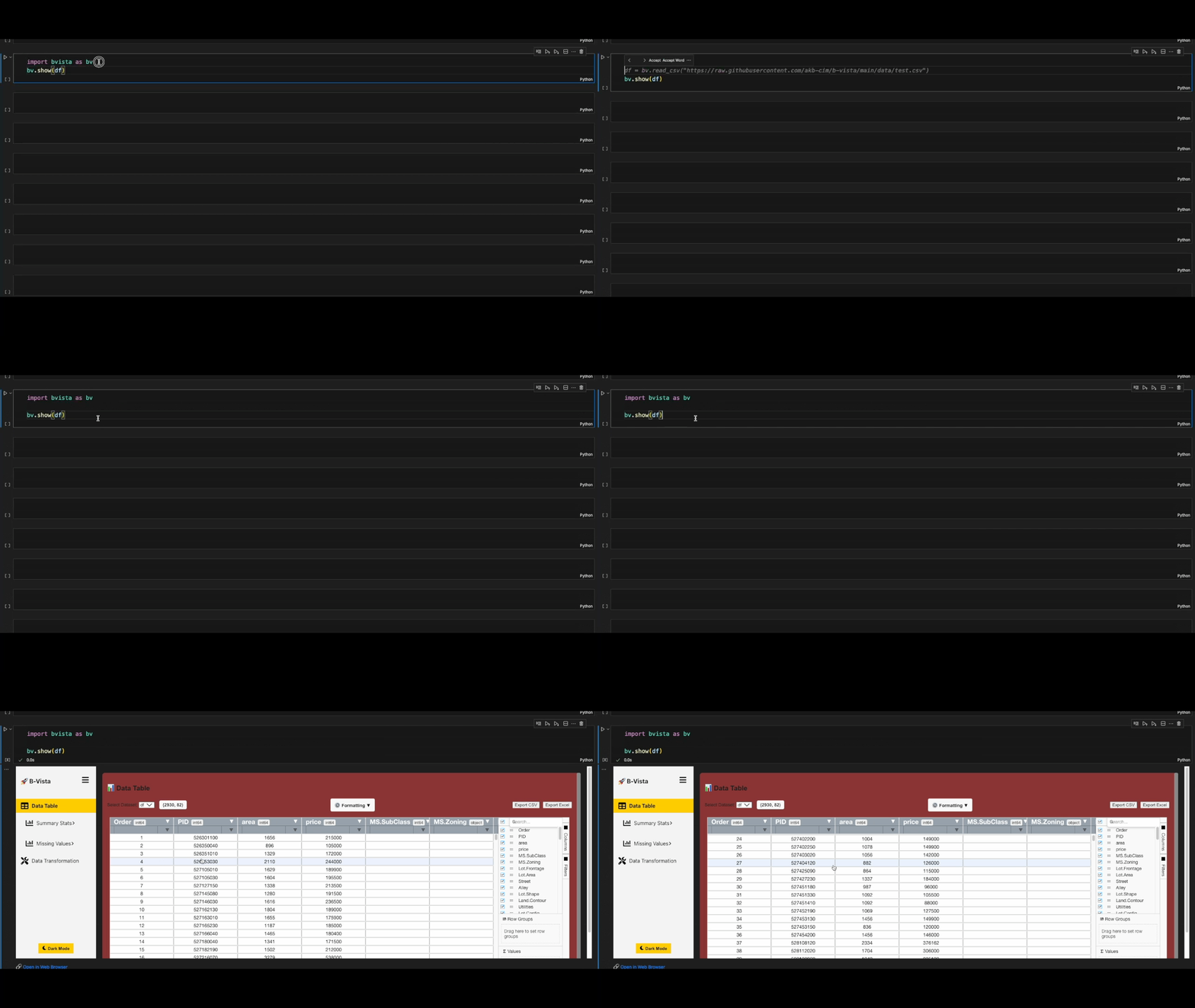
The fastest way to get started (in a notebook):
import bvista

df = pd.read_csv("dataset.csv")
bvista.show(df)
Command line (terminal)
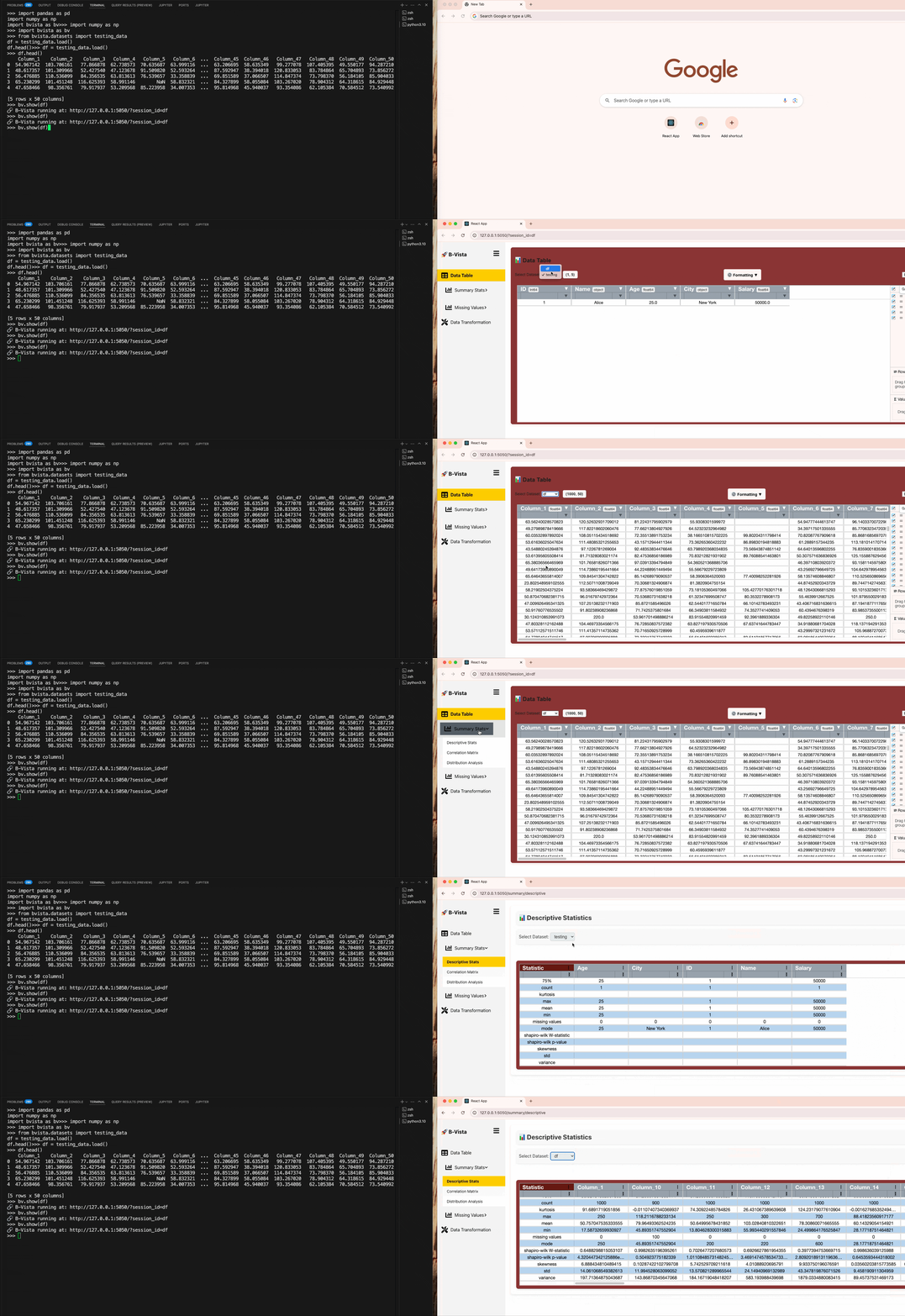
⚙️ Advanced Usage
For full control over how and where B-Vista runs, use the show() function with advanced arguments:
import bvista
import pandas as pd

df = pd.read_csv("dataset.csv")

# 👇 Customize how B-Vista starts and displays
bvista.show(
    df,                   # Required: your pandas DataFrame
    name="my_dataset",       # Optional: session name
    open_browser=True,       # Optional: open in browser outside notebooks
    silent=False             # Optional: print connection messages
)
🔁 Reconnect to a Previous Session
bvista.show(session_id="your_previous_session_id")
Use this to revisit an earlier session or re-use a shared session.
🐳 Environment & Compatibility
| Tool | Version |
|---|---|
| Python | ≥ 3.7 (tested on 3.10) |
| Node.js | ^18.x |
| npm | ^9.x |
📘 Documentation
for full usage details and architecture?
👉 See DOCUMENTATION.md for complete docs.
🖥️ UI
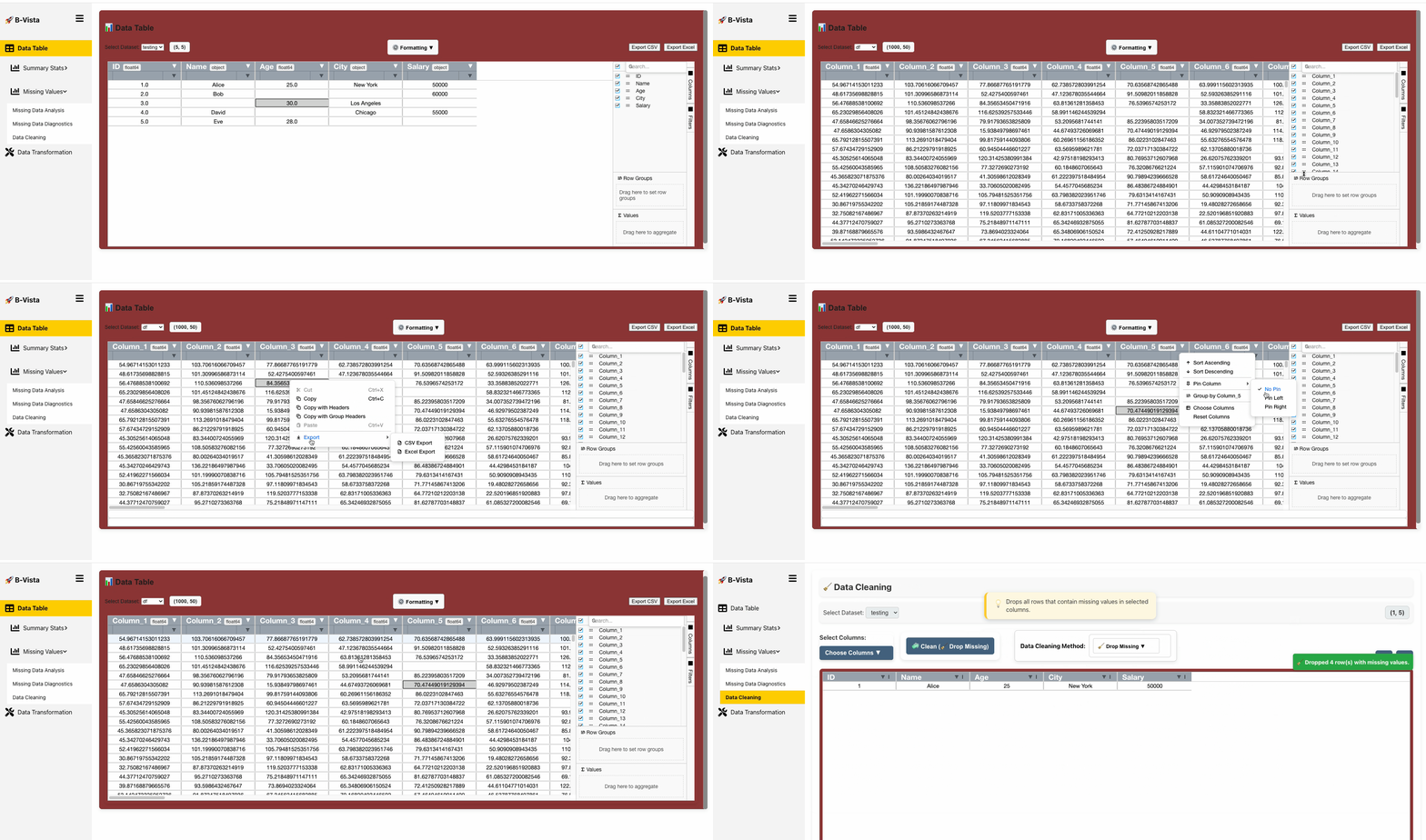
B-Vista features a modern, interactive, and highly customizable interface built with React and AG Grid Enterprise. It’s designed to handle large datasets with performance and clarity — right from your notebook and browser.
🔢 Interactive Data Grid
At the heart of B-Vista is the Data Table view — a real-time, Excel-like experience for your DataFrame.
Key Features:
-
🧭 Column-wise Data Types
Each column displays its data type (int,float,bool,datetime, etc.) along its name. These types are detected on upload and can be modified from the UI my using the convert data type feature on the Formatting dropdown. -
🔁 Live Editing + Sync
Click any cell to edit it directly. Changes are WebSocket-synced across tabs and sessions — only the changed cell is transmitted. -
🔍 Smart Filters & Search
Use quick column filters or open the adjustable right-hand panel to:- Build complex filters
- Filter by range, category, substring, null presence, etc.
-
🧱 Column Grouping & Aggregation
- Drag columns to group by their values
- Aggregate via Sum, Avg, Min/Max, Count, or Custom
- View live totals per group or globally
-
🪟 Adjustable Layout Panel
Expand/collapse the sidebar for:- Column manager (reorder, hide, freeze)
- Pivot setup
- Filter manager
- Aggregation panel
-
📐 Dataset Shape + Schema Summary
Always visible at the top:- Dataset shape:
rows × columns
- Dataset shape:
-
📦 Column Tools Menu
- Each column has a dropdown for filtering, sorting, etc
- Type conversion (e.g., to
currency,bool,date, etc.) via Formatting dropdown - Format adjustment (round decimals, datetime formats) via Formatting dropdown
- Replace values in-place via Formatting dropdown
- Detect/remove duplicates via Formatting dropdown
📂 Session Management
B-Vista supports session-based dataset isolation, letting you work across multiple datasets seamlessly.
Features:
-
🧾 Session Selector
At the top-left, select your active dataset (e.g.df,sales_data,test_set). You can switch sessions without re-uploading. -
🕒 Session Expiry
- Sessions expire after 60 minutes of inactivity
- Expiration is automatic to prevent memory buildup
-
📜 Session History
- See all available sessions
- Session IDs are generated automatically but customizable on upload
📂 No-Code Cleaning & Transformation
All transformations can be performed from the UI with no code:
- Impute missing values (mean, median, mode, etc.)
- Remove duplicates (first, last, all)
- Cast column data types
- Normalize or standardize
- Rename columns or reorder
📊 Performance & Usability
- ⚡ Fast rendering with virtualized rows/columns for large datasets
- 📋 Copy/paste supported for multiple cells (just like Excel)
- 🧾 Export to CSV/Excel/image(charts) with formatting preserved
- 📱 Responsive UI — works across notebooks and modern desktop browsers
💡 In the News & Inspiration
“B-Vista solves the frustration of static DataFrames — making EDA easy and accessible with no codes: interactive, shareable, and explorable.”
— Beta User & Data Science Educator
We built B-Vista to bridge the gap between:
- 💻 command line
- 💻 The Notebook
- 🌐 The Browser
- 🔄 Real-time collaboration and computation
It’s designed to serve:
- Data scientists who want speed, clarity, data preparation for modeling, etc
- Analysts who need to clean and shape data efficiently
- Teams who need to explore shared datasets interactively
🔗 Related Tools & Inspiration
B-Vista builds upon and complements other amazing open-source projects:
| Tool | Purpose |
|---|---|
| pandas | Core DataFrame engine |
| Lux | EDA assistant for pandas |
| pandas-profiling | Automated summary reports |
| Plotly | Rich interactive visualizations |
| Flask-SocketIO | WebSocket backbone for real-time sync |
| Vite | Lightning-fast frontend dev server |
📂 Project Structure
The B-Vista project is organized as a modular full-stack application. Below is an overview of the core directories and files.
b-vista/
├── bvista/                     ← Main Python package
│   ├── __init__.py             ← Auto-start backend in notebooks
│   ├── notebook_integration.py← Jupyter + Colab + terminal helper
│   ├── server_manager.py       ← Launch logic for backend server
│   ├── frontend/               ← React-based UI (AG Grid, Vite, Plotly)
│   ├── backend/                ← Flask + WebSocket backend API
│   │   ├── app.py              ← Backend entry point
│   │   ├── config.py           ← Server config & constants
│   │   ├── models/             ← Data processing logic (stats, EDA)
│   │   ├── routes/             ← Flask API routes (upload, clean, stats)
│   │   ├── websocket/          ← Real-time updates via Socket.IO
│   │   ├── static/             ← Temp storage, file handling utils
│   │   └── utils/              ← Logging, helpers
│   └── datasets/               ← Example datasets
│
├── tests/                      ← Pytest-based backend test suite
├── docs/                       ← Extended documentation & wiki stubs
├── requirements.txt            ← Production dependencies
├── pyproject.toml              ← Packaging metadata (PEP 621)
├── Dockerfile                  ← Builds self-contained container
├── DOCUMENTATION.md            ← Full technical documentation
├── CONTRIBUTING.md             ← Developer guide & contribution rules
├── CODE_OF_CONDUCT.md          ← Community standards
├── README.md                   ← You’re reading this
🧭 Key Architecture Highlights
-
Modular Backend: Each core task (e.g. correlation, distribution, missing data) has its own logic module under
backend/models. -
Stateless API Routes:
backend/routes/data_routes.pyhandles all DataFrame operations through REST endpoints. -
WebSocket Sync: Bi-directional session sync, live cell edits, and notifications are handled by
websocket/socket_manager.py. -
Frontend SPA (Single Page App): The UI lives in
frontend/and is powered by React + Vite for fast loading and a responsive user experience. -
Notebook-Aware:
notebook_integration.pydetects Jupyter/Colab environments and renders inline IFrames automatically.
📂 Dataset
B-Vista ships with a growing collection of built-in datasets and live data connectors, making it easy to start exploring.
🎒 Built-in Datasets
These datasets are included with the package and require no setup or internet connection:
| Dataset | Description |
|---|---|
ames_housing |
🏠 Real estate dataset with 80+ features on home sales in Ames, Iowa. |
titanic |
🚢 Titanic survival dataset — classic classification use case. |
testing_data |
🧪 Lightweight sample DataFrame used for test automation. |
Usage:
from bvista.datasets import ames_housing, titanic

df = ames_housing.load()
df2 = titanic.load()

🔌 Live Data Connectors
B-Vista also includes plug-and-play connectors for real-world, real-time data APIs. These are great for dynamic dashboards, teaching demos, or financial/data journalism.
🦠 covid19_live — COVID-19 Tracker
- Powered by: API Ninjas
- Fetch confirmed + new cases per region and day
- Requires an API key via env variable or argument
from bvista.datasets import covid19_live

df = covid19_live.load(country="Canada", API_KEY="your_key")
📄 Full doc: covid19_live.md
📈 stock_prices — Live Stock Market Data
- Powered by: Alpha Vantage
- Supports daily, weekly, or monthly prices
- Filter by year or date range
- Single or multiple tickers supported
from bvista.datasets import stock_prices

df = stock_prices.load(
    symbol=["AAPL", "TSLA"],
    interval="daily",
    date="2023",
    API_KEY="your_key"
)
📄 Full doc: stock_prices.md
🔑 API Key Configuration
Some datasets require an API key. You can provide it in two ways:
✅ Inline (for quick testing):
df = covid19_live.load(country="Nigeria", API_KEY="your_key")
✅ Environment variable (recommended for reuse):
export API_NINJAS_API_KEY="your_key"
export ALPHAVANTAGE_API_KEY="your_key"
🧪 Testing Dataset for Devs
from bvista.datasets import testing_data

df = testing_data.load()
Use this for:
- UI stress testing
- Column type detection
- Testing WebSocket edits & missing data tools
🔖 Versioning
Follows Semantic Versioning
Current: v0.1.0 (pre-release)
Expect fast iteration and breaking changes until 1.0.0
🧑💻 Developer Setup & Contributing
Whether you're fixing a bug, improving the UI, or adding new data science modules — you're welcome to contribute to B-Vista!
🧰 1. Clone the Repository
git clone https://github.com/Baci-Ak/b-vista.git
cd b-vista
🧪 2. Local Development (Recommended)
Set up a virtual environment and install dependencies:
python -m venv venv
source venv/bin/activate  # or venv\Scripts\activate on Windows
pip install -r requirements.txt

pip install --upgrade pip
pip install -e ".[dev]"
python bvista/backend/app.py
🐳 3. Docker Dev Environment
Prefer isolation? Use Docker to build and run the entire app:
# Build the image
docker buildx build --platform linux/amd64 -t baciak/bvista:test .

# Run the container
docker run --platform linux/amd64 -p 8501:5050 baciak/bvista:test
Your app will be available at:
http://localhost:8501
🔧 4. Live Dev with Volume Mounting
For live updates as you edit:
docker run --platform linux/amd64 \
  -p 8501:5050 \
  -v $(pwd):/app \
  -w /app \
  --entrypoint bash \
  baciak/bvista:test
Inside the container, launch the backend manually:
python bvista/backend/app.py
🧼 5. Frontend Setup (Optional)
The frontend lives in bvista/frontend. To run it independently:
cd bvista/frontend
npm install

`npm start`
Runs the app in the development mode.
Open http://localhost:3000 to view it in your browser
npm run dev`
or
npm run build
Builds the app for production to the dev folder.\ or build.\
refer to Frontend Setup for more details
🤝 6. Want to Contribute?
All contributions are welcome — from UI polish and bug reports to backend features.
Check out CONTRIBUTING.md to learn how to:
- Open a pull request (PR)
- Follow code style and linting
- Suggest new ideas
- Join our community discussions
🔒 By contributing, you agree to follow our Code of Conduct.
🧑💻 Security
B-Vista is designed with session safety, memory isolation, and zero-disk write defaults.
👉 For full details, see our SECURITY.md
📄 License
B-Vista is released under the BSD 3-Clause License
Release history Release notifications | RSS feed


Download files
Download the file for your platform. If you're not sure which to choose, learn more about installing packages.
Source Distribution
Built Distribution
Filter files by name, interpreter, ABI, and platform.
If you're not sure about the file name format, learn more about wheel file names.
Copy a direct link to the current filters
File details
Details for the file bvista-1.1.0.tar.gz.
File metadata
- Download URL: bvista-1.1.0.tar.gz
- Upload date:
- Size: 11.2 MB
- Tags: Source
- Uploaded using Trusted Publishing? No
- Uploaded via: twine/6.1.0 CPython/3.12.9
File hashes
| Algorithm | Hash digest | |
|---|---|---|
| SHA256 |
daea30cf54a736f45659dbefd0d0f4d78a16ff61d1be8fdfa59b8be4f74baa07
|
|
| MD5 |
c01b1ad3c40292232212d84b4a4b37de
|
|
| BLAKE2b-256 |
114e53e7b310391d6b17703446dd7f92fe2ddcc4112d09ff8095035829c3aeec
|
File details
Details for the file bvista-1.1.0-py3-none-any.whl.
File metadata
- Download URL: bvista-1.1.0-py3-none-any.whl
- Upload date:
- Size: 11.3 MB
- Tags: Python 3
- Uploaded using Trusted Publishing? No
- Uploaded via: twine/6.1.0 CPython/3.12.9
File hashes
| Algorithm | Hash digest | |
|---|---|---|
| SHA256 |
3bfd94cd00133d431c02a80557fcc009259597ce9e9075b2b9715325b7ea1443
|
|
| MD5 |
8698d863aa998b4364e3949618415afb
|
|
| BLAKE2b-256 |
ebfe1362d20575bccfb13c9ea9feb6d6c0a686d1716ce77dfc63c65747a9564b
|






