
Caland ▦
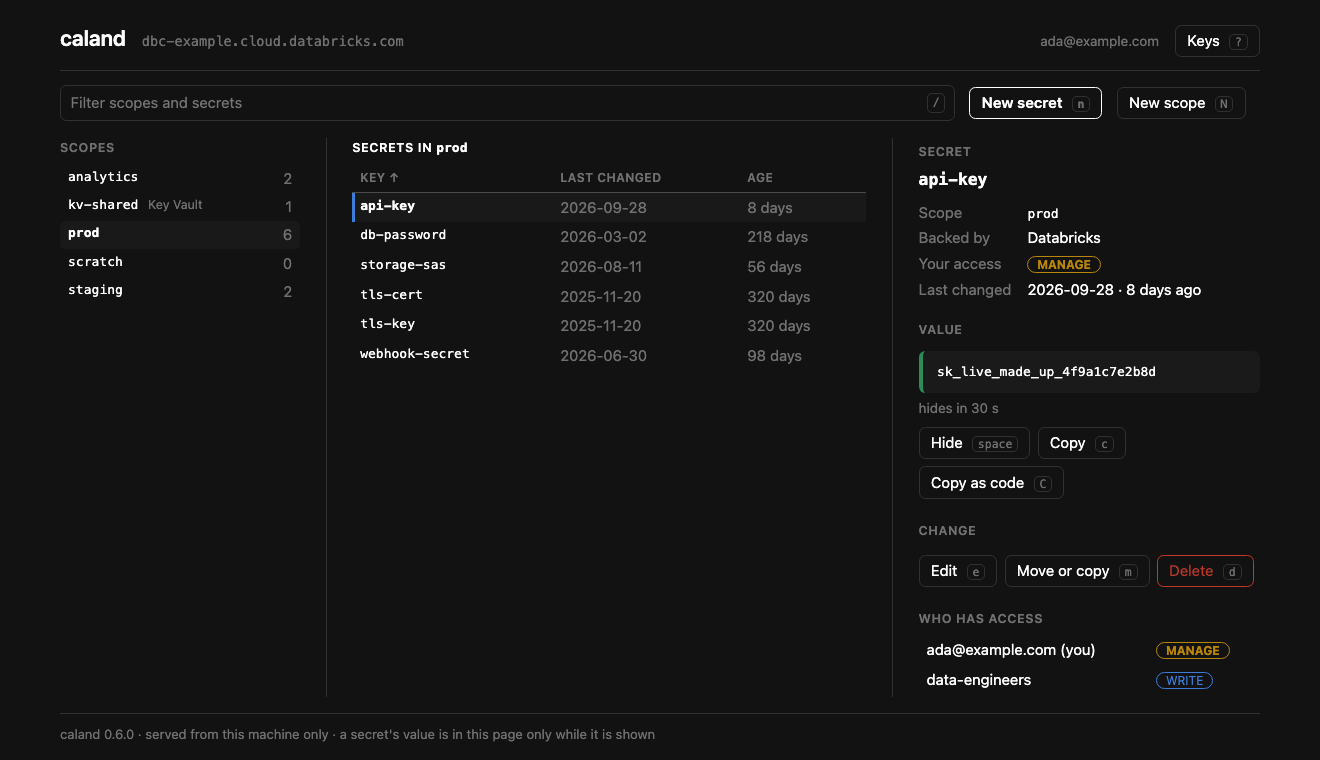
Databricks secrets, by hand: a keyboard-driven page in your browser, served from your own machine. Browse scopes, secrets and grants; create, edit, move and delete; show and copy values; put a certificate in from a file.






Read the docs → — installation, connecting, every key, and how the page is kept yours.
Named after
Pieter Caland (1826–1902), the engineer who designed and built the Nieuwe Waterweg — the cut through the dunes that gave Rotterdam its way to the sea. Like the other Kostavo tools, Caland carries an engineer's name.
Until 0.6 Caland was a terminal app, and before that it was called isolinear. That
terminal app is still on PyPI under that name, as it was, and is a separate tool now —
if you want a terminal app.
Install
Run it with uv — no clone, no virtualenv:
uvx caland              # run once, ephemerally
uv tool install caland  # install the `caland` command on PATH
Or with pipx: pipx run caland / pipx install caland.
Requires Python ≥ 3.11 and a browser. Built on the Databricks SDK.
Quickstart
caland
It starts a small server on your machine and opens a tab. You don't need to set anything up: Caland finds the workspaces it can reach, and when there is no doubt which one you mean — the workspace of a bundle in the current folder, or your only profile — it goes straight there. Otherwise the page asks:
- A bundle — the workspace of a
databricks.ymlin the current folder, picked for you. ~/.databrickscfg— every profile.- An address — sign in through the browser. No token to paste; keep it as a profile if you want to come back by name.
caland prod               # straight to a workspace by name
caland prod --read-only   # and change nothing there
caland --no-open          # print the link instead of opening a browser
Ctrl+C stops it and forgets every value it held.
What it does
- Three panes — scopes, the secrets of one with when each was last changed, and the detail: your access, who else has a grant, and the value once you ask for it.
- Secrets, with a way back — new, edit, move, copy, rename, delete. Nothing is deleted
without a
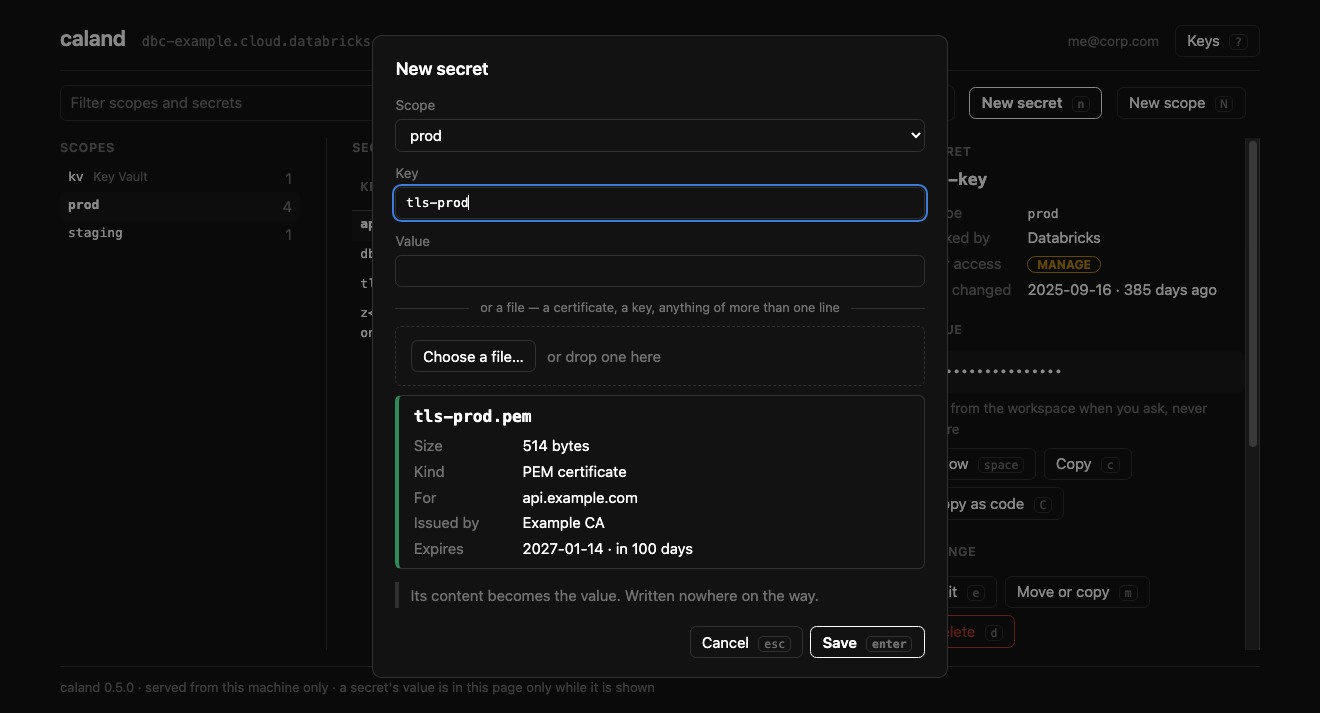
y, anduputs the last one back. - Files as they are — choose a certificate with your system's file dialog. Caland says who it is for and when it expires before it is saved, and stores it byte for byte.
- Grants — who has access to a scope; what you can reach; what somebody else can.
.envin and out, and a report of the secrets nobody has changed in a while.- A value is shown when asked, and hides itself after 30 seconds.
Keys
Everything has a key, and everything can be clicked. ? on the page lists them all.
| Keys | |
|---|---|
| Tab · ← → | From pane to pane |
| ↑ ↓ · j k | Inside a pane |
| / | Filter scopes and secrets |
| Space · c · C | Show the value · copy it · copy how to reach it from code |
| n · e · m · d · u | New · edit · move or copy · delete · put back |
| N · D | New scope · delete scope |
| p · a · P | Grants of the scope · what you can reach · what somebody else can |
| i · x · A | .env in · .env out · secrets gone stale |
| s · S · f | Sort · the other way round · all scopes or only yours |
| w | Another workspace |
Security
- A value is read from the workspace each time you ask for it, and written nowhere: not to disk, not to a log. Shown, it hides itself after 30 seconds.
- The page is yours only. It is served from
127.0.0.1, answers only to its own page at its own address, and to nothing without the session's key — which is never a cookie and never on a command line. - Nothing is deleted without a
y, and--read-onlychanges nothing in the workspace. On your own machine it may still write what it always may: your two preferences, and a profile if you sign in to an address and ask to keep it. - No credentials of its own. Caland stores no token. It signs in through the Databricks
SDK, which keeps a browser sign-in in its own folder
(
~/.config/databricks-sdk-py/oauth/). A profile Caland saves holds an address and how to sign in, never a token.
More, and what it cannot defend against, in the docs.
How it's built
Hexagonal / DDD layers; dependencies point inward and all I/O is behind domain ports, so the UI never touches the SDK and the whole domain is unit-testable without a network:
caland/
  domain/          model, rules + ports (SecretStore, WorkspaceConnector, ProfileStore,
                   BundleStore, SettingsStore)
  application/     use-cases (WorkspaceService, OnboardingService) + read model
  infrastructure/  adapters — the only Databricks-SDK importers
  interface/web/   the page: a server on this machine, and what it serves
  app.py           the command
Contributing
Issues and PRs welcome — see CONTRIBUTING.md. The toolkit is all-Astral: uv (env/deps/run), ruff (lint+format), ty (types).
uv sync
uv run pytest        # tests (units, the server over HTTP, the page in Chrome)
uv run ruff check .  # lint
uv run ty check      # types
uv run caland     # run it

uv run --group docs mkdocs serve   # preview the docs site at localhost:8000
Where it fits
Terraform for your platform, Asset Bundles for your code, stevin for your data model.
Caland is one of the Kostavo tools for Databricks. Each does one job and none needs another: this one is for the secrets a deploy and a data model both end up depending on, and for the people who have to look after them. Kostavo is the company behind them: it builds a governance platform for Databricks workspaces, and the tools are complete without it.
Community project, not affiliated with or endorsed by Databricks.
License
Apache-2.0 — see LICENSE.
1 maintainer

Metadata
1 maintainer
Release files for caland 0.7.1
For a detailed explanation of source distributions (sdists) and built distributions (wheels), please see the package formats documentation.
Source distribution (sdist)
| File | Size | Uploaded | |
|---|---|---|---|
| caland-0.7.1.tar.gz | 139.5 kB | Details |
Built distribution (wheel)
| File | Interpreter | ABI | Platform | Reset |
|---|---|---|---|---|
| caland-0.7.1-py3-none-any.whl | Python 3 | none | any | Details |
Total release size: 222.0 kB
Release files / caland-0.7.1.tar.gz
| Download URL | caland-0.7.1.tar.gz |
|---|---|
| Size | 139.5 kB |
| Tags | Source |
|
SHA-256 checksum How to use checksums |
97eb0451805810f4c981944ef0719019682286d3dd2620f1500de496d4926ff7
|
|
BLAKE2b-256 checksum How to use checksums |
5f2300a060440bc977b4c8e5509c1351fdb17ff6495c68b4ef58531a00664c1e
|
| Upload date | |
|
Uploaded using Trusted Publishing? What is trusted publishing? |
Yes |
| Uploaded via |
uv/0.12.24 {"installer":{"name":"uv","version":"0.12.24","subcommand":["publish"]},"python":null,"implementation":{"name":null,"version":null},"distro":{"name":"Ubuntu","version":"24.04","id":"noble","libc":null},"system":{"name":null,"release":null},"cpu":null,"openssl_version":null,"setuptools_version":null,"rustc_version":null,"ci":true}
|
Release files / caland-0.7.1-py3-none-any.whl
| Download URL | caland-0.7.1-py3-none-any.whl |
|---|---|
| Size | 82.6 kB |
| Tags | Python 3 |
|
SHA-256 checksum How to use checksums |
d43a165fc7d3af91f6a49019c06725202fc387e7463620354907afc09bb38d28
|
|
BLAKE2b-256 checksum How to use checksums |
29035bbcb9dd3324f67697cefcd5d73540d995eb1c75ab2ceebd300ed1d52915
|
| Upload date | |
|
Uploaded using Trusted Publishing? What is trusted publishing? |
Yes |
| Uploaded via |
uv/0.12.24 {"installer":{"name":"uv","version":"0.12.24","subcommand":["publish"]},"python":null,"implementation":{"name":null,"version":null},"distro":{"name":"Ubuntu","version":"24.04","id":"noble","libc":null},"system":{"name":null,"release":null},"cpu":null,"openssl_version":null,"setuptools_version":null,"rustc_version":null,"ci":true}
|














