
Caland ▦
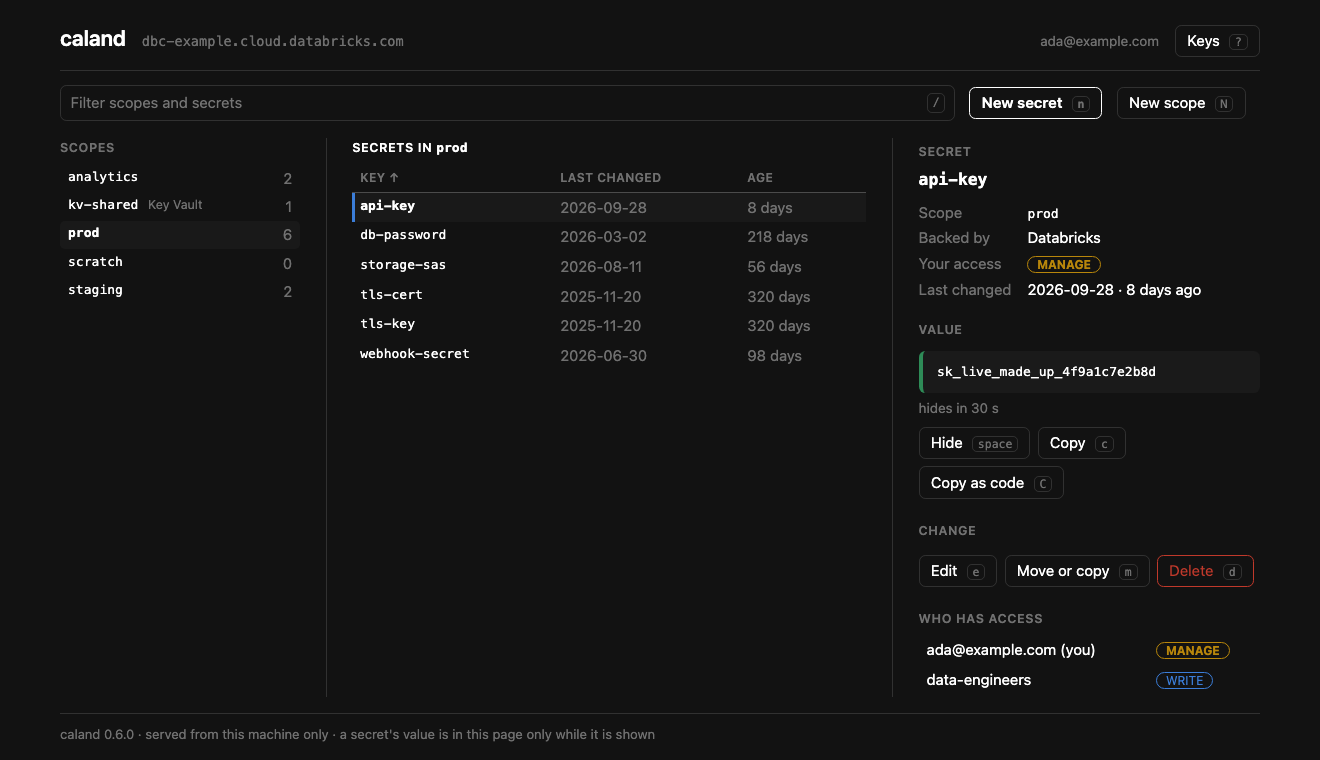
Databricks secrets, by hand: a keyboard-driven page in your browser, served from your own machine. Browse scopes, secrets and grants; create, edit, move and delete; show and copy values; put a certificate in from a file.






Read the docs → — installation, connecting, every key, and how the page is kept yours.
Why
Databricks secrets have an API and a CLI, and no screen. Rotating a key is a command copied from a wiki, and who may read which scope is a question nobody can answer quickly. Caland is the screen: a workspace's scopes, secrets and grants on one page, on your own machine, with a value read only when you ask for it and written nowhere.
Named after
Pieter Caland (1826–1902), the engineer who designed and built the Nieuwe Waterweg — the cut through the dunes that gave Rotterdam its way to the sea. Like the other Kostavo tools, Caland carries an engineer's name.
Until 0.6 Caland was a terminal app, and before that it was called isolinear. That
terminal app is still on PyPI under that name, as it was, and is a separate tool now —
if you want a terminal app.
Install
Run it with uv — no clone, no virtualenv:
uvx caland              # run once, ephemerally
uv tool install caland  # install the `caland` command on PATH
Or with pipx: pipx run caland / pipx install caland.
Requires Python ≥ 3.11 and a browser. Built on the Databricks SDK.
Quickstart
caland
It starts a small server on your machine and opens a tab. You don't need to set anything up: Caland finds the workspaces it can reach, and when there is no doubt which one you mean — the workspace of a bundle in the current folder, or your only profile — it goes straight there. Otherwise the page asks:
- A bundle — the workspace of a
databricks.ymlin the current folder, picked for you. ~/.databrickscfg— every profile.- An address — sign in through the browser. No token to paste; keep it as a profile if you want to come back by name.
caland prod               # straight to a workspace by name
caland prod --read-only   # and change nothing there
caland --no-open          # print the link instead of opening a browser
Ctrl+C stops it and forgets every value it held.
What it does
- Three panes — scopes, the secrets of one with when each was last changed, and the detail: your access, who else has a grant, and the value once you ask for it.
- Secrets, with a way back — new, edit, move, copy, rename, delete. Nothing is deleted
without a
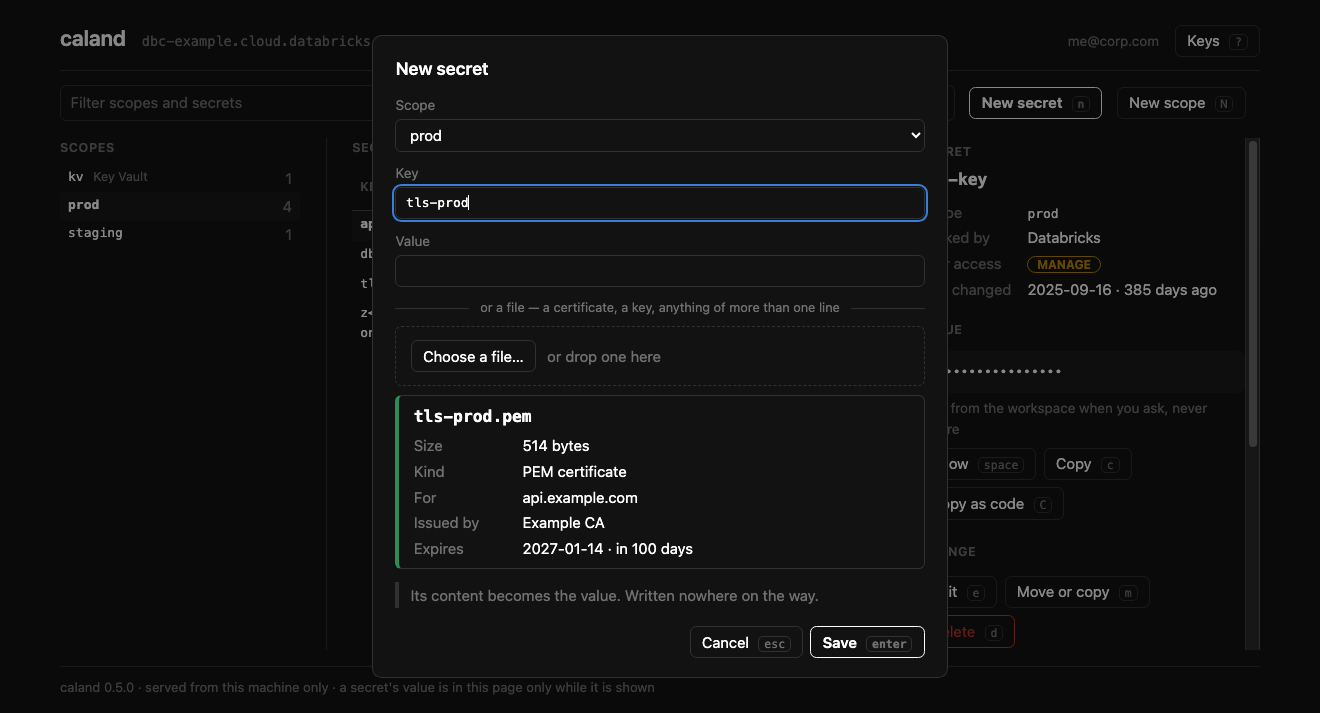
y, anduputs the last one back. - Files as they are — choose a certificate with your system's file dialog. Caland says who it is for and when it expires before it is saved, and stores it byte for byte.
- Grants — who has access to a scope; what you can reach; what somebody else can.
.envin and out, and a report of the secrets nobody has changed in a while.- A value is shown when asked, and hides itself after 30 seconds.
Keys
Everything has a key, and everything can be clicked. ? on the page lists them all.
| Keys | |
|---|---|
| Tab · ← → | From pane to pane |
| ↑ ↓ · j k | Inside a pane |
| / | Filter scopes and secrets |
| Space · c · C | Show the value · copy it · copy how to reach it from code |
| n · e · m · d · u | New · edit · move or copy · delete · put back |
| N · D | New scope · delete scope |
| p · a · P | Grants of the scope · what you can reach · what somebody else can |
| i · x · A | .env in · .env out · secrets gone stale |
| s · S · f | Sort · the other way round · all scopes or only yours |
| w | Another workspace |
Security
- A value is read from the workspace each time you ask for it, and written nowhere: not to disk, not to a log. Shown, it hides itself after 30 seconds.
- The page is yours only. It is served from
127.0.0.1, answers only to its own page at its own address, and to nothing without the session's key — which is never a cookie and never on a command line. - Nothing is deleted without a
y, and--read-onlychanges nothing in the workspace. On your own machine it may still write what it always may: your two preferences, and a profile if you sign in to an address and ask to keep it. - No credentials of its own. Caland stores no token. It signs in through the Databricks
SDK, which keeps a browser sign-in in its own folder
(
~/.config/databricks-sdk-py/oauth/). A profile Caland saves holds an address and how to sign in, never a token.
More, and what it cannot defend against, in the docs.
How it's built
Hexagonal / DDD layers; dependencies point inward and all I/O is behind domain ports, so the UI never touches the SDK and the whole domain is unit-testable without a network:
caland/
  domain/          model, rules + ports (SecretStore, WorkspaceConnector, ProfileStore,
                   BundleStore, SettingsStore)
  application/     use-cases (WorkspaceService, OnboardingService) + read model
  infrastructure/  adapters — the only Databricks-SDK importers
  interface/web/   the page: a server on this machine, and what it serves
  app.py           the command
Contributing
Issues and PRs welcome — see CONTRIBUTING.md. The toolkit is all-Astral: uv (env/deps/run), ruff (lint+format), ty (types).
uv sync
uv run pytest        # tests (units, the server over HTTP, the page in Chrome)
uv run ruff check .  # lint
uv run ty check      # types
uv run caland     # run it

uv run --group docs mkdocs serve   # preview the docs site at localhost:8000
When not to use it
- In a pipeline. Caland is for a person at a keyboard. It has no command that runs unattended, and is not to get one.
- To keep secrets in code. It declares nothing and plans nothing: what it does, it does now, to the workspace it is connected to.
- For secrets outside Databricks secret scopes. A Key Vault-backed scope is shown and its values can be read; its secrets are managed in Azure.
- To see when a secret was last read. That takes the audit table and a warehouse, and Caland uses only the Databricks SDK: no query, no warehouse, no system table.
When you no longer need it
When a Databricks workspace has a page of its own for secret scopes — the scopes, the secrets in each, who may read them, and a way to change one — use that. Today the docs name one screen, a form that creates a scope; listing, reading and changing go through the CLI, the API or the SDK.
Where it fits
Caland is one of the Kostavo tools: small tools for the ugly gaps on Databricks, one gap each. Its gap is the secret you reach through an API: rotating a key is a command copied from a wiki, and who may read which scope is a question nobody can answer quickly. Each works alone. Kostavo is the company behind them: it builds a governance platform for Databricks workspaces, and the tools are complete without it.
Community project, not affiliated with or endorsed by Databricks.
License
Apache-2.0 — see LICENSE.
1 maintainer

Metadata
1 maintainer
Release files for caland 0.7.2
For a detailed explanation of source distributions (sdists) and built distributions (wheels), please see the package formats documentation.
Source distribution (sdist)
| File | Size | Uploaded | |
|---|---|---|---|
| caland-0.7.2.tar.gz | 139.7 kB | Details |
Built distribution (wheel)
| File | Interpreter | ABI | Platform | Reset |
|---|---|---|---|---|
| caland-0.7.2-py3-none-any.whl | Python 3 | none | any | Details |
Total release size: 222.8 kB
Release files / caland-0.7.2.tar.gz
| Download URL | caland-0.7.2.tar.gz |
|---|---|
| Size | 139.7 kB |
| Tags | Source |
|
SHA-256 checksum How to use checksums |
a39371a6e660e209907497d026ba92eb06698e7bdf0e8570d291b8c00fb43344
|
|
BLAKE2b-256 checksum How to use checksums |
dffdf48ee08d004b603572c6f32ce0783494dbed57cdedd5595e3f720b7c19d6
|
| Upload date | |
|
Uploaded using Trusted Publishing? What is trusted publishing? |
Yes |
| Uploaded via |
uv/0.13.0 {"installer":{"name":"uv","version":"0.13.0","subcommand":["publish"]},"python":null,"implementation":{"name":null,"version":null},"distro":{"name":"Ubuntu","version":"24.04","id":"noble","libc":null},"system":{"name":null,"release":null},"cpu":null,"openssl_version":null,"setuptools_version":null,"rustc_version":null,"ci":true}
|
Release files / caland-0.7.2-py3-none-any.whl
| Download URL | caland-0.7.2-py3-none-any.whl |
|---|---|
| Size | 83.0 kB |
| Tags | Python 3 |
|
SHA-256 checksum How to use checksums |
ad5c40b55b8834c1af068610f78b89e7dc4119a55c7f678301e89708e04fd927
|
|
BLAKE2b-256 checksum How to use checksums |
0d1c0facdf453409d7377c79bc654692befb6fdbbd6e8d0bf8954713d29c392c
|
| Upload date | |
|
Uploaded using Trusted Publishing? What is trusted publishing? |
Yes |
| Uploaded via |
uv/0.13.0 {"installer":{"name":"uv","version":"0.13.0","subcommand":["publish"]},"python":null,"implementation":{"name":null,"version":null},"distro":{"name":"Ubuntu","version":"24.04","id":"noble","libc":null},"system":{"name":null,"release":null},"cpu":null,"openssl_version":null,"setuptools_version":null,"rustc_version":null,"ci":true}
|














