
Caland ▦
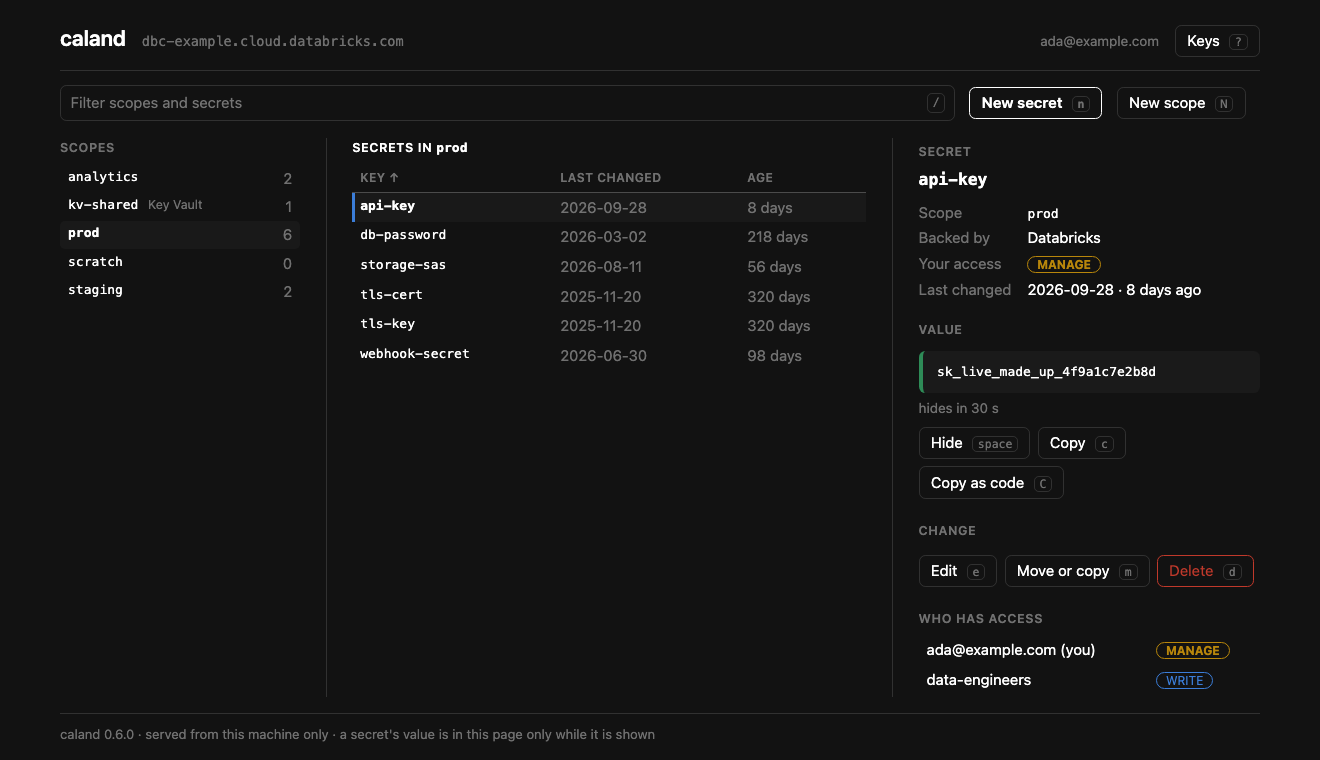
Databricks secrets, by hand: a keyboard-driven page in your browser, served from your own machine. Browse scopes, secrets and grants; create, edit, move and delete; show and copy values; put a certificate in from a file.




Why
Databricks secrets have an API and a CLI, and no screen. Rotating a key is a command copied from a wiki, and who may read which scope is a question nobody can answer quickly. Caland is the screen: a workspace's scopes, secrets and grants on one page, on your own machine, with a value read only when you ask for it and written nowhere.
Quickstart
It needs Python 3.11 or later, a browser, and macOS or Linux.
uvx caland # run it once; or: uv tool install caland
It starts a small server on your machine and opens a tab. Nothing is set up first:
Caland finds the workspace of a bundle in the current folder and the profiles in
~/.databrickscfg. When there is no doubt which workspace you mean it goes straight
there. Otherwise the page asks, and takes an address to sign in to through the browser.
caland prod               # straight to a workspace by name
caland prod --read-only   # and change nothing there
caland --no-open          # print the link instead of opening a browser
? on the page lists the keys. Ctrl+C in the terminal stops Caland and forgets every value it held.
The docs
How to use it is in the docs, and only there:
- Installation: uvx, uv tool or pipx, and upgrading.
- Connecting: which workspace, where workspaces are found, and keeping a sign-in as a profile.
- Using the page: secrets, files,
grants,
.envin and out, the lists, every key, and how the page is kept yours. - Security: what Caland keeps to, what it holds of a value, and where to report a vulnerability.
Tried, and not yet
On 2026-10-06 the page was driven in Chrome against a real workspace, in a throwaway scope: text and files stored byte for byte, a rename, a delete and the secret put back, a grant given and taken. A Key Vault-backed scope, a sign-in by an address, other browsers than Chrome and Windows have not been tried.
Tried, and not yet is the record.
When not to use it
- In a pipeline. Caland is for a person at a keyboard. It has no command that runs unattended, and is not to get one.
- To keep secrets in code. It declares nothing and plans nothing: what it does, it does now, to the workspace it is connected to.
- For secrets outside Databricks secret scopes. A Key Vault-backed scope is shown and its values can be read; its secrets are managed in Azure.
- To see when a secret was last read. That takes the audit table and a warehouse, and Caland uses only the Databricks SDK: no query, no warehouse, no system table.
When you no longer need it
When a Databricks workspace has a page of its own for secret scopes — the scopes, the secrets in each, who may read them, and a way to change one — use that. Today the docs name one screen, a form that creates a scope; listing, reading and changing go through the CLI, the API or the SDK.
Where it fits
Caland is one of the Kostavo tools: small tools for the ugly gaps on Databricks, one gap each. Its gap is the secret you reach through an API. Each works alone. Kostavo is the company behind them: it builds a governance platform for Databricks workspaces, and the tools are complete without it.
Community project, not affiliated with or endorsed by Databricks.
Named after
Pieter Caland (1826–1902), the engineer who designed and built the Nieuwe Waterweg — the cut through the dunes that gave Rotterdam its way to the sea.
Until 0.6 Caland was a terminal app, and before that it was called isolinear. That
terminal app is still on PyPI under that name, as it was, and is a separate tool now:
if you want a terminal app.
License
1 maintainer

Metadata
1 maintainer
Release files for caland 0.8.0
For a detailed explanation of source distributions (sdists) and built distributions (wheels), please see the package formats documentation.
Source distribution (sdist)
| File | Size | Uploaded | |
|---|---|---|---|
| caland-0.8.0.tar.gz | 151.2 kB | Details |
Built distribution (wheel)
| File | Interpreter | ABI | Platform | Reset |
|---|---|---|---|---|
| caland-0.8.0-py3-none-any.whl | Python 3 | none | any | Details |
Total release size: 238.9 kB
Release files / caland-0.8.0.tar.gz
| Download URL | caland-0.8.0.tar.gz |
|---|---|
| Size | 151.2 kB |
| Tags | Source |
|
SHA-256 checksum How to use checksums |
84d32d06791b95457619e6e2853a9f028026a10dcfd0a5a1faa438c963cfb71f
|
|
BLAKE2b-256 checksum How to use checksums |
8db2d64cee48410779cca0614c5803e718ca533f04771ad93337b2a6ee5dcfc4
|
| Upload date | |
|
Uploaded using Trusted Publishing? What is trusted publishing? |
Yes |
| Uploaded via |
uv/0.13.0 {"installer":{"name":"uv","version":"0.13.0","subcommand":["publish"]},"python":null,"implementation":{"name":null,"version":null},"distro":{"name":"Ubuntu","version":"24.04","id":"noble","libc":null},"system":{"name":null,"release":null},"cpu":null,"openssl_version":null,"setuptools_version":null,"rustc_version":null,"ci":true}
|
Release files / caland-0.8.0-py3-none-any.whl
| Download URL | caland-0.8.0-py3-none-any.whl |
|---|---|
| Size | 87.6 kB |
| Tags | Python 3 |
|
SHA-256 checksum How to use checksums |
fbf9a5ee856b62abd644dfc3e6a775c5921f8cee9071ba46d6fa1442209c4e54
|
|
BLAKE2b-256 checksum How to use checksums |
d6cb3fcc2fcea61b3838906a49c1e91f49d9b3f993bd24ed995874dfc91b2889
|
| Upload date | |
|
Uploaded using Trusted Publishing? What is trusted publishing? |
Yes |
| Uploaded via |
uv/0.13.0 {"installer":{"name":"uv","version":"0.13.0","subcommand":["publish"]},"python":null,"implementation":{"name":null,"version":null},"distro":{"name":"Ubuntu","version":"24.04","id":"noble","libc":null},"system":{"name":null,"release":null},"cpu":null,"openssl_version":null,"setuptools_version":null,"rustc_version":null,"ci":true}
|














