





Calliope Studio
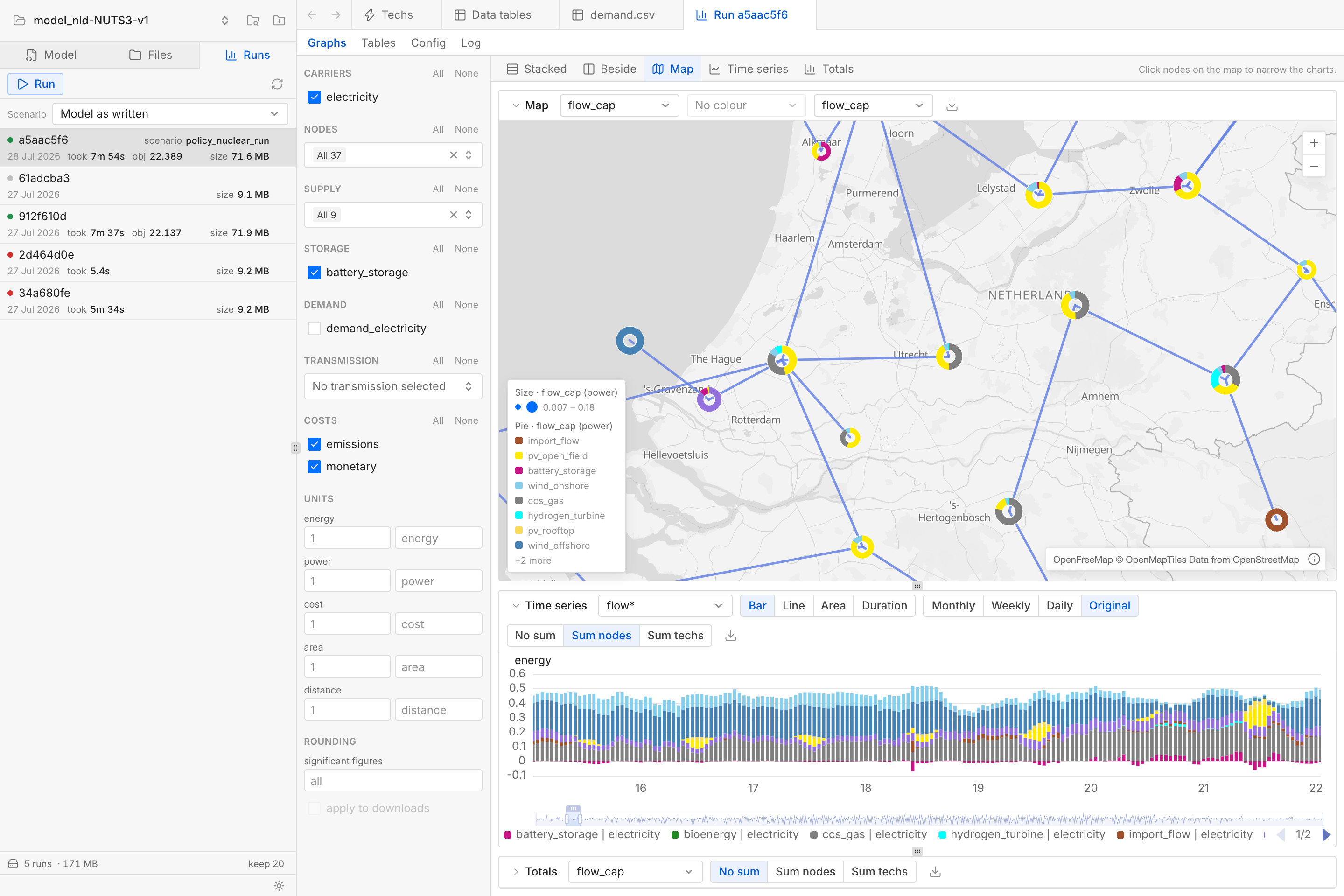
Calliope Studio is a web-based user interface for the Calliope energy system modelling framework.
It lets you define, edit, validate, run, and analyse Calliope models, all in a single tool.
It runs in a browser directly on your computer.
Installation
With uv:
# One-time setup for uv on macOS and Linux
curl -LsSf https://astral.sh/uv/install.sh | sh
# One-time setup for uv on Windows
#   powershell -c "irm https://astral.sh/uv/install.ps1 | iex"

uv tool install calliope-studio
conda create -n calliope-studio -c conda-forge calliope-studio
conda activate calliope-studio
Then:
calliope-studio my-model      # a model folder containing model.yaml or a solved results .nc
calliope-studio               # no argument opens Calliope Studio with a model picker
To quit Calliope Studio, close its terminal window or press Ctrl+C inside it.
Development builds
To install a development build based on the latest main branch commit:
uv tool install --reinstall --prerelease allow \
  --find-links https://github.com/sjpfenninger/calliope-studio/releases/expanded_assets/dev \
  calliope-studio
The same command updates an existing install to the newest development build. To go back to the stable (released) version:
uv tool install --reinstall calliope-studio
FAQ
- Why does "Run" fail with a solver error? Calliope needs a solver to run a model. Calliope 0.7 bundles the HiGHS solver, but some models may refer to other solvers such as CBC or Gurobi. Refer to the Calliope documentation for the different solver options.
- Why is the list of models wrong or outdated? The list of models you have opened lives in a small registry file, separate from the models themselves. Its location is reported as
registry_pathbyhttp://127.0.0.1:8000/api/healthwhile Calliope Studio is running. Deleting it resets the list without actually touching any of your models. - Where are model results stored? When running a model from inside Calliope Studio, results are saved in a
calliope-studio/folder next to themodel.yamlfile. This folder is created automatically when running a model for the first time and comes with its own.gitignorefile.
Development
Requires pixi. Try pixi task list to see all the available development tasks.
pixi run serve      # API on port 8000 with auto-reload
pixi run web-dev    # Vite dev server, proxying /api to port 8000
serve opens ./example-model, scaffolding it from Calliope's national_scale template on first use.
The frontend tests run from web/:
cd web
pnpm test
Pixi is configured with a gurobi environment to test with Gurobi (needs a license):
pixi run -e gurobi calliope-studio my-model # Gurobi available as a solver
Release
Pushing a v* tag builds the wheel and sdist and publishes them:
git tag v0.2.0 && git push --tags
A release tag with exactly three numeric components (v0.2.0) goes to PyPI. Anything else (e.g. v0.2.0rc1 or a typo) goes to TestPyPI instead.
On release, the conda-forge autotick bot should open a pull request on the feedstock.
Architecture
The frontend is a Vue 3 single-page TypeScript app served by a FastAPI backend.
The backend consists of four Python packages with a one-way import rule: server may import the others, while they import neither server nor each other:
server: FastAPI app and HTTP routesmodeldef: YAML and CSV model definitions on diskruns: Builds and solves models in a separate processresults: Reads.ncfiles and streams them as Apache Arrow batches for charts and tables
License
AGPL-3.0-or-later. See LICENSE.
1 maintainer

Metadata
1 maintainer
Release files for calliope-studio 0.2.1
For a detailed explanation of source distributions (sdists) and built distributions (wheels), please see the package formats documentation.
Source distribution (sdist)
| File | Size | Uploaded | |
|---|---|---|---|
| calliope_studio-0.2.1.tar.gz | 5.3 MB | Details |
Built distribution (wheel)
| File | Interpreter | ABI | Platform | Reset |
|---|---|---|---|---|
| calliope_studio-0.2.1-py3-none-any.whl | Python 3 | none | any | Details |
Total release size: 9.6 MB
Release files / calliope_studio-0.2.1.tar.gz
| Download URL | calliope_studio-0.2.1.tar.gz |
|---|---|
| Size | 5.3 MB |
| Tags | Source |
|
SHA-256 checksum How to use checksums |
63fddfd53108ed21b7a83882a9e618d72bb9252f928a678f6bc1dc9140e913fa
|
|
BLAKE2b-256 checksum How to use checksums |
d5c9f26685d9a2dec2b8b3c19715036aecf576512612dbca214a0ef784a1fec6
|
| Upload date | |
|
Uploaded using Trusted Publishing? What is trusted publishing? |
Yes |
| Uploaded via |
twine/7.0.0 CPython/3.13.14
|
Provenance
Provenance describes where a file came from. On PyPI, provenance is shared via attestations, which provide a verifiable record of the build or publishing details. View details, limitations and caveats.


PyPI Publish Attestation
PyPI verified that this artifact, at this checksum, originated from the publisher listed below.
Signed by GitHub Actions, verified by PyPI on Sep 17, 2026.
Transparency logRelease files / calliope_studio-0.2.1-py3-none-any.whl
| Download URL | calliope_studio-0.2.1-py3-none-any.whl |
|---|---|
| Size | 4.3 MB |
| Tags | Python 3 |
|
SHA-256 checksum How to use checksums |
975166dfe84898be785e65b67f5a9986a2ec0a8dfaead3b0ba7fa212e9b4ea6b
|
|
BLAKE2b-256 checksum How to use checksums |
1a372302f7525db06ee5bcb6d71047d26c6d5573940ead31eb2567a82477b08c
|
| Upload date | |
|
Uploaded using Trusted Publishing? What is trusted publishing? |
Yes |
| Uploaded via |
twine/7.0.0 CPython/3.13.14
|
Provenance
Provenance describes where a file came from. On PyPI, provenance is shared via attestations, which provide a verifiable record of the build or publishing details. View details, limitations and caveats.
PyPI Publish Attestation
PyPI verified that this artifact, at this checksum, originated from the publisher listed below.
Signed by GitHub Actions, verified by PyPI on Sep 17, 2026.
Transparency log













