







Python driver for the Calypso UP10 anemometer
About
Hardware device
The Calypso UP10 ultrasonic portable solar wind meter is a Bluetooth, solar-powered, pocket-sized, ultrasonic anemometer. No power cords or data wires needed.
Pictures:

Calypso UP10.
Resources:
Software library
The device driver library is written in Python, based on the Bleak library. It was verified to work well on an OpenPlotter installation on a Raspberry Pi, as well as a macOS workstation.
Features
Run device discovery
Acquire device status and readings (one shot)
Acquire device readings continuously (subscribe/notify)
Set device data rate
Telemetry with NMEA-0183 and SignalK over UDP
Setup
pip install --upgrade calypso-anemometer
To install the latest development version from the repository, invoke:
pip install --upgrade git+https://github.com/maritime-labs/calypso-anemometer
Pre-flight checks
We have some documentation about investigating and configuring your Bluetooth/BLE stack and about simulating the telemetry messaging. On this matter, you might want to run through a sequence of preflight checks before going into production.
Usage
Command line
Discover the ULTRASONIC BLE device and run a conversation on it. By default, the Bluetooth adapter hci0 will be used.
# Get device information with discovery.
calypso-anemometer info

# Get device reading.
calypso-anemometer read

# Get device reading, with compass (roll, pitch, heading).
calypso-anemometer read --compass=on

# Get device readings, continuously at 4 Hz (default).
calypso-anemometer read --subscribe

# Get device readings, continuously at 1 Hz.
calypso-anemometer read --subscribe --rate=hz_1

# Generate fake device readings, continuously at 8 Hz.
pip install --upgrade calypso-anemometer[fake]
calypso-anemometer fake --subscribe --rate=hz_8
If you already discovered your device, know its address, and want to connect directly without automatic device discovery, see skip discovery.
Likewise, when your system has multiple Bluetooth adapters, you may want to choose a specific one, see select Bluetooth adapter.
# Get device information w/o discovery.
calypso-anemometer info --ble-address=F8:C7:2C:EC:13:D0

# Get device information w/o discovery, using a specific Bluetooth adapter.
calypso-anemometer info --ble-adapter=hci1 --ble-address=F8:C7:2C:EC:13:D0
Library
In order to use the library API, please consult the programs in the examples folder.
Synopsis:
from calypso_anemometer.core import CalypsoDeviceApi

async with CalypsoDeviceApi() as calypso:
    reading = await calypso.get_reading()
    reading.print()
Telemetry setup
The program can optionally submit telemetry messages in different formats.
SignalK telemetry
Continuously receive device readings and submit them in SignalK Delta Format via UDP:
calypso-anemometer read --subscribe --rate=hz_1 --target=udp+signalk+delta://openplotter.local:4123
To make a SignalK server receive the data, create an “UDP receiver” data connection on the Server » Data Connections dialog of your OpenPlotter instance.
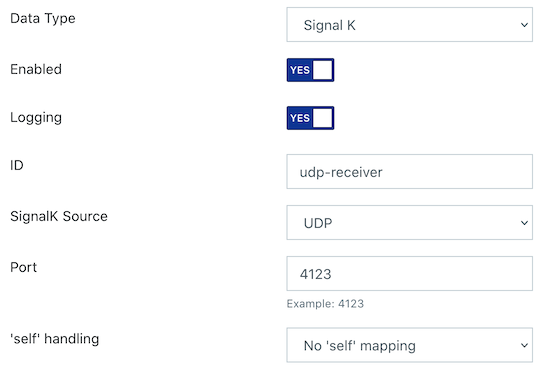
SignalK UDP receiver on port 4123.
NMEA-0183 telemetry
Continuously receive device readings and submit them in NMEA-0183 format via UDP broadcast:
calypso-anemometer read --subscribe --rate=hz_1 --target=udp+broadcast+nmea0183://255.255.255.255:10110
To make OpenCPN receive the data, create a corresponding data connection like outlined in those screenshots.
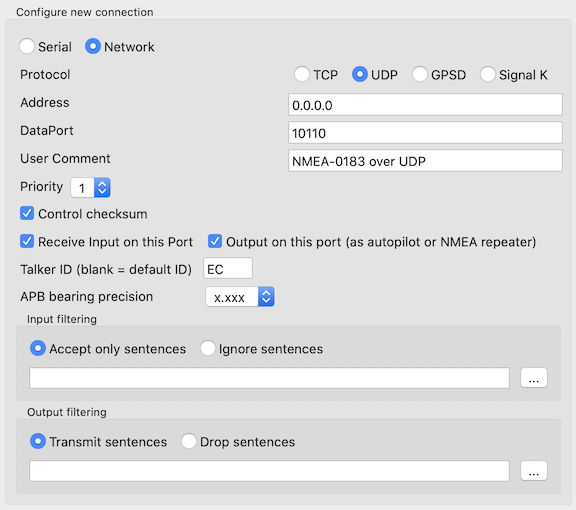
Add NMEA-0183 UDP receiver on port 10110.
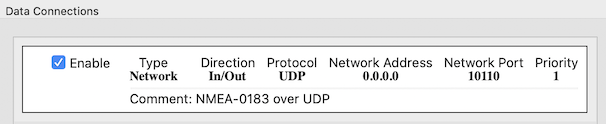
Configured NMEA-0183 UDP receiver on port 10110.
An example NMEA-0183 payload, including multiple sentences, is:
$MLHDT,235.0,T*27
$MLVWR,154.0,L,11.06,N,5.69,M,20.48,K*64
$MLXDR,A,-60.0,D,PTCH#CAL,A,30.0,D,ROLL#CAL*75
$MLXDR,C,33.0,C,AIRTEMP#CAL*6A
$MLXDR,L,0.9,R,BATT#CAL*18
Other projects
AocpnUltrasonicLink is an Android app for linking Calypso Ultrasonic wind data to OpenCPN, written in Java.
BLE_Wind is an Arduino firmware for reading data from a Calypso anemometer, written in C++.
CalypsoUltrasonicAPI is a library for the Calypso Ultrasonic Anemometer, written in Visual Basic .NET and Java, (also) for Android.
signalk-calypso-ultrasonic is a Signal K server plugin for the Calypso Ultrasonic wireless anemometer, written in JavaScript.
ultrasonic-ble-react is a React native test app for the Calypso UltraSonic wind sensor, written in JavaScript.
Troubleshooting
For helping you to find solutions for known problems, we are maintaining a dedicated page at troubleshooting. The topic range is from permission errors to BLE timeouts.
Acknowledgements
Kudos to Henrik Blidh, David Lechner, and contributors for conceiving and maintaining the excellent Bleak library.
Special thanks to Fabian Tollenaar for creating signalk-calypso-ultrasonic.
Project information
Contributions
Every kind of contribution, feedback, or patch, is much welcome. Create an issue or submit a patch if you think we should include a new feature, or to report or fix a bug.
Development
In order to setup a development environment on your workstation, please head over to the development sandbox documentation. When you see the software tests succeed, you should be ready to start hacking.
Resources
License
The project is licensed under the terms of the GNU AGPL license, see LICENSE.
Warranty and liability
There is no warranty for the program. In no event will any copyright holder, or any other party who modifies and/or conveys the program, be liable for any damages arising out of the use or inability to use the program.
See also sections 15, 16, and 17 of the LICENSE file.
1 maintainer

Metadata
1 maintainer
Release files for calypso-anemometer 0.6.0
For a detailed explanation of source distributions (sdists) and built distributions (wheels), please see the package formats documentation.
Source distribution (sdist)
| File | Size | Uploaded | |
|---|---|---|---|
| calypso-anemometer-0.6.0.tar.gz | 49.7 kB | Details |
Built distribution (wheel)
| File | Interpreter | ABI | Platform | Reset |
|---|---|---|---|---|
| calypso_anemometer-0.6.0-py3-none-any.whl | Python 3 | none | any | Details |
Total release size: 109.1 kB
Release files / calypso-anemometer-0.6.0.tar.gz
| Download URL | calypso-anemometer-0.6.0.tar.gz |
|---|---|
| Size | 49.7 kB |
| Tags | Source |
|
SHA-256 checksum How to use checksums |
82b67d8836352fa5d225852eb5adc01046d42c1d932b45b277f71402fb6c48a4
|
|
BLAKE2b-256 checksum How to use checksums |
7d0b12876710aff61c6f5d5e33de9704c682a74132a247a5fd067754627abae6
|
| Upload date | |
|
Uploaded using Trusted Publishing? What is trusted publishing? |
No |
| Uploaded via |
twine/4.0.2 CPython/3.10.8
|
Release files / calypso_anemometer-0.6.0-py3-none-any.whl
| Download URL | calypso_anemometer-0.6.0-py3-none-any.whl |
|---|---|
| Size | 59.4 kB |
| Tags | Python 3 |
|
SHA-256 checksum How to use checksums |
8539bc0e2e4eadad9abfe28c98dd7d7edb63615c281f190efa417f4d327ea0b0
|
|
BLAKE2b-256 checksum How to use checksums |
a6f399ec1c24268ef7cb5d8d2dfd9efb94495fb362831ff3503492d91afc7533
|
| Upload date | |
|
Uploaded using Trusted Publishing? What is trusted publishing? |
No |
| Uploaded via |
twine/4.0.2 CPython/3.10.8
|














